Problem Regarding Wifi in sony Vaio laptop

xasiotis

New member
Local time
12:05 AM
Messages
10
I recently bout Sony vaio laptop , it came wid preinstalled windows 7 home premium OS.. But i din liked d os so i upgraded it to windows 7 ultimate... i copied all d drivers from window.old folder.. n everything is working fine except for wifi..
wifi drivers r availabl on sony vaio drivers section for 64 bit windows ultimate but none is working..
my wifi is off & i cant on it..
everything is fine except d wifi

Sony vaio drivers section is crap..installed evi available wifi drivers but of no use..

plzz help me..

Wifi is only working wen i restore my laptop in home premium version..

My Laptop model : SONY VAIO SVE 15118FN
 

My Computer My Computer

At a glance

Windows 7
OS
Windows 7
24zvbs1.jpg


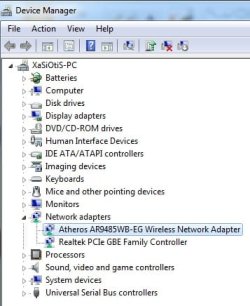
d wifi network adaptor is displaying not connected.. had copied d wifi drivers frm windows.old folder & it got installed properly but still not working :-(
 

My Computer My Computer

At a glance

Windows 7
OS
Windows 7
Ethernet LAN connection is working perfectly
 

My Computer My Computer

At a glance

Windows 7
OS
Windows 7
What happens when you try to connect to a wireless network?
 

My Computer My Computer

At a glance

Windows 10 Education 64 bitAMD Phenom II X4 980 Black Edition Deneb 3.7GHz8GB 4GBx2 Kingston PC10600 DDR3 1333 MemoryZotac NVIDIA Geforce GT640 2 Gig DDR3 PCIe
Computer type
PC/Desktop
Computer Manufacturer/Model Number
Home Built
OS
Windows 10 Education 64 bit
CPU
AMD Phenom II X4 980 Black Edition Deneb 3.7GHz
Motherboard
Asus M4N68T-M V2 µATX Motherboard
Memory
8GB 4GBx2 Kingston PC10600 DDR3 1333 Memory
Graphics Card(s)
Zotac NVIDIA Geforce GT640 2 Gig DDR3 PCIe
Sound Card
VIA VT1708s High Definition Audio 8-channel Onboard
Monitor(s) Displays
22" LG E2242 1080p and 2 19" I-INC AG191D
Screen Resolution
1280x1024 - 1920x1080 - 1280x1024
Hard Drives
Crucial M100 256 GB SSD and 500 GB WD Blue SATA
PSU
Thermaltake TR 620
Case
Power Up Black ATX Mid-Tower Case
Cooling
Stock heatsink and fan
Keyboard
Logitech Wireless K350 Wave
Mouse
Logitech Wireless M570 Trackman Wheel
Internet Speed
80 Mbps Down 30 Mbps Up
Antivirus
Windows Defender
Browser
Internet Explorer 11
Other Info
HP DVD1040e Lightscribe - External USB2

My Computer My Computer

At a glance

Windows 7 Ultimate 32bit SP1Intel(R) Core(TM)2 Quad CPU @ 2.40GHz, 2400 MHz4 GBATI Radeon HD 2600 Pro
Computer type
PC/Desktop
Computer Manufacturer/Model Number
Bruce ... somewhere in his 40's
OS
Windows 7 Ultimate 32bit SP1
CPU
Intel(R) Core(TM)2 Quad CPU @ 2.40GHz, 2400 MHz
Motherboard
INTEL/D975XBX2
Memory
4 GB
Graphics Card(s)
ATI Radeon HD 2600 Pro
Monitor(s) Displays
Samsung SyncMaster 914v
Screen Resolution
1280 x 1024
Hard Drives
2/500GB each ... ST3500630AS ATA Device.
One is not connected
PSU
Rocketfish 700 W
Case
G.Skill Gigabyte Chassis
Keyboard
Standard PS/2 Keyboard
Mouse
Microsoft PS/2 Mouse
Internet Speed
DSL
Antivirus
Avira Internet Security
Browser
IE 11
Other Info
ATI HDMI Audio
What feature did you need in Ultimate that isn't in Premium? Are you aware that they are the exact same except for a few extra expensive features?

If you have an Ultimate license you want to use anyway then you can insert the Producct Key in Anytime Upgrade, or Clean Reinstall - Factory OEM Windows 7 .

Uninstall the wireless driver in Control Panel.

Plug in by ethernet cable, run all rounds of Important and Optional Updates until there are no more Updates available. Your wireless driver should be provided by Windows 7.

If not determine the make/model if it's not given in Device manager by using Hardware Identification
 
What happens when you try to connect to a wireless network?

i cant connect nor i can view wireless connections...

wen i go to network adaptor section.. n diagnose d problem .. it says dat wireless capabilities is off

& all d drivers of wireless r installed ..
 

Attachments

  • Untitled.jpg
    Untitled.jpg
    13.5 KB · Views: 1
  • dev.jpg
    dev.jpg
    27 KB · Views: 1

My Computer My Computer

At a glance

Windows 7
OS
Windows 7
What feature did you need in Ultimate that isn't in Premium? Are you aware that they are the exact same except for a few extra expensive features?

If you have an Ultimate license you want to use anyway then you can insert the Producct Key in Anytime Upgrade, or Clean Reinstall - Factory OEM Windows 7 .

Uninstall the wireless driver in Control Panel.

Plug in by ethernet cable, run all rounds of Important and Optional Updates until there are no more Updates available. Your wireless driver should be provided by Windows 7.

If not determine the make/model if it's not given in Device manager by using Hardware Identification

Thnxx for ur reply
.

ill update d windows & let u knw :-)
 

My Computer My Computer

At a glance

Windows 7
OS
Windows 7
xasiotis

Click on :orb: then go to Control Panel >> Network and Sharing Center >> Change adapter settings >> Then right Click on the Wireless Network and select Status Then click Wireless Properties and make sure that if you have it set to connect when in range that it is also set to connect to Connect to a more preferred network if available.
 

My Computer My Computer

At a glance

Windows 7 Ultimate 32-Bit & Windows 7 Ultimat...Intel Core i7 CPU 950 @ 3.07GHzOCZ 6GB (3 x 2GB) 240-Pin DDR3 SDRAM DDR3 160...ATI Radeon HD 5700 Series
Computer Manufacturer/Model Number
Custom Built
OS
Windows 7 Ultimate 32-Bit & Windows 7 Ultimate 64-Bit
CPU
Intel Core i7 CPU 950 @ 3.07GHz
Motherboard
ASUS P6T DELUXE V2
Memory
OCZ 6GB (3 x 2GB) 240-Pin DDR3 SDRAM DDR3 1600 OCZ3X1600R2
Graphics Card(s)
ATI Radeon HD 5700 Series
Sound Card
OnBoard
Hard Drives
WD6400AACS-00M3B0 (640GB SATA )
PSU
CORSAIR 850w
Case
NZXT LEXA
Cooling
Intel Stock Heatsink Fan
Keyboard
Microsoft Wireless Laser Keyboard 7000
Mouse
Microsoft Wireless Laser Mouse 7000
If your wireless driver is already installed then in Network and Sharing Center>Change Adapter settings, disable Local Connection and enable Wireless connection, then Connect to Network.
 
Hello,

In addition, try to manually update your driver, you will need to select the .inf file (the working atheros driver). Here's the link to download your Atheros driver.
Drivers for Atheros AR9485WB and Windows 7

An update will be appreciated.
 

My Computer My Computer

At a glance

Win7 & Win8 64bitIntel i5
Computer Manufacturer/Model Number
Lenovo Desktop/Samsung Laptop
OS
Win7 & Win8 64bit
CPU
Intel i5
Internet Speed
Charter-20 Mbps
Antivirus
Avast
Browser
FF, IE9 and Chrome
In case someone has not find a solution about this problem, I want to report that after a lot of research for another vaio laptop with the same problem, I found that if you install the VAIO smart network utility, then the wifi will work again.
I had installed the atheros driver and the card was seems ok, but it was not discovering any networks, but after I installed this utility, magically it started working.
Install everything that it's related with network from the sony utilities and drivers and you will be fine.
I hope this helps.
 

My Computer My Computer

At a glance

Windows 7 Ultimate x329550
Computer type
PC/Desktop
Computer Manufacturer/Model Number
Asus
OS
Windows 7 Ultimate x32
CPU
9550
Back
Top