Problem restoring Macrium image, please help!

anne1982

New member
Member
Local time
6:47 PM
Messages
89
Hello all,

Few months ago, I made an image with Macrium Rescue for my whole C HD. Yesterday I decide to restore that image because the computer starts showing some problems (slow starting on reboot etc…). I used Macrium Rescue CD – V2.1.3775 (Linux 26) which I made during the backup. The CD works good and I could get the recovery menu. When the Macrium menu starts I could chose the source drive for the image which is in this case a USB HD and chose to restore all the HD. The operation took about 10 hours because the image is about 300 GB. After that I got the message that (Partition image is successfully restored, press cansel to reboot).

Doing so, I got a message BOOTMGR is missing, Press CTR+ALT+DEL ro restart. Then go back in a circle! Anyone knows what is going wrong in this case. The computer is running on Win7Ultimate/with Raid Intel volume0 (2 HD mirror of each others).


Thanks & Best regards,
[FONT=&quot]
Anne[/FONT]
 

My Computer

OS
Windows 7 Ultimate x64
You apparently did not image nor restore the system partition that contains the bootmgr. You may be able to fix it by running system repair 3 times with an installation or repair disc.

It is not such a good idea to use the Macrium Linux recovery disc because it can only restore the whole disk. Download and burn the WinPE recovery disc which gives you a lot more options. You can download it from my Skydrive. That saves you several hours versus creating it yourself. https://skydrive.live.com/?cid=475a0a48ca6d4035&provision=1&ref=3&wa=wsignin1.0&sa=412485191#cid=475A0A48CA6D4035&id=475A0A48CA6D4035%211812
 

My Computer

Computer Manufacturer/Model Number
HP, Dell, Gateway, Toshiba - 4 laptops and 2 desktops
OS
Vista, Windows7, Mint Mate, Zorin, Windows 8
CPU
from 1.6GHz Duo to i7
Monitor(s) Displays
2x HP w2207
Hard Drives
5x HDD, 7x SSD, 12x Externals
Keyboard
with trackball - no mices
Mouse
Trackball mice
Internet Speed
DSL 6000
Hello whs,

Thank you for your answer. I downloaded and burned the WinPE CD from the link you mentioned. Unfortunately it did not work and the computer did not reboot with it! I have no idea about the reason for that, maybe the raid construction which I dismantled now? Any way, I decide to make a clean installation for windows 7 which went fine. Luckily I copied all documents to a USB drive before starting this restoration work so I did not lose any document.

I have been regularly backing up both my documents and the OS (Win7) once a week, but pity I could not get them back when needed.

My PC is working very good now and I am thinking to backup both my Doc's and OS again. The question is: shall I do it with the same (Macrium Rescue) or it is better to use another software? By the way, up till now I don't know what went wrong in the restoration (or backup) process.

My PC is just little over one years old running on Windows Seven 64 Bit.

Any advice will be highly appreciated.


Best regards,

Anne
 

My Computer

OS
Windows 7 Ultimate x64
Macrium is still as good as any software for the task.

Post a picture of your Windows Disk Management if possible.

You most likely have a System Reserved partition.

I think WHS recommends that System Reserved be imaged separately from C. So you would have 2 image files: System Reserved and C. Both would have to be restored.

Or you should be able to make 1 single image file containing both System Reserved and C partitions.

Back up your personal documents with a regular file by file program, rather than an image.

I can't help you with the WinPE problem.
 

My Computer

Computer type
PC/Desktop
Computer Manufacturer/Model Number
Ignatz Special; 4 speed manual gearbox; factory air conditioning; one of one
OS
Windows 7 Home Premium SP1, 64-bit
CPU
Intel Skylake i5-6600K, not overclocked
Motherboard
AsRock Z170M Extreme 4, micro ATX
Memory
8 GB HyperX DDR4-2666 (2 x 4 GB)
Graphics Card(s)
none; graphics are integrated on CPU
Sound Card
onboard: Realtek ALC1150; external: USB Behringer UF0-202
Monitor(s) Displays
Dell S2340M 23 inch IPS
Screen Resolution
1600 x 900
Hard Drives
System: Crucial MX100 series SSD, 128 GB;
Data: Samsung Spinpoint 103SJ, 1 TB;
Backup: WD Caviar Green WD30EZRX-00D8PB0, 3 TB
PSU
Rosewill SilentNight 500 watt fanless, semi-modular
Case
Antec Solo II
Cooling
Noctua NH-U12S; Noctua F12 intake, Noctua S12A exhaust
Keyboard
Microsoft 200 6JH-00001 USB
Mouse
Dell or Microsoft optical wired; USB
Antivirus
Microsoft Security Essentials and Malwarebytes Premium
Browser
Pale Moon
Other Info
All fans PWM; speeds at idle: CPU circa 500 rpm; intake circa 600 rpm; exhaust circa 600 rpm; CPU temps 27 idle and 47 C load in a warm room (27 C/81 F) when running Intel Extreme Tuning Utility stress test.
Macrium is still as good as any software for the task.

Post a picture of your Windows Disk Management if possible.

You most likely have a System Reserved partition.

I think WHS recommends that System Reserved be imaged separately from C. So you would have 2 image files: System Reserved and C. Both would have to be restored.

Or you should be able to make 1 single image file containing both System Reserved and C partitions.

Back up your personal documents with a regular file by file program, rather than an image.

I can't help you with the WinPE problem.

Hello Ignatzatsonic,

Thanks for your answer. Please explain me how to make a picture of the Windows Disk Management if possible. Sure I will make it and post it to the forum.


Best regards,

Anne
 

My Computer

OS
Windows 7 Ultimate x64
Hmm, strange, many people downloaded the WinPE .iso and it worked. I recommend to burn it with ImgBurn. Maybe you try again.

For the imaging part I would stick with Macrium. It is the easiest and most efficient. As was said, image the system reserved and C partitions seperately to 2 seperate folders on your backup disk. Then you know which image is in which place.

For a system restore it is usually not required to restore the system partition because that gets rarely damaged. But it does not hurt to restore it and it takes only a few seconds anyhow. Just be aware that the system partition does get modified the day you install a second OS in double boot. Then you would have to make another image.

On my desktops, I keep my data in a seperate data partition (because my OS is always on a small SSD) and image that too. But there are other methods for data backup. I am just too used to imaging that I stay with that method.
 

My Computer

Computer Manufacturer/Model Number
HP, Dell, Gateway, Toshiba - 4 laptops and 2 desktops
OS
Vista, Windows7, Mint Mate, Zorin, Windows 8
CPU
from 1.6GHz Duo to i7
Monitor(s) Displays
2x HP w2207
Hard Drives
5x HDD, 7x SSD, 12x Externals
Keyboard
with trackball - no mices
Mouse
Trackball mice
Internet Speed
DSL 6000
Hello Ignatzatsonic,

Thanks for your answer. Please explain me how to make a picture of the Windows Disk Management if possible. Sure I will make it and post it to the forum.

Anne:

You should be able to post a screenshot with these instructions I found in another thread:


1. Type Disk Management in Start Search box.
2. Open Disk Mgmt. window and maximize it.
3. Type Snipping Tool in Start Search box.
4. Open Snipping Tool, choose Rectangular Snip, draw a box around full map and all listings.
5, Save Snip, attach using paper clip in Reply Box.

Not a major deal if you can't figure it out.

Ideally, we'd like to see what partitions you have and how they are marked. That info is revealed in Disk Management.

At a minimum, go to Disk Management and notice how many partitions are shown and what it says beside each of them, such as "system" or "boot" or "active" or "crash dump" etc?

Do you see only System Reserved and C on your main hard drive?
 

My Computer

Computer type
PC/Desktop
Computer Manufacturer/Model Number
Ignatz Special; 4 speed manual gearbox; factory air conditioning; one of one
OS
Windows 7 Home Premium SP1, 64-bit
CPU
Intel Skylake i5-6600K, not overclocked
Motherboard
AsRock Z170M Extreme 4, micro ATX
Memory
8 GB HyperX DDR4-2666 (2 x 4 GB)
Graphics Card(s)
none; graphics are integrated on CPU
Sound Card
onboard: Realtek ALC1150; external: USB Behringer UF0-202
Monitor(s) Displays
Dell S2340M 23 inch IPS
Screen Resolution
1600 x 900
Hard Drives
System: Crucial MX100 series SSD, 128 GB;
Data: Samsung Spinpoint 103SJ, 1 TB;
Backup: WD Caviar Green WD30EZRX-00D8PB0, 3 TB
PSU
Rosewill SilentNight 500 watt fanless, semi-modular
Case
Antec Solo II
Cooling
Noctua NH-U12S; Noctua F12 intake, Noctua S12A exhaust
Keyboard
Microsoft 200 6JH-00001 USB
Mouse
Dell or Microsoft optical wired; USB
Antivirus
Microsoft Security Essentials and Malwarebytes Premium
Browser
Pale Moon
Other Info
All fans PWM; speeds at idle: CPU circa 500 rpm; intake circa 600 rpm; exhaust circa 600 rpm; CPU temps 27 idle and 47 C load in a warm room (27 C/81 F) when running Intel Extreme Tuning Utility stress test.
Hello whs & Ignatzatsonic,

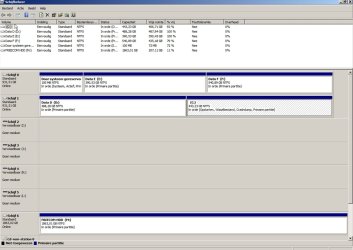
Here is a picture of the Windows Disk Management! The first partition is a system partition of 100 MB NTFS. The last (Freecom) is a USB HD.

Best regards,

Anne
 

Attachments

  • Disk Management.jpg
    Disk Management.jpg
    386.5 KB · Views: 23

My Computer

OS
Windows 7 Ultimate x64
Good job!

I'll defer to WHS as he is more experienced on this stuff than I am, but at first glance.......

It appears that your System Reserved partition is on Disk 0 and that the C partition is on Disk 1. That's unusual. Normally, you would want System Reserved to be on the same drive as C---Disk 1 in this case.

I assume the image you made is of C only, excluding System Reserved?

There are ways to get System Reserved onto Disk 1 and for that matter there are ways of getting rid of System Reserved entirely. I don't have a System Reserved.

I'd wait for WHS to respond, but your partition situation is fixable.

If you then still have issues with making and restoring an image, that would have to be investigated at that time.
 

My Computer

Computer type
PC/Desktop
Computer Manufacturer/Model Number
Ignatz Special; 4 speed manual gearbox; factory air conditioning; one of one
OS
Windows 7 Home Premium SP1, 64-bit
CPU
Intel Skylake i5-6600K, not overclocked
Motherboard
AsRock Z170M Extreme 4, micro ATX
Memory
8 GB HyperX DDR4-2666 (2 x 4 GB)
Graphics Card(s)
none; graphics are integrated on CPU
Sound Card
onboard: Realtek ALC1150; external: USB Behringer UF0-202
Monitor(s) Displays
Dell S2340M 23 inch IPS
Screen Resolution
1600 x 900
Hard Drives
System: Crucial MX100 series SSD, 128 GB;
Data: Samsung Spinpoint 103SJ, 1 TB;
Backup: WD Caviar Green WD30EZRX-00D8PB0, 3 TB
PSU
Rosewill SilentNight 500 watt fanless, semi-modular
Case
Antec Solo II
Cooling
Noctua NH-U12S; Noctua F12 intake, Noctua S12A exhaust
Keyboard
Microsoft 200 6JH-00001 USB
Mouse
Dell or Microsoft optical wired; USB
Antivirus
Microsoft Security Essentials and Malwarebytes Premium
Browser
Pale Moon
Other Info
All fans PWM; speeds at idle: CPU circa 500 rpm; intake circa 600 rpm; exhaust circa 600 rpm; CPU temps 27 idle and 47 C load in a warm room (27 C/81 F) when running Intel Extreme Tuning Utility stress test.
Hello ignatzatsonic,

This picture shows, of course the system with the new installation. The old was different because the system had (raid 1) which I dismantled.

To be honest I did not put the System Reserved partition on Disk 0 and the C partition on Disk 1 intentionally but it just happened automatically during the installation. If you know a better, easier and safer construction then please let me know it and I will change it.

By the way, which version of the free Macrium rescue is good and where to down load it?

Thanks & best regards,

Anne
 

My Computer

OS
Windows 7 Ultimate x64
Here is the download location for the most recent free version of Macrium:

Macrium Reflect FREE Edition - Information and download

If you have more than one drive connected during a Win 7 install, it can do some odd things. The solution is to disconnect or disable all drives other than the one onto which you intend to install Win 7.

One of the odd things Win 7 can do is install System Reserved onto Disc 0 whenever possible---even if C is on Disk 1. That's likely what happened in your case.

If you had the hard disk containing C attached as Disc 0 rather than Disc 1, then System Reserved and C would likely have ended up on the same disk--Disc 0.

If you ever intend to do a fresh install, you can swap the 2 drive cables of those drives at the motherboard level. Connect the hard drive containing C to the port that Disc 0 is now connected. Leave the other drive unconnected during the install. After the install is complete, connect the drive containing your E and F partitions to the other port---the one to which the C drive is now connected.

Wait for WHS. I think you can likely fix your current issue by following his instructions from post 2, but I'd let him confirm that.
 

My Computer

Computer type
PC/Desktop
Computer Manufacturer/Model Number
Ignatz Special; 4 speed manual gearbox; factory air conditioning; one of one
OS
Windows 7 Home Premium SP1, 64-bit
CPU
Intel Skylake i5-6600K, not overclocked
Motherboard
AsRock Z170M Extreme 4, micro ATX
Memory
8 GB HyperX DDR4-2666 (2 x 4 GB)
Graphics Card(s)
none; graphics are integrated on CPU
Sound Card
onboard: Realtek ALC1150; external: USB Behringer UF0-202
Monitor(s) Displays
Dell S2340M 23 inch IPS
Screen Resolution
1600 x 900
Hard Drives
System: Crucial MX100 series SSD, 128 GB;
Data: Samsung Spinpoint 103SJ, 1 TB;
Backup: WD Caviar Green WD30EZRX-00D8PB0, 3 TB
PSU
Rosewill SilentNight 500 watt fanless, semi-modular
Case
Antec Solo II
Cooling
Noctua NH-U12S; Noctua F12 intake, Noctua S12A exhaust
Keyboard
Microsoft 200 6JH-00001 USB
Mouse
Dell or Microsoft optical wired; USB
Antivirus
Microsoft Security Essentials and Malwarebytes Premium
Browser
Pale Moon
Other Info
All fans PWM; speeds at idle: CPU circa 500 rpm; intake circa 600 rpm; exhaust circa 600 rpm; CPU temps 27 idle and 47 C load in a warm room (27 C/81 F) when running Intel Extreme Tuning Utility stress test.
Here is the download location for the most recent free version of Macrium:

Macrium Reflect FREE Edition - Information and download

If you have more than one drive connected during a Win 7 install, it can do some odd things. The solution is to disconnect or disable all drives other than the one onto which you intend to install Win 7.

One of the odd things Win 7 can do is install System Reserved onto Disc 0 whenever possible---even if C is on Disk 1. That's likely what happened in your case.

If you had the hard disk containing C attached as Disc 0 rather than Disc 1, then System Reserved and C would likely have ended up on the same disk--Disc 0.

If you ever intend to do a fresh install, you can swap the 2 drive cables of those drives at the motherboard level. Connect the hard drive containing C to the port that Disc 0 is now connected. Leave the other drive unconnected during the install. After the install is complete, connect the drive containing your E and F partitions to the other port---the one to which the C drive is now connected.

Wait for WHS. I think you can likely fix your current issue by following his instructions from post 2, but I'd let him confirm that.


Hello ignatzatsonic,

Thank you for the advice and the link. I will wait for WHS, maybe he has an advice to solve this problem.

Many thanks again & best regards,

Anne
 

My Computer

OS
Windows 7 Ultimate x64
It looks to me that Maybe E: is where you should have restored your image. So when you mount your image (double click on it) how large is the mounted partition?
F: may need to be re sized to accommodate it.
 

My Computer

Computer type
PC/Desktop
Computer Manufacturer/Model Number
Own build
OS
Windows 7x64 Home Premium SP1
CPU
Intel i7 2600k
Motherboard
ASUS P8Z68 Deluxe
Memory
G.Skill Ripjaws (DDR3-1600) 2x4GB
Graphics Card(s)
Nvidia GeForce GTS 450; Intel HD Graphics 3000(GT2+)
Monitor(s) Displays
Dell Ultrasharp IPS panel U2311H, Samsung SyncMaster P2350
Screen Resolution
1920x1080
Hard Drives
Samsung 850 Pro SSD 256GB, Samsung SSD 840 120GB, Seagates 1TB Barracuda ST31000528AS x2
PSU
Seasonic M12II 520W
Case
Lian Li Lancool PC-K60
Cooling
Case: 1x120mm, 3x140mm CPU: Hyper 212+
Keyboard
Logitech MK520 (wireless)
Mouse
Logitech MK520
Internet Speed
6-7 Mbps
Antivirus
Norton Security Premium, Malwarebytes on 2 (MSE on 3rd PC)
Browser
FireFox
Other Info
Audio: Logitech Z523 2.1
First step to do is make Data D somewhat smaller (unallocated space appears on the rechterkant) so system reserved will fit in the free space. Then copy "system reserved" from disk 0 to unallocated space on disk 1. Make that copy a "primary partition" and mark it active.

All done using Partition Wizard.

How to Move/Resize Partition with partition manager? Partition Wizard Move/Resize Partition Video Help.
How to Copy Partition with partition manager? Partition Wizard Copy Partition Video Help.
Video help on how to set partition as Primary or Logical.
How to Set Active/Inactive partition with partition magic? Partition Wizard Video Help.

Main download (it's free!) Home7.5 Full version
windowsicon.gif
Windows XP, 2000 Professional, Vista SP2, Windows 7 SP1 and Windows 8(all editions, 32 bit and 64 bit)11 MB
download.gif
Download from Download.com
 

My Computer

Computer type
Laptop
Computer Manufacturer/Model Number
ACER ASPIRE 5742G
OS
Microsoft Windows 7 Home Premium 64-bits 7601 Multiprocessor Free Service Pack 1
CPU
Intel(R) Core(TM) i3 CPU M 370 @ 2.40GHz
Motherboard
Acer Aspire 5742G
Memory
4,00 GB
Graphics Card(s)
ATI Mobility Radeon HD 5400 Series
Sound Card
(1) AMD High Definition Audio Device (2) Realtek High Defi
Screen Resolution
1366 x 768 x 32 bits (4294967296 colors) @ 60 Hz
Hard Drives
WDC WD5000BEVT-22ZAT0
Post screenshot afterwards
 

My Computer

Computer type
Laptop
Computer Manufacturer/Model Number
ACER ASPIRE 5742G
OS
Microsoft Windows 7 Home Premium 64-bits 7601 Multiprocessor Free Service Pack 1
CPU
Intel(R) Core(TM) i3 CPU M 370 @ 2.40GHz
Motherboard
Acer Aspire 5742G
Memory
4,00 GB
Graphics Card(s)
ATI Mobility Radeon HD 5400 Series
Sound Card
(1) AMD High Definition Audio Device (2) Realtek High Defi
Screen Resolution
1366 x 768 x 32 bits (4294967296 colors) @ 60 Hz
Hard Drives
WDC WD5000BEVT-22ZAT0
Hi Anne,

1. It was the installer that placed the system partition on Disk0. The installer always grabs the disk with the lowest port number for the system partition. The only way to avoid that is to either install the system on the disk with the lowest port number or physically disconnect all disks that are not needed for the installation.

2. The odd setup you have can be easily fixed. I suggest you move (copy) the bootmgr to C. Then you can forget about the system partition and you only have to image C. http://www.sevenforums.com/tutorials/209885-bootmgr-move-c-easybcd.html

3. I have uploaded the latest version of the WinPE recovery disk .iso to my skydrive site. Download the file from there and burn it to a CD - I suggest you use ImgBurn. That seems to always work. Doing it that way as compared to producing it from Macrium saves you a few hours.
 

My Computer

Computer Manufacturer/Model Number
HP, Dell, Gateway, Toshiba - 4 laptops and 2 desktops
OS
Vista, Windows7, Mint Mate, Zorin, Windows 8
CPU
from 1.6GHz Duo to i7
Monitor(s) Displays
2x HP w2207
Hard Drives
5x HDD, 7x SSD, 12x Externals
Keyboard
with trackball - no mices
Mouse
Trackball mice
Internet Speed
DSL 6000
Hello WHS,

Thanks for the information. I downloaded and used the (EasyBCD 2.1.2). According to the EasyBCD is the backup successful. Now, I am having a file in the C drive called (EasyBCD Backup (07-27-2012)). I do not see any changes on the picture of the Disk Manager! Do I have to do anything else or that is it. Is the odd setup fixed now?

Thanks & best regards,

Anne
 

My Computer

OS
Windows 7 Ultimate x64

My Computer

Computer type
Laptop
Computer Manufacturer/Model Number
ACER ASPIRE 5742G
OS
Microsoft Windows 7 Home Premium 64-bits 7601 Multiprocessor Free Service Pack 1
CPU
Intel(R) Core(TM) i3 CPU M 370 @ 2.40GHz
Motherboard
Acer Aspire 5742G
Memory
4,00 GB
Graphics Card(s)
ATI Mobility Radeon HD 5400 Series
Sound Card
(1) AMD High Definition Audio Device (2) Realtek High Defi
Screen Resolution
1366 x 768 x 32 bits (4294967296 colors) @ 60 Hz
Hard Drives
WDC WD5000BEVT-22ZAT0
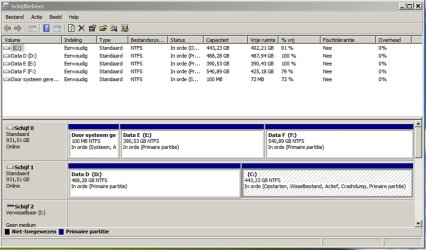
C is marked ACTIVE now in disk management?
 

My Computer

Computer type
Laptop
Computer Manufacturer/Model Number
ACER ASPIRE 5742G
OS
Microsoft Windows 7 Home Premium 64-bits 7601 Multiprocessor Free Service Pack 1
CPU
Intel(R) Core(TM) i3 CPU M 370 @ 2.40GHz
Motherboard
Acer Aspire 5742G
Memory
4,00 GB
Graphics Card(s)
ATI Mobility Radeon HD 5400 Series
Sound Card
(1) AMD High Definition Audio Device (2) Realtek High Defi
Screen Resolution
1366 x 768 x 32 bits (4294967296 colors) @ 60 Hz
Hard Drives
WDC WD5000BEVT-22ZAT0
C is marked ACTIVE now in disk management?

Hello Kaktussoft,

Thanks for your reaction. Indeed, you are right! Now the C drive is marked (Active) as you can see in the new picture of the Disk Management.

Best regards,

Anne
 

Attachments

  • Disk Management 2.jpg
    Disk Management 2.jpg
    394.6 KB · Views: 13

My Computer

OS
Windows 7 Ultimate x64
Back
Top