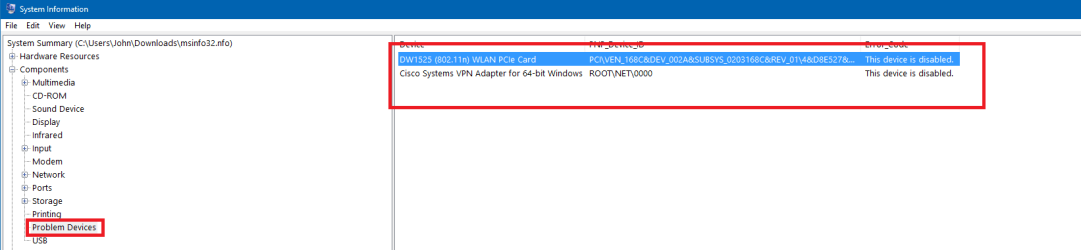
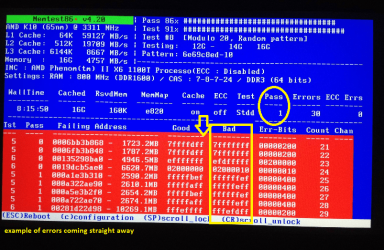
My computer is acting very strange lately I have Windows 7 and its shutting down unexpectedly at all the time and I'm so frustrated and I do not know what to do with it, I have read couple of posts and able to gather msinfo32.nfo file and I'm attaching with this thread
Please see the attacehed MSINFO32.nfo file. - Thanks for your help.
System Information File below:
Windows
Problem: Shut down unexpectedly
Files that help describe the problem:
050316-27939-01.dmp
sysdata.xml
WERInternalMetadata.xml
View a temporary copy of these files
Warning: If a virus or other security threat caused the problem, opening a copy of the files could harm your computer.
Windows
Problem: Shut down unexpectedly
Files that help describe the problem:
052716-25786-01.dmp
sysdata.xml
WERInternalMetadata.xml
View a temporary copy of these files
Warning: If a virus or other security threat caused the problem, opening a copy of the files could harm your computer.
Windows
Problem: Shut down unexpectedly
Files that help describe the problem:
050316-26863-01.dmp
sysdata.xml
WERInternalMetadata.xml
View a temporary copy of these files
Warning: If a virus or other security threat caused the problem, opening a copy of the files could harm your computer.
Windows
Problem: Shut down unexpectedly
Files that help describe the problem:
050316-27939-01.dmp
sysdata.xml
WERInternalMetadata.xml
View a temporary copy of these files
Warning: If a virus or other security threat caused the problem, opening a copy of the files could harm your computer.
Windows
Problem: Shut down unexpectedly
Files that help describe the problem:
073015-20389-01.dmp
sysdata.xml
WERInternalMetadata.xml
View a temporary copy of these files
Warning: If a virus or other security threat caused the problem, opening a copy of the files could harm your computer.
Windows
Problem: Shut down unexpectedly
Files that help describe the problem:
050316-27939-01.dmp
sysdata.xml
WERInternalMetadata.xml
View a temporary copy of these files
Warning: If a virus or other security threat caused the problem, opening a copy of the files could harm your computer.
Windows
Problem: Shut down unexpectedly
Files that help describe the problem:
072415-18673-01.dmp
sysdata.xml
WERInternalMetadata.xml
View a temporary copy of these files
Warning: If a virus or other security threat caused the problem, opening a copy of the files could harm your computer.
Windows
Problem: Shut down unexpectedly
Files that help describe the problem:
123115-23696-01.dmp
sysdata.xml
WERInternalMetadata.xml
View a temporary copy of these files
Warning: If a virus or other security threat caused the problem, opening a copy of the files could harm your computer.
Windows
Problem: Shut down unexpectedly
Files that help describe the problem:
050216-25162-01.dmp
sysdata.xml
WERInternalMetadata.xml
View a temporary copy of these files
Warning: If a virus or other security threat caused the problem, opening a copy of the files could harm your computer.
Windows
Problem: Shut down unexpectedly
Files that help describe the problem:
070715-24835-01.dmp
sysdata.xml
WERInternalMetadata.xml
View a temporary copy of these files
Warning: If a virus or other security threat caused the problem, opening a copy of the files could harm your computer.
Windows
Problem: Shut down unexpectedly
Files that help describe the problem:
123115-30607-01.dmp
sysdata.xml
WERInternalMetadata.xml
View a temporary copy of these files
Warning: If a virus or other security threat caused the problem, opening a copy of the files could harm your computer.
Windows
Problem: Shut down unexpectedly
Files that help describe the problem:
082015-23041-01.dmp
sysdata.xml
WERInternalMetadata.xml
View a temporary copy of these files
Warning: If a virus or other security threat caused the problem, opening a copy of the files could harm your computer.
Please see the attacehed MSINFO32.nfo file. - Thanks for your help.
System Information File below:
Windows
Problem: Shut down unexpectedly
Files that help describe the problem:
050316-27939-01.dmp
sysdata.xml
WERInternalMetadata.xml
View a temporary copy of these files
Warning: If a virus or other security threat caused the problem, opening a copy of the files could harm your computer.
Windows
Problem: Shut down unexpectedly
Files that help describe the problem:
052716-25786-01.dmp
sysdata.xml
WERInternalMetadata.xml
View a temporary copy of these files
Warning: If a virus or other security threat caused the problem, opening a copy of the files could harm your computer.
Windows
Problem: Shut down unexpectedly
Files that help describe the problem:
050316-26863-01.dmp
sysdata.xml
WERInternalMetadata.xml
View a temporary copy of these files
Warning: If a virus or other security threat caused the problem, opening a copy of the files could harm your computer.
Windows
Problem: Shut down unexpectedly
Files that help describe the problem:
050316-27939-01.dmp
sysdata.xml
WERInternalMetadata.xml
View a temporary copy of these files
Warning: If a virus or other security threat caused the problem, opening a copy of the files could harm your computer.
Windows
Problem: Shut down unexpectedly
Files that help describe the problem:
073015-20389-01.dmp
sysdata.xml
WERInternalMetadata.xml
View a temporary copy of these files
Warning: If a virus or other security threat caused the problem, opening a copy of the files could harm your computer.
Windows
Problem: Shut down unexpectedly
Files that help describe the problem:
050316-27939-01.dmp
sysdata.xml
WERInternalMetadata.xml
View a temporary copy of these files
Warning: If a virus or other security threat caused the problem, opening a copy of the files could harm your computer.
Windows
Problem: Shut down unexpectedly
Files that help describe the problem:
072415-18673-01.dmp
sysdata.xml
WERInternalMetadata.xml
View a temporary copy of these files
Warning: If a virus or other security threat caused the problem, opening a copy of the files could harm your computer.
Windows
Problem: Shut down unexpectedly
Files that help describe the problem:
123115-23696-01.dmp
sysdata.xml
WERInternalMetadata.xml
View a temporary copy of these files
Warning: If a virus or other security threat caused the problem, opening a copy of the files could harm your computer.
Windows
Problem: Shut down unexpectedly
Files that help describe the problem:
050216-25162-01.dmp
sysdata.xml
WERInternalMetadata.xml
View a temporary copy of these files
Warning: If a virus or other security threat caused the problem, opening a copy of the files could harm your computer.
Windows
Problem: Shut down unexpectedly
Files that help describe the problem:
070715-24835-01.dmp
sysdata.xml
WERInternalMetadata.xml
View a temporary copy of these files
Warning: If a virus or other security threat caused the problem, opening a copy of the files could harm your computer.
Windows
Problem: Shut down unexpectedly
Files that help describe the problem:
123115-30607-01.dmp
sysdata.xml
WERInternalMetadata.xml
View a temporary copy of these files
Warning: If a virus or other security threat caused the problem, opening a copy of the files could harm your computer.
Windows
Problem: Shut down unexpectedly
Files that help describe the problem:
082015-23041-01.dmp
sysdata.xml
WERInternalMetadata.xml
View a temporary copy of these files
Warning: If a virus or other security threat caused the problem, opening a copy of the files could harm your computer.
Attachments
Last edited:
My Computer
At a glance
64 windows 712 gb
- Computer type
- PC/Desktop
- Computer Manufacturer/Model Number
- dell
- OS
- 64 windows 7
- Memory
- 12 gb
- Hard Drives
- 1.5 tb
- Antivirus
- mcafee
- Browser
- chrome