Solved Problem starting pc with dual boot XP-Windows 7

Alerik

New member
Local time
4:12 AM
Messages
22
Hi everyone,
First of all please forgive me for my English as is not my native language.

Yesterday I installed Windows 7 on a hard drive which had XP previously. During the installation procedures everything went OK after I updated and installed some programs to test the new OS including a couple of games. After that I tested booting the previous OS, that is XP. Everything worked fine as well, even switching both Operating systems a couple of times during the rest of the day.

The problem began today when I turned on the PC for the first time and the black sceren with the option to select an OS wouldn´t respond until Windows 7 booted itself. But after a couple of minutes the PC was frozen, including mouse and keyboard, so I had to force restart the pc and it all worked fine ´till I turned the PC off.

After a couple of hours when I started the PC back on the exact same situation happened again. Pc no responding at first, just after restart.

One thing to add, which I don´t know if is relevant, is that I have 2 hard drives, one for the operating systems and another just for data.

Any kind of help will be very welcome. Thanks in advance!
 

My Computer

OS
Windows 7 ultimate 32 bit.
It would be better to install the OS's to separate HD"s booted by the BIOS, unplugging the other HD when installing.

However for now mark the Win7 partition Active, then boot the Win7 DVD System Recovery Options or System Repair Disk to run Startup Repair - Run up to 3 Separate Times until Win7 starts and holds the System Active flags.

Then install EasyBCD (free Download at bottom of page - no name or email required) to Win7 to add XP on the Add OS Entry tab, by name, type, let drive letter autocomplete, accept boot files, reboot.
 
Thanks gregrocker. I will try that fix as soon as I have the time.

However I have one more question. Given that, as I mentioned before, both OSs seem to work well after restart, is it advisable to go on using the pc like that or will the problem get worse by doing so?
 

My Computer

OS
Windows 7 ultimate 32 bit.
Since it's booting now please post back a screenshot of your maximized Disk Management drive map and listings:

1. Type Disk Management in Start Search box.
2. Open Disk Mgmt. window and maximize it.
3. Type Snipping Tool in Start Search box.
4. Open Snipping Tool, choose Rectangular Snip, click New, draw a box around full drive map and all listings.
5, Save Snip, attach using paper clip in Reply Box.

Tell us what is on each partition.
 
Hello gregrocker.

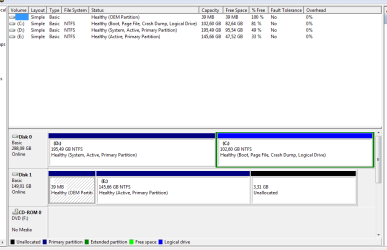
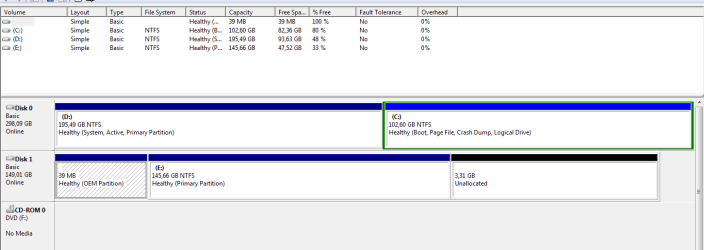
Here is the image. HD Map.PNG

As yesterday, today on first boot the pc would not respond on the black screen where you choose the OS. Only the countdown went on untill windows 7 booted and worked fine, the pc did not freeze. When restarting from the (shoot down) menu both operating systems seem to work fine. So it seems the hang only occurs after first system boot and on boot manager screen.
 

My Computer

OS
Windows 7 ultimate 32 bit.
I asked you to tell us what is on each partition.

From what I can see you have Win7 on C and likely have XP on D which holds the System boot files for both OS's.

Complicating things is the Disk1 is clearly a former factory OEM OS HD which still has the OEM partition which was not wiped or deleted before being used as a data drive (correct?). E is also marked Active as though the OS might even still be on there. Is it? I would immediately Mark Partition as Inactive which you can do from Win7 Elevated Command Prompt.

After that if the problem persists power down to open the case and pull the data cable plug from Disk1 to see if the problem goes away.
 
Sorry, forgot to tell you the content of each partition.
Partition marked as C has windows 7, partition D has XP and E has mostly files, music, movies, games, etc. and a previous OS that I used on another PC which, as you pointed out, was not removed as I though that wouldn´t matter. So perhaps that is the culprit.
So according to that, shall I proceed as you recommended or that leads to another method.

One thing to notice is that when I´m on XP the letters of the partitions change, that is, C for XP, D for files and previous OS and F for windows 7.
 

My Computer

OS
Windows 7 ultimate 32 bit.
That's correct - since WIn7 was installed last it was able to also claim C when booted into it.

Yes, perform the steps I gave in my last post and report back. This will help determine additional steps if necessary.
 
Well, performed both steps, marked partition E as inactive Capture.PNG and unplugged the disk but the problem pesisted. When I boot the system for the first time the boot manager screen will not allow me to choose an OS untill Windows 7 boots and from then on everything works OK, even restarting from Shut Down menu and then black screen for boot choice works fine.
So as you can see the problem is not that bothersome but what worries me is that it may get worse, but if you consider otherwise I would continue using the PC like that.

Regards
 

My Computer

OS
Windows 7 ultimate 32 bit.
The problem , in my opinion , is because 7 is installed on a logical partition. It should have been converted to a primary partition before the install was done.

Did you make that partition yourself ? Or was it already there ?
 

My Computer

Computer type
PC/Desktop
Computer Manufacturer/Model Number
Skylake Special #666
OS
Windows 10 Pro x64
CPU
Intel Core i7 6700K
Motherboard
Asus Sabertooth Z170 Mark 1
Memory
GSkill TridentZ RGB 16GB 3600 16-16-16-36
Graphics Card(s)
EVGA GTX 980 Ti SC x2
Sound Card
Realtek High Definition
Monitor(s) Displays
AOC G2460PG
Screen Resolution
1920 x 1080 144Hz
Hard Drives
Samsung 860 Pro 256GB, Seagate Barracuda 4TB x2
PSU
EVGA 1000 P2, EVGA White Custom Braided Cables
Case
Corsair Vengeance C70 Gunmetal Black
Cooling
Corsair H100i v2, Corsair ML120 x2, Thermal Grizzly Kryonaut
Keyboard
Logitech G910 Orion Spectrum
Mouse
Logitech G700s
Internet Speed
Verizon Fios Quantum Gateway 75/75
Antivirus
Windows Defender, Malwarebytes Free 3.8.3
Browser
Chrome
Other Info
Corsair SP120 x4, LG Blu-ray Drive, Durabrand HT-395 100 Watt Dolby Digital Amp, Corsair H2100 Wireless 7.1 Headset
I made the partition with EaseUS
 

My Computer

OS
Windows 7 ultimate 32 bit.
There's nothing wrong with Win7 being installed on a Logical partition since the boot files are placed on the XP partition anyway in a Dual Boot install where WIn7 is installed last. Only the boot files must be placed on a Primary partition.

However we see that a Dual Boot can often be more stable if configured from the Win7 partition. So one possible solution would be to convert Win7 partition to Primary, mark it Active and then run Startup Repair - Run up to 3 Separate Times until it holds the System Active flags

THen install EasyBCD (click Download - no Name or Email required) to Win7 to add XP on Add OS tab by OS type, accept offered boot files, let it autocomplete drive letter, then reboot to Dual Boot menu. Is the problem solved?

Since this will sort the boot again if the problem persists you'll need to look at the hardware, running the tests in Troubleshooting Steps for Windows 7
 
Ok Greg thanks for your kind help.
For the time being I will use the PC like this but in case something related occurs I will try the options you gave me.

One last question is, should I mark this topic as solved or wait a while in case more procedures are needed?
 

My Computer

OS
Windows 7 ultimate 32 bit.
Well it's not solved at all if the Dual Boot Menu will still not function correctly the first time. I would not want it that way and cannot advise you to keep it that way.

Is there something keeping you from trying the procedure I gave you now? We're here to help you. Feel free to ask back all the questions you need to understand the steps.
 
Well, TBH those last procedures you provided kind of overwhelmed me a bit so I wouldn´s like to screw something and render the system useless. So I´ll try to understand them more thoroughly with enough time and give them a try.

Again, thanks for your help and patience.
 
Last edited:

My Computer

OS
Windows 7 ultimate 32 bit.
Hello again

I´ll try the other procedures you recommended since today the system froze again after some minutes following first boot and perhaps this problem is related to the boot screen issue.
But how do I convert the Windows 7 partition to primary?
 

My Computer

OS
Windows 7 ultimate 32 bit.
...

However we see that a Dual Boot can often be more stable if configured from the Win7 partition. So one possible solution would be to convert Win7 partition to Primary, mark it Active and then run Startup Repair - Run up to 3 Separate Times until it holds the System Active flags

THen install EasyBCD (click Download - no Name or Email required) to Win7 to add XP on Add OS tab by OS type, accept offered boot files, let it autocomplete drive letter, then reboot to Dual Boot menu. Is the problem solved?

Since this will sort the boot again if the problem persists you'll need to look at the hardware, running the tests in Troubleshooting Steps for Windows 7

1. How to set partition as Primary with partition manager?
2. Mark Partition Active
3. Startup Repair - Run up to 3 Separate Times
4. EasyBCD (click Download - no Name or Email required)
 
But when I mark that partition as active must I mark the other as inactive?
 

My Computer

OS
Windows 7 ultimate 32 bit.
Done but bad news, same problem, when restart from power button can´t choose an OS to boot. Worst part is I don´t know if the freeze I mentioned before is related to the boot up problem.

Things to note, now Windows 7 says (recovered) beside its name in the boot menu. And after that menu another one shows to choose between both XP. And in one of the repairs after restart it said NTLDR not found. But after 3 runs it said that it could not detect a problem.
 

My Computer

OS
Windows 7 ultimate 32 bit.
Back
Top