Problem when adjusting screen resolution

Son

New member
Local time
9:35 PM
Messages
10
Hi everyone!
I have a problem when i start using Win7 and adjust my screen resolution...
when i adjust the resolution to 1206x682 or higher, the whole windows become larger and eventually become larger than my screen. So i can see only part of my taskbar. However, this will not happen when i use XP.
Is this normal?
At this time i can't use any video editing software as they require 1024x768 or higher resolution, what should i do?
Sorry for my poor English. I am still an English learner.
thanks!

UPDATE-----
when i set to a higher resolution in XP, the icons are smaller and the size of the windows doesnt change. But when i do this in 7, the size of icons doesnt change but the whole windows become larger.
SCREENSHOT-----
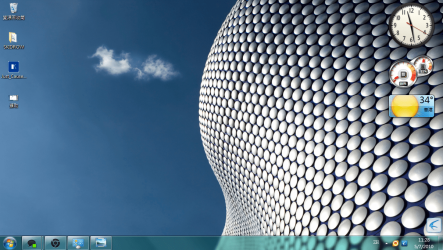
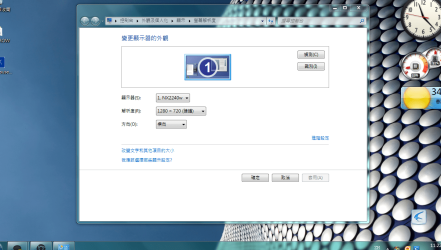
In 1820x720: (im using a Chinese Win7)
??.PNG
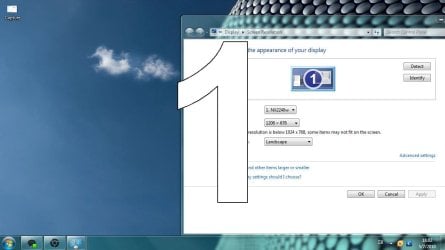
but in 1206x682:
??2.PNG
 
Last edited:

My Computer

OS
Windows 7 Ultimate
CPU
Intel Core2Duo E6550
Memory
2 GB
Graphics Card(s)
nvidea 8600 GT
Monitor(s) Displays
ViewSonic NX2240w (16:10)
Hi Son, welcome to the forums Hereis a link to the drivers for you're video card NVIDIA DRIVERS 257.21 WHQL if you post a little more info on you're system we may be able to help you further :)
 

My Computer

Computer type
PC/Desktop
Computer Manufacturer/Model Number
self build
OS
win 7 ultimate32bit, Win8.1pro wmc 32bit
CPU
amd phenom x4 9600
Motherboard
asus m2n32-sli deluxe
Memory
corsair twinxs 2x2gb
Graphics Card(s)
2x nvidia 1gb 8500gt
Sound Card
onboard
Monitor(s) Displays
23" PB Viseo 233d
Screen Resolution
1920x1080
Hard Drives
maxtor sata 500gb
maxtor sata 320gb
fujitsu sata200gb
PSU
oryxx tornado 750w
Case
thermaltake xaser lll
Cooling
artic freezer64 pro + 7 case fans
  • Like
Reactions: Son
Hi Son, welcome to the forums Hereis a link to the drivers for you're video card NVIDIA DRIVERS 257.21 WHQL if you post a little more info on you're system we may be able to help you further :)

thanks very much for your reply.
i already have the 257.21 driver (international one) but it didn't help.
No matter i adjust my resolution using the nvidea control panel or the Win7 "screen resolution" option the windows is become larger

BTW what system info should i provide?
 

My Computer

OS
Windows 7 Ultimate
CPU
Intel Core2Duo E6550
Memory
2 GB
Graphics Card(s)
nvidea 8600 GT
Monitor(s) Displays
ViewSonic NX2240w (16:10)
Hi Son, welcome to the forums Hereis a link to the drivers for you're video card NVIDIA DRIVERS 257.21 WHQL if you post a little more info on you're system we may be able to help you further :)

thanks very much for your reply.
i already have the 257.21 driver (international one) but it didn't help.
No matter i adjust my resolution using the nvidea control panel or the Win7 "screen resolution" option the windows is become larger

BTW what system info should i provide?

If you fill in your system secs in the "user CP " at the top left of the forum banner or tell us the make/model of your computer ,we may be in a better position to help you ;)
 

My Computer

Computer type
PC/Desktop
Computer Manufacturer/Model Number
self build
OS
win 7 ultimate32bit, Win8.1pro wmc 32bit
CPU
amd phenom x4 9600
Motherboard
asus m2n32-sli deluxe
Memory
corsair twinxs 2x2gb
Graphics Card(s)
2x nvidia 1gb 8500gt
Sound Card
onboard
Monitor(s) Displays
23" PB Viseo 233d
Screen Resolution
1920x1080
Hard Drives
maxtor sata 500gb
maxtor sata 320gb
fujitsu sata200gb
PSU
oryxx tornado 750w
Case
thermaltake xaser lll
Cooling
artic freezer64 pro + 7 case fans
Hi Son, welcome to the forums Hereis a link to the drivers for you're video card NVIDIA DRIVERS 257.21 WHQL if you post a little more info on you're system we may be able to help you further :)

thanks very much for your reply.
i already have the 257.21 driver (international one) but it didn't help.
No matter i adjust my resolution using the nvidea control panel or the Win7 "screen resolution" option the windows is become larger

BTW what system info should i provide?

If you fill in your system secs in the "user CP " at the top left of the forum banner or tell us the make/model of your computer ,we may be in a better position to help you ;)

its a custom built computer so there is no model number, sorry.
but i already filled in as much information as i could. hope it helps!
 

My Computer

OS
Windows 7 Ultimate
CPU
Intel Core2Duo E6550
Memory
2 GB
Graphics Card(s)
nvidea 8600 GT
Monitor(s) Displays
ViewSonic NX2240w (16:10)
thanks very much for your reply.
i already have the 257.21 driver (international one) but it didn't help.
No matter i adjust my resolution using the nvidea control panel or the Win7 "screen resolution" option the windows is become larger

BTW what system info should i provide?

If you fill in your system secs in the "user CP " at the top left of the forum banner or tell us the make/model of your computer ,we may be in a better position to help you ;)

its a custom built computer so there is no model number, sorry.
but i already filled in as much information as i could. hope it helps!

OK Son you may have to update the chip set drivers for the motherboard ;)
 

My Computer

Computer type
PC/Desktop
Computer Manufacturer/Model Number
self build
OS
win 7 ultimate32bit, Win8.1pro wmc 32bit
CPU
amd phenom x4 9600
Motherboard
asus m2n32-sli deluxe
Memory
corsair twinxs 2x2gb
Graphics Card(s)
2x nvidia 1gb 8500gt
Sound Card
onboard
Monitor(s) Displays
23" PB Viseo 233d
Screen Resolution
1920x1080
Hard Drives
maxtor sata 500gb
maxtor sata 320gb
fujitsu sata200gb
PSU
oryxx tornado 750w
Case
thermaltake xaser lll
Cooling
artic freezer64 pro + 7 case fans
If you go to "Devices and Printers" does your monitor show up, and is it correctly identified? Do you know what the native resolution is supposed to be? I guessing Windows doesn't know what monitor you have connected and that it is a wide screen format. You may have to hunt up a driver (inf file) for it. It is a wide screen 19 inch LCD right?

EDIT:> changed 10 to read 19 inch.
 

My Computer

Computer type
PC/Desktop
Computer Manufacturer/Model Number
Home Built
OS
Windows 10 Education 64 bit
CPU
AMD Phenom II X4 980 Black Edition Deneb 3.7GHz
Motherboard
Asus M4N68T-M V2 µATX Motherboard
Memory
8GB 4GBx2 Kingston PC10600 DDR3 1333 Memory
Graphics Card(s)
Zotac NVIDIA Geforce GT640 2 Gig DDR3 PCIe
Sound Card
VIA VT1708s High Definition Audio 8-channel Onboard
Monitor(s) Displays
22" LG E2242 1080p and 2 19" I-INC AG191D
Screen Resolution
1280x1024 - 1920x1080 - 1280x1024
Hard Drives
Crucial M100 256 GB SSD and 500 GB WD Blue SATA
PSU
Thermaltake TR 620
Case
Power Up Black ATX Mid-Tower Case
Cooling
Stock heatsink and fan
Keyboard
Logitech Wireless K350 Wave
Mouse
Logitech Wireless M570 Trackman Wheel
Internet Speed
80 Mbps Down 30 Mbps Up
Antivirus
Windows Defender
Browser
Internet Explorer 11
Other Info
HP DVD1040e Lightscribe - External USB2
If you go to "Devices and Printers" does your monitor show up, and is it correctly identified? Do you know what the native resolution is supposed to be? I guessing Windows doesn't know what monitor you have connected and that it is a wide screen format. You may have to hunt up a driver (inf file) for it. It is a wide screen 10 inch LCD right?
I think this is a 22 inch screen. Perhaps the solution on this topic might help, Son
http://www.sevenforums.com/general-discussion/95366-weird-zoom-problem-7-a.html
 

My Computer

Computer type
PC/Desktop
OS
Microsoft Windows 7 Home Premium 64-bit 7601 Multiprocessor Free Service Pack 1
CPU
Intel(R) Core(TM) i7-3770 CPU @ 3.40GHz
Motherboard
ASUSTeK COMPUTER INC. P8H77-M
Memory
8.00 GB
Graphics Card(s)
Intel(R) HD Graphics 4000
Sound Card
On Board
Monitor(s) Displays
Dell 24"
Screen Resolution
1920 x 1080
Hard Drives
(1) INTEL SSDSC2CT180A3 ATA Device (2) ST500DM002-1BD142 ATA Device (3) WDC WD3200AAKS-75L9A0 ATA Device (4) Generic- Compact Flash USB Device (5) Generic- MS/MS-Pro USB Device (6) Generic- SD/MMC USB Device (7) Generic- SM/xD-Picture USB
PSU
500w Corsair
Case
Cooler Master
Cooling
3 Fans
Keyboard
Logitech MK300
Mouse
Logitech WOM
Internet Speed
75Mb
Antivirus
Norton 360
Browser
Firefox, Opera, IE
Thanks for the reply.
@pebbly: I've dl the latest intel chipset driver but still, no luck.
@alphanumeric: my LCD is 22inch. When i click "Identify", it does show "1".
@mitchell65: i think u hv misunderstood my problem. please take a look of the newly uploaded screenshot, anyway thanks!
 

My Computer

OS
Windows 7 Ultimate
CPU
Intel Core2Duo E6550
Memory
2 GB
Graphics Card(s)
nvidea 8600 GT
Monitor(s) Displays
ViewSonic NX2240w (16:10)
@mitchell65: i think u hv misunderstood my problem. please take a look of the newly uploaded screenshot, anyway thanks!
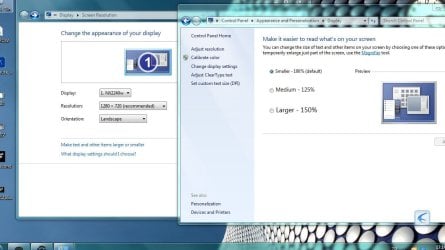
You screenshot shows exactly what I would expect to see if your display showed more that 100%. Have you done a quick check on the Display details, if so what % is it on?
 

My Computer

Computer type
PC/Desktop
OS
Microsoft Windows 7 Home Premium 64-bit 7601 Multiprocessor Free Service Pack 1
CPU
Intel(R) Core(TM) i7-3770 CPU @ 3.40GHz
Motherboard
ASUSTeK COMPUTER INC. P8H77-M
Memory
8.00 GB
Graphics Card(s)
Intel(R) HD Graphics 4000
Sound Card
On Board
Monitor(s) Displays
Dell 24"
Screen Resolution
1920 x 1080
Hard Drives
(1) INTEL SSDSC2CT180A3 ATA Device (2) ST500DM002-1BD142 ATA Device (3) WDC WD3200AAKS-75L9A0 ATA Device (4) Generic- Compact Flash USB Device (5) Generic- MS/MS-Pro USB Device (6) Generic- SD/MMC USB Device (7) Generic- SM/xD-Picture USB
PSU
500w Corsair
Case
Cooler Master
Cooling
3 Fans
Keyboard
Logitech MK300
Mouse
Logitech WOM
Internet Speed
75Mb
Antivirus
Norton 360
Browser
Firefox, Opera, IE
  • Like
Reactions: Son

My Computer

Computer type
PC/Desktop
Computer Manufacturer/Model Number
Me
OS
Win 7 Ultimate x64
CPU
FX-8350 @ 4.6 GHz so far
Motherboard
Asus M5A97 EVO
Memory
ADATA XPG V1 Series Black 8GB DDR3 1600
Graphics Card(s)
Sapphire R9 270x Dual-X
Sound Card
Xonar DGX w/ Corsair Vengence 1300
Monitor(s) Displays
Acer S232HL Abid
Screen Resolution
1920x1080
Hard Drives
120 GB OCZ Vertex 3
500 GB Seagate 7200.12
PSU
Antec Earthwatts 650W Green
Case
Antec Three Hundred
Cooling
Cooler Master 212 EVO
Keyboard
Logitech G510
Mouse
Logitech G500s
Internet Speed
35000/3000
@mitchell65: the size is 100% even the windows become larger than the screen
This is what i can see in 1280x720: (i install the english language pack)
Capture.JPG
 

My Computer

OS
Windows 7 Ultimate
CPU
Intel Core2Duo E6550
Memory
2 GB
Graphics Card(s)
nvidea 8600 GT
Monitor(s) Displays
ViewSonic NX2240w (16:10)
Just curious but why are you trying to force a non-native resolution that isn't even the correct aspect ratio?

According to the specs for your monitor it has a native resolution of 1680x1050 and is a 16:10 monitor, and you are trying to run it at a 16:9 resolution of 1280x720.
 

My Computer

Computer type
PC/Desktop
Computer Manufacturer/Model Number
Me
OS
Win 7 Ultimate x64
CPU
FX-8350 @ 4.6 GHz so far
Motherboard
Asus M5A97 EVO
Memory
ADATA XPG V1 Series Black 8GB DDR3 1600
Graphics Card(s)
Sapphire R9 270x Dual-X
Sound Card
Xonar DGX w/ Corsair Vengence 1300
Monitor(s) Displays
Acer S232HL Abid
Screen Resolution
1920x1080
Hard Drives
120 GB OCZ Vertex 3
500 GB Seagate 7200.12
PSU
Antec Earthwatts 650W Green
Case
Antec Three Hundred
Cooling
Cooler Master 212 EVO
Keyboard
Logitech G510
Mouse
Logitech G500s
Internet Speed
35000/3000
Thanks 4 your reply.
@stormy13: i dont have an 1680x1050 or16:10 option in the screen resolution panel. How can i change it to a 16:10 resolution?
 

My Computer

OS
Windows 7 Ultimate
CPU
Intel Core2Duo E6550
Memory
2 GB
Graphics Card(s)
nvidea 8600 GT
Monitor(s) Displays
ViewSonic NX2240w (16:10)
Thanks 4 your reply.
@stormy13: i dont have an 1680x1050 or16:10 option in the screen resolution panel. How can i change it to a 16:10 resolution?

Have you done this yet,

If you go to "Devices and Printers" does your monitor show up, and is it correctly identified? Do you know what the native resolution is supposed to be? I guessing Windows doesn't know what monitor you have connected and that it is a wide screen format. You may have to hunt up a driver (inf file) for it.

If not and when you do, if the monitor isn't listed correctly check either Windows Update for a driver for it (a monitor is one of the very few devices I would recommend getting a driver through WU for) or use the one directly from Viewsonic,

ViewSonic - Knowledge Base

they are only showing up to Vista but it should still work in Windows 7.
 

My Computer

Computer type
PC/Desktop
Computer Manufacturer/Model Number
Me
OS
Win 7 Ultimate x64
CPU
FX-8350 @ 4.6 GHz so far
Motherboard
Asus M5A97 EVO
Memory
ADATA XPG V1 Series Black 8GB DDR3 1600
Graphics Card(s)
Sapphire R9 270x Dual-X
Sound Card
Xonar DGX w/ Corsair Vengence 1300
Monitor(s) Displays
Acer S232HL Abid
Screen Resolution
1920x1080
Hard Drives
120 GB OCZ Vertex 3
500 GB Seagate 7200.12
PSU
Antec Earthwatts 650W Green
Case
Antec Three Hundred
Cooling
Cooler Master 212 EVO
Keyboard
Logitech G510
Mouse
Logitech G500s
Internet Speed
35000/3000
Thanks 4 your reply.
@stormy13: i dont have an 1680x1050 or16:10 option in the screen resolution panel. How can i change it to a 16:10 resolution?

Have you done this yet,

If you go to "Devices and Printers" does your monitor show up, and is it correctly identified? Do you know what the native resolution is supposed to be? I guessing Windows doesn't know what monitor you have connected and that it is a wide screen format. You may have to hunt up a driver (inf file) for it.

If not and when you do, if the monitor isn't listed correctly check either Windows Update for a driver for it (a monitor is one of the very few devices I would recommend getting a driver through WU for) or use the one directly from Viewsonic,

ViewSonic - Knowledge Base

they are only showing up to Vista but it should still work in Windows 7.

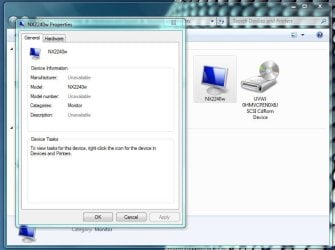
i already have the latest viewsonic driver.
and i think the monitor is identified.
Capture.JPG
Capture2.JPG
 

My Computer

OS
Windows 7 Ultimate
CPU
Intel Core2Duo E6550
Memory
2 GB
Graphics Card(s)
nvidea 8600 GT
Monitor(s) Displays
ViewSonic NX2240w (16:10)
Just realized that that isn't really a monitor but a TV. How are you connecting to it?

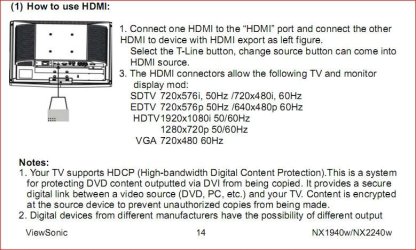
Edit: Found the manual for your TV and if you are connected to it via HDMI then that would be why the resolution and display are wrong. Straight from the manual regarding HDMI,

NX2240w.JPG

So if it is connected via HDMI try the VGA connection instead and then you should have the full 1680x1050 resolution available.
 
Last edited:

My Computer

Computer type
PC/Desktop
Computer Manufacturer/Model Number
Me
OS
Win 7 Ultimate x64
CPU
FX-8350 @ 4.6 GHz so far
Motherboard
Asus M5A97 EVO
Memory
ADATA XPG V1 Series Black 8GB DDR3 1600
Graphics Card(s)
Sapphire R9 270x Dual-X
Sound Card
Xonar DGX w/ Corsair Vengence 1300
Monitor(s) Displays
Acer S232HL Abid
Screen Resolution
1920x1080
Hard Drives
120 GB OCZ Vertex 3
500 GB Seagate 7200.12
PSU
Antec Earthwatts 650W Green
Case
Antec Three Hundred
Cooling
Cooler Master 212 EVO
Keyboard
Logitech G510
Mouse
Logitech G500s
Internet Speed
35000/3000
  • Like
Reactions: Son
@stormy13:
i use a DVI(graphic card) to HDMI(tv) cable
 

My Computer

OS
Windows 7 Ultimate
CPU
Intel Core2Duo E6550
Memory
2 GB
Graphics Card(s)
nvidea 8600 GT
Monitor(s) Displays
ViewSonic NX2240w (16:10)
@stormy13:
i use a DVI(graphic card) to HDMI(tv) cable

That is why you can't get higher resolutions, see my edit in my previous post.
 

My Computer

Computer type
PC/Desktop
Computer Manufacturer/Model Number
Me
OS
Win 7 Ultimate x64
CPU
FX-8350 @ 4.6 GHz so far
Motherboard
Asus M5A97 EVO
Memory
ADATA XPG V1 Series Black 8GB DDR3 1600
Graphics Card(s)
Sapphire R9 270x Dual-X
Sound Card
Xonar DGX w/ Corsair Vengence 1300
Monitor(s) Displays
Acer S232HL Abid
Screen Resolution
1920x1080
Hard Drives
120 GB OCZ Vertex 3
500 GB Seagate 7200.12
PSU
Antec Earthwatts 650W Green
Case
Antec Three Hundred
Cooling
Cooler Master 212 EVO
Keyboard
Logitech G510
Mouse
Logitech G500s
Internet Speed
35000/3000
i use this since i using XP, but why i only have the problem when im using 7?

edit---so i had 2 upgrade my graphic card or use VGA 2 get rid this problem?
 

My Computer

OS
Windows 7 Ultimate
CPU
Intel Core2Duo E6550
Memory
2 GB
Graphics Card(s)
nvidea 8600 GT
Monitor(s) Displays
ViewSonic NX2240w (16:10)
Back
Top