Problem while creating new partition on hard disk.

rocker07

New member
Local time
2:58 PM
Messages
24
First sorry for bad english.
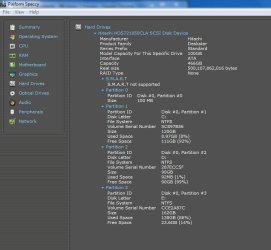
I am using Hitachi hard disk (Hitachi HDS721050CLA SCSI Disk Device) which has actual size of 466 GB, on windows 7. When i assembled PC from retailer he made three partitions of size C=151, D=152, E=162 GB. I had no idea about partitions at that time.
Now I understand that making more partitions will be useful for data management so I moved all my important data to E drive. And as my system was slow i also wanted format windows 7.

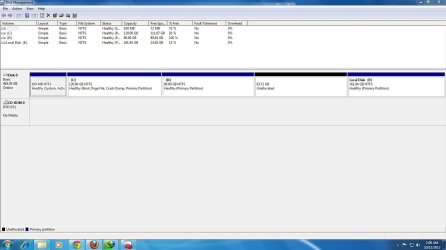
While formatting i deleted C drive(System) and D drive(which was labelled as logical), which Created about 300 GB free space. First I created 1 drive with size of 120 GB. while creating this drive windows pop up with message saying something like this, 'For security reasons windows will create one additional drive".So It created two drives , one with 120 GB and second with 100 GB.It Still shows 183 GB free space was left. I created one extra drive with 90 GB space. After creating this drive 93 GB free space was left on hard disk. But there was no option to make additional drive. So i completed format and re-installed windows 7.


Now i have three drives, Newly created C=120, D=90 and old E=162 GB plus 93 GB free space. When computer restart after format, it open D drive in auto-play menu like DVD, which was totally unusual for me and it even ask me to format it.
Now the problem is i want to create new partition from with that 93 GB free space. So i opened disk management tool. Then while creating a new simple volume at unallocate space i have this message before creating

"the operation you selected will convert the selected basic disk to dynamic disk,if you convert the disk to dynamic you will not be able to start installed OS from any volume(expect the current boot volume).

Does something wrong is happening with me, some users are saying that this will destroy hard disk. My PC is just one year old. So i simply cant buy new hard disk. Should i proceed or better loose my valuable 93 GB space.
 

Attachments
  • Capture.JPG
    Capture.JPG
    126.2 KB · Views: 39
  • Capturea.JPG
    Capturea.JPG
    68.5 KB · Views: 29

My Computer

OS
Windows 7 Ultimate x32
CPU
AMD Athlon II X2 255
Motherboard
Gigabyte Technology Co., Ltd. M68MT-S2 (Socket M2)
Memory
2 gb
Graphics Card(s)
Nvidia GeForce 7025 / nForce 630a (Gigabyte)
Sound Card
Realtek High Definition Audio
Hard Drives
488GB Hitachi Hitachi HDS721050CLA SCSI Disk Device (ATA)
Creating a Dynamic disk will delete all the data on all the remaining partitions. The Windows 7 OS will remain intact.
This procedure only destroys data, not the physical drive.

There's free partitioning software that will allow you to increase the partition(s) sizes, to utilize the 93GB.

Free download Magic Partition Manager Software, partition magic alternative, free partition magic, partition magic Windows 7 and server partition software - Partition Wizard Online
The home versions are free.
 

My Computer

Computer type
PC/Desktop
Computer Manufacturer/Model Number
Custom Build
OS
Windows 7 Home Premium 64 bit
CPU
Intel Core i7-4790
Motherboard
GA-Z87X-D3H
Memory
G.SKILL 8GB (2 x 4GB) DDR3 F3-10666CL9D-8GBNT
Graphics Card(s)
AMD Radeon R7 250
Sound Card
Realtek ALC892
Monitor(s) Displays
Samsung UN32EH5000, Dell 1703FPT
Screen Resolution
1920 x 1080, 1280 x 1024
Hard Drives
WD5003AZEX
WD10EZEX
Samsung HD103SJ
Samsung 128 GB 840 PRO
PSU
SeaSonic M12II SS-500GM
Case
Fractal Design Define R4
Cooling
Zalman CNPS9900ALED
Keyboard
Logitech K800
Mouse
Logitech M705
Internet Speed
16 Mbps
Antivirus
Avast
Browser
Firefox
Other Info
Bose Companion 2 Multimedia Speakers
Creating a Dynamic disk will delete all the data on all the partitions, other than the OS partition. You're probably better off using a partitioning software to increase the size on one of the partitions.

Free download Magic Partition Manager Software, partition magic alternative, free partition magic, partition magic Windows 7 and server partition software - Partition Wizard Online
The home versions are free.
Thanks for reply. I will try to do that. But i have still concerned about D drive auto-play and asking for format. though this happen only once, Thus this mean that my hard disk is damaged.
I have lot of bad memories regarding USB pen drive for same problem. when pen drive is useless it give same error when attached to PC. It work good until i move data in it and when i again connect it to other or same pc, it always ask for format.
 

My Computer

OS
Windows 7 Ultimate x32
CPU
AMD Athlon II X2 255
Motherboard
Gigabyte Technology Co., Ltd. M68MT-S2 (Socket M2)
Memory
2 gb
Graphics Card(s)
Nvidia GeForce 7025 / nForce 630a (Gigabyte)
Sound Card
Realtek High Definition Audio
Hard Drives
488GB Hitachi Hitachi HDS721050CLA SCSI Disk Device (ATA)
Do not say yes to dynamic disks. They are a major problem.

4 or 5 partitions is not the most efficient way to manage data. Folders are much better.

The problem with 4 or 5 partitions is that you can't accurately guess how quickly each will fill up and you will run out of space sooner than planned in at least one of the partitions.

If I were you, I would use 3 partitions: the very small 100 MB system partition, C for Windows, and D for all data. Use a series of folders on D to manage data.

I'd temporarily move all data now on E to C and D. Then delete E.

Then expand D to make it much larger, using all of the unallocated space, including the space formerly occupied by E.

Then move any data temporarily on C back to D.

You could also make C smaller than it is now and add that space to D also. A C partition of 80 or 100 GB is plenty for most installations.

You can do all of that with Partition Wizard as mentioned by Sardonicus. Make sure you get the bootable version and burn it to a disc.

If you think your hard drive is damaged, you should run the drive manufacturer's downloadable testing utility.
 

My Computer

Computer type
PC/Desktop
Computer Manufacturer/Model Number
Ignatz Special; 4 speed manual gearbox; factory air conditioning; one of one
OS
Windows 7 Home Premium SP1, 64-bit
CPU
Intel Skylake i5-6600K, not overclocked
Motherboard
AsRock Z170M Extreme 4, micro ATX
Memory
8 GB HyperX DDR4-2666 (2 x 4 GB)
Graphics Card(s)
none; graphics are integrated on CPU
Sound Card
onboard: Realtek ALC1150; external: USB Behringer UF0-202
Monitor(s) Displays
Dell S2340M 23 inch IPS
Screen Resolution
1600 x 900
Hard Drives
System: Crucial MX100 series SSD, 128 GB;
Data: Samsung Spinpoint 103SJ, 1 TB;
Backup: WD Caviar Green WD30EZRX-00D8PB0, 3 TB
PSU
Rosewill SilentNight 500 watt fanless, semi-modular
Case
Antec Solo II
Cooling
Noctua NH-U12S; Noctua F12 intake, Noctua S12A exhaust
Keyboard
Microsoft 200 6JH-00001 USB
Mouse
Dell or Microsoft optical wired; USB
Antivirus
Microsoft Security Essentials and Malwarebytes Premium
Browser
Pale Moon
Other Info
All fans PWM; speeds at idle: CPU circa 500 rpm; intake circa 600 rpm; exhaust circa 600 rpm; CPU temps 27 idle and 47 C load in a warm room (27 C/81 F) when running Intel Extreme Tuning Utility stress test.
Do not say yes to dynamic disks. They are a major problem.

4 or 5 partitions is not the most efficient way to manage data. Folders are much better.

The problem with 4 or 5 partitions is that you can't accurately guess how quickly each will fill up and you will run out of space sooner than planned in at least one of the partitions.

If I were you, I would use 3 partitions: the very small 100 MB system partition, C for Windows, and D for all data. Use a series of folders on D to manage data.

I'd temporarily move all data now on E to C and D. Then delete E.

Then expand D to make it much larger, using all of the unallocated space, including the space formerly occupied by E.

Then move any data temporarily on C back to D.

You could also make C smaller than it is now and add that space to D also. A C partition of 80 or 100 GB is plenty for most installations.

You can do all of that with Partition Wizard as mentioned by Sardonicus. Make sure you get the bootable version and burn it to a disc.

If you think your hard drive is damaged, you should run the drive manufacturer's downloadable testing utility.
The problem has solved with EaseUs partition manger home. I created c=120 GB, D and G both logical of 90 GB. and kept E(primary) with 162 GB.
Now the problem remains of hard disk damage. I noticed lots of videos on hard drive got corrupted. Sometimes my songs are also missing. Though there are various reasons for this, does this is because hard disk damage.
I searched Hitachi website but i cant find my hard disk name. I used crystal disk info which was recommended on various sites for hard disk health information. That gives me horrible results. can someone give me more information regarding this issue.
 

Attachments

  • Captured.JPG
    Captured.JPG
    187.8 KB · Views: 18

My Computer

OS
Windows 7 Ultimate x32
CPU
AMD Athlon II X2 255
Motherboard
Gigabyte Technology Co., Ltd. M68MT-S2 (Socket M2)
Memory
2 gb
Graphics Card(s)
Nvidia GeForce 7025 / nForce 630a (Gigabyte)
Sound Card
Realtek High Definition Audio
Hard Drives
488GB Hitachi Hitachi HDS721050CLA SCSI Disk Device (ATA)
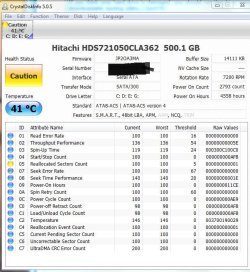
Your reallocated sector count is shaky.

That means that portions of your drive have gone bad. The normal course of events is that more and more of it will go bad over time.

I'd start shopping for a new drive, but you might want to run a drive utility from Hitachi for confirmation.
 

My Computer

Computer type
PC/Desktop
Computer Manufacturer/Model Number
Ignatz Special; 4 speed manual gearbox; factory air conditioning; one of one
OS
Windows 7 Home Premium SP1, 64-bit
CPU
Intel Skylake i5-6600K, not overclocked
Motherboard
AsRock Z170M Extreme 4, micro ATX
Memory
8 GB HyperX DDR4-2666 (2 x 4 GB)
Graphics Card(s)
none; graphics are integrated on CPU
Sound Card
onboard: Realtek ALC1150; external: USB Behringer UF0-202
Monitor(s) Displays
Dell S2340M 23 inch IPS
Screen Resolution
1600 x 900
Hard Drives
System: Crucial MX100 series SSD, 128 GB;
Data: Samsung Spinpoint 103SJ, 1 TB;
Backup: WD Caviar Green WD30EZRX-00D8PB0, 3 TB
PSU
Rosewill SilentNight 500 watt fanless, semi-modular
Case
Antec Solo II
Cooling
Noctua NH-U12S; Noctua F12 intake, Noctua S12A exhaust
Keyboard
Microsoft 200 6JH-00001 USB
Mouse
Dell or Microsoft optical wired; USB
Antivirus
Microsoft Security Essentials and Malwarebytes Premium
Browser
Pale Moon
Other Info
All fans PWM; speeds at idle: CPU circa 500 rpm; intake circa 600 rpm; exhaust circa 600 rpm; CPU temps 27 idle and 47 C load in a warm room (27 C/81 F) when running Intel Extreme Tuning Utility stress test.
Your reallocated sector count is shaky.

That means that portions of your drive have gone bad. The normal course of events is that more and more of it will go bad over time.

I'd start shopping for a new drive, but you might want to run a drive utility from Hitachi for confirmation.
Will this issue will cover under warranty. Hitachi provides three years warranty , that means still 1 1/2 year still left. I had previously 488 GB available space but now only 466 GB available. That means already i have lost 22 GB in 1 1/2 year. Is this normal?
Here is one another screenshot.
 

Attachments

  • 12-October-2012_17-33.png
    12-October-2012_17-33.png
    79.4 KB · Views: 14
Last edited:

My Computer

OS
Windows 7 Ultimate x32
CPU
AMD Athlon II X2 255
Motherboard
Gigabyte Technology Co., Ltd. M68MT-S2 (Socket M2)
Memory
2 gb
Graphics Card(s)
Nvidia GeForce 7025 / nForce 630a (Gigabyte)
Sound Card
Realtek High Definition Audio
Hard Drives
488GB Hitachi Hitachi HDS721050CLA SCSI Disk Device (ATA)
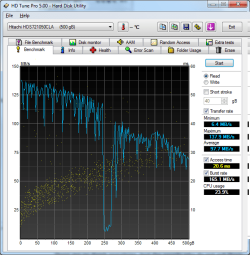
The actual usable space on a hard drive is about 93% of the advertised space. 93% of 500 is 465, which is within 1 GB of the actual usable space I would expect to see on your hard drive. I'm not sure where you got the 488 GB number.

You should run a Hitachi drive utility test on the drive. If it fails the test, you may have a warranty claim.

That HDD Tune picture doesn't tell me much. The access time of 20.6 looks a bit high (slow).
 

My Computer

Computer type
PC/Desktop
Computer Manufacturer/Model Number
Ignatz Special; 4 speed manual gearbox; factory air conditioning; one of one
OS
Windows 7 Home Premium SP1, 64-bit
CPU
Intel Skylake i5-6600K, not overclocked
Motherboard
AsRock Z170M Extreme 4, micro ATX
Memory
8 GB HyperX DDR4-2666 (2 x 4 GB)
Graphics Card(s)
none; graphics are integrated on CPU
Sound Card
onboard: Realtek ALC1150; external: USB Behringer UF0-202
Monitor(s) Displays
Dell S2340M 23 inch IPS
Screen Resolution
1600 x 900
Hard Drives
System: Crucial MX100 series SSD, 128 GB;
Data: Samsung Spinpoint 103SJ, 1 TB;
Backup: WD Caviar Green WD30EZRX-00D8PB0, 3 TB
PSU
Rosewill SilentNight 500 watt fanless, semi-modular
Case
Antec Solo II
Cooling
Noctua NH-U12S; Noctua F12 intake, Noctua S12A exhaust
Keyboard
Microsoft 200 6JH-00001 USB
Mouse
Dell or Microsoft optical wired; USB
Antivirus
Microsoft Security Essentials and Malwarebytes Premium
Browser
Pale Moon
Other Info
All fans PWM; speeds at idle: CPU circa 500 rpm; intake circa 600 rpm; exhaust circa 600 rpm; CPU temps 27 idle and 47 C load in a warm room (27 C/81 F) when running Intel Extreme Tuning Utility stress test.
i had the same problem and i click yes when the message the operation you selected will convert the selected basic disk to dynamic disk,if you convert the disk to dynamic you will not be able to start installed OS from any volume(expect the current boot volume). pop up. now os is not loading neither i can format whole system using windows cd. i have permission to format only c drive. pls help
 

My Computer

Computer type
Laptop
Computer Manufacturer/Model Number
Asus
OS
windows 7 64bit
Memory
500gb
Graphics Card(s)
2gb
Hard Drives
500gb
Antivirus
avast
Back
Top