Problem - Win7 64bit Context [Send to]

tecknomage

New member
Local time
1:27 PM
Messages
21
Location
San Diego, CA USA
I have a brand new, custom built, Win7 64bit rig :geek:

Problem:

When I use the context menu [Send to] it ONLY shows [Documents] and all my drives :cry:

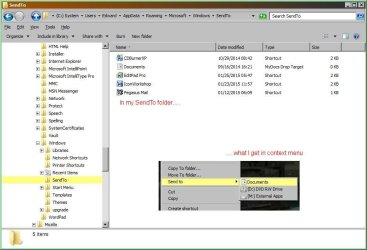
When I go into my User profile (using SHELL:SENDTO or navigating) my full list IS there.

Is there a way to make Win7 refresh or see my full Sent To list?
 

My Computer

Computer type
PC/Desktop
Computer Manufacturer/Model Number
Custom build
OS
Windows 7 64bit
CPU
Intel(R) Core(TM) i5-4690 CPU @ 3.50GHz
Motherboard
Gigabyte Technology Co., Ltd. Z97X-UD5H
Memory
8gb
Graphics Card(s)
GeForce GTX 770, 2gb memory
Hard Drives
Seagate ST4000DX001-1CE16 4tb Hybread (SSD + SATA)

Western Digital WDC WD1600BB-32DWA0 USB Device 160gb (external)
Antivirus
ESET NOD32 Antivirus
Browser
Firefox & IE

My Computer

Computer type
PC/Desktop
Computer Manufacturer/Model Number
Home made Desktop
OS
Windows 10 Pro. 64/ version 1709 Windows 7 Pro/64
CPU
Intel i7-6800K @ 4.3
Motherboard
ASUS X-99 Deluxe II
Memory
Corsair Platinum 16 gig @2400
Graphics Card(s)
EVGA GTX 1070 OC
Monitor(s) Displays
Asus 27" LED LCD/VE278Q
Screen Resolution
1920-1080 or 1280-720 HDMI
Hard Drives
INTEL SSD 730-240 Gb Sata 3.0/
PSU
EVGA Platium 1200W
Case
Phanteks Luxe Tempered Glass 8 fans/ one radiator
Cooling
XSPC/ Water Cooled CPU
Keyboard
Das 4 Professional
Mouse
Logitech M705/MX Anywhere 2-S
Internet Speed
100 mbits
Antivirus
Microsoft Security Essentials/ Malwarebytes Premium 3.0/ SAS
Browser
I.E. 11 default/Firefox/ ISP Time Warner Cable/Spectrum
Other Info
LG BluRay Burner/
Sound system-KLipsch-THX/
Icy Dock ssd Hot Swap bays.

My Computer

Computer type
PC/Desktop
Computer Manufacturer/Model Number
Custom build
OS
Windows 7 64bit
CPU
Intel(R) Core(TM) i5-4690 CPU @ 3.50GHz
Motherboard
Gigabyte Technology Co., Ltd. Z97X-UD5H
Memory
8gb
Graphics Card(s)
GeForce GTX 770, 2gb memory
Hard Drives
Seagate ST4000DX001-1CE16 4tb Hybread (SSD + SATA)

Western Digital WDC WD1600BB-32DWA0 USB Device 160gb (external)
Antivirus
ESET NOD32 Antivirus
Browser
Firefox & IE
Hello tecknomage, and welcome to Seven Forums.

As a test, press and hold the Shift key while right clicking on the item, release Shift, then click on Send to to see if everything is there.
 

My Computer

Computer type
PC/Desktop
Computer Manufacturer/Model Number
Self built custom
OS
64-bit Windows 11 Pro for Workstations
CPU
Intel i7-8700K OC'd to 5 GHz
Motherboard
ASUS ROG Maximus XI Formula Z390
Memory
64 GB (4x16GB) G.SKILL TridentZ RGB DDR4 3600 MHz
Graphics Card(s)
ASUS ROG-STRIX-GTX1080TI-O11G-GAMING
Sound Card
Integrated
Monitor(s) Displays
2 x Samsung Odyssey G7 27"
Screen Resolution
2560x1440
Hard Drives
1TB Samsung 990 PRO M.2,
4TB Samsung 990 PRO PRO M.2,
TerraMaster F8 SSD Plus NAS
PSU
Seasonic Prime Titanium 850W
Case
Thermaltake Core P3
Cooling
Corsair Hydro H115i
Keyboard
Logitech wireless K800
Mouse
Logitech MX Master 4
Internet Speed
2 Gb/s Download and 100 Mb/s Upload
Antivirus
Malwarebyte Anti-Malware Premium
Browser
Google Chrome
Other Info
Logitech Z625 speaker system,
Logitech BRIO 4K Pro webcam,
HP Color LaserJet Pro MFP M477fdn,
APC SMART-UPS RT 1000 XL - SURT1000XLI,
Galaxy S23 Plus phone
Hello tecknomage, and welcome to Seven Forums.

As a test, press and hold the Shift key while right clicking on the item, release Shift, then click on Send to to see if everything is there.

The only thing that does is show my User Start Menu list.

The programs listed my my [Send to] folder are still NOT there.
 

My Computer

Computer type
PC/Desktop
Computer Manufacturer/Model Number
Custom build
OS
Windows 7 64bit
CPU
Intel(R) Core(TM) i5-4690 CPU @ 3.50GHz
Motherboard
Gigabyte Technology Co., Ltd. Z97X-UD5H
Memory
8gb
Graphics Card(s)
GeForce GTX 770, 2gb memory
Hard Drives
Seagate ST4000DX001-1CE16 4tb Hybread (SSD + SATA)

Western Digital WDC WD1600BB-32DWA0 USB Device 160gb (external)
Antivirus
ESET NOD32 Antivirus
Browser
Firefox & IE
It just occurred to me.

I check the [Send to] folder for the [Default] User. Sure enough, that is what I'm getting.

In other words I get the [Default] User [Send to] instead of my account's User [Send to].

BUT, copying the contents of my User [Send to] does NOT fix the problem.

Looks like a Registry error, but what and how to fix?
 

My Computer

Computer type
PC/Desktop
Computer Manufacturer/Model Number
Custom build
OS
Windows 7 64bit
CPU
Intel(R) Core(TM) i5-4690 CPU @ 3.50GHz
Motherboard
Gigabyte Technology Co., Ltd. Z97X-UD5H
Memory
8gb
Graphics Card(s)
GeForce GTX 770, 2gb memory
Hard Drives
Seagate ST4000DX001-1CE16 4tb Hybread (SSD + SATA)

Western Digital WDC WD1600BB-32DWA0 USB Device 160gb (external)
Antivirus
ESET NOD32 Antivirus
Browser
Firefox & IE

My Computer

Computer type
PC/Desktop
Computer Manufacturer/Model Number
Self built custom
OS
64-bit Windows 11 Pro for Workstations
CPU
Intel i7-8700K OC'd to 5 GHz
Motherboard
ASUS ROG Maximus XI Formula Z390
Memory
64 GB (4x16GB) G.SKILL TridentZ RGB DDR4 3600 MHz
Graphics Card(s)
ASUS ROG-STRIX-GTX1080TI-O11G-GAMING
Sound Card
Integrated
Monitor(s) Displays
2 x Samsung Odyssey G7 27"
Screen Resolution
2560x1440
Hard Drives
1TB Samsung 990 PRO M.2,
4TB Samsung 990 PRO PRO M.2,
TerraMaster F8 SSD Plus NAS
PSU
Seasonic Prime Titanium 850W
Case
Thermaltake Core P3
Cooling
Corsair Hydro H115i
Keyboard
Logitech wireless K800
Mouse
Logitech MX Master 4
Internet Speed
2 Gb/s Download and 100 Mb/s Upload
Antivirus
Malwarebyte Anti-Malware Premium
Browser
Google Chrome
Other Info
Logitech Z625 speaker system,
Logitech BRIO 4K Pro webcam,
HP Color LaserJet Pro MFP M477fdn,
APC SMART-UPS RT 1000 XL - SURT1000XLI,
Galaxy S23 Plus phone

My Computer

Computer type
PC/Desktop
Computer Manufacturer/Model Number
Custom build
OS
Windows 7 64bit
CPU
Intel(R) Core(TM) i5-4690 CPU @ 3.50GHz
Motherboard
Gigabyte Technology Co., Ltd. Z97X-UD5H
Memory
8gb
Graphics Card(s)
GeForce GTX 770, 2gb memory
Hard Drives
Seagate ST4000DX001-1CE16 4tb Hybread (SSD + SATA)

Western Digital WDC WD1600BB-32DWA0 USB Device 160gb (external)
Antivirus
ESET NOD32 Antivirus
Browser
Firefox & IE

Attachments

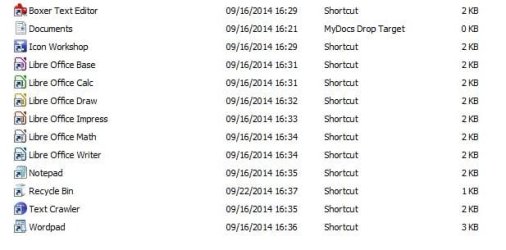
  • MySendTo.jpg
    MySendTo.jpg
    36.4 KB · Views: 40

My Computer

Computer type
PC/Desktop
Computer Manufacturer/Model Number
Custom build
OS
Windows 7 64bit
CPU
Intel(R) Core(TM) i5-4690 CPU @ 3.50GHz
Motherboard
Gigabyte Technology Co., Ltd. Z97X-UD5H
Memory
8gb
Graphics Card(s)
GeForce GTX 770, 2gb memory
Hard Drives
Seagate ST4000DX001-1CE16 4tb Hybread (SSD + SATA)

Western Digital WDC WD1600BB-32DWA0 USB Device 160gb (external)
Antivirus
ESET NOD32 Antivirus
Browser
Firefox & IE

My Computer

Computer type
PC/Desktop
Computer Manufacturer/Model Number
Self built custom
OS
64-bit Windows 11 Pro for Workstations
CPU
Intel i7-8700K OC'd to 5 GHz
Motherboard
ASUS ROG Maximus XI Formula Z390
Memory
64 GB (4x16GB) G.SKILL TridentZ RGB DDR4 3600 MHz
Graphics Card(s)
ASUS ROG-STRIX-GTX1080TI-O11G-GAMING
Sound Card
Integrated
Monitor(s) Displays
2 x Samsung Odyssey G7 27"
Screen Resolution
2560x1440
Hard Drives
1TB Samsung 990 PRO M.2,
4TB Samsung 990 PRO PRO M.2,
TerraMaster F8 SSD Plus NAS
PSU
Seasonic Prime Titanium 850W
Case
Thermaltake Core P3
Cooling
Corsair Hydro H115i
Keyboard
Logitech wireless K800
Mouse
Logitech MX Master 4
Internet Speed
2 Gb/s Download and 100 Mb/s Upload
Antivirus
Malwarebyte Anti-Malware Premium
Browser
Google Chrome
Other Info
Logitech Z625 speaker system,
Logitech BRIO 4K Pro webcam,
HP Color LaserJet Pro MFP M477fdn,
APC SMART-UPS RT 1000 XL - SURT1000XLI,
Galaxy S23 Plus phone
Looking at your screenshot, I don't see the full list. Compressed (zipped) folder, Desktop (create shortcut), Fax recipient, and Mail Recipient are missing.

http://www.sevenforums.com/tutorials/45421-send-context-menu-remove-restore-default-items.html


From what is happening I gather that Win7's [SendTo] does NOT work like WinXP. That is, Win7 cannot use shortcuts in the [SendTo] folder.

I'm I correct :sarc:

If what I surmised is true, this is just another example of Microdunce breaking a good thing :mad:
 

My Computer

Computer type
PC/Desktop
Computer Manufacturer/Model Number
Custom build
OS
Windows 7 64bit
CPU
Intel(R) Core(TM) i5-4690 CPU @ 3.50GHz
Motherboard
Gigabyte Technology Co., Ltd. Z97X-UD5H
Memory
8gb
Graphics Card(s)
GeForce GTX 770, 2gb memory
Hard Drives
Seagate ST4000DX001-1CE16 4tb Hybread (SSD + SATA)

Western Digital WDC WD1600BB-32DWA0 USB Device 160gb (external)
Antivirus
ESET NOD32 Antivirus
Browser
Firefox & IE
Did you add any missing "Send to" items you wanted to the location in my previous post to restore them?

Yes, you could use shortcuts of items in "Send to" to send a file to.

Send To Context Menu
 

My Computer

Computer type
PC/Desktop
Computer Manufacturer/Model Number
Self built custom
OS
64-bit Windows 11 Pro for Workstations
CPU
Intel i7-8700K OC'd to 5 GHz
Motherboard
ASUS ROG Maximus XI Formula Z390
Memory
64 GB (4x16GB) G.SKILL TridentZ RGB DDR4 3600 MHz
Graphics Card(s)
ASUS ROG-STRIX-GTX1080TI-O11G-GAMING
Sound Card
Integrated
Monitor(s) Displays
2 x Samsung Odyssey G7 27"
Screen Resolution
2560x1440
Hard Drives
1TB Samsung 990 PRO M.2,
4TB Samsung 990 PRO PRO M.2,
TerraMaster F8 SSD Plus NAS
PSU
Seasonic Prime Titanium 850W
Case
Thermaltake Core P3
Cooling
Corsair Hydro H115i
Keyboard
Logitech wireless K800
Mouse
Logitech MX Master 4
Internet Speed
2 Gb/s Download and 100 Mb/s Upload
Antivirus
Malwarebyte Anti-Malware Premium
Browser
Google Chrome
Other Info
Logitech Z625 speaker system,
Logitech BRIO 4K Pro webcam,
HP Color LaserJet Pro MFP M477fdn,
APC SMART-UPS RT 1000 XL - SURT1000XLI,
Galaxy S23 Plus phone
Did you add any missing "Send to" items you wanted to the location in my previous post to restore them?

Yes, you could use shortcuts of items in "Send to" to send a file to.

Send To Context Menu

NO. Well, my shortcuts don't work.

The only default one that I left as is is [Documents].
 

My Computer

Computer type
PC/Desktop
Computer Manufacturer/Model Number
Custom build
OS
Windows 7 64bit
CPU
Intel(R) Core(TM) i5-4690 CPU @ 3.50GHz
Motherboard
Gigabyte Technology Co., Ltd. Z97X-UD5H
Memory
8gb
Graphics Card(s)
GeForce GTX 770, 2gb memory
Hard Drives
Seagate ST4000DX001-1CE16 4tb Hybread (SSD + SATA)

Western Digital WDC WD1600BB-32DWA0 USB Device 160gb (external)
Antivirus
ESET NOD32 Antivirus
Browser
Firefox & IE
Usually it's best to only have folder or drive shortcuts in "Send To" instead of for a program.
 

My Computer

Computer type
PC/Desktop
Computer Manufacturer/Model Number
Self built custom
OS
64-bit Windows 11 Pro for Workstations
CPU
Intel i7-8700K OC'd to 5 GHz
Motherboard
ASUS ROG Maximus XI Formula Z390
Memory
64 GB (4x16GB) G.SKILL TridentZ RGB DDR4 3600 MHz
Graphics Card(s)
ASUS ROG-STRIX-GTX1080TI-O11G-GAMING
Sound Card
Integrated
Monitor(s) Displays
2 x Samsung Odyssey G7 27"
Screen Resolution
2560x1440
Hard Drives
1TB Samsung 990 PRO M.2,
4TB Samsung 990 PRO PRO M.2,
TerraMaster F8 SSD Plus NAS
PSU
Seasonic Prime Titanium 850W
Case
Thermaltake Core P3
Cooling
Corsair Hydro H115i
Keyboard
Logitech wireless K800
Mouse
Logitech MX Master 4
Internet Speed
2 Gb/s Download and 100 Mb/s Upload
Antivirus
Malwarebyte Anti-Malware Premium
Browser
Google Chrome
Other Info
Logitech Z625 speaker system,
Logitech BRIO 4K Pro webcam,
HP Color LaserJet Pro MFP M477fdn,
APC SMART-UPS RT 1000 XL - SURT1000XLI,
Galaxy S23 Plus phone
Did you add any missing "Send to" items you wanted to the location in my previous post to restore them?

Yes, you could use shortcuts of items in "Send to" to send a file to.

Send To Context Menu

OPPS: In my [SendTo] folder there was a shortcut for Notepad but it did NOT show in the Context Menu [Send to].
 

My Computer

Computer type
PC/Desktop
Computer Manufacturer/Model Number
Custom build
OS
Windows 7 64bit
CPU
Intel(R) Core(TM) i5-4690 CPU @ 3.50GHz
Motherboard
Gigabyte Technology Co., Ltd. Z97X-UD5H
Memory
8gb
Graphics Card(s)
GeForce GTX 770, 2gb memory
Hard Drives
Seagate ST4000DX001-1CE16 4tb Hybread (SSD + SATA)

Western Digital WDC WD1600BB-32DWA0 USB Device 160gb (external)
Antivirus
ESET NOD32 Antivirus
Browser
Firefox & IE
Bingo. ;)
 

My Computer

Computer type
PC/Desktop
Computer Manufacturer/Model Number
Self built custom
OS
64-bit Windows 11 Pro for Workstations
CPU
Intel i7-8700K OC'd to 5 GHz
Motherboard
ASUS ROG Maximus XI Formula Z390
Memory
64 GB (4x16GB) G.SKILL TridentZ RGB DDR4 3600 MHz
Graphics Card(s)
ASUS ROG-STRIX-GTX1080TI-O11G-GAMING
Sound Card
Integrated
Monitor(s) Displays
2 x Samsung Odyssey G7 27"
Screen Resolution
2560x1440
Hard Drives
1TB Samsung 990 PRO M.2,
4TB Samsung 990 PRO PRO M.2,
TerraMaster F8 SSD Plus NAS
PSU
Seasonic Prime Titanium 850W
Case
Thermaltake Core P3
Cooling
Corsair Hydro H115i
Keyboard
Logitech wireless K800
Mouse
Logitech MX Master 4
Internet Speed
2 Gb/s Download and 100 Mb/s Upload
Antivirus
Malwarebyte Anti-Malware Premium
Browser
Google Chrome
Other Info
Logitech Z625 speaker system,
Logitech BRIO 4K Pro webcam,
HP Color LaserJet Pro MFP M477fdn,
APC SMART-UPS RT 1000 XL - SURT1000XLI,
Galaxy S23 Plus phone

Attachments

  • Win7Pro_SendTo_Folder.jpg
    Win7Pro_SendTo_Folder.jpg
    77.7 KB · Views: 4

My Computer

Computer type
PC/Desktop
Computer Manufacturer/Model Number
Custom build
OS
Windows 7 64bit
CPU
Intel(R) Core(TM) i5-4690 CPU @ 3.50GHz
Motherboard
Gigabyte Technology Co., Ltd. Z97X-UD5H
Memory
8gb
Graphics Card(s)
GeForce GTX 770, 2gb memory
Hard Drives
Seagate ST4000DX001-1CE16 4tb Hybread (SSD + SATA)

Western Digital WDC WD1600BB-32DWA0 USB Device 160gb (external)
Antivirus
ESET NOD32 Antivirus
Browser
Firefox & IE
Send To SendTo

This old trick I got from Leo LaPorte works for me from XP onward. I am on Windows 8.0 and it works fine here.

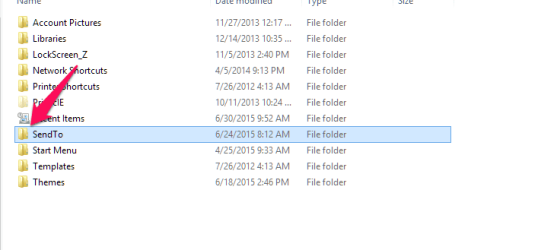
Go to your SendTo folder, then up one. Select the SendTo folder as shown by the arrow in the first shot, and copy it.

first.png

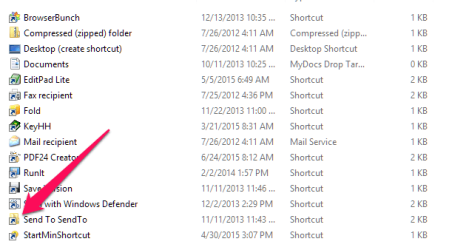
Now double click it to go back into the SendTo folder. Paste it. Rename it
Send To SendTo

second.png


Now you can right click any shortcut and select Send To SendTo and it will properly be in the Send To folder

Edit: Note that this only works for shortcuts. If you right click on an exe and choose Send To SendTo it will not work.
 

My Computer

Computer Manufacturer/Model Number
HP Media Center
OS
Windows 7 32 bit
CPU
AMD 5200+ dual core
Memory
2 GB
Graphics Card(s)
NVidia GeForce 6150SE 128 MB
Monitor(s) Displays
CRT
Screen Resolution
1280x1024
Hard Drives
500 GB Sata internal :

SIIG USB 3.0 docking stations w/WD Caviar Black 6 Gb/s drives
Keyboard
PS/2
Mouse
PS/2 Wheel Mouse
Other Info
SIIG USB 3.0 PCIexpress card.

My Computer

Computer type
PC/Desktop
Computer Manufacturer/Model Number
Custom build
OS
Windows 7 64bit
CPU
Intel(R) Core(TM) i5-4690 CPU @ 3.50GHz
Motherboard
Gigabyte Technology Co., Ltd. Z97X-UD5H
Memory
8gb
Graphics Card(s)
GeForce GTX 770, 2gb memory
Hard Drives
Seagate ST4000DX001-1CE16 4tb Hybread (SSD + SATA)

Western Digital WDC WD1600BB-32DWA0 USB Device 160gb (external)
Antivirus
ESET NOD32 Antivirus
Browser
Firefox & IE
This old trick I got from Leo LaPorte works for me from XP onward. I am on Windows 8.0 and it works fine here.

Go to your SendTo folder, then up one. Select the SendTo folder as shown by the arrow in the first shot, and copy it.

View attachment 364411

Now double click it to go back into the SendTo folder. Paste it. Rename it
Send To SendTo

View attachment 364412


Now you can right click any shortcut and select Send To SendTo and it will properly be in the Send To folder

Edit: Note that this only works for shortcuts. If you right click on an exe and choose Send To SendTo it will not work.

Steps you stated did NOT work on my Win7 Pro. Refused to paste folder of the same name into the folder SendTo.
 

My Computer

Computer type
PC/Desktop
Computer Manufacturer/Model Number
Custom build
OS
Windows 7 64bit
CPU
Intel(R) Core(TM) i5-4690 CPU @ 3.50GHz
Motherboard
Gigabyte Technology Co., Ltd. Z97X-UD5H
Memory
8gb
Graphics Card(s)
GeForce GTX 770, 2gb memory
Hard Drives
Seagate ST4000DX001-1CE16 4tb Hybread (SSD + SATA)

Western Digital WDC WD1600BB-32DWA0 USB Device 160gb (external)
Antivirus
ESET NOD32 Antivirus
Browser
Firefox & IE
Back
Top