Solved Problem with Adobe Flash not working.

TGMcCallie

New member
Member
Local time
3:54 PM
Messages
43
Location
GA USA
I have Win 7 and running Internet Explorer latest version.
I have Flash 13 installed but when I go to a site that needs to use Flash Player, I get message that Flash
Player is needed to operate this site.

I have tried everything I know to correct this problem but nothing works.

I think I have 32bit vs of IE. Will not work on FireFox either.

Can someone please help me.?
Thanks
Tom
 

My Computer

Computer type
PC/Desktop
Computer Manufacturer/Model Number
HP Pavilion A-6542P
OS
Windows 7 Ultimate 64 bit
CPU
Intel Pentium Dual Core E2200 2.2 GHz 1 MB L2, 800MHz FSB
Motherboard
Pegatron Corp Benicia 1.01 80 mhz Bios Am. Megarends 5.25
Memory
8 Megabytes PC2-6400 DDR2
Graphics Card(s)
Asus Radeon HD6450
Sound Card
Realteck High Definition Audio
Monitor(s) Displays
HP 2311x
Screen Resolution
1080p
Hard Drives
Pioneer BD-RW drives BRA 206D and BRA 209D
Mouse
Microsoft Wireless
Internet Speed
Download 110.31 Mbps Upload 88.88 Mbps
Antivirus
Kaspersky Internet Securities & Malwarebytes Premium
Browser
IE and Firefox
Other Info
Everything is up to date.
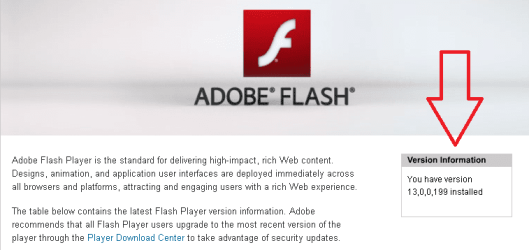
Does Flash work for you on this website?
https://www.adobe.com/software/flash/about/

You should see your version info when using IE or Firefox.

F13.png

If Flash fails to work for you on that website...
...please follow these steps to uninstall Flash:
Uninstall Flash Player | Windows
Be sure to complete all of step 3.
Restart the computer, but do not re-install Flash just yet.

Reset IE using these steps:
http://www.sevenforums.com/tutorials/1222-internet-explorer-reset.html
Be sure to do step 5.

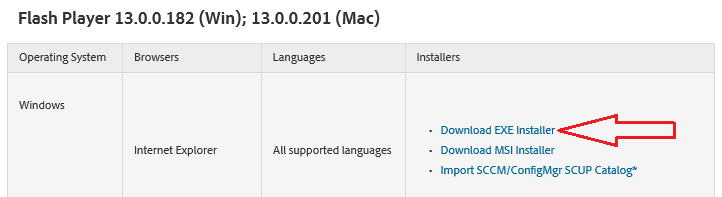
Now you can install Flash again using the installer from here:
Adobe Flash Player Distribution | Adobe
For now, just install Flash for IE.

F13-2.png
 

My Computer

Computer type
Laptop
Computer Manufacturer/Model Number
Employer provided Dell Latitude
OS
W7 Pro SP1 64bit
CPU
i7
Memory
8GB
Graphics Card(s)
Intel HD Graphics
Hard Drives
crappy SSD
Antivirus
Employer mandated Symantec Endpoint Protection
Browser
Pale Moon 64bit, IE11 64bit & Chrome 64bit
The first item in your post fixed myproblem.
I had tried to install it many many times, but your solution worked. After I installed it the animations etc
showed up.

Thanks
Tom
 

My Computer

Computer type
PC/Desktop
Computer Manufacturer/Model Number
HP Pavilion A-6542P
OS
Windows 7 Ultimate 64 bit
CPU
Intel Pentium Dual Core E2200 2.2 GHz 1 MB L2, 800MHz FSB
Motherboard
Pegatron Corp Benicia 1.01 80 mhz Bios Am. Megarends 5.25
Memory
8 Megabytes PC2-6400 DDR2
Graphics Card(s)
Asus Radeon HD6450
Sound Card
Realteck High Definition Audio
Monitor(s) Displays
HP 2311x
Screen Resolution
1080p
Hard Drives
Pioneer BD-RW drives BRA 206D and BRA 209D
Mouse
Microsoft Wireless
Internet Speed
Download 110.31 Mbps Upload 88.88 Mbps
Antivirus
Kaspersky Internet Securities & Malwarebytes Premium
Browser
IE and Firefox
Other Info
Everything is up to date.
You are welcome.

Glad to hear that it is working.
 

My Computer

Computer type
Laptop
Computer Manufacturer/Model Number
Employer provided Dell Latitude
OS
W7 Pro SP1 64bit
CPU
i7
Memory
8GB
Graphics Card(s)
Intel HD Graphics
Hard Drives
crappy SSD
Antivirus
Employer mandated Symantec Endpoint Protection
Browser
Pale Moon 64bit, IE11 64bit & Chrome 64bit
Back
Top