Problem with Bit colour and Resolution

g0tit

New member
Local time
8:20 PM
Messages
15
Today I installed windows 7 ,when the installation started I noticed the colour bit was very low and the resolution low aswell and after the installation, the colours were all messed up and the images were too big and and the resolution was 800 x 600 and somehow i cannot change it, I tried installing the graphic drivers but still not worked, did anyone experienced or is experiencing the same problem? I leave a screenshot. (I am using an Nvidia Geforce 8400 Gs)


By the way , nevermind the site I just used a black background for you guys to see what i'm talking about.
 

My Computer

OS
Windows 7
Please help it's an emergency

Hello , today I installed windows 7 64-bit, build 7100, and apparently it doesnt recognize my Graphic card and my monitor, I installed some drives but they are not working I am going crazy, some of you have any fix for this problem? Please help me, I don't know much about computers, and I really need to get this fixed fast! My specs are Nvidia Geforce 8400 GS AMD 64 3200+ 1,7 Gb RAM Samsung SyncMaster 913v The colour bit is set to 16-bit and there is no way of changing it, and my resolution is set to 800x600 , also no way of changing, and the images and icons and letters are amazingly big and really messy (the colours are changed a lot). Please try to help me , I am very sadenned because I thought It would work without any problem and it's turning out to be a nightmare :(

wiv8zk.png
 

My Computer

OS
Windows 7
help

Hello , today I installed windows 7 64-bit, build 7100, and apparently it doesnt recognize my Graphic card and my monitor, I installed some drives but they are not working I am going crazy, some of you have any fix for this problem? Please help me, I don't know much about computers, and I really need to get this fixed fast! My specs are Nvidia Geforce 8400 GS AMD 64 3200+ 1,7 Gb RAM Samsung SyncMaster 913v The colour bit is set to 16-bit and there is no way of changing it, and my resolution is set to 800x600 , also no way of changing, and the images and icons and letters are amazingly big and really messy (the colours are changed a lot). Please try to help me , I am very sadenned because I thought It would work without any problem and it's turning out to be a nightmare :(

gotit

Hey not to worry its a video driver. First things first we need your systems specs, and the model of your video card

Waiting for info

Ken
 

My Computer

Computer Manufacturer/Model Number
HP Pavillion dv-7 1005 Tx
OS
Win 8 Release candidate 8400
CPU
[email protected]
Memory
4 gigs
Graphics Card(s)
Nvidia 9600M
Sound Card
HD built-in
Monitor(s) Displays
17" Wxga
Screen Resolution
1440x900
Cooling
none
Internet Speed
45Mb down 5Mb up

My Computer

Computer type
PC/Desktop
Computer Manufacturer/Model Number
Self built custom
OS
64-bit Windows 11 Pro for Workstations
CPU
Intel i7-8700K OC'd to 5 GHz
Motherboard
ASUS ROG Maximus XI Formula Z390
Memory
64 GB (4x16GB) G.SKILL TridentZ RGB DDR4 3600 MHz
Graphics Card(s)
ASUS ROG-STRIX-GTX1080TI-O11G-GAMING
Sound Card
Integrated
Monitor(s) Displays
2 x Samsung Odyssey G7 27"
Screen Resolution
2560x1440
Hard Drives
1TB Samsung 990 PRO M.2,
4TB Samsung 990 PRO PRO M.2,
TerraMaster F8 SSD Plus NAS
PSU
Seasonic Prime Titanium 850W
Case
Thermaltake Core P3
Cooling
Corsair Hydro H115i
Keyboard
Logitech wireless K800
Mouse
Logitech MX Master 4
Internet Speed
2 Gb/s Download and 100 Mb/s Upload
Antivirus
Malwarebyte Anti-Malware Premium
Browser
Google Chrome
Other Info
Logitech Z625 speaker system,
Logitech BRIO 4K Pro webcam,
HP Color LaserJet Pro MFP M477fdn,
APC SMART-UPS RT 1000 XL - SURT1000XLI,
Galaxy S23 Plus phone
I am using a Nvidia GeForce 8400 Gs. Thanks in advance sir.

Brink I am using 64-Bit and those were the drivers I installed but the problem wasn't solved, when i restarted computer I still had it.
 

My Computer

OS
Windows 7
Have you tried to Install the latest driver for your graphic card? ;)
edit: what OS was the driver you tried to install designed for? Win 7, Vista ,xp?
 
Those are possibly the only drivers available for my Graphic card, and they asre not working, I am desperate , if someone knows a possible fix please help me I am really sad :(
 

My Computer

OS
Windows 7
g0tit,

32bit or 64bit os?

these are latest on NVIDIA site.

32bit
GeForce/ION Driver Release 190 WHQL
Version: 190.38
Release Date: July 21, 2009
Operating System: Windows 7 or Windows Vista (32-bit)
Language: U.S. English
File Size: 95.5 MB

64bit
GeForce/ION Driver Release 190 WHQL
Version: 190.38
Release Date: July 21, 2009
Operating System: Windows 7 or Windows Vista (64-bit)
Language: U.S. English
File Size: 112 MB

Drivers - Download NVIDIA Drivers
 

My Computer

OS
Win7 Build 7600 x86
CPU
Pentium II 300MHz
Motherboard
Asus
Memory
32mb EDO RAM
Graphics Card(s)
Diamond Viper
Sound Card
Soundblaster 16
Monitor(s) Displays
14" AOC CRT 16K color
Screen Resolution
800x600
Hard Drives
300mb Quantum fireball
PSU
110 Watts
Cooling
Passive
Keyboard
Trust Ergonomic
Mouse
Generic
Internet Speed
256K u 128K d
64-bit, and that is the driver i've installed countless times and it's not fixing my problem, i am sad because I thought win 7 wouldn't give me any problems and now I can't access my computer perfectly.
 

My Computer

OS
Windows 7
64-bit, and that is the driver i've installed countless times and it's not fixing my problem, i am sad because I thought win 7 wouldn't give me any problems and now I can't access my computer perfectly.

Try older driver.

By the way, what Win7 build, 7600?
What leak? WZOR? Chines dude's?

Setup? One screen, two screens? LCD or CRT? Cables: DVI? HDMI? VGA?

greetz
 

My Computer

OS
Win7 Build 7600 x86
CPU
Pentium II 300MHz
Motherboard
Asus
Memory
32mb EDO RAM
Graphics Card(s)
Diamond Viper
Sound Card
Soundblaster 16
Monitor(s) Displays
14" AOC CRT 16K color
Screen Resolution
800x600
Hard Drives
300mb Quantum fireball
PSU
110 Watts
Cooling
Passive
Keyboard
Trust Ergonomic
Mouse
Generic
Internet Speed
256K u 128K d
Build 7100, No Leak I believe One Screen LCD How do I check what cable? sorry im no computer expert :)
 

My Computer

OS
Windows 7
Build 7100, No Leak I believe One Screen LCD How do I check what cable? sorry im no computer expert :)

Build 7100 64bit or 32bit?

Build 7100 does have some issues with Nvidia graphics cards.
I couldn't get mine right also.


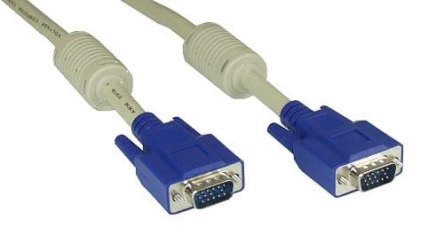
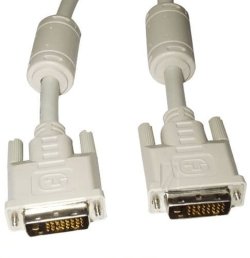
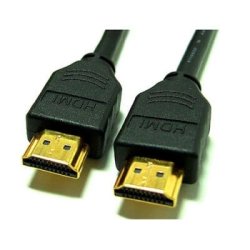
Different cables
VGA:
vga.jpg

DVI:
Dvi d kabel.jpg

HDMI:
hdmi_000.jpg
 

My Computer

OS
Win7 Build 7600 x86
CPU
Pentium II 300MHz
Motherboard
Asus
Memory
32mb EDO RAM
Graphics Card(s)
Diamond Viper
Sound Card
Soundblaster 16
Monitor(s) Displays
14" AOC CRT 16K color
Screen Resolution
800x600
Hard Drives
300mb Quantum fireball
PSU
110 Watts
Cooling
Passive
Keyboard
Trust Ergonomic
Mouse
Generic
Internet Speed
256K u 128K d
This forum is no.1 for support.

Nice job helping people.

:thumbsup:
 

My Computer

Computer Manufacturer/Model Number
ME!
OS
Windows 7 SP1 Ultimate 64bit
CPU
AMD Phenom II X4 940
Motherboard
ASUS M4A79 Deluxe (BIOS 3603)
Memory
OCZ PC8500 Platinum 4GB
Graphics Card(s)
Sapphire HD4870 1GB 256-bit GDDR5
Sound Card
HT Omega Claro
Monitor(s) Displays
ViewSonic G220fb still rocks
Screen Resolution
1600x1200@85hz
Hard Drives
160GB Seagate 7200.10 Sata
150GB WD Raptor 10,000rpm Sata
PSU
Corsair TX950W
Cooling
Zalman 9700NT
Keyboard
Logitech Standard
Mouse
Microsoft SideWinder
Internet Speed
5.26MB down 0.86MB up
Other Info
APC BackUps 900VA
Those are possibly the only drivers available for my Graphic card, and they asre not working, I am desperate , if someone knows a possible fix please help me I am really sad :(
Tell us what happens when you tried to run the driver...have you tried to run it as an administrator?
 

My Computer

Computer Manufacturer/Model Number
Compal JFT02 (Custom Build Laptop)
OS
Windows 7 Home Premium x64 - Mac OS X 10.6.4 x64
CPU
Intel Core 2 Duo T9300 2.5 GHz
Motherboard
JFT02
Memory
4GB Kingston DDR2-800
Graphics Card(s)
NVIDIA Geforce 8600M GT (512MB Model)
Sound Card
Realtek HD Audio
Monitor(s) Displays
WUXGA Standard Laptop Display
Screen Resolution
1680*1050
Hard Drives
Toshiba 320GB 5400RPM Laptop HD
PSU
Standard Laptop Power Supply
Case
Standard Laptop Case
Cooling
Standard Laptop Cooling
Keyboard
Standard Laptop 105 Key-Keyboard
Mouse
Synaptics Touchpad
Internet Speed
Verizion Online DSL 3360/864 kbs (dl/up)

My Computer

OS
Win7 Build 7600 x86
CPU
Pentium II 300MHz
Motherboard
Asus
Memory
32mb EDO RAM
Graphics Card(s)
Diamond Viper
Sound Card
Soundblaster 16
Monitor(s) Displays
14" AOC CRT 16K color
Screen Resolution
800x600
Hard Drives
300mb Quantum fireball
PSU
110 Watts
Cooling
Passive
Keyboard
Trust Ergonomic
Mouse
Generic
Internet Speed
256K u 128K d
second thread

For my fellow boardmembers info.

g0tit has already opened thread for this problem and I was helping him.

http://www.sevenforums.com/graphic-cards/18023-problem-bit-colour-resolution.html#post193827

I am a bit surprised, :shock: he has opened another one with exactely the same problem.

Just thought you needed to know.

I am done helping him.

Going to find some other folks to give a hand.

squonksc

If you think this is a second identical thread there is an option for you . click on the red triangle and report to mods/admins. you can use it for spam, threads that need splitting, or moved, etc.

Ken
 

My Computer

Computer Manufacturer/Model Number
HP Pavillion dv-7 1005 Tx
OS
Win 8 Release candidate 8400
CPU
[email protected]
Memory
4 gigs
Graphics Card(s)
Nvidia 9600M
Sound Card
HD built-in
Monitor(s) Displays
17" Wxga
Screen Resolution
1440x900
Cooling
none
Internet Speed
45Mb down 5Mb up
Threads merged.

@g0tit,

Please only make one thread on your particular problem in the appropriate forum, and don't post the same thing in different forums. Thanks.
 

My Computer

Computer type
PC/Desktop
Computer Manufacturer/Model Number
Airbot 2.0
OS
Windows 7 Ultimate x64 SP1
CPU
Core i7 920 (D0) @ 4Ghz, *26c idle *65c full load on air
Motherboard
Asus P6X58D Premium - Sata 6Gb/s - USB 3.0
Memory
12GB DDR3 Corsair Dominator -CMD12GX3M6A1600C8 at 1600MHz
Graphics Card(s)
Zotac Geforce GTX 770
Sound Card
ASUS Xonar D2X
Monitor(s) Displays
1 LG 24" Flatron W2453V-PF 1 Samsung 24" P2450H both 2ms RT
Screen Resolution
1920x1080@60hz
Hard Drives
1 Samsung 250GB 840 Evo SSD
1 OCZ Vertex2 180GB SSD
1 TB Samsung Spinpoint F1 7200RPM 32MB cache
2 500GB WD Caviar Blacks 7200RPM 32MB cache (WD5001AALS)

Pioneer DVD Burner DVR-S18M
PSU
Corsair HX1000W
Case
Cooler Master HAF 932
Cooling
Case Fans *3 230mm, *1 140mm/CPU - *Tuniq Tower 120 Extreme
Keyboard
Logitech Wireless MK700
Mouse
Logitech Wireless MK700
Internet Speed
DL 15 Mbps UL 0.98 Mbps
Antivirus
None
Browser
Firefox Nightly
Other Info
Processor-7.7 *RAM- 7.9 *Graphics-7.9 *Gaming Graphics- 7.9 *SSD- 7.8 W.E.I final score= 7.7
*Phone- LG Nexus 5
g0tit,

Since the drivers do not seem to help. Try a repair install to see if that may be able to. You will not lose anything doing it.
 

My Computer

Computer type
PC/Desktop
Computer Manufacturer/Model Number
Self built custom
OS
64-bit Windows 11 Pro for Workstations
CPU
Intel i7-8700K OC'd to 5 GHz
Motherboard
ASUS ROG Maximus XI Formula Z390
Memory
64 GB (4x16GB) G.SKILL TridentZ RGB DDR4 3600 MHz
Graphics Card(s)
ASUS ROG-STRIX-GTX1080TI-O11G-GAMING
Sound Card
Integrated
Monitor(s) Displays
2 x Samsung Odyssey G7 27"
Screen Resolution
2560x1440
Hard Drives
1TB Samsung 990 PRO M.2,
4TB Samsung 990 PRO PRO M.2,
TerraMaster F8 SSD Plus NAS
PSU
Seasonic Prime Titanium 850W
Case
Thermaltake Core P3
Cooling
Corsair Hydro H115i
Keyboard
Logitech wireless K800
Mouse
Logitech MX Master 4
Internet Speed
2 Gb/s Download and 100 Mb/s Upload
Antivirus
Malwarebyte Anti-Malware Premium
Browser
Google Chrome
Other Info
Logitech Z625 speaker system,
Logitech BRIO 4K Pro webcam,
HP Color LaserJet Pro MFP M477fdn,
APC SMART-UPS RT 1000 XL - SURT1000XLI,
Galaxy S23 Plus phone
g0tit,

Since the drivers do not seem to help. Try a repair install to see if that may be able to. You will not lose anything doing it.
Shawn

Forcing the driver to install might do the trick...

Is it just me friends or are we having alot of threads with Windows 7+Nvidia 9 Series Card+Drivers somewhere in the title?
 

My Computer

Computer Manufacturer/Model Number
Compal JFT02 (Custom Build Laptop)
OS
Windows 7 Home Premium x64 - Mac OS X 10.6.4 x64
CPU
Intel Core 2 Duo T9300 2.5 GHz
Motherboard
JFT02
Memory
4GB Kingston DDR2-800
Graphics Card(s)
NVIDIA Geforce 8600M GT (512MB Model)
Sound Card
Realtek HD Audio
Monitor(s) Displays
WUXGA Standard Laptop Display
Screen Resolution
1680*1050
Hard Drives
Toshiba 320GB 5400RPM Laptop HD
PSU
Standard Laptop Power Supply
Case
Standard Laptop Case
Cooling
Standard Laptop Cooling
Keyboard
Standard Laptop 105 Key-Keyboard
Mouse
Synaptics Touchpad
Internet Speed
Verizion Online DSL 3360/864 kbs (dl/up)
I am using VGA Cables, and I've done lots of installs and nothing seems to work, is it build 7100's problem?

I am sorry about the double thread for all you people who tried rto help me but I was in a rush and I didnt think about it. Sorry folks.
 

My Computer

OS
Windows 7
Back
Top