Problem with DEFAULT save location

jimheller

New member
Local time
4:23 PM
Messages
3
We have a number of users who use Adobe Acrobat. When we do a "save as", by default it directs us to a folder called OLK and that is a hidden folder.
Can anyone help me with instructions on how to change the default "save as" to a folder of our choosing?
Thanks
I apprciate your time.
Jim
 

My Computer

OS
Windows 7 Professional 32bit
I'd look for a setting within the program itself. There should be an option to assign the default save / save as folder.
 

My Computer

Computer Manufacturer/Model Number
Dell Optiplex
OS
Windows 7 Professional 64 bit
Memory
4096
Pricetech is correct.

Just want to add that its weird that the default save folder is a hidden folder - unless someone changed it to a hidden folder afterwards. Might want to look into that.
 

My Computer

Computer type
PC/Desktop
Computer Manufacturer/Model Number
Custom built by me.
OS
Windows 10 Pro
CPU
Intel Core i7-4770K (3.5Ghz)
Motherboard
Gigabyte G1 Sniper 5 (F10 Bios)
Memory
32 gig Corsair Dominator Platinum (4x8Gig)
Graphics Card(s)
Sapphire Tri-X R9 Fury
Sound Card
Soundblaster ZXR
Monitor(s) Displays
NEC PA242W 24" LCD Monitor
Screen Resolution
1920 x 1200
Hard Drives
Primary - Samsung 850 Pro (512gig), Samsung 840 Pro (256gig), 2TB WD Caviar Black.
PSU
EVGA Supernova 1000 G2
Case
Cooler Master HAF X
Cooling
Corsair H100i with Corsair Air Series SP120 Quiet Fans
Keyboard
Logitech Wireless Wave
Mouse
Logitech Performance MX
Internet Speed
High Speed Cable
Antivirus
Norton Security
Browser
IE11
Other Info
Memory Timings - 1866MHz @ 9-9-9-27-1T @ 1.5 volts
AFAIK, You can't specify the default save location within the program.

The OLK folder is a default save location for Microsoft Office Programs and, I guess, other programs assume that location as well. The only way to change this location involves a registry change. Change this location at your own risk:

Find the Microsoft Outlook Temporary OLK folder
 

My Computer

OS
XP / Win7 x64 Pro
CPU
Intel Quad-Core Q9450 @ 3.2GHz
Motherboard
Asus P5-E
Memory
2x2GB GSkill DDR2
Graphics Card(s)
NVIDIA GeForce 8600 GTS (EVGA)
Monitor(s) Displays
Dell 2408WFP
Screen Resolution
1920x1200
I'd look for a setting within the program itself. There should be an option to assign the default save / save as folder.

Thanks for the suggestion, can't find any setting anywhere in Adobe to allow me to direct the saves to where I wantr them to go.
Once the file has been saved to a folder, if you do a "save as" again it will take you to the folder you had directed it to.
 

My Computer

OS
Windows 7 Professional 32bit
I suspected that as well.

Just seems there should be a way to specify where you want it to save to.
 

My Computer

Computer Manufacturer/Model Number
Dell Optiplex
OS
Windows 7 Professional 64 bit
Memory
4096
The OLK folder is a default save location for Microsoft Office Programs and, I guess, other programs assume that location as well. The only way to change this location involves a registry change. Change this location at your own risk:

Find the Microsoft Outlook Temporary OLK folder

No they wouldn't, they would normally have their own folders. Some programs actually will save files/folders in the Documents folder.

Anyway the ONLY programs that should be using Microsoft folder's are Microsoft programs. Adobe usually creates it's own folders, sometimes in the Documents folder.

What Adobe product is this anyway??? Never mind... I see it - Acrobat. I'll check mine for save as options.

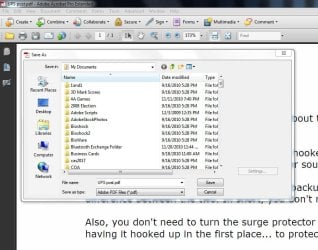
I just checked my settings, though there is no default setting, you can save it where you want.

Capture.JPG
 
Last edited:

My Computer

Computer type
PC/Desktop
Computer Manufacturer/Model Number
Custom built by me.
OS
Windows 10 Pro
CPU
Intel Core i7-4770K (3.5Ghz)
Motherboard
Gigabyte G1 Sniper 5 (F10 Bios)
Memory
32 gig Corsair Dominator Platinum (4x8Gig)
Graphics Card(s)
Sapphire Tri-X R9 Fury
Sound Card
Soundblaster ZXR
Monitor(s) Displays
NEC PA242W 24" LCD Monitor
Screen Resolution
1920 x 1200
Hard Drives
Primary - Samsung 850 Pro (512gig), Samsung 840 Pro (256gig), 2TB WD Caviar Black.
PSU
EVGA Supernova 1000 G2
Case
Cooler Master HAF X
Cooling
Corsair H100i with Corsair Air Series SP120 Quiet Fans
Keyboard
Logitech Wireless Wave
Mouse
Logitech Performance MX
Internet Speed
High Speed Cable
Antivirus
Norton Security
Browser
IE11
Other Info
Memory Timings - 1866MHz @ 9-9-9-27-1T @ 1.5 volts
I would agree, "normally". Except the OP is stating that the OLK is the folder Adobe is saving to, by default. So, I think it's safe to assume the qualifiers of "wouldn't", "should", and "usually" don't apply in this case as something's quite awry here. Somehow Adobe (and maybe other programs) has assumed this default temporary location that MS Office products use, I just don't know how unless we're missing some more information (i.e. it doesn't always save to this location, or this was just the last saved location and not the default).

Perhaps, the default save location of the Documents (or others) Library has been changed...

Change a Library’s Default Save Location in Windows 7 — MAXIMUMpcguides – Windows 7 tips, tricks, help, and how-to guides
 

My Computer

OS
XP / Win7 x64 Pro
CPU
Intel Quad-Core Q9450 @ 3.2GHz
Motherboard
Asus P5-E
Memory
2x2GB GSkill DDR2
Graphics Card(s)
NVIDIA GeForce 8600 GTS (EVGA)
Monitor(s) Displays
Dell 2408WFP
Screen Resolution
1920x1200
Something doesn't sound right here. I can't help but get the feeling that someone has did something to cause Adobe's Acrobat files to be automatically saved to a hidden Microsoft outlook folder; Unless the file is in outlook message format (.msg)

Thus the bigger question is what files (extensions) are those saved files in? That might help with the mystery. Being that this is Adobe Acobat I assume they would be PDF files, but.... :confused:
 

My Computer

Computer type
PC/Desktop
Computer Manufacturer/Model Number
Custom built by me.
OS
Windows 10 Pro
CPU
Intel Core i7-4770K (3.5Ghz)
Motherboard
Gigabyte G1 Sniper 5 (F10 Bios)
Memory
32 gig Corsair Dominator Platinum (4x8Gig)
Graphics Card(s)
Sapphire Tri-X R9 Fury
Sound Card
Soundblaster ZXR
Monitor(s) Displays
NEC PA242W 24" LCD Monitor
Screen Resolution
1920 x 1200
Hard Drives
Primary - Samsung 850 Pro (512gig), Samsung 840 Pro (256gig), 2TB WD Caviar Black.
PSU
EVGA Supernova 1000 G2
Case
Cooler Master HAF X
Cooling
Corsair H100i with Corsair Air Series SP120 Quiet Fans
Keyboard
Logitech Wireless Wave
Mouse
Logitech Performance MX
Internet Speed
High Speed Cable
Antivirus
Norton Security
Browser
IE11
Other Info
Memory Timings - 1866MHz @ 9-9-9-27-1T @ 1.5 volts
Everyone has been very helpful. Here is another piece of info.
I create forms for use here using Adobe Acrobat and these forms are emailed to staff.
They open the form via Outlook email and then they fill out the form and need to do a "save as". when they do this it defaults to the OLK folder nd you have to maunaully direct it to another location. Users who are in a hurry, don't pay attenion and the file gets saved to the OLK folder and then they can never find it again.
Also interesting is this: once the file has been saved to a new location and you open it back up again, if you do a "save as" again, it does not default to the OLK folder.
Thanks for the help.
Jim
 

My Computer

OS
Windows 7 Professional 32bit
Unless the file is in outlook message format (.msg)

I create forms for use here using Adobe Acrobat and these forms are emailed to staff.

They open the form via Outlook email and then they fill out the form and need to do a "save as". when they do this it defaults to the OLK folder nd you have to maunaully direct it to another location. Users who are in a hurry, don't pay attenion and the file gets saved to the OLK folder and then they can never find it again.

Now the mystery is clear. Yes, when you open attachments in email, they will default to a temp location called OLK as explained here.... Find the Microsoft Outlook Temporary OLK folder....
When you open file attachments that are considered safe, Outlook places these attachments in a subdirectory under the your Temporary Internet Files directory as an extra precaution. When Outlook first tries to use a temporary file, it examines the registry to determine whether or not the TEMP OLK folder has already been created. If yes, it uses the folder. If no, it creates a random folder then stores the path in the registry location mentioned above.

Basically if a file is opened and not saved to a location, it will be kept in temp storage by outlook. In this instance you (the non e-mail account holder) won't have access to it. They have to choose a save location.

What I suggest is to either store the files in a location everyone has access to, or if you're going to e-mail them, have them save the file and send it right back to you, or insist on a save location of your choosing. If this isn't done, the task isn't complete!

Also interesting is this: once the file has been saved to a new location and you open it back up again, if you do a "save as" again, it does not default to the OLK folder.

You can actually do a "Save As" to any location you choose once you open and decide to save the file..... you just have to manually do it, it's not automatic.

Yes, a lot of times the last save location will be the default save location unless it's changed by the user. So for example if you saved your PDF files in Doucments, anytime you save a PDF file, it will be saved to Documents folder unless you tell it to save somewhere else.

Also bear in mind that this is specific to each user, so one user may have their saves going to documents, while another might have them going eleswhere. That's why it just best to have the file(s) in a central place where everyone has access to them, or insist that the files be e-mailed back to you filled out. Again, If the instructions aren't followed, the task isn't complete!

Sorry for the long reply; hope this clears things up.

 

My Computer

Computer type
PC/Desktop
Computer Manufacturer/Model Number
Custom built by me.
OS
Windows 10 Pro
CPU
Intel Core i7-4770K (3.5Ghz)
Motherboard
Gigabyte G1 Sniper 5 (F10 Bios)
Memory
32 gig Corsair Dominator Platinum (4x8Gig)
Graphics Card(s)
Sapphire Tri-X R9 Fury
Sound Card
Soundblaster ZXR
Monitor(s) Displays
NEC PA242W 24" LCD Monitor
Screen Resolution
1920 x 1200
Hard Drives
Primary - Samsung 850 Pro (512gig), Samsung 840 Pro (256gig), 2TB WD Caviar Black.
PSU
EVGA Supernova 1000 G2
Case
Cooler Master HAF X
Cooling
Corsair H100i with Corsair Air Series SP120 Quiet Fans
Keyboard
Logitech Wireless Wave
Mouse
Logitech Performance MX
Internet Speed
High Speed Cable
Antivirus
Norton Security
Browser
IE11
Other Info
Memory Timings - 1866MHz @ 9-9-9-27-1T @ 1.5 volts
Back
Top