Problem with desktop icons / unable to delete "thumbs.db" files

LAinWLA

New member
Local time
1:57 PM
Messages
9
Problem with desktop icons / unable to delete "thumbs.db" files

All pdf and Microsoft Office files on my laptop are shown with a generic Windows thumbnail instead of the Adobe, Word or Excel thumbnail.

From what I've read, I want to delete the "thumbcache.db" files and I found them but Windows won't allow me to delete them. It keeps saying they are in use. I tried using Disk Cleanup but they're still there.

I read that changing my folder options to "always show icons, never thumbnails" would enable me to delete the thumbchache files but that didn't help.

I read that turning off the caching of thumbnail pictures in the Local Group Policy Editor would enable me to delete the thumbcache files but that didn't help either.

I have read that I should try "CCleaner" but their website wants me to create a login, sign up for a trial of their cloud product, etc. I just wanted to download the free version but couldn't figure out how.

I'm not sophisticated at all when it comes to trouble shooting and I'm feeling so frustrated. :confused: I've never seen this problem on any other computer I've ever had.

I'd be very grateful for a solution!
 

My Computer My Computer

At a glance

Windows 7 Professional 64 bit
Computer type
PC/Desktop
OS
Windows 7 Professional 64 bit
If you double click on the shortcut, does it open the related program?
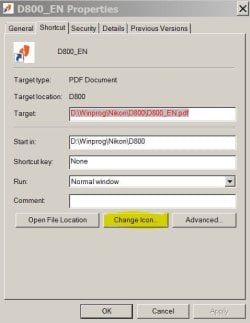
Right click on the desktop shortcut, properties - Change icon


CCleaner http://download.piriform.com/ccsetup536.exe. Pay attention on the installation options or it will install Chome.
Once installed, open it, go to Options - monitoring - uncheck all boxes
 

My Computers My Computers

  • At a glance

    Windows 7 HP 64i5 6600K - 800MHz to 4200MHz4+4G GSkill DDR4 3000IG - Intel 530
    Computer type
    PC/Desktop
    Computer Manufacturer/Model Number
    custom build
    OS
    Windows 7 HP 64
    CPU
    i5 6600K - 800MHz to 4200MHz
    Motherboard
    GA-Z170-HD3P
    Memory
    4+4G GSkill DDR4 3000
    Graphics Card(s)
    IG - Intel 530
    Monitor(s) Displays
    Samsung 226BW
    Screen Resolution
    1680x1050
    Hard Drives
    (1) -1 SM951 – 128GB M.2 AHCI PCIe SSD drive for Windows 7 and Lubuntu
    (2) -1 WD SATA 3 - 1T for Data
    (3) -1 WD SATA 3 - 1T for backup
    PSU
    Thermaltake 450W TR2 gold
    Keyboard
    Old and good Chicony mechanical keyboard
    Mouse
    Logitech mX performance - 9 buttons (had to disable some)
    Internet Speed
    500Mb/s
    Browser
    Firefox 64
    Other Info
    TinyWall firewall
  • At a glance

    Windows 7 Proi7-4500U 800MHz to 3.0GHz(4+4)G DDR3 1600IG intel 4400 + NVIDIA GeForce GT 745M
    Computer type
    Laptop
    System Manufacturer/Model Number
    Asus Q550LF
    OS
    Windows 7 Pro
    CPU
    i7-4500U 800MHz to 3.0GHz
    Motherboard
    Asus Q550LF
    Memory
    (4+4)G DDR3 1600
    Graphics Card(s)
    IG intel 4400 + NVIDIA GeForce GT 745M
    Sound Card
    Realtek
    Monitor(s) Displays
    LG Display LP156WF4-SPH1
    Screen Resolution
    1920 x 1080
    Hard Drives
    BX500 120G SSD for Windows and programs +
    1T HDD for data
    Internet Speed
    500 Mb/s
    Browser
    Firefox
    Other Info
    TinyWall firewall
Yes it does open the correct related program. When I go to properties I see an option to change the program the file opens with, but not the icon.

I installed CCleaner and did as you directed but I still can't delete the thumbcache.db files.


If you double click on the shortcut, does it open the related program?
Right click on the desktop shortcut, properties - Change icon


CCleaner http://download.piriform.com/ccsetup536.exe. Pay attention on the installation options or it will install Chome.
Once installed, open it, go to Options - monitoring - uncheck all boxes
 

My Computer My Computer

At a glance

Windows 7 Professional 64 bit
Computer type
PC/Desktop
OS
Windows 7 Professional 64 bit
I think that the shortcut icons has nothing to do with thumbcache.db files.
 

My Computers My Computers

  • At a glance

    Windows 7 HP 64i5 6600K - 800MHz to 4200MHz4+4G GSkill DDR4 3000IG - Intel 530
    Computer type
    PC/Desktop
    Computer Manufacturer/Model Number
    custom build
    OS
    Windows 7 HP 64
    CPU
    i5 6600K - 800MHz to 4200MHz
    Motherboard
    GA-Z170-HD3P
    Memory
    4+4G GSkill DDR4 3000
    Graphics Card(s)
    IG - Intel 530
    Monitor(s) Displays
    Samsung 226BW
    Screen Resolution
    1680x1050
    Hard Drives
    (1) -1 SM951 – 128GB M.2 AHCI PCIe SSD drive for Windows 7 and Lubuntu
    (2) -1 WD SATA 3 - 1T for Data
    (3) -1 WD SATA 3 - 1T for backup
    PSU
    Thermaltake 450W TR2 gold
    Keyboard
    Old and good Chicony mechanical keyboard
    Mouse
    Logitech mX performance - 9 buttons (had to disable some)
    Internet Speed
    500Mb/s
    Browser
    Firefox 64
    Other Info
    TinyWall firewall
  • At a glance

    Windows 7 Proi7-4500U 800MHz to 3.0GHz(4+4)G DDR3 1600IG intel 4400 + NVIDIA GeForce GT 745M
    Computer type
    Laptop
    System Manufacturer/Model Number
    Asus Q550LF
    OS
    Windows 7 Pro
    CPU
    i7-4500U 800MHz to 3.0GHz
    Motherboard
    Asus Q550LF
    Memory
    (4+4)G DDR3 1600
    Graphics Card(s)
    IG intel 4400 + NVIDIA GeForce GT 745M
    Sound Card
    Realtek
    Monitor(s) Displays
    LG Display LP156WF4-SPH1
    Screen Resolution
    1920 x 1080
    Hard Drives
    BX500 120G SSD for Windows and programs +
    1T HDD for data
    Internet Speed
    500 Mb/s
    Browser
    Firefox
    Other Info
    TinyWall firewall
I accept that possibility! :D

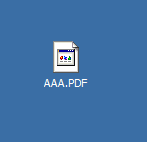
I'm attaching a picture of one of the adobe pdf files that I am trying to fix. It doesn't have the Adobe icon, it has a generic Windows icon.

All of my Word, Excel and Adobe pdf documents have this same icon instead of the normal program icon.


I think that the shortcut icons has nothing to do with thumbcache.db files.
 

Attachments

  • Image.png
    Image.png
    618 bytes · Views: 13

My Computer My Computer

At a glance

Windows 7 Professional 64 bit
Computer type
PC/Desktop
OS
Windows 7 Professional 64 bit
Right click on the desktop shortcut, properties - Change icon
 

Attachments

  • Icon.JPG
    Icon.JPG
    34 KB · Views: 11

My Computers My Computers

  • At a glance

    Windows 7 HP 64i5 6600K - 800MHz to 4200MHz4+4G GSkill DDR4 3000IG - Intel 530
    Computer type
    PC/Desktop
    Computer Manufacturer/Model Number
    custom build
    OS
    Windows 7 HP 64
    CPU
    i5 6600K - 800MHz to 4200MHz
    Motherboard
    GA-Z170-HD3P
    Memory
    4+4G GSkill DDR4 3000
    Graphics Card(s)
    IG - Intel 530
    Monitor(s) Displays
    Samsung 226BW
    Screen Resolution
    1680x1050
    Hard Drives
    (1) -1 SM951 – 128GB M.2 AHCI PCIe SSD drive for Windows 7 and Lubuntu
    (2) -1 WD SATA 3 - 1T for Data
    (3) -1 WD SATA 3 - 1T for backup
    PSU
    Thermaltake 450W TR2 gold
    Keyboard
    Old and good Chicony mechanical keyboard
    Mouse
    Logitech mX performance - 9 buttons (had to disable some)
    Internet Speed
    500Mb/s
    Browser
    Firefox 64
    Other Info
    TinyWall firewall
  • At a glance

    Windows 7 Proi7-4500U 800MHz to 3.0GHz(4+4)G DDR3 1600IG intel 4400 + NVIDIA GeForce GT 745M
    Computer type
    Laptop
    System Manufacturer/Model Number
    Asus Q550LF
    OS
    Windows 7 Pro
    CPU
    i7-4500U 800MHz to 3.0GHz
    Motherboard
    Asus Q550LF
    Memory
    (4+4)G DDR3 1600
    Graphics Card(s)
    IG intel 4400 + NVIDIA GeForce GT 745M
    Sound Card
    Realtek
    Monitor(s) Displays
    LG Display LP156WF4-SPH1
    Screen Resolution
    1920 x 1080
    Hard Drives
    BX500 120G SSD for Windows and programs +
    1T HDD for data
    Internet Speed
    500 Mb/s
    Browser
    Firefox
    Other Info
    TinyWall firewall
Thanks but my issue is not with a shortcut, it is with an actual document that is saved on my desktop. :)
 

My Computer My Computer

At a glance

Windows 7 Professional 64 bit
Computer type
PC/Desktop
OS
Windows 7 Professional 64 bit
Back
Top