
BestUsername
New member
- Local time
- 7:03 AM
- Messages
- 18
Win 7 x64 OS.
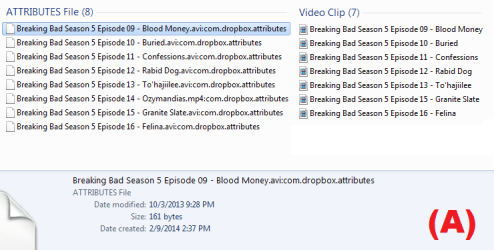
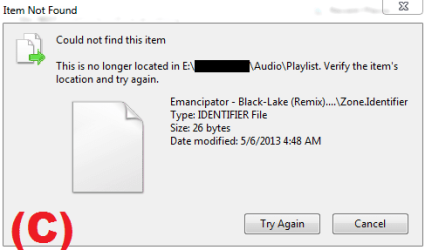
I did a data recovery to restore hundreds of deleted files on my external hard drive. After some files were successfully restored, I also had hundreds of unwanted "zone.identifier" files and ".attributes" files that I am unable to delete. (See Images A & B) I've tried deleting the zone.identifier and .attributes files but get an "Item Not found" error window, which says "This is no longer located in E:\. Verify the item's location and try again." (See Image C)
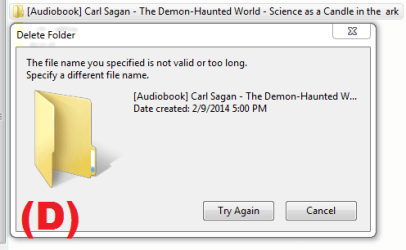
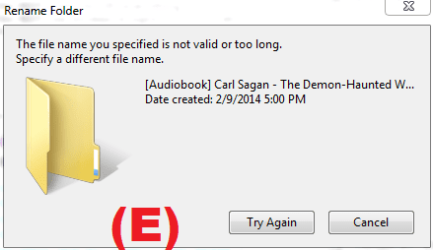
I also have a file folder that I am unable to delete. After trying, I get a "The file name you specified is not valid or too long. Specify a different file name." (See Image D) If I try to rename the folder with a valid name, I get the same message. (See Image E)
Any idea how I can delete all these unwanted files?
Rebooting the computer didn't spolve the problem.
I did a data recovery to restore hundreds of deleted files on my external hard drive. After some files were successfully restored, I also had hundreds of unwanted "zone.identifier" files and ".attributes" files that I am unable to delete. (See Images A & B) I've tried deleting the zone.identifier and .attributes files but get an "Item Not found" error window, which says "This is no longer located in E:\. Verify the item's location and try again." (See Image C)
I also have a file folder that I am unable to delete. After trying, I get a "The file name you specified is not valid or too long. Specify a different file name." (See Image D) If I try to rename the folder with a valid name, I get the same message. (See Image E)
Any idea how I can delete all these unwanted files?
Rebooting the computer didn't spolve the problem.
Attachments

My Computer
- Computer type
- Laptop
- Computer Manufacturer/Model Number
- Lenovo
- OS
- Win 7 Home Premium 64
- Motherboard
- 4383
- Memory
- 4096MB RAM
- Hard Drives
- Local Disk (C:) 152 GB free of 254 GB
LENOVO (D:) 26.5 GB free of 28.9 GB
- Antivirus
- Avast