
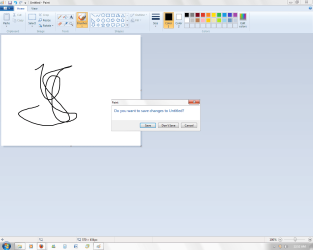
Problem with dialogue box edges

jeniuskid

New member
Member
Local time
8:22 PM
Messages
46
Location
Vancouver, BC
Hey guys, so i just recently noticed that my dialogue boxes only have a really thin edge on them. I don't really know how else to describe it. Attached is an example. Anyone know how to fix this issue?
 

Attachments

  • SevenForums.png
    SevenForums.png
    44.7 KB · Views: 66

My Computer My Computer

Computer Manufacturer/Model Number
ASUS Zenbook UX31E
OS
Windows 7 Home Premium 64 bit
CPU
Intel Core i5-2557M
Memory
4GB DDR3
Graphics Card(s)
Intel HD 3000
Screen Resolution
1600x900
Hard Drives
128GB SSD
Other Info
Non removable battery
Are you using the default Aero.msstyle or a custom msstyle? I noticed a couple of themes altered both dialogue boxes and normal windows- all I did was try and find the original Aero.msstyle and replaced the one I was using so everything was back to normal
 

My Computer My Computer

Computer Manufacturer/Model Number
Hp Compaq CQ56 156SA
OS
windows 7 Home Premium 64 Bit
CPU
AMD V140
Memory
2GB
Graphics Card(s)
ATI Mobility Radeon HD 4250
Sound Card
Realtek
Monitor(s) Displays
Generic
Screen Resolution
1366 x 768
Hard Drives
Hitachi
Mouse
Wireless LG
Internet Speed
Finger-licking good
Other Info
Windows 7 Home Premium Pre-Installed.
Old Machine: HP Pavilion DV6 1120sa (R.I.P)
It looks more like he's using basic, which might have lines like that.

Trying out basic, I also see those lines.
 

My Computer My Computer

Computer type
Laptop
Computer Manufacturer/Model Number
Toshiba P775-S7100
OS
Windows 7 Professional SP1 64-bit
CPU
Intel Core i5-2450M @2.5 GHz
Memory
6 GB DDR3 1333MHz
Graphics Card(s)
Intel HD 3000
Monitor(s) Displays
Built-in 17.3" LED; 22" Insignia NS-L22Q-10A
Screen Resolution
1600x900; 1360x768
Hard Drives
750 GB Hitachi
1TB Seagate FreeAgent External
Internet Speed
Verizon DSL Speed(Down/Up): 3360 Kbps / 800 Kbps
Antivirus
MSE and MBAM Pro
Browser
IE10
It looks more like he's using basic, which might have lines like that.

Trying out basic, I also see those lines.

I'm using aero. I just turned off the transparency settings for a couple days. Eventually i noticed the edges of boxes like that are really thin. They don't look normal (they look cut off) to me so I'm hoping that there's a way to fix it.

Though I am still having this problem, I discovered that if i switch my theme to a different one, the message box edges are normal sized again. However if i switch back to the problematic theme, the edges are still cut off. I didn't really solve anything, but i've simply decided to use a different theme. Ill see if i could repeat the problem but for now, thanks for the suggestions
 

My Computer My Computer

Computer Manufacturer/Model Number
ASUS Zenbook UX31E
OS
Windows 7 Home Premium 64 bit
CPU
Intel Core i5-2557M
Memory
4GB DDR3
Graphics Card(s)
Intel HD 3000
Screen Resolution
1600x900
Hard Drives
128GB SSD
Other Info
Non removable battery
Im having the same problem too :(

I did recently change the aero theme color to completely transparent, and I think that may have caused the problem
 

My Computer My Computer

Computer Manufacturer/Model Number
Acer
OS
MS Windows 7 Home Premium 64-bit
CPU
Intel Pentium T4300 @ 2.10GHz
Motherboard
Acer Aspire 5732Z (uPGA-478)
Memory
3.00GB Dual-Channel DDR3 @ 399MHz (6-6-6-15)
Graphics Card(s)
Mobile Intel(R) 4 Series Express Chipset Family
Sound Card
Realtek High Definition Audio
Monitor(s) Displays
Generic PnP Monitor
Screen Resolution
1366x768
Hard Drives
244GB Hitachi HTS545025B9A300 (IDE)
YES I KNOW HOW TO FIX IT! Go to task manager, and find dwm.exe and end the process. If it comes up again just end it again until it goes. Now right-click desktop, click personalize, and at the bottom it will say troubleshoot problems. Click on it and run through the wizard. It will say Desktop Window Manager is disabled. Close it, and voila!
 

My Computer My Computer

Computer Manufacturer/Model Number
Acer
OS
MS Windows 7 Home Premium 64-bit
CPU
Intel Pentium T4300 @ 2.10GHz
Motherboard
Acer Aspire 5732Z (uPGA-478)
Memory
3.00GB Dual-Channel DDR3 @ 399MHz (6-6-6-15)
Graphics Card(s)
Mobile Intel(R) 4 Series Express Chipset Family
Sound Card
Realtek High Definition Audio
Monitor(s) Displays
Generic PnP Monitor
Screen Resolution
1366x768
Hard Drives
244GB Hitachi HTS545025B9A300 (IDE)
Back
Top