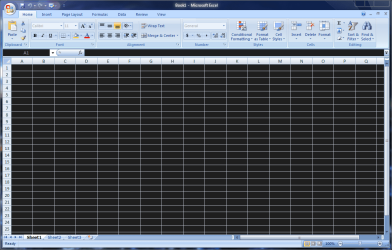
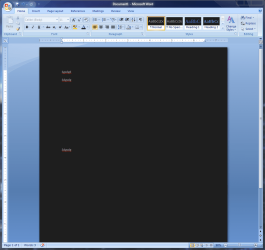
Solved problem with glass theme affecting ms ofice & excel

xxxwea

New member
Local time
5:50 PM
Messages
6
the theme in question is here
I think it's called "all transparent vs for win7" or "AeroA", I'm not really sure.
but it's the best out of all the glass themes I have tried so far.

excelfixmepng.png
wordfixme.png

it also does this to other programs that are white and turns them black, which I don't really mind since its a nice theme and the black coincides with the look I'm going for.

is there any way to fix this?
like by editing the theme or by having the theme not apply to certain processes(exact opposite of what BlackGlass Enhanced does) like winword.exe & excel.exe?
 

My Computer My Computer

Computer Manufacturer/Model Number
desktop & an HP Mini 2140
OS
Win 7 Ultimate x86
CPU
Intel Pentium Dual Core CPU E2140 @ 1.60GHz
Motherboard
AsRock ConRoe1333-D667 R2.0
Memory
2x 512mb DDR2 SDRAM
Graphics Card(s)
NVIDIA GeForce 6500
Sound Card
Realtek Onboard HDMI HD Audio
Monitor(s) Displays
AOC 2217V 22-Inch LCD Monitor
Screen Resolution
1680 x 1050
Hard Drives
Samsung HD080HJ/P [80gb]
Seagate Barracuda 7200.10 [320gb]
Seagate FreeAgent™ | Desk [2tb]
Seagate GoFlex™ [2tb]
PSU
generic 500w switching psu
Cooling
two 120mm generic case fans
Keyboard
A4Tech 7300N V-Track Wireless Desktop
Mouse
A4Tech 7300N V-Track Wireless Desktop
Internet Speed
DSL
Here's something to try.

Right click blank space on desktop> Personalize> Window Color at bottom> Advanced appearance settings> Item dropdown box> Window

See what the Item color is:

qz3uj6.jpg


Might also look at Application background as well. Let us know if any luck. A Guy
 

My Computer My Computer

Computer type
PC/Desktop
OS
Windows 10 Home x64
CPU
INTEL Core i5-750 Quad-Core 3.37GHz
Motherboard
ASUS P7P55D
Memory
HyperX Fury Black Series 8GB (2 x 4GB) 1866Mhz
Graphics Card(s)
EVGA GeForce GTX 750 Superclocked 1GB 128-Bit GDDR5
Monitor(s) Displays
LG 32MA68HY 32" IPS
Screen Resolution
1920 x 1080
Hard Drives
Samsung 840 Evo 120GB, SEAGATE 500GB Barracuda® 7200.12, SATA 3 Gb/s, 7200 RPM, 16MB cache
PSU
ANTEC TruePower New TP-550, 80 PLUS, 550W
Case
ANTEC Three Hundred Illusion
Cooling
COOLER MASTER Hyper 212 Plus, 4 x 120mm 1 x 140mm Noctua's
Internet Speed
85 + Mbps
Antivirus
Avast
Browser
Vivaldi
how did I miss that :shock:
I've actually been tinkering with that, though it was because of another issue with the theme.

that aside, it's lookin' like it's supposed to now :D
too bad that all the other black windows turned to white as well, but oh well
thanks a lot for your help :)
 

My Computer My Computer

Computer Manufacturer/Model Number
desktop & an HP Mini 2140
OS
Win 7 Ultimate x86
CPU
Intel Pentium Dual Core CPU E2140 @ 1.60GHz
Motherboard
AsRock ConRoe1333-D667 R2.0
Memory
2x 512mb DDR2 SDRAM
Graphics Card(s)
NVIDIA GeForce 6500
Sound Card
Realtek Onboard HDMI HD Audio
Monitor(s) Displays
AOC 2217V 22-Inch LCD Monitor
Screen Resolution
1680 x 1050
Hard Drives
Samsung HD080HJ/P [80gb]
Seagate Barracuda 7200.10 [320gb]
Seagate FreeAgent™ | Desk [2tb]
Seagate GoFlex™ [2tb]
PSU
generic 500w switching psu
Cooling
two 120mm generic case fans
Keyboard
A4Tech 7300N V-Track Wireless Desktop
Mouse
A4Tech 7300N V-Track Wireless Desktop
Internet Speed
DSL
you could change the page color in word to a light color then change it back when done ,obviously it will print ok and not be black, i have a black windows theme and have the same issue,
after a while you get used to it,
occasionally you have to highlight something just to read it,
but hey so what.
the other alternative i do is use word on my wifes lappy as it is not a dark theme ;)
 

My Computer My Computer

Computer Manufacturer/Model Number
Hewlett packard/p6512uk
OS
Microsoft Windows 7 Home Premium 64-bit 7600
CPU
IIx4 amd athelon 635 processor
Motherboard
FOXCONN 2AA9
Memory
2x2gb
Graphics Card(s)
ati radeon HD 5450
Sound Card
(1) Realtek High Definition Audio (2) AMD High Definition
Monitor(s) Displays
samsung lcd tv 32"
Screen Resolution
1360x 768
Hard Drives
(1) WDC WD10 01FAES-60Z2A0 SATA Disk Device (2) Maxtor OneTouch USB Device (3) ST310003 33AS USB Device (4) WD My Book 1111 USB Device
PSU
?
Cooling
air!
Keyboard
wireless hp
Mouse
wireless Hp,optical
Internet Speed
1.10mb/s
Antivirus
MSE
Browser
Firefox
I actually did that via editing of the normal.dotm template with Word.
But I couldn't figure out a way to do the same with Excel.
with Excel I had to change the page color to white but then the grid lines would disappear.
And the only way to get them to show was by filling them black, but would make them appear in print as well :confused:
 

My Computer My Computer

Computer Manufacturer/Model Number
desktop & an HP Mini 2140
OS
Win 7 Ultimate x86
CPU
Intel Pentium Dual Core CPU E2140 @ 1.60GHz
Motherboard
AsRock ConRoe1333-D667 R2.0
Memory
2x 512mb DDR2 SDRAM
Graphics Card(s)
NVIDIA GeForce 6500
Sound Card
Realtek Onboard HDMI HD Audio
Monitor(s) Displays
AOC 2217V 22-Inch LCD Monitor
Screen Resolution
1680 x 1050
Hard Drives
Samsung HD080HJ/P [80gb]
Seagate Barracuda 7200.10 [320gb]
Seagate FreeAgent™ | Desk [2tb]
Seagate GoFlex™ [2tb]
PSU
generic 500w switching psu
Cooling
two 120mm generic case fans
Keyboard
A4Tech 7300N V-Track Wireless Desktop
Mouse
A4Tech 7300N V-Track Wireless Desktop
Internet Speed
DSL
Glad you found an acceptable alternative. Not sure there isn't a different way, but within windows, this is the fix :thumbsup:

A Guy
 

My Computer My Computer

Computer type
PC/Desktop
OS
Windows 10 Home x64
CPU
INTEL Core i5-750 Quad-Core 3.37GHz
Motherboard
ASUS P7P55D
Memory
HyperX Fury Black Series 8GB (2 x 4GB) 1866Mhz
Graphics Card(s)
EVGA GeForce GTX 750 Superclocked 1GB 128-Bit GDDR5
Monitor(s) Displays
LG 32MA68HY 32" IPS
Screen Resolution
1920 x 1080
Hard Drives
Samsung 840 Evo 120GB, SEAGATE 500GB Barracuda® 7200.12, SATA 3 Gb/s, 7200 RPM, 16MB cache
PSU
ANTEC TruePower New TP-550, 80 PLUS, 550W
Case
ANTEC Three Hundred Illusion
Cooling
COOLER MASTER Hyper 212 Plus, 4 x 120mm 1 x 140mm Noctua's
Internet Speed
85 + Mbps
Antivirus
Avast
Browser
Vivaldi
How to do on win 8

help. i have the same problem on windows 8.. i know its the windows 7 forum.. xD
but idk how to do it on win 8!
 

My Computer My Computer

Computer type
Laptop
OS
zuid-holland

My Computer My Computer

Computer type
PC/Desktop
OS
Windows 10 Home x64
CPU
INTEL Core i5-750 Quad-Core 3.37GHz
Motherboard
ASUS P7P55D
Memory
HyperX Fury Black Series 8GB (2 x 4GB) 1866Mhz
Graphics Card(s)
EVGA GeForce GTX 750 Superclocked 1GB 128-Bit GDDR5
Monitor(s) Displays
LG 32MA68HY 32" IPS
Screen Resolution
1920 x 1080
Hard Drives
Samsung 840 Evo 120GB, SEAGATE 500GB Barracuda® 7200.12, SATA 3 Gb/s, 7200 RPM, 16MB cache
PSU
ANTEC TruePower New TP-550, 80 PLUS, 550W
Case
ANTEC Three Hundred Illusion
Cooling
COOLER MASTER Hyper 212 Plus, 4 x 120mm 1 x 140mm Noctua's
Internet Speed
85 + Mbps
Antivirus
Avast
Browser
Vivaldi
Back
Top