
You are using an out of date browser. It may not display this or other websites correctly.
You should upgrade or use an alternative browser.
You should upgrade or use an alternative browser.
Solved Problem with hard drive space
- Thread starter Sean Birt
- Start date
My Computer
- Computer Manufacturer/Model Number
- emachines
- OS
- win7 ultimate x32
- CPU
- 1.6
- Memory
- 2gb ram 250 gb hd
- Hard Drives
- 250 gb toshiba MK2555GSX ata

You are now going down a vary dangerous road, and if you can't get back where all this started your in trouble. Quit shrinking and extending now or a clean install of the os will be your only choice.
My Computer
- Computer Manufacturer/Model Number
- Dell XPS 730
- OS
- Windows 7 Home Premium 64 bit
- CPU
- Intel Core 2 quad Extreme Q9770 @ 3.2 GHz
- Memory
- 4x2 GB Muskin 1600 MHz ram
- Graphics Card(s)
- NVidia GTX 250
- Sound Card
- Soundblaster X-Fi Fatality Champion
- Monitor(s) Displays
- 2 Dell 2007WFP Ultrascans
- Screen Resolution
- 3360 x 1050
- Hard Drives
- WD Black 1TB sata, 2-WD Black 500 sata, 2-Seagate 500 Go external
- PSU
- 1000 Watt
- Cooling
- air
- Keyboard
- MS Natrual Keyboard Pro
- Mouse
- Logitech Wireless Trackball
- Internet Speed
- DSL Elite

You can right click at that unallocated space and New Simple Volume and create a new partition from there but you have the option to customize the size. You shouldnt have shrunk most of drive E:.
You can try deleting drive E: by right clicking it and Delete Volume, see if it becomes an unallocated space, colored black or free space colored apple green. Usually, its the free space that can be used to extend drive C:
Sorry if its causing you a bit of trouble.
You can try deleting drive E: by right clicking it and Delete Volume, see if it becomes an unallocated space, colored black or free space colored apple green. Usually, its the free space that can be used to extend drive C:
Sorry if its causing you a bit of trouble.
My Computer
- Computer Manufacturer/Model Number
- Custom Built
- OS
- Windows 7 Ultimate 32 Bit, Windows Developer Preview, Linux Mint 9 Gnome 32 Bit
- CPU
- Intel Pentium Dual CPU E2180@2GHz
- Motherboard
- Elitegroup 671T-M3
- Graphics Card(s)
- NVIDIA GeForce 7200 GS
- Monitor(s) Displays
- AOC TFT1560 15" LCD Monitor
- Screen Resolution
- 1024x768
- Keyboard
- Logitech USB Keyboard
seavixen32
New member
You are now going down a vary dangerous road, and if you can't get back where all this started your in trouble. Quit shrinking and extending now or a clean install of the os will be your only choice.
I agree entirely.
Disk management is very restrictive in what it can do, and you being asked to carry out tasks that are more suited to Partition Wizard and suchlike.
For that you would need to download the Partition Wizard ISO and burn it to a blank disc then boot into it to carry out your partitioning tasks.
My Computer
- Computer Manufacturer/Model Number
- HP Pavilion Elite 495UK
- OS
- Windows 7 Ultimate SP1 64-Bit
- CPU
- Intel Core i7 870 @ 2.93GHz
- Motherboard
- MSI 2A9C (CPU1)
- Memory
- 8Gb Dual-Channel DDR3 @ 664MHz
- Graphics Card(s)
- nVidia GeForce GTX 460 1024MB dedicated RAM
- Sound Card
- Realtek HD Audio
- Monitor(s) Displays
- HP2310i
- Screen Resolution
- 1920 x 1080
- Hard Drives
- 1x1954GB Hitachi HDS22020ALA 330 (RAID), 1x1954GB Hitachi External for backup and storage
- PSU
- 460W
- Case
- HP Elite
- Cooling
- Air cooled
- Keyboard
- Logitech K750 solar-powered keyboard
- Mouse
- Logitech Wireless M180 mouse
- Internet Speed
- 2Mb
- Other Info
- Pure Avanti Flow Internet Radio with iPod Dock, 64Gb iPod, HP USB Speakers, Sony MDR-V500 Headphones, Sony Vaio F-Series Laptop
hummm yes i know. i can extend E back into the space but i can not remove the drive letter. i do have windows7 disc but i have tried reinstalling it but the same happened with the drive space.
My Computer
- Computer Manufacturer/Model Number
- emachines
- OS
- win7 ultimate x32
- CPU
- 1.6
- Memory
- 2gb ram 250 gb hd
- Hard Drives
- 250 gb toshiba MK2555GSX ata
You can right click at that unallocated space and New Simple Volume and create a new partition from there but you have the option to customize the size. You shouldnt have shrunk most of drive E:.
You can try deleting drive E: by right clicking it and Delete Volume, see if it becomes an unallocated space, colored black or free space colored apple green. Usually, its the free space that can be used to extend drive C:
Sorry if its causing you a bit of trouble.
If he has all unallocated space you have caused him to lose all his data on that drive.
My Computer
- Computer Manufacturer/Model Number
- Dell XPS 730
- OS
- Windows 7 Home Premium 64 bit
- CPU
- Intel Core 2 quad Extreme Q9770 @ 3.2 GHz
- Memory
- 4x2 GB Muskin 1600 MHz ram
- Graphics Card(s)
- NVidia GTX 250
- Sound Card
- Soundblaster X-Fi Fatality Champion
- Monitor(s) Displays
- 2 Dell 2007WFP Ultrascans
- Screen Resolution
- 3360 x 1050
- Hard Drives
- WD Black 1TB sata, 2-WD Black 500 sata, 2-Seagate 500 Go external
- PSU
- 1000 Watt
- Cooling
- air
- Keyboard
- MS Natrual Keyboard Pro
- Mouse
- Logitech Wireless Trackball
- Internet Speed
- DSL Elite
His drive E: is currently empty I suppose but maybe its just right to use a third party partition manager but some of those don't come free. Reinstalling, won't change the size of the current drive C: anyways unless he installs on the current unallocated space, then that becomes the new drive C:.You can right click at that unallocated space and New Simple Volume and create a new partition from there but you have the option to customize the size. You shouldnt have shrunk most of drive E:.
You can try deleting drive E: by right clicking it and Delete Volume, see if it becomes an unallocated space, colored black or free space colored apple green. Usually, its the free space that can be used to extend drive C:
Sorry if its causing you a bit of trouble.
If he has all unallocated space you have caused him to lose all his data on that drive.
My Computer
- Computer Manufacturer/Model Number
- Custom Built
- OS
- Windows 7 Ultimate 32 Bit, Windows Developer Preview, Linux Mint 9 Gnome 32 Bit
- CPU
- Intel Pentium Dual CPU E2180@2GHz
- Motherboard
- Elitegroup 671T-M3
- Graphics Card(s)
- NVIDIA GeForce 7200 GS
- Monitor(s) Displays
- AOC TFT1560 15" LCD Monitor
- Screen Resolution
- 1024x768
- Keyboard
- Logitech USB Keyboard
seavixen32
New member
Partition Wizard does come free and is eminently suitable for partitioning a hard drive.
http://www.sevenforums.com/tutorials/93322-partition-wizard-use-bootable-cd.html
http://www.sevenforums.com/tutorials/93322-partition-wizard-use-bootable-cd.html
My Computer
- Computer Manufacturer/Model Number
- HP Pavilion Elite 495UK
- OS
- Windows 7 Ultimate SP1 64-Bit
- CPU
- Intel Core i7 870 @ 2.93GHz
- Motherboard
- MSI 2A9C (CPU1)
- Memory
- 8Gb Dual-Channel DDR3 @ 664MHz
- Graphics Card(s)
- nVidia GeForce GTX 460 1024MB dedicated RAM
- Sound Card
- Realtek HD Audio
- Monitor(s) Displays
- HP2310i
- Screen Resolution
- 1920 x 1080
- Hard Drives
- 1x1954GB Hitachi HDS22020ALA 330 (RAID), 1x1954GB Hitachi External for backup and storage
- PSU
- 460W
- Case
- HP Elite
- Cooling
- Air cooled
- Keyboard
- Logitech K750 solar-powered keyboard
- Mouse
- Logitech Wireless M180 mouse
- Internet Speed
- 2Mb
- Other Info
- Pure Avanti Flow Internet Radio with iPod Dock, 64Gb iPod, HP USB Speakers, Sony MDR-V500 Headphones, Sony Vaio F-Series Laptop
My Computer
- Computer Manufacturer/Model Number
- emachines
- OS
- win7 ultimate x32
- CPU
- 1.6
- Memory
- 2gb ram 250 gb hd
- Hard Drives
- 250 gb toshiba MK2555GSX ata
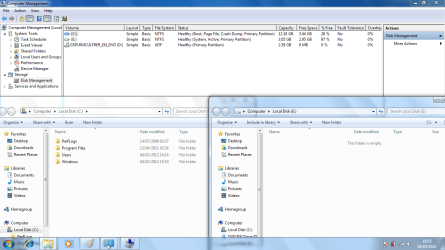
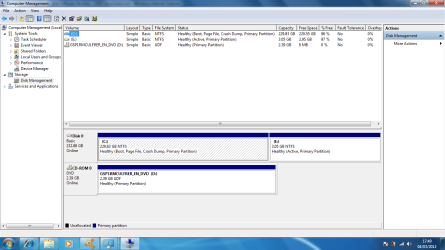
Now will the pc boot properly, do you have your data, what is on the 3 gig partition, if yes to the questions make the c:/ drive active, right click the little 3gig drive and delete the volumn then extend c: to have the whole drive will be c:
My Computer
- Computer Manufacturer/Model Number
- Dell XPS 730
- OS
- Windows 7 Home Premium 64 bit
- CPU
- Intel Core 2 quad Extreme Q9770 @ 3.2 GHz
- Memory
- 4x2 GB Muskin 1600 MHz ram
- Graphics Card(s)
- NVidia GTX 250
- Sound Card
- Soundblaster X-Fi Fatality Champion
- Monitor(s) Displays
- 2 Dell 2007WFP Ultrascans
- Screen Resolution
- 3360 x 1050
- Hard Drives
- WD Black 1TB sata, 2-WD Black 500 sata, 2-Seagate 500 Go external
- PSU
- 1000 Watt
- Cooling
- air
- Keyboard
- MS Natrual Keyboard Pro
- Mouse
- Logitech Wireless Trackball
- Internet Speed
- DSL Elite
seavixen32
New member
It's looking better.
Boot back into Partition Wizard and remove the active flag from partition E then make the C partition active.
If you don't need the small E partition you can delete it and extend C to take up the slack.
Bowtie just beat me to it!
Boot back into Partition Wizard and remove the active flag from partition E then make the C partition active.
If you don't need the small E partition you can delete it and extend C to take up the slack.
Bowtie just beat me to it!
My Computer
- Computer Manufacturer/Model Number
- HP Pavilion Elite 495UK
- OS
- Windows 7 Ultimate SP1 64-Bit
- CPU
- Intel Core i7 870 @ 2.93GHz
- Motherboard
- MSI 2A9C (CPU1)
- Memory
- 8Gb Dual-Channel DDR3 @ 664MHz
- Graphics Card(s)
- nVidia GeForce GTX 460 1024MB dedicated RAM
- Sound Card
- Realtek HD Audio
- Monitor(s) Displays
- HP2310i
- Screen Resolution
- 1920 x 1080
- Hard Drives
- 1x1954GB Hitachi HDS22020ALA 330 (RAID), 1x1954GB Hitachi External for backup and storage
- PSU
- 460W
- Case
- HP Elite
- Cooling
- Air cooled
- Keyboard
- Logitech K750 solar-powered keyboard
- Mouse
- Logitech Wireless M180 mouse
- Internet Speed
- 2Mb
- Other Info
- Pure Avanti Flow Internet Radio with iPod Dock, 64Gb iPod, HP USB Speakers, Sony MDR-V500 Headphones, Sony Vaio F-Series Laptop
It's looking better.
Boot back into Partition Wizard and remove the active flag from partition E then make the C partition active.
If you don't need the small E partition you can delete it and extend C to take up the slack.
Bowtie just beat me to it!
 sorry bout that, but i think you know more about this than i do.
My Computer
- Computer Manufacturer/Model Number
- Dell XPS 730
- OS
- Windows 7 Home Premium 64 bit
- CPU
- Intel Core 2 quad Extreme Q9770 @ 3.2 GHz
- Memory
- 4x2 GB Muskin 1600 MHz ram
- Graphics Card(s)
- NVidia GTX 250
- Sound Card
- Soundblaster X-Fi Fatality Champion
- Monitor(s) Displays
- 2 Dell 2007WFP Ultrascans
- Screen Resolution
- 3360 x 1050
- Hard Drives
- WD Black 1TB sata, 2-WD Black 500 sata, 2-Seagate 500 Go external
- PSU
- 1000 Watt
- Cooling
- air
- Keyboard
- MS Natrual Keyboard Pro
- Mouse
- Logitech Wireless Trackball
- Internet Speed
- DSL Elite

- Local time
- 1:50 PM
- Messages
- 50,634
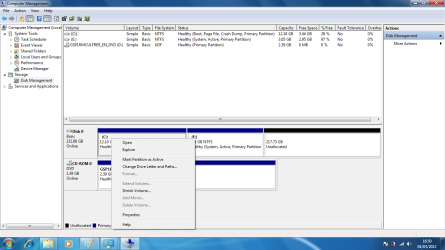
You'll need to recover the Win7 System boot files which have been derailed during install or repair to the right hand partition.
We know that you are booted into C because it has the label Boot.

But we also know by looking that the System Active flags are on the adjacent partition which means it has wrongly claimed the Win7 boot files. It may have been the only partition marked Active when it was installed or repaired causing this, since the installer or Startup Repair will (re)write the System boot files to the first Active partition it sees.
The solution to this which at the same time will open up the space to the right needed for C is as follows.
Mark C Active in Disk Mgmt or from Command Line as shown in this tutorial: Partition - Mark as Active
Reboot into the Win7 DVD System Recovery Options to run Startup Repair - Run 3 Separate Times until Win7 starts and C contains the System Active Boot files.
Now enter Disk Management, Delete the partition on the right and extend C into the space:
Partition or Volume - Delete
Partition or Volume - Extend
We know that you are booted into C because it has the label Boot.

But we also know by looking that the System Active flags are on the adjacent partition which means it has wrongly claimed the Win7 boot files. It may have been the only partition marked Active when it was installed or repaired causing this, since the installer or Startup Repair will (re)write the System boot files to the first Active partition it sees.
The solution to this which at the same time will open up the space to the right needed for C is as follows.
Mark C Active in Disk Mgmt or from Command Line as shown in this tutorial: Partition - Mark as Active
Reboot into the Win7 DVD System Recovery Options to run Startup Repair - Run 3 Separate Times until Win7 starts and C contains the System Active Boot files.
Now enter Disk Management, Delete the partition on the right and extend C into the space:
Partition or Volume - Delete
Partition or Volume - Extend
Last edited:
ill try that after ive finished avast scan. and see what happens thank you for your help, hopefully i will not need to call on you again haha thanks
My Computer
- Computer Manufacturer/Model Number
- emachines
- OS
- win7 ultimate x32
- CPU
- 1.6
- Memory
- 2gb ram 250 gb hd
- Hard Drives
- 250 gb toshiba MK2555GSX ata
We really don't mind everybody here try's to help when they can.
My Computer
- Computer Manufacturer/Model Number
- Dell XPS 730
- OS
- Windows 7 Home Premium 64 bit
- CPU
- Intel Core 2 quad Extreme Q9770 @ 3.2 GHz
- Memory
- 4x2 GB Muskin 1600 MHz ram
- Graphics Card(s)
- NVidia GTX 250
- Sound Card
- Soundblaster X-Fi Fatality Champion
- Monitor(s) Displays
- 2 Dell 2007WFP Ultrascans
- Screen Resolution
- 3360 x 1050
- Hard Drives
- WD Black 1TB sata, 2-WD Black 500 sata, 2-Seagate 500 Go external
- PSU
- 1000 Watt
- Cooling
- air
- Keyboard
- MS Natrual Keyboard Pro
- Mouse
- Logitech Wireless Trackball
- Internet Speed
- DSL Elite
seavixen32
New member
Thanks for tidying up the loose ends Greg, it's appreciated: tried to rep you, but I got warned off for not spreading it around.
All being well Sean, you should finish up with a fully-working system.
All being well Sean, you should finish up with a fully-working system.
My Computer
- Computer Manufacturer/Model Number
- HP Pavilion Elite 495UK
- OS
- Windows 7 Ultimate SP1 64-Bit
- CPU
- Intel Core i7 870 @ 2.93GHz
- Motherboard
- MSI 2A9C (CPU1)
- Memory
- 8Gb Dual-Channel DDR3 @ 664MHz
- Graphics Card(s)
- nVidia GeForce GTX 460 1024MB dedicated RAM
- Sound Card
- Realtek HD Audio
- Monitor(s) Displays
- HP2310i
- Screen Resolution
- 1920 x 1080
- Hard Drives
- 1x1954GB Hitachi HDS22020ALA 330 (RAID), 1x1954GB Hitachi External for backup and storage
- PSU
- 460W
- Case
- HP Elite
- Cooling
- Air cooled
- Keyboard
- Logitech K750 solar-powered keyboard
- Mouse
- Logitech Wireless M180 mouse
- Internet Speed
- 2Mb
- Other Info
- Pure Avanti Flow Internet Radio with iPod Dock, 64Gb iPod, HP USB Speakers, Sony MDR-V500 Headphones, Sony Vaio F-Series Laptop
- Local time
- 1:50 PM
- Messages
- 50,634
Don't delete E until C holds the System Active Boot flags.
Somehow the Repairs that were run since your first post screenshot showing System Active flags on what is now E, have lost the System flag . The boot files should not have moved since they will be written only to the partition marked Active.
But I don't know why the System flag would disappear so don't delete any partitions until System Active flags are correctly on C.
You can use PW CD to mark C Active, click OK, then click on HD # to highlight, from Disk tab select Rebuild MBR, Apply both steps. THis may preclude the need to run Repairs from DVD as given in my earlier steps.
Before misguided repairs:
After misguided repairs:

The repairs were "misguided" because C was not specified to be marked Active which would guide Startup Repair to write the System boot files correctly to C when run up to 3 separate times with reboots. Leaving the Active flag on E will only leave the boot files on E since no guidance was given Startup Repair as to where they should correctly reside.
Somehow the Repairs that were run since your first post screenshot showing System Active flags on what is now E, have lost the System flag . The boot files should not have moved since they will be written only to the partition marked Active.
But I don't know why the System flag would disappear so don't delete any partitions until System Active flags are correctly on C.
You can use PW CD to mark C Active, click OK, then click on HD # to highlight, from Disk tab select Rebuild MBR, Apply both steps. THis may preclude the need to run Repairs from DVD as given in my earlier steps.
Before misguided repairs:
After misguided repairs:

The repairs were "misguided" because C was not specified to be marked Active which would guide Startup Repair to write the System boot files correctly to C when run up to 3 separate times with reboots. Leaving the Active flag on E will only leave the boot files on E since no guidance was given Startup Repair as to where they should correctly reside.
Last edited:
Similar threads


- Replies
- 6
- Views
- 5K

- Replies
- 3
- Views
- 2K
