Solved Problem with ini files and VirtualStore

mnd017

New member
Local time
3:41 PM
Messages
4
Hey,
I have a problem with this magical tool. My program is supposed to save and read data from ini file from c:/windows. But, Windows created the same file in VirtualStore and now sometimes it reads from that directory. Could you explain my why? And in what cases?

Thx in advance,
Regards,
 

My Computer

OS
Windows 7 Pro 32bit

My Computer

Computer type
PC/Desktop
OS
Windows 8.1 ; Windows 7 x86 (Dec2008-Jan2013)
Other Info
"The scale icon at the top right of a post or tutorial is how you can give rep to the member."
Thanks, I understand now how VS works, but.. I still have a problem.
As administrator: I can save and read ini file from c:/windows
Than I created a simple default win7 user (not an admin). As user: I can read ini file from c:/windows, but I can't make any changes. Manually - no chance. So I created a program that changes ini file and still can't change! (no error message appeared).

So I checked my VirtualStore dir.. but my new user don't have that directory in ..\AppData\Local. Also I search by windows tool for that file and found only one file - in c:/windows.

Any ideas what happened ?
 

My Computer

OS
Windows 7 Pro 32bit
Have to look at your program. PM me the link, if you want.
 

My Computer

Computer type
PC/Desktop
OS
Windows 8.1 ; Windows 7 x86 (Dec2008-Jan2013)
Other Info
"The scale icon at the top right of a post or tutorial is how you can give rep to the member."
ok.. well, I think I can't sand PM: "mnd017, you do not have permission to access this page. This could be due to one of several reasons:" or I don't know how to do that :/

Anyway.. My test program is here: http://www.sendspace.com/file/puh59p , thx for help
 

My Computer

OS
Windows 7 Pro 32bit
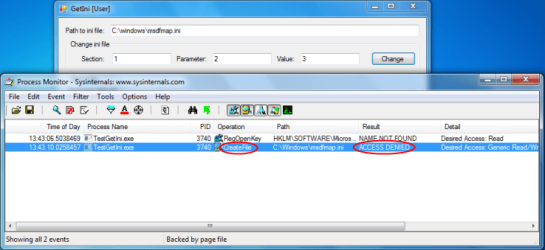
When you open this program as a Standard user you won't be able to modify those files ("Access denied", see screenshot attached). This has to do with file permissions for non-admin user. I dot not know why virtualstore does not kick in. But I you have to run it as admin to work or ini file has to have a permission to be modified by a regular user (which is not good for files in Windows folder).
 

Attachments

  • access_denied.png
    access_denied.png
    126.3 KB · Views: 96

My Computer

Computer type
PC/Desktop
OS
Windows 8.1 ; Windows 7 x86 (Dec2008-Jan2013)
Other Info
"The scale icon at the top right of a post or tutorial is how you can give rep to the member."
Ok. Thank you for your time
 

My Computer

OS
Windows 7 Pro 32bit
Back
Top