
" Sorry if this is the wrong section of the forums "--
I've got some recent problems with my rig's CPU - Intel Core Duo 2 E7400 2,8gHz
It was running most (kinda) high-end games like, Arma 2, Bad company 2 and Crysis 2 on high with perfect fps around 30-40 (Playable) I can barely run the games on Low settings even with the monitor resolution on 1024x768 - 1680x1050 - I've checked out my Graphics card but that isn't causing the problems.
In the later months i've been getting random lag spikes.. for brief seconds. I noticed that my CPU is working it's arse off on the taskmanager and i've been googling for fixes with no help at all.
So i did a few tests and checked my performance out on several programs, including Window's own performance check.
Complete System specs:
Core: DualCore Intel Core 2 Duo E7400, 2800MHz (10.5 x 267)
Motherboard: ASUS P5QL-EM
RAM: 2 GB x2 DDR2-800 DDR2 SDRAM (6-6-6-18 @ 400MHz)
BIOS: AMI (07/16/08)Version.0314 - Outdated?
Graphics Adapter: ATI Radeon HD 4800 Series 512 MB
HDD 1@: Samsung HD161 HJ ATA Device (160GB, 7200 RPM, SATA-II)
HDD 2@: Samsung HD252HJ ATA Device (250GB, 7200 RPM, SATA-II)
OS: Windows 7 - Proffessional 64-bit.
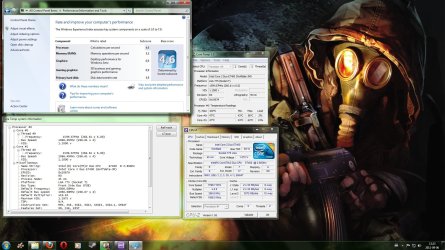
 - First off, Windows own check, CPU-Z and Cool Temp
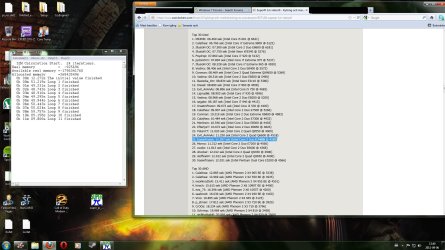
 - This is control check of SuperPi 32M - Ignore the highlighted blue text on the 11.sec record. It's completely irrelevant. Dunno why I had it there.
Does anyone have a clue why it might've dropped from 5.9 to a 4.6 on Perfomance mode, signs of a breaking core or is it perhaps my MOBO Socket 775 that is not supported by the E7400(Drivers/likewise, Read at other places that updates needs to be in order for it to be supported)? It worked perfectly fine before, no idea why'd it break off now, Since I'm no proffessional at this stuff, i only have a mere understanding of it ^^
Help please!
/Suij
I've got some recent problems with my rig's CPU - Intel Core Duo 2 E7400 2,8gHz
It was running most (kinda) high-end games like, Arma 2, Bad company 2 and Crysis 2 on high with perfect fps around 30-40 (Playable) I can barely run the games on Low settings even with the monitor resolution on 1024x768 - 1680x1050 - I've checked out my Graphics card but that isn't causing the problems.
In the later months i've been getting random lag spikes.. for brief seconds. I noticed that my CPU is working it's arse off on the taskmanager and i've been googling for fixes with no help at all.
So i did a few tests and checked my performance out on several programs, including Window's own performance check.
Complete System specs:
Core: DualCore Intel Core 2 Duo E7400, 2800MHz (10.5 x 267)
Motherboard: ASUS P5QL-EM
RAM: 2 GB x2 DDR2-800 DDR2 SDRAM (6-6-6-18 @ 400MHz)
BIOS: AMI (07/16/08)Version.0314 - Outdated?
Graphics Adapter: ATI Radeon HD 4800 Series 512 MB
HDD 1@: Samsung HD161 HJ ATA Device (160GB, 7200 RPM, SATA-II)
HDD 2@: Samsung HD252HJ ATA Device (250GB, 7200 RPM, SATA-II)
OS: Windows 7 - Proffessional 64-bit.
Does anyone have a clue why it might've dropped from 5.9 to a 4.6 on Perfomance mode, signs of a breaking core or is it perhaps my MOBO Socket 775 that is not supported by the E7400(Drivers/likewise, Read at other places that updates needs to be in order for it to be supported)? It worked perfectly fine before, no idea why'd it break off now, Since I'm no proffessional at this stuff, i only have a mere understanding of it ^^
Help please!
/Suij
Attachments
My Computer
- OS
- Windows 7 Professional 64bit
- CPU
- Intel Core 2 Duo E7400 (Wolfdale-3m)
- Motherboard
- ASUS P5QL-EM - BIOS: American Megatrends Inc. V. 0314
- Memory
- 2x OCZ DDR2 Dual Channels 4096mb
- Graphics Card(s)
- Radeon HD 4850 512mb
- Monitor(s) Displays
- Benq 24" HDMI LCD screen
- PSU
- 450W
- Cooling
- Fan


