Problem with monitor...HP

CriticalError

New member
Member
VIP
Local time
9:16 PM
Messages
118
I posted this also in the gaming section however I have now come to a conclusion that Splinter Cell is not causing the problem. Although when playing Splinter Cell the problem can happen..

I have a HP monitor HP w1907 Wide LCD Monitor the problem is the monitor goes black and I can't see nothing. The monitor switch light is still on I switch it off then turn it back on the I can see the screen for like 2 seconds then it goes black again! So I then have to wait like one minute for the problem to fix it self. I have ruled out that my Graphics card is fine because I have a second monitor without problems. I also booted in Safe Mode and I don't have the problem there! So I am ruling out that it is software/driver related. My Graphics Card Driver is up to date..

However my monitor driver is odd. I have the CD but can't still driver because of an "unexpected error" (I think cause I am on Windows 7 ultimate 32bit)

OK Besides that in Device Manager it says:

This device is working properly.

But it also says this on the driver tab

Driver: Provider: is Unknown

Date, Version: Is not available

Digital Signer: Not digitally signed

Has anyone got any suggestions thanks..

(Graphics Card is ATI Radeon HD 3450)
 

My Computer My Computer

At a glance

Windows 7 Ultimate 32AMD Athlon 64 X2 4400+ Brisbane 65nm TechnologySize 3072 MBytesATI Radeon HD 3450
OS
Windows 7 Ultimate 32
CPU
AMD Athlon 64 X2 4400+ Brisbane 65nm Technology
Motherboard
ASUSTek Computer INC. NARRA3 (Socket AM2 )
Memory
Size 3072 MBytes
Graphics Card(s)
ATI Radeon HD 3450
Sound Card
Realtek High Definition Audio
Monitor(s) Displays
Name Generic PnP Monitor on ATI Radeon HD 3450 Current Resol
Screen Resolution
1440x900
Hard Drives
Manufacturer Seagate
Form Factor 3.5"
Interface ATA
Capacity 352GB
Real size 360,080,695,296 bytes
RAID Type None
S.M.A.R.T
S.M.A.R.T not supported
Partition 0
Partition ID Disk #0, Partition #0
Disk Letter C:
File System NTFS
Critical,

You can try looking for an updated driver for your monitor (windows 7 32 bit) on the manufacturer's website. However, it is unlikely that this is the problem, as windows installs a generic one if it is missing. Now, you say you can play the full screen application with another monitor just fine, have you tried putting the problem monitor with another computer and starting a full screen app, such as a game? If it doesn't work, it proves the monitor is to blame. Do you use the same cables and ports for both monitors when you switch them?
 

My Computer My Computer

At a glance

Microsoft Windows 8.1 Pro 64-bitIntel(R) Core(TM) i3-4130 CPU @ 3.40GHz8.00 GBNone
Computer type
PC/Desktop
Computer Manufacturer/Model Number
Custom Asus Build
OS
Microsoft Windows 8.1 Pro 64-bit
CPU
Intel(R) Core(TM) i3-4130 CPU @ 3.40GHz
Motherboard
B85M-E
Memory
8.00 GB
Graphics Card(s)
None
Sound Card
Realtek High Definition Audio
Monitor(s) Displays
Asus 23.6" Monitor
Screen Resolution
1920 x 1080 x 32 bits (4294967296 colors) @ 60 Hz
Hard Drives
INTEL SSDSC2BW180A4
Samsung SSD 840 PRO Series
PSU
Seasonic S12II-380Bronze
Case
Lian Li
Cooling
Fan, Passive
Keyboard
Logitech K120
Mouse
Microsoft Touch Mouse
Internet Speed
4ms Ping, 19.0 Mbps Download, 19.0 Mbps Upload
Antivirus
Eset Endpoint
Browser
Internet Explorer, Chrome
No I have two screens, the other screen is connected via DVI to VGA. I work with two monitors so I don't switch cables, plus like I said if the problem is not happening in safe mode then it is a driver / software issues I guess. I disabled the driver for the monitor and the problem only happened once but worked fine...I could try uninstalling the monitor driver then re-installing (I will let windows find it.)
 

My Computer My Computer

At a glance

Windows 7 Ultimate 32AMD Athlon 64 X2 4400+ Brisbane 65nm TechnologySize 3072 MBytesATI Radeon HD 3450
OS
Windows 7 Ultimate 32
CPU
AMD Athlon 64 X2 4400+ Brisbane 65nm Technology
Motherboard
ASUSTek Computer INC. NARRA3 (Socket AM2 )
Memory
Size 3072 MBytes
Graphics Card(s)
ATI Radeon HD 3450
Sound Card
Realtek High Definition Audio
Monitor(s) Displays
Name Generic PnP Monitor on ATI Radeon HD 3450 Current Resol
Screen Resolution
1440x900
Hard Drives
Manufacturer Seagate
Form Factor 3.5"
Interface ATA
Capacity 352GB
Real size 360,080,695,296 bytes
RAID Type None
S.M.A.R.T
S.M.A.R.T not supported
Partition 0
Partition ID Disk #0, Partition #0
Disk Letter C:
File System NTFS

Perhaps this doesn't even need to be said, but just in case: when you use a full screen app, one monitor will go blank while the other should be fine.

tell me how all the monitors are connected in more detail if you can. switch the monitors again but use the troubled monitor's cabling and see if it has the same problems. Make sure you also use the troubled monitor's port in the graphics card.

Sorry, you said the problem isn't happening in safe mode.

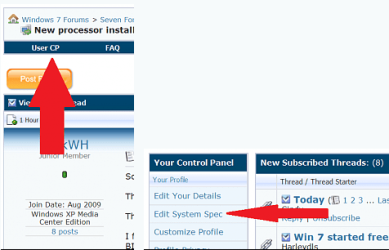
update your system specs for me: Fill out your system specs (this tool may help you out a great deal).
 

My Computer My Computer

At a glance

Microsoft Windows 8.1 Pro 64-bitIntel(R) Core(TM) i3-4130 CPU @ 3.40GHz8.00 GBNone
Computer type
PC/Desktop
Computer Manufacturer/Model Number
Custom Asus Build
OS
Microsoft Windows 8.1 Pro 64-bit
CPU
Intel(R) Core(TM) i3-4130 CPU @ 3.40GHz
Motherboard
B85M-E
Memory
8.00 GB
Graphics Card(s)
None
Sound Card
Realtek High Definition Audio
Monitor(s) Displays
Asus 23.6" Monitor
Screen Resolution
1920 x 1080 x 32 bits (4294967296 colors) @ 60 Hz
Hard Drives
INTEL SSDSC2BW180A4
Samsung SSD 840 PRO Series
PSU
Seasonic S12II-380Bronze
Case
Lian Li
Cooling
Fan, Passive
Keyboard
Logitech K120
Mouse
Microsoft Touch Mouse
Internet Speed
4ms Ping, 19.0 Mbps Download, 19.0 Mbps Upload
Antivirus
Eset Endpoint
Browser
Internet Explorer, Chrome
Download Revo uninstaller and remove both your monitor's driver and all of your graphics card drivers. Then download the correct ones. if you fill out your specs, I can show you where.

Unknown to many people, poor performing AVs can cause problems. What AV do you have?
 

My Computer My Computer

At a glance

Microsoft Windows 8.1 Pro 64-bitIntel(R) Core(TM) i3-4130 CPU @ 3.40GHz8.00 GBNone
Computer type
PC/Desktop
Computer Manufacturer/Model Number
Custom Asus Build
OS
Microsoft Windows 8.1 Pro 64-bit
CPU
Intel(R) Core(TM) i3-4130 CPU @ 3.40GHz
Motherboard
B85M-E
Memory
8.00 GB
Graphics Card(s)
None
Sound Card
Realtek High Definition Audio
Monitor(s) Displays
Asus 23.6" Monitor
Screen Resolution
1920 x 1080 x 32 bits (4294967296 colors) @ 60 Hz
Hard Drives
INTEL SSDSC2BW180A4
Samsung SSD 840 PRO Series
PSU
Seasonic S12II-380Bronze
Case
Lian Li
Cooling
Fan, Passive
Keyboard
Logitech K120
Mouse
Microsoft Touch Mouse
Internet Speed
4ms Ping, 19.0 Mbps Download, 19.0 Mbps Upload
Antivirus
Eset Endpoint
Browser
Internet Explorer, Chrome
Download Revo uninstaller and remove both your monitor's driver and all of your graphics card drivers. Then download the correct ones. if you fill out your specs, I can show you where.

Unknown to many people, poor performing AVs can cause problems. What AV do you have?

Sorry what does AV Mean?

Anyway from DxDiag:

------------------
System Information
------------------
Time of this report: 12/29/2011, 22:04:30
Machine name: ASIM-PC
Operating System: Windows 7 Ultimate 32-bit (6.1, Build 7601) Service Pack 1 (7601.win7sp1_gdr.111025-1505)
Language: English (Regional Setting: English)
System Manufacturer: HP-Pavilion
System Model: KP304AA-ABU a6421.uk
BIOS: Phoenix - AwardBIOS v6.00PG
Processor: AMD Athlon(tm) 64 X2 Dual Core Processor 4400+ (2 CPUs), ~2.3GHz
Memory: 3072MB RAM
Available OS Memory: 3070MB RAM
Page File: 2412MB used, 3726MB available
Windows Dir: C:\Windows
DirectX Version: DirectX 11
DX Setup Parameters: Not found
User DPI Setting: Using System DPI
System DPI Setting: 96 DPI (100 percent)
DWM DPI Scaling: Disabled
DxDiag Version: 6.01.7601.17514 32bit Unicode

------------
DxDiag Notes
------------
Display Tab 1: No problems found.
Display Tab 2: No problems found.
Sound Tab 1: No problems found.
Sound Tab 2: No problems found.
Sound Tab 3: No problems found.
Sound Tab 4: No problems found.
Input Tab: No problems found.

--------------------
DirectX Debug Levels
--------------------
Direct3D: 0/4 (retail)
DirectDraw: 0/4 (retail)
DirectInput: 0/5 (retail)
DirectMusic: 0/5 (retail)
DirectPlay: 0/9 (retail)
DirectSound: 0/5 (retail)
DirectShow: 0/6 (retail)

---------------
Display Devices
---------------
Card name: ATI Radeon HD 3450
Manufacturer: ATI Technologies Inc.
Chip type: ATI display adapter (0x95C5)
DAC type: Internal DAC(400MHz)
Device Key: Enum\PCI\VEN_1002&DEV_95C5&SUBSYS_11811462&REV_00
Display Memory: 1530 MB
Dedicated Memory: 251 MB
Shared Memory: 1279 MB
Current Mode: 1440 x 900 (32 bit) (60Hz)
Monitor Name: Generic PnP Monitor
Monitor Model: unknown
Monitor Id: CVT4668
Native Mode: 1440 x 900(p) (60.169Hz)
Output Type: HD15
Driver Name: atiu9pag.dll,aticfx32.dll,atiumdag.dll,atidxx32.dll,atiumdva.cap
Driver File Version: 8.14.0001.6099 (English)
Driver Version: 8.712.1.0
DDI Version: 10.1
Driver Model: WDDM 1.1
Driver Attributes: Final Retail
Driver Date/Size: 3/10/2010 22:33:04, 20480 bytes
WHQL Logo'd: Yes
WHQL Date Stamp:
Device Identifier: {D7B71EE2-D685-11CF-0160-8031A1C2C535}
Vendor ID: 0x1002
Device ID: 0x95C5
SubSys ID: 0x11811462
Revision ID: 0x0000
Driver Strong Name: oem38.inf:ATI.Mfg.NTx86.6.0:ati2mtag_RV610:8.712.1.0:pci\ven_1002&dev_95c5&subsys_11811462
Rank Of Driver: 00E60001
Video Accel: ModeMPEG2_A ModeMPEG2_C
Deinterlace Caps: {6E8329FF-B642-418B-BCF0-BCB6591E255F}: Format(In/Out)=(YUY2,YUY2) Frames(Prev/Fwd/Back)=(0,0,1) Caps=VideoProcess_YUV2RGB VideoProcess_StretchX VideoProcess_StretchY DeinterlaceTech_PixelAdaptive
{335AA36E-7884-43A4-9C91-7F87FAF3E37E}: Format(In/Out)=(YUY2,YUY2) Frames(Prev/Fwd/Back)=(0,0,0) Caps=VideoProcess_YUV2RGB VideoProcess_StretchX VideoProcess_StretchY DeinterlaceTech_BOBVerticalStretch
{5A54A0C9-C7EC-4BD9-8EDE-F3C75DC4393B}: Format(In/Out)=(YUY2,YUY2) Frames(Prev/Fwd/Back)=(0,0,0) Caps=VideoProcess_YUV2RGB VideoProcess_StretchX VideoProcess_StretchY
{6E8329FF-B642-418B-BCF0-BCB6591E255F}: Format(In/Out)=(UYVY,UYVY) Frames(Prev/Fwd/Back)=(0,0,1) Caps=VideoProcess_YUV2RGB VideoProcess_StretchX VideoProcess_StretchY DeinterlaceTech_PixelAdaptive
{335AA36E-7884-43A4-9C91-7F87FAF3E37E}: Format(In/Out)=(UYVY,UYVY) Frames(Prev/Fwd/Back)=(0,0,0) Caps=VideoProcess_YUV2RGB VideoProcess_StretchX VideoProcess_StretchY DeinterlaceTech_BOBVerticalStretch
{5A54A0C9-C7EC-4BD9-8EDE-F3C75DC4393B}: Format(In/Out)=(UYVY,UYVY) Frames(Prev/Fwd/Back)=(0,0,0) Caps=VideoProcess_YUV2RGB VideoProcess_StretchX VideoProcess_StretchY
{3C5323C1-6FB7-44F5-9081-056BF2EE449D}: Format(In/Out)=(NV12,0x3231564e) Frames(Prev/Fwd/Back)=(0,0,2) Caps=VideoProcess_YUV2RGB VideoProcess_StretchX VideoProcess_StretchY DeinterlaceTech_PixelAdaptive
{552C0DAD-CCBC-420B-83C8-74943CF9F1A6}: Format(In/Out)=(NV12,0x3231564e) Frames(Prev/Fwd/Back)=(0,0,2) Caps=VideoProcess_YUV2RGB VideoProcess_StretchX VideoProcess_StretchY DeinterlaceTech_PixelAdaptive
{6E8329FF-B642-418B-BCF0-BCB6591E255F}: Format(In/Out)=(NV12,0x3231564e) Frames(Prev/Fwd/Back)=(0,0,1) Caps=VideoProcess_YUV2RGB VideoProcess_StretchX VideoProcess_StretchY DeinterlaceTech_PixelAdaptive
{335AA36E-7884-43A4-9C91-7F87FAF3E37E}: Format(In/Out)=(NV12,0x3231564e) Frames(Prev/Fwd/Back)=(0,0,0) Caps=VideoProcess_YUV2RGB VideoProcess_StretchX VideoProcess_StretchY DeinterlaceTech_BOBVerticalStretch
{5A54A0C9-C7EC-4BD9-8EDE-F3C75DC4393B}: Format(In/Out)=(NV12,0x3231564e) Frames(Prev/Fwd/Back)=(0,0,0) Caps=VideoProcess_YUV2RGB VideoProcess_StretchX VideoProcess_StretchY
D3D9 Overlay: Not Supported
DXVA-HD: Not Supported
DDraw Status: Enabled
D3D Status: Enabled
AGP Status: Enabled

Card name: ATI Radeon HD 3450
Manufacturer: ATI Technologies Inc.
Chip type: ATI display adapter (0x95C5)
DAC type: Internal DAC(400MHz)
Device Key: Enum\PCI\VEN_1002&DEV_95C5&SUBSYS_11811462&REV_00
Display Memory: 1530 MB
Dedicated Memory: 251 MB
Shared Memory: 1279 MB
Current Mode: 1440 x 900 (32 bit) (60Hz)
Monitor Name: HP w1907 Wide LCD Monitor
Monitor Model:
Monitor Id:
Native Mode:
Output Type:
Driver Name: atiu9pag.dll,aticfx32.dll,atiumdag.dll,atidxx32.dll,atiumdva.cap
Driver File Version: 8.14.0001.6099 (English)
Driver Version: 8.712.1.0
DDI Version: 10.1
Driver Model: WDDM 1.1
Driver Attributes: Final Retail
Driver Date/Size: 3/10/2010 22:33:04, 20480 bytes
WHQL Logo'd: Yes
WHQL Date Stamp:
Device Identifier: {D7B71EE2-D685-11CF-0160-8031A1C2C535}
Vendor ID: 0x1002
Device ID: 0x95C5
SubSys ID: 0x11811462
Revision ID: 0x0000
Driver Strong Name: oem38.inf:ATI.Mfg.NTx86.6.0:ati2mtag_RV610:8.712.1.0:pci\ven_1002&dev_95c5&subsys_11811462
Rank Of Driver: 00E60001
Video Accel: ModeMPEG2_A ModeMPEG2_C
Deinterlace Caps: {6E8329FF-B642-418B-BCF0-BCB6591E255F}: Format(In/Out)=(YUY2,YUY2) Frames(Prev/Fwd/Back)=(0,0,1) Caps=VideoProcess_YUV2RGB VideoProcess_StretchX VideoProcess_StretchY DeinterlaceTech_PixelAdaptive
{335AA36E-7884-43A4-9C91-7F87FAF3E37E}: Format(In/Out)=(YUY2,YUY2) Frames(Prev/Fwd/Back)=(0,0,0) Caps=VideoProcess_YUV2RGB VideoProcess_StretchX VideoProcess_StretchY DeinterlaceTech_BOBVerticalStretch
{5A54A0C9-C7EC-4BD9-8EDE-F3C75DC4393B}: Format(In/Out)=(YUY2,YUY2) Frames(Prev/Fwd/Back)=(0,0,0) Caps=VideoProcess_YUV2RGB VideoProcess_StretchX VideoProcess_StretchY
{6E8329FF-B642-418B-BCF0-BCB6591E255F}: Format(In/Out)=(UYVY,UYVY) Frames(Prev/Fwd/Back)=(0,0,1) Caps=VideoProcess_YUV2RGB VideoProcess_StretchX VideoProcess_StretchY DeinterlaceTech_PixelAdaptive
{335AA36E-7884-43A4-9C91-7F87FAF3E37E}: Format(In/Out)=(UYVY,UYVY) Frames(Prev/Fwd/Back)=(0,0,0) Caps=VideoProcess_YUV2RGB VideoProcess_StretchX VideoProcess_StretchY DeinterlaceTech_BOBVerticalStretch
{5A54A0C9-C7EC-4BD9-8EDE-F3C75DC4393B}: Format(In/Out)=(UYVY,UYVY) Frames(Prev/Fwd/Back)=(0,0,0) Caps=VideoProcess_YUV2RGB VideoProcess_StretchX VideoProcess_StretchY
{3C5323C1-6FB7-44F5-9081-056BF2EE449D}: Format(In/Out)=(NV12,0x3231564e) Frames(Prev/Fwd/Back)=(0,0,2) Caps=VideoProcess_YUV2RGB VideoProcess_StretchX VideoProcess_StretchY DeinterlaceTech_PixelAdaptive
{552C0DAD-CCBC-420B-83C8-74943CF9F1A6}: Format(In/Out)=(NV12,0x3231564e) Frames(Prev/Fwd/Back)=(0,0,2) Caps=VideoProcess_YUV2RGB VideoProcess_StretchX VideoProcess_StretchY DeinterlaceTech_PixelAdaptive
{6E8329FF-B642-418B-BCF0-BCB6591E255F}: Format(In/Out)=(NV12,0x3231564e) Frames(Prev/Fwd/Back)=(0,0,1) Caps=VideoProcess_YUV2RGB VideoProcess_StretchX VideoProcess_StretchY DeinterlaceTech_PixelAdaptive
{335AA36E-7884-43A4-9C91-7F87FAF3E37E}: Format(In/Out)=(NV12,0x3231564e) Frames(Prev/Fwd/Back)=(0,0,0) Caps=VideoProcess_YUV2RGB VideoProcess_StretchX VideoProcess_StretchY DeinterlaceTech_BOBVerticalStretch
{5A54A0C9-C7EC-4BD9-8EDE-F3C75DC4393B}: Format(In/Out)=(NV12,0x3231564e) Frames(Prev/Fwd/Back)=(0,0,0) Caps=VideoProcess_YUV2RGB VideoProcess_StretchX VideoProcess_StretchY
D3D9 Overlay: Not Supported
DXVA-HD: Not Supported
DDraw Status: Enabled
D3D Status: Enabled
AGP Status: Enabled

-------------
Sound Devices
-------------
Description: Speakers (Realtek High Definition Audio)
Default Sound Playback: Yes
Default Voice Playback: Yes
Hardware ID: HDAUDIO\FUNC_01&VEN_10EC&DEV_0888&SUBSYS_103C2A6C&REV_1001
Manufacturer ID: 1
Product ID: 100
Type: WDM
Driver Name: RTKVHDA.sys
Driver Version: 6.00.0001.6316 (English)
Driver Attributes: Final Retail
WHQL Logo'd: Yes
Date and Size: 2/24/2011 17:21:12, 3408808 bytes
Other Files:
Driver Provider: Realtek Semiconductor Corp.
HW Accel Level: Basic
Cap Flags: 0xF1F
Min/Max Sample Rate: 100, 200000
Static/Strm HW Mix Bufs: 1, 0
Static/Strm HW 3D Bufs: 0, 0
HW Memory: 0
Voice Management: No
EAX(tm) 2.0 Listen/Src: No, No
I3DL2(tm) Listen/Src: No, No
Sensaura(tm) ZoomFX(tm): No

Description: Speakers (Bluetooth AV Audio)
Default Sound Playback: No
Default Voice Playback: No
Hardware ID: {F12D3CF8-B11D-457e-8641-BE2AF2D6D204}\BLUELETAUDIO
Manufacturer ID: 1
Product ID: 100
Type: WDM
Driver Name: blueletaudio.sys
Driver Version: 6.00.0013.0061 (English)
Driver Attributes: Final Retail
WHQL Logo'd: Yes
Date and Size: 5/11/2007 02:10:50, 34704 bytes
Other Files:
Driver Provider: IVT Corporation
HW Accel Level: Basic
Cap Flags: 0xF1F
Min/Max Sample Rate: 100, 200000
Static/Strm HW Mix Bufs: 1, 0
Static/Strm HW 3D Bufs: 0, 0
HW Memory: 0
Voice Management: No
EAX(tm) 2.0 Listen/Src: No, No
I3DL2(tm) Listen/Src: No, No
Sensaura(tm) ZoomFX(tm): No

Description: Speakers (Bluetooth SCO Audio)
Default Sound Playback: No
Default Voice Playback: No
Hardware ID: {F12D3CF8-B11D-457e-8641-BE2AF2D6D204}\BLUELETSCOAUDIO
Manufacturer ID: 1
Product ID: 100
Type: WDM
Driver Name: BlueletSCOAudio.sys
Driver Version: 6.00.0012.0056 (English)
Driver Attributes: Final Retail
WHQL Logo'd: Yes
Date and Size: 3/5/2007 05:00:04, 27792 bytes
Other Files:
Driver Provider: IVT Corporation
HW Accel Level: Basic
Cap Flags: 0xF1F
Min/Max Sample Rate: 100, 200000
Static/Strm HW Mix Bufs: 1, 0
Static/Strm HW 3D Bufs: 0, 0
HW Memory: 0
Voice Management: No
EAX(tm) 2.0 Listen/Src: No, No
I3DL2(tm) Listen/Src: No, No
Sensaura(tm) ZoomFX(tm): No

Description: Realtek Digital Output (Realtek High Definition Audio)
Default Sound Playback: No
Default Voice Playback: No
Hardware ID: HDAUDIO\FUNC_01&VEN_10EC&DEV_0888&SUBSYS_103C2A6C&REV_1001
Manufacturer ID: 1
Product ID: 100
Type: WDM
Driver Name: RTKVHDA.sys
Driver Version: 6.00.0001.6316 (English)
Driver Attributes: Final Retail
WHQL Logo'd: Yes
Date and Size: 2/24/2011 17:21:12, 3408808 bytes
Other Files:
Driver Provider: Realtek Semiconductor Corp.
HW Accel Level: Basic
Cap Flags: 0xF1F
Min/Max Sample Rate: 100, 200000
Static/Strm HW Mix Bufs: 1, 0
Static/Strm HW 3D Bufs: 0, 0
HW Memory: 0
Voice Management: No
EAX(tm) 2.0 Listen/Src: No, No
I3DL2(tm) Listen/Src: No, No
Sensaura(tm) ZoomFX(tm): No

---------------------
Sound Capture Devices
---------------------
Description: Stereo Mix (Realtek High Definition Audio)
Default Sound Capture: Yes
Default Voice Capture: Yes
Driver Name: RTKVHDA.sys
Driver Version: 6.00.0001.6316 (English)
Driver Attributes: Final Retail
Date and Size: 2/24/2011 17:21:12, 3408808 bytes
Cap Flags: 0x1
Format Flags: 0xFFFFF

Description: Microphone (Bluetooth SCO Audio)
Default Sound Capture: No
Default Voice Capture: No
Driver Name: BlueletSCOAudio.sys
Driver Version: 6.00.0012.0056 (English)
Driver Attributes: Final Retail
Date and Size: 3/5/2007 05:00:04, 27792 bytes
Cap Flags: 0x1
Format Flags: 0xFFFFF

Description: Microphone (Bluetooth AV Audio)
Default Sound Capture: No
Default Voice Capture: No
Driver Name: blueletaudio.sys
Driver Version: 6.00.0013.0061 (English)
Driver Attributes: Final Retail
Date and Size: 5/11/2007 02:10:50, 34704 bytes
Cap Flags: 0x1
Format Flags: 0xFFFFF

-------------------
DirectInput Devices
-------------------
Device Name: Mouse
Attached: 1
Controller ID: n/a
Vendor/Product ID: n/a
FF Driver: n/a

Device Name: Keyboard
Attached: 1
Controller ID: n/a
Vendor/Product ID: n/a
FF Driver: n/a

Device Name: CTH-460
Attached: 1
Controller ID: 0x0
Vendor/Product ID: 0x056A, 0x00D1
FF Driver: n/a

Device Name: CTH-460
Attached: 1
Controller ID: 0x0
Vendor/Product ID: 0x056A, 0x00D1
FF Driver: n/a

Device Name: Wacom Virtual Hid Driver
Attached: 1
Controller ID: 0x0
Vendor/Product ID: 0x056A, 0x1001
FF Driver: n/a

Device Name: Wacom Virtual Hid Driver
Attached: 1
Controller ID: 0x0
Vendor/Product ID: 0x056A, 0x1001
FF Driver: n/a

Device Name: Wacom Virtual Hid Driver
Attached: 1
Controller ID: 0x0
Vendor/Product ID: 0x056A, 0x1001
FF Driver: n/a

Poll w/ Interrupt: No

-----------
USB Devices
-----------
+ USB Root Hub
| Vendor/Product ID: 0x10DE, 0x03F1
| Matching Device ID: usb\root_hub
| Service: usbhub
| Driver: usbhub.sys, 3/25/2011 02:58:37, 258560 bytes
| Driver: usbd.sys, 3/25/2011 02:57:53, 5888 bytes

----------------
Gameport Devices
----------------

------------
PS/2 Devices
------------
+ Enhanced Multimedia PS/2 Keyboard
| Matching Device ID: acpi\pnp0303
| Upper Filters: PS2
| Service: i8042prt
| Driver: PS2.sys, 12/12/2005 16:27:00, 19072 bytes
| Driver: i8042prt.sys, 7/13/2009 23:11:24, 80896 bytes
| Driver: kbdclass.sys, 7/14/2009 01:20:36, 42576 bytes
|
+ Terminal Server Keyboard Driver
| Matching Device ID: root\rdp_kbd
| Upper Filters: kbdclass
| Service: TermDD
| Driver: i8042prt.sys, 7/13/2009 23:11:24, 80896 bytes
| Driver: kbdclass.sys, 7/14/2009 01:20:36, 42576 bytes
|
+ PS/2 Compatible Mouse
| Matching Device ID: *pnp0f13
| Service: i8042prt
| Driver: i8042prt.sys, 7/13/2009 23:11:24, 80896 bytes
| Driver: mouclass.sys, 7/14/2009 01:20:44, 41552 bytes
|
+ Wacom Mouse Monitor
| Vendor/Product ID: 0x056A, 0x00D1
| Matching Device ID: hid\vid_056a&pid_00d1&mi_00&col01
| Upper Filters: wacmoumonitor
| Service: mouhid
|
+ Wacom Mouse
| Matching Device ID: hid\wacomvirtualhid&col03
| Upper Filters: wacommousefilter
| Service: mouhid
| Driver: wacommousefilter.sys, 10/5/2010 12:26:02, 11312 bytes
| Driver: mouhid.sys, 7/13/2009 23:45:08, 26112 bytes
| Driver: mouclass.sys, 7/14/2009 01:20:44, 41552 bytes
|
+ Terminal Server Mouse Driver
| Matching Device ID: root\rdp_mou
| Upper Filters: mouclass
| Service: TermDD
| Driver: termdd.sys, 11/20/2010 12:30:12, 53120 bytes
| Driver: sermouse.sys, 7/13/2009 23:45:08, 19968 bytes
| Driver: mouclass.sys, 7/14/2009 01:20:44, 41552 bytes

------------------------
Disk & DVD/CD-ROM Drives
------------------------
Drive: C:
Free Space: 164.4 GB
Total Space: 238.3 GB
File System: NTFS
Model: ST336032 0AS SCSI Disk Device

Drive: F:
Free Space: 2.5 GB
Total Space: 20.5 GB
File System: NTFS
Model: Seagate Desktop USB Device

Drive: G:
Free Space: 21.2 GB
Total Space: 105.1 GB
File System: NTFS
Model: ST336032 0AS SCSI Disk Device

Drive: U:
Free Space: 325.4 GB
Total Space: 456.5 GB
File System: NTFS
Model: Seagate Desktop USB Device

Drive: D:
Model: ATAPI DVD A DH16A3L SCSI CdRom Device
Driver: c:\windows\system32\drivers\cdrom.sys, 6.01.7601.17514 (English), 11/20/2010 08:38:10, 108544 bytes

Drive: M:
Model: ELBY CLONEDRIVE SCSI CdRom Device
Driver: c:\windows\system32\drivers\cdrom.sys, 6.01.7601.17514 (English), 11/20/2010 08:38:10, 108544 bytes
 
Last edited:

My Computer My Computer

At a glance

Windows 7 Ultimate 32AMD Athlon 64 X2 4400+ Brisbane 65nm TechnologySize 3072 MBytesATI Radeon HD 3450
OS
Windows 7 Ultimate 32
CPU
AMD Athlon 64 X2 4400+ Brisbane 65nm Technology
Motherboard
ASUSTek Computer INC. NARRA3 (Socket AM2 )
Memory
Size 3072 MBytes
Graphics Card(s)
ATI Radeon HD 3450
Sound Card
Realtek High Definition Audio
Monitor(s) Displays
Name Generic PnP Monitor on ATI Radeon HD 3450 Current Resol
Screen Resolution
1440x900
Hard Drives
Manufacturer Seagate
Form Factor 3.5"
Interface ATA
Capacity 352GB
Real size 360,080,695,296 bytes
RAID Type None
S.M.A.R.T
S.M.A.R.T not supported
Partition 0
Partition ID Disk #0, Partition #0
Disk Letter C:
File System NTFS

My Computer My Computer

At a glance

Windows 7 ultimate 64 bit / XP Home sp3intel Core 2 Duo E8400 3.0ghz8 gigs 1066 OCZ Fata1tyEVGA GTX 580 Call of Duty Black Ops Edition
Computer Manufacturer/Model Number
Self Built
OS
Windows 7 ultimate 64 bit / XP Home sp3
CPU
intel Core 2 Duo E8400 3.0ghz
Motherboard
Asus P5ND bios 1401
Memory
8 gigs 1066 OCZ Fata1ty
Graphics Card(s)
EVGA GTX 580 Call of Duty Black Ops Edition
Sound Card
Creative Soundblaster Audigy 2zs
Monitor(s) Displays
Asus 24in LCD's 2MS X2
Screen Resolution
1920x1080p @60Hz
Hard Drives
WD Caviar 500 Black/ WD Caviar 200 Blue
PSU
OCZ 700W GameXtreme
Case
NZXT Apollo
Cooling
Corsair H50 CPU/120mm x3 /60mm x2 /Corsair Dominator Ram
Keyboard
Logitech Bluetooth Wireless MX5000
Mouse
Logitech Bluetooth Wireless MX1000
Internet Speed
Download 19.83 Upload 0.97
Other Info
Logitech Z2300 Speakers/ Bose Noise Cancelling Headphones/Avermedia PCI-e Hybrid TV Bravo/Epson NX415 all in one/ 4 Port Powered USB Hub/ LG 10x Bluray Burner /TSST Corp DVDRW External
OK I updated my specs.

oh and I am using Microsoft Security Essentials..


OK I tried to update it using Device Manager but get error "Access is Denied" I am admin..
 

My Computer My Computer

At a glance

Windows 7 Ultimate 32AMD Athlon 64 X2 4400+ Brisbane 65nm TechnologySize 3072 MBytesATI Radeon HD 3450
OS
Windows 7 Ultimate 32
CPU
AMD Athlon 64 X2 4400+ Brisbane 65nm Technology
Motherboard
ASUSTek Computer INC. NARRA3 (Socket AM2 )
Memory
Size 3072 MBytes
Graphics Card(s)
ATI Radeon HD 3450
Sound Card
Realtek High Definition Audio
Monitor(s) Displays
Name Generic PnP Monitor on ATI Radeon HD 3450 Current Resol
Screen Resolution
1440x900
Hard Drives
Manufacturer Seagate
Form Factor 3.5"
Interface ATA
Capacity 352GB
Real size 360,080,695,296 bytes
RAID Type None
S.M.A.R.T
S.M.A.R.T not supported
Partition 0
Partition ID Disk #0, Partition #0
Disk Letter C:
File System NTFS
For now, update the GPU here: ATI Catalyst

You will need to have removed the previous one
 

My Computer My Computer

At a glance

Microsoft Windows 8.1 Pro 64-bitIntel(R) Core(TM) i3-4130 CPU @ 3.40GHz8.00 GBNone
Computer type
PC/Desktop
Computer Manufacturer/Model Number
Custom Asus Build
OS
Microsoft Windows 8.1 Pro 64-bit
CPU
Intel(R) Core(TM) i3-4130 CPU @ 3.40GHz
Motherboard
B85M-E
Memory
8.00 GB
Graphics Card(s)
None
Sound Card
Realtek High Definition Audio
Monitor(s) Displays
Asus 23.6" Monitor
Screen Resolution
1920 x 1080 x 32 bits (4294967296 colors) @ 60 Hz
Hard Drives
INTEL SSDSC2BW180A4
Samsung SSD 840 PRO Series
PSU
Seasonic S12II-380Bronze
Case
Lian Li
Cooling
Fan, Passive
Keyboard
Logitech K120
Mouse
Microsoft Touch Mouse
Internet Speed
4ms Ping, 19.0 Mbps Download, 19.0 Mbps Upload
Antivirus
Eset Endpoint
Browser
Internet Explorer, Chrome
For now, update the GPU here: ATI Catalyst

You will need to have removed the previous one


I did in fact I already had this anyway. However I uninstalled the drivers and stuff and let windows find the monitor which it did and it used Windows Update to update it. However when I play Splinter Cell the screen for some reason can go off, but will come back on after a minute it maybe the game since other games work fine...

Let see how it goes..
 

My Computer My Computer

At a glance

Windows 7 Ultimate 32AMD Athlon 64 X2 4400+ Brisbane 65nm TechnologySize 3072 MBytesATI Radeon HD 3450
OS
Windows 7 Ultimate 32
CPU
AMD Athlon 64 X2 4400+ Brisbane 65nm Technology
Motherboard
ASUSTek Computer INC. NARRA3 (Socket AM2 )
Memory
Size 3072 MBytes
Graphics Card(s)
ATI Radeon HD 3450
Sound Card
Realtek High Definition Audio
Monitor(s) Displays
Name Generic PnP Monitor on ATI Radeon HD 3450 Current Resol
Screen Resolution
1440x900
Hard Drives
Manufacturer Seagate
Form Factor 3.5"
Interface ATA
Capacity 352GB
Real size 360,080,695,296 bytes
RAID Type None
S.M.A.R.T
S.M.A.R.T not supported
Partition 0
Partition ID Disk #0, Partition #0
Disk Letter C:
File System NTFS
you might try reinstalling the game then...
 

My Computer My Computer

At a glance

Microsoft Windows 8.1 Pro 64-bitIntel(R) Core(TM) i3-4130 CPU @ 3.40GHz8.00 GBNone
Computer type
PC/Desktop
Computer Manufacturer/Model Number
Custom Asus Build
OS
Microsoft Windows 8.1 Pro 64-bit
CPU
Intel(R) Core(TM) i3-4130 CPU @ 3.40GHz
Motherboard
B85M-E
Memory
8.00 GB
Graphics Card(s)
None
Sound Card
Realtek High Definition Audio
Monitor(s) Displays
Asus 23.6" Monitor
Screen Resolution
1920 x 1080 x 32 bits (4294967296 colors) @ 60 Hz
Hard Drives
INTEL SSDSC2BW180A4
Samsung SSD 840 PRO Series
PSU
Seasonic S12II-380Bronze
Case
Lian Li
Cooling
Fan, Passive
Keyboard
Logitech K120
Mouse
Microsoft Touch Mouse
Internet Speed
4ms Ping, 19.0 Mbps Download, 19.0 Mbps Upload
Antivirus
Eset Endpoint
Browser
Internet Explorer, Chrome
you might try reinstalling the game then...


Its from steam it is happening on Splinter Cell 1 and 3 I have not tried 4..

Anyway I think it could be OS issue and directX Since SC only supports DirectriX9 but 11 is backwards compatible, but it still could give issues..
 

My Computer My Computer

At a glance

Windows 7 Ultimate 32AMD Athlon 64 X2 4400+ Brisbane 65nm TechnologySize 3072 MBytesATI Radeon HD 3450
OS
Windows 7 Ultimate 32
CPU
AMD Athlon 64 X2 4400+ Brisbane 65nm Technology
Motherboard
ASUSTek Computer INC. NARRA3 (Socket AM2 )
Memory
Size 3072 MBytes
Graphics Card(s)
ATI Radeon HD 3450
Sound Card
Realtek High Definition Audio
Monitor(s) Displays
Name Generic PnP Monitor on ATI Radeon HD 3450 Current Resol
Screen Resolution
1440x900
Hard Drives
Manufacturer Seagate
Form Factor 3.5"
Interface ATA
Capacity 352GB
Real size 360,080,695,296 bytes
RAID Type None
S.M.A.R.T
S.M.A.R.T not supported
Partition 0
Partition ID Disk #0, Partition #0
Disk Letter C:
File System NTFS
Don't the games install Dx 9 on top of Dx11 if they use it? If not, Dx11 should work perfectly well for those games, as it is completely backwards compatible.

Do you have any other steam games this is happening to? Any other Dx9 games?

I played Dx9 Steam Civ V on my computer recently, it was fine. I've never installed any Dx other than what my games have installed, so I don't think that the OS is the problem. I'd think it was a steam problem, but I can't really be sure of this. It could even be your graphics card can't handle it (I don't know much about the ATI brand, or if your card has gone bad or not).

Do you have games outside of steam, and do they work well? Do all steam games have this problem?
 

My Computer My Computer

At a glance

Microsoft Windows 8.1 Pro 64-bitIntel(R) Core(TM) i3-4130 CPU @ 3.40GHz8.00 GBNone
Computer type
PC/Desktop
Computer Manufacturer/Model Number
Custom Asus Build
OS
Microsoft Windows 8.1 Pro 64-bit
CPU
Intel(R) Core(TM) i3-4130 CPU @ 3.40GHz
Motherboard
B85M-E
Memory
8.00 GB
Graphics Card(s)
None
Sound Card
Realtek High Definition Audio
Monitor(s) Displays
Asus 23.6" Monitor
Screen Resolution
1920 x 1080 x 32 bits (4294967296 colors) @ 60 Hz
Hard Drives
INTEL SSDSC2BW180A4
Samsung SSD 840 PRO Series
PSU
Seasonic S12II-380Bronze
Case
Lian Li
Cooling
Fan, Passive
Keyboard
Logitech K120
Mouse
Microsoft Touch Mouse
Internet Speed
4ms Ping, 19.0 Mbps Download, 19.0 Mbps Upload
Antivirus
Eset Endpoint
Browser
Internet Explorer, Chrome
Don't the games install Dx 9 on top of Dx11 if they use it? If not, Dx11 should work perfectly well for those games, as it is completely backwards compatible.

Do you have any other steam games this is happening to? Any other Dx9 games?

I played Dx9 Steam Civ V on my computer recently, it was fine. I've never installed any Dx other than what my games have installed, so I don't think that the OS is the problem. I'd think it was a steam problem, but I can't really be sure of this. It could even be your graphics card can't handle it (I don't know much about the ATI brand, or if your card has gone bad or not).

Do you have games outside of steam, and do they work well? Do all steam games have this problem?


No other games have this problem, it maybe steam or my Graphics Card by graphics card is quite low..
 

My Computer My Computer

At a glance

Windows 7 Ultimate 32AMD Athlon 64 X2 4400+ Brisbane 65nm TechnologySize 3072 MBytesATI Radeon HD 3450
OS
Windows 7 Ultimate 32
CPU
AMD Athlon 64 X2 4400+ Brisbane 65nm Technology
Motherboard
ASUSTek Computer INC. NARRA3 (Socket AM2 )
Memory
Size 3072 MBytes
Graphics Card(s)
ATI Radeon HD 3450
Sound Card
Realtek High Definition Audio
Monitor(s) Displays
Name Generic PnP Monitor on ATI Radeon HD 3450 Current Resol
Screen Resolution
1440x900
Hard Drives
Manufacturer Seagate
Form Factor 3.5"
Interface ATA
Capacity 352GB
Real size 360,080,695,296 bytes
RAID Type None
S.M.A.R.T
S.M.A.R.T not supported
Partition 0
Partition ID Disk #0, Partition #0
Disk Letter C:
File System NTFS
I thought Dx11 went mostly to newer/better cards. Go into an elevated command prompt (run command prompt as administrator) and type dxdiag and tell me what Dx version you have (9-11).

Though I think it could be the card as well. Steam is a pretty hefty program that isn't very quick itself, so it takes its time on the smaller cards.
 

My Computer My Computer

At a glance

Microsoft Windows 8.1 Pro 64-bitIntel(R) Core(TM) i3-4130 CPU @ 3.40GHz8.00 GBNone
Computer type
PC/Desktop
Computer Manufacturer/Model Number
Custom Asus Build
OS
Microsoft Windows 8.1 Pro 64-bit
CPU
Intel(R) Core(TM) i3-4130 CPU @ 3.40GHz
Motherboard
B85M-E
Memory
8.00 GB
Graphics Card(s)
None
Sound Card
Realtek High Definition Audio
Monitor(s) Displays
Asus 23.6" Monitor
Screen Resolution
1920 x 1080 x 32 bits (4294967296 colors) @ 60 Hz
Hard Drives
INTEL SSDSC2BW180A4
Samsung SSD 840 PRO Series
PSU
Seasonic S12II-380Bronze
Case
Lian Li
Cooling
Fan, Passive
Keyboard
Logitech K120
Mouse
Microsoft Touch Mouse
Internet Speed
4ms Ping, 19.0 Mbps Download, 19.0 Mbps Upload
Antivirus
Eset Endpoint
Browser
Internet Explorer, Chrome
OK I left this topic off for a while to see what happens, however it is actually Windows 7 it self, this can happen any time, especially if I lock the computer, screen saver comes, on etc. Some times it happens at the BIOS screen, that mostly happens only if I restart from windows 7. It now also happens in safe mode......

However I had Ubuntu on Dual Boot but it never happened there, I am thinking of reinstalling Windows I have full retail disc how shall I do it?


Oh is there anyway on the disc, where I can just uninstall ALL Programs but leave user settings etc?
 

My Computer My Computer

At a glance

Windows 7 Ultimate 32AMD Athlon 64 X2 4400+ Brisbane 65nm TechnologySize 3072 MBytesATI Radeon HD 3450
OS
Windows 7 Ultimate 32
CPU
AMD Athlon 64 X2 4400+ Brisbane 65nm Technology
Motherboard
ASUSTek Computer INC. NARRA3 (Socket AM2 )
Memory
Size 3072 MBytes
Graphics Card(s)
ATI Radeon HD 3450
Sound Card
Realtek High Definition Audio
Monitor(s) Displays
Name Generic PnP Monitor on ATI Radeon HD 3450 Current Resol
Screen Resolution
1440x900
Hard Drives
Manufacturer Seagate
Form Factor 3.5"
Interface ATA
Capacity 352GB
Real size 360,080,695,296 bytes
RAID Type None
S.M.A.R.T
S.M.A.R.T not supported
Partition 0
Partition ID Disk #0, Partition #0
Disk Letter C:
File System NTFS
Hello again Critical,

Reread your Original post. You said it was a problem only with your monitor and that another monitor doesn't act the same when you use it. If that is the case, try getting a new monitor and returning the HP one. Windows drivers should work fine with any monitor (meaning try not installing any monitor drivers on your computer, especially if using 2 monitors at the same time). As well, since you have 2 monitors hooked up at the same time, try switching only the monitors (Don't switch the cables. Unplug them only from the monitor and switch only the monitor to test if it is indeed the monitor's fault).

I appologize, I read back and it seems like I've been leading you in the wrong direction. I should have read your original post more carefully.
 

My Computer My Computer

At a glance

Microsoft Windows 8.1 Pro 64-bitIntel(R) Core(TM) i3-4130 CPU @ 3.40GHz8.00 GBNone
Computer type
PC/Desktop
Computer Manufacturer/Model Number
Custom Asus Build
OS
Microsoft Windows 8.1 Pro 64-bit
CPU
Intel(R) Core(TM) i3-4130 CPU @ 3.40GHz
Motherboard
B85M-E
Memory
8.00 GB
Graphics Card(s)
None
Sound Card
Realtek High Definition Audio
Monitor(s) Displays
Asus 23.6" Monitor
Screen Resolution
1920 x 1080 x 32 bits (4294967296 colors) @ 60 Hz
Hard Drives
INTEL SSDSC2BW180A4
Samsung SSD 840 PRO Series
PSU
Seasonic S12II-380Bronze
Case
Lian Li
Cooling
Fan, Passive
Keyboard
Logitech K120
Mouse
Microsoft Touch Mouse
Internet Speed
4ms Ping, 19.0 Mbps Download, 19.0 Mbps Upload
Antivirus
Eset Endpoint
Browser
Internet Explorer, Chrome
Hello again Critical,

Reread your Original post. You said it was a problem only with your monitor and that another monitor doesn't act the same when you use it. If that is the case, try getting a new monitor and returning the HP one. Windows drivers should work fine with any monitor (meaning try not installing any monitor drivers on your computer, especially if using 2 monitors at the same time). As well, since you have 2 monitors hooked up at the same time, try switching only the monitors (Don't switch the cables. Unplug them only from the monitor and switch only the monitor to test if it is indeed the monitor's fault).

I appologize, I read back and it seems like I've been leading you in the wrong direction. I should have read your original post more carefully.

It never happened in Linux, to be honest I don't want to get a new monitor want to make sure this one is faulty or not, plus I can't return in, its out of warranty...

However, I disabled my Msconfig all start up items and it never happened! then I figured out it was the Keyboard driver causing this problem....Well I have the keyboard driver off and it never happens, enable it and it does. I don't know how the keyboard is messing with my screen lol..
 

My Computer My Computer

At a glance

Windows 7 Ultimate 32AMD Athlon 64 X2 4400+ Brisbane 65nm TechnologySize 3072 MBytesATI Radeon HD 3450
OS
Windows 7 Ultimate 32
CPU
AMD Athlon 64 X2 4400+ Brisbane 65nm Technology
Motherboard
ASUSTek Computer INC. NARRA3 (Socket AM2 )
Memory
Size 3072 MBytes
Graphics Card(s)
ATI Radeon HD 3450
Sound Card
Realtek High Definition Audio
Monitor(s) Displays
Name Generic PnP Monitor on ATI Radeon HD 3450 Current Resol
Screen Resolution
1440x900
Hard Drives
Manufacturer Seagate
Form Factor 3.5"
Interface ATA
Capacity 352GB
Real size 360,080,695,296 bytes
RAID Type None
S.M.A.R.T
S.M.A.R.T not supported
Partition 0
Partition ID Disk #0, Partition #0
Disk Letter C:
File System NTFS
Well, that is something I never would have suspected, thanks for the update. I will have to remember to recommend msconfig more often. Unless you do anything special with your keyboard, the windows default driver for it will work perfectly well.

PS. when I said 'new' monitor, i just meant another monitor you had handy nearby.

glad you figured it out though! cheers mate
 

My Computer My Computer

At a glance

Microsoft Windows 8.1 Pro 64-bitIntel(R) Core(TM) i3-4130 CPU @ 3.40GHz8.00 GBNone
Computer type
PC/Desktop
Computer Manufacturer/Model Number
Custom Asus Build
OS
Microsoft Windows 8.1 Pro 64-bit
CPU
Intel(R) Core(TM) i3-4130 CPU @ 3.40GHz
Motherboard
B85M-E
Memory
8.00 GB
Graphics Card(s)
None
Sound Card
Realtek High Definition Audio
Monitor(s) Displays
Asus 23.6" Monitor
Screen Resolution
1920 x 1080 x 32 bits (4294967296 colors) @ 60 Hz
Hard Drives
INTEL SSDSC2BW180A4
Samsung SSD 840 PRO Series
PSU
Seasonic S12II-380Bronze
Case
Lian Li
Cooling
Fan, Passive
Keyboard
Logitech K120
Mouse
Microsoft Touch Mouse
Internet Speed
4ms Ping, 19.0 Mbps Download, 19.0 Mbps Upload
Antivirus
Eset Endpoint
Browser
Internet Explorer, Chrome
Well, that is something I never would have suspected, thanks for the update. I will have to remember to recommend msconfig more often. Unless you do anything special with your keyboard, the windows default driver for it will work perfectly well.

PS. when I said 'new' monitor, i just meant another monitor you had handy nearby.

glad you figured it out though! cheers mate

My keyboard is a multimedia keyboard, it opens the hard drive bays, and plays back media...
 

My Computer My Computer

At a glance

Windows 7 Ultimate 32AMD Athlon 64 X2 4400+ Brisbane 65nm TechnologySize 3072 MBytesATI Radeon HD 3450
OS
Windows 7 Ultimate 32
CPU
AMD Athlon 64 X2 4400+ Brisbane 65nm Technology
Motherboard
ASUSTek Computer INC. NARRA3 (Socket AM2 )
Memory
Size 3072 MBytes
Graphics Card(s)
ATI Radeon HD 3450
Sound Card
Realtek High Definition Audio
Monitor(s) Displays
Name Generic PnP Monitor on ATI Radeon HD 3450 Current Resol
Screen Resolution
1440x900
Hard Drives
Manufacturer Seagate
Form Factor 3.5"
Interface ATA
Capacity 352GB
Real size 360,080,695,296 bytes
RAID Type None
S.M.A.R.T
S.M.A.R.T not supported
Partition 0
Partition ID Disk #0, Partition #0
Disk Letter C:
File System NTFS
Back
Top