Solved Problem with loading Internet websites on my PC

lukewt1017

Banned
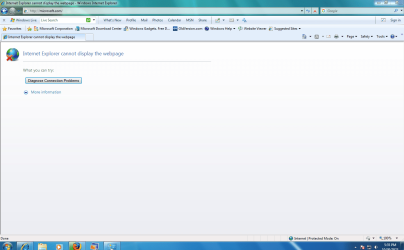
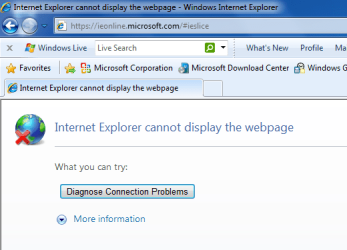
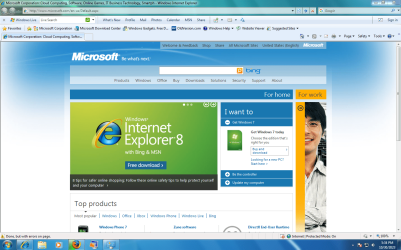
My grandmother's HP G72-C55DX laptop loads most websites perfectly fine on Internet Explorer. This is good, since some web sites I visit (about 4 web sites in total that i usually visit) need Internet Explorer and are not yet compatible with some newer browsers, like Firefox or Safari. :-) I have my own personal computer, a DELL Optiplex 9020 desktop PC. However, when I try and load these websites on my own computer, Internet Explorer says "Internet Explorer cannot display the web page". This is weird, considering that we use the SAME EXACT version of Internet Explorer. For example, (this website is compatible but still) when I load up to the Microsoft home page, it gives me that error. However, on my grandmother's laptop, this problem is not an issue. :confused:

IMAGE EXAMPLE: (1st image = my grandmother's pc, 2nd image is my PC)
Microsoft.PNGerror.PNG
G72-C55DX laptop Optiplex 9020 desktop
 

My Computers

System One System Two

  • Computer type
    PC/Desktop
    Computer Manufacturer/Model Number
    DELL
    OS
    Windows 7 Professional SP1 64 bit
    Memory
    8 GB RAM
    Graphics Card(s)
    Integrated Intel® HD Graphics 4600
    Sound Card
    High Definition Audio Device
    Monitor(s) Displays
    Dell™ E1910
    Screen Resolution
    1440 x 900
    Hard Drives
    1
    Keyboard
    HP KU-3016
    Mouse
    ione LYNX-M9 Optical Mouse
    Antivirus
    Microsoft Security Essentials
    Browser
    Mypal, Internet Explorer 8
    Other Info
    DELL™ Optiplex 9020
  • Computer type
    Laptop
    System Manufacturer/Model Number
    HP
    OS
    Windows 7 Ultimate SP1 64 bit
    Graphics Card(s)
    Intel HD Graphics
    Sound Card
    High Definition Audio Device
    Screen Resolution
    1440 x 900
    Keyboard
    Built in G72 Laptop Keyboard
    Mouse
    HP G72 Laptop Built in Touchpad
    Browser
    Mypal, Internet Explorer 8
    Other Info
    HP G72 C55DX Notebook PC
You may need to compare and contrast Internet Options from the Windows Control Panel on both computers.

Go here once on your laptop. Same difference? microsoft.com/en-us/default.aspx

Try putting an S after the HTTP. So HTTPS.
 

My Computer

Computer type
PC/Desktop
OS
Windows 7 Ultimate x64
You may need to compare and contrast Internet Options from the Windows Control Panel on both computers.

Go here once on your laptop. Same difference? microsoft.com/en-us/default.aspx

Try putting an S after the HTTP. So HTTPS.

I tried this. Well, thanks for giving a possible solution, but this sadly didn't work.:huh:Capture.PNG

However, next time I am with my grandmother, I will note of her Internet Options for Internet Explorer.
 

My Computers

System One System Two

  • Computer type
    PC/Desktop
    Computer Manufacturer/Model Number
    DELL
    OS
    Windows 7 Professional SP1 64 bit
    Memory
    8 GB RAM
    Graphics Card(s)
    Integrated Intel® HD Graphics 4600
    Sound Card
    High Definition Audio Device
    Monitor(s) Displays
    Dell™ E1910
    Screen Resolution
    1440 x 900
    Hard Drives
    1
    Keyboard
    HP KU-3016
    Mouse
    ione LYNX-M9 Optical Mouse
    Antivirus
    Microsoft Security Essentials
    Browser
    Mypal, Internet Explorer 8
    Other Info
    DELL™ Optiplex 9020
  • Computer type
    Laptop
    System Manufacturer/Model Number
    HP
    OS
    Windows 7 Ultimate SP1 64 bit
    Graphics Card(s)
    Intel HD Graphics
    Sound Card
    High Definition Audio Device
    Screen Resolution
    1440 x 900
    Keyboard
    Built in G72 Laptop Keyboard
    Mouse
    HP G72 Laptop Built in Touchpad
    Browser
    Mypal, Internet Explorer 8
    Other Info
    HP G72 C55DX Notebook PC
What version of IE as it can be out of date
 

My Computer

Computer type
PC/Desktop
OS
win 8 32 bit
First of all, Internet Explorer is a completely obsolete browser by today standards, not having received a single improvement in 10 years (while the web advanced notably in this period). It's a very bad idea to try to use it except for very particular cases.

That said, the message doesn't shows anything that we can use to identify the problem. Try clicking the more information option and see what's there. Most likely it'll be a problem related with HTTPS, either a missing root certificate or an unrecognized protocol. The difference could be in a Windows Update.
 

My Computer

Computer type
Laptop
Computer Manufacturer/Model Number
Toshiba Sattelite A665-S6092
OS
Windows 7 Ultimate x64
CPU
Intel Core i7-740QM
Memory
8 GB DDR3
Graphics Card(s)
NVIDIA GeForce 330GT
Screen Resolution
1366x768
Hard Drives
Samsung 840 SSD 500GB
1TB USB3 external HD
Cooling
Coolermaster Notepal U3 notebook cooling pad
Internet Speed
3mbps ASDL
Antivirus
ClamWin 0.98.7
Browser
Opera 12.17 x86 (main), Firefox 38 (sec), IE11 (last resort)
First of all, Internet Explorer is a completely obsolete browser by today standards, not having received a single improvement in 10 years (while the web advanced notably in this period). It's a very bad idea to try to use it except for very particular cases.

That said, the message doesn't shows anything that we can use to identify the problem. Try clicking the more information option and see what's there. Most likely it'll be a problem related with HTTPS, either a missing root certificate or an unrecognized protocol. The difference could be in a Windows Update.

My grandmother's HP G72-C55DX laptop loads most websites perfectly fine on Internet Explorer. This is good, since some web sites I visit (about 4 web sites in total that i usually visit) need Internet Explorer and are not yet compatible with some newer browsers, like Firefox or Safari.

:tip:
That's why I need this help. Read the bold underlined text and maybe you'll know why I need help. ;)


- - - Updated - - -

What version of IE as it can be out of date

:info: We have the same exact version of Internet Explorer.
 

My Computers

System One System Two

  • Computer type
    PC/Desktop
    Computer Manufacturer/Model Number
    DELL
    OS
    Windows 7 Professional SP1 64 bit
    Memory
    8 GB RAM
    Graphics Card(s)
    Integrated Intel® HD Graphics 4600
    Sound Card
    High Definition Audio Device
    Monitor(s) Displays
    Dell™ E1910
    Screen Resolution
    1440 x 900
    Hard Drives
    1
    Keyboard
    HP KU-3016
    Mouse
    ione LYNX-M9 Optical Mouse
    Antivirus
    Microsoft Security Essentials
    Browser
    Mypal, Internet Explorer 8
    Other Info
    DELL™ Optiplex 9020
  • Computer type
    Laptop
    System Manufacturer/Model Number
    HP
    OS
    Windows 7 Ultimate SP1 64 bit
    Graphics Card(s)
    Intel HD Graphics
    Sound Card
    High Definition Audio Device
    Screen Resolution
    1440 x 900
    Keyboard
    Built in G72 Laptop Keyboard
    Mouse
    HP G72 Laptop Built in Touchpad
    Browser
    Mypal, Internet Explorer 8
    Other Info
    HP G72 C55DX Notebook PC

My Computer

Computer type
PC/Desktop
Computer Manufacturer/Model Number
medionl/Aspire 6930G/acer x55a
OS
W7 home premium 32bit/W7HP 64bit/w10 tp insider ring
CPU
E5300 dual core
Motherboard
medion MS7366
Memory
3gb
Graphics Card(s)
Nvidia Geforce 7100 Nforce 630i
Monitor(s) Displays
avixc
Internet Speed
n (isp resticted to 72)
Antivirus
mse/pands
Browser
palemoon
Other Info
Belkin Fd7050 n USB using Railink RT2870 drivers, more upto date
as F22 mentioned did you compare the internet settings for IE, (advanced)

see this thread, especially TLS
IE 11 'This page can't be displayed... Turn on TLS 1.0...'

haven't visited my grandmother yet. just a quick update. ;)

- - - Updated - - -

Another issue is that I can't enable Suggested Sites.ieslice.PNG

- - - Updated - - -

- - - Updated - - -

I have a screen recorded video about this situation! Click on the *.AVI file below this text.


- - - Updated - - -

I installed Legacy Update and this has now fixed my problem. Thanks for everyone's attempt to help me. This forum will now be marked as "Solved". :orb: :D
 

My Computers

System One System Two

  • Computer type
    PC/Desktop
    Computer Manufacturer/Model Number
    DELL
    OS
    Windows 7 Professional SP1 64 bit
    Memory
    8 GB RAM
    Graphics Card(s)
    Integrated Intel® HD Graphics 4600
    Sound Card
    High Definition Audio Device
    Monitor(s) Displays
    Dell™ E1910
    Screen Resolution
    1440 x 900
    Hard Drives
    1
    Keyboard
    HP KU-3016
    Mouse
    ione LYNX-M9 Optical Mouse
    Antivirus
    Microsoft Security Essentials
    Browser
    Mypal, Internet Explorer 8
    Other Info
    DELL™ Optiplex 9020
  • Computer type
    Laptop
    System Manufacturer/Model Number
    HP
    OS
    Windows 7 Ultimate SP1 64 bit
    Graphics Card(s)
    Intel HD Graphics
    Sound Card
    High Definition Audio Device
    Screen Resolution
    1440 x 900
    Keyboard
    Built in G72 Laptop Keyboard
    Mouse
    HP G72 Laptop Built in Touchpad
    Browser
    Mypal, Internet Explorer 8
    Other Info
    HP G72 C55DX Notebook PC
Back
Top