
I recently had excellent help from this site to remove a virus.
I have a LAN with a Netgear Modem Rooter, a Desktop (Windows 7)(Intel Pentium, Dual CPU 1.8 GHz; 3GB RAM) and a laptop (Windows 7). My daughter when she is home also connects. Two printers connected to the desktop
I had no problems in the passed. We are both wired and wireless.
After the virus removal, we were unable to print from the laptops, but could print from the desktop. From the desktop, I cannot see my laptop; from the laptop, I can see desktop.
On my laptop, it idicates that the printers are off line.
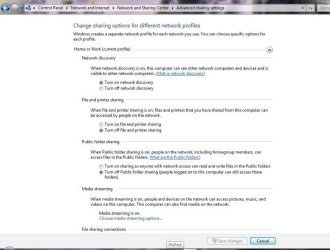
After searching the internet, I realized I had problems with network discovery. The settings on the desktop were all "off". I changed them to on, save, but next time they were off again.
This is what I did on the desktop:
Changed SSDP Discovery to automatic;
Function Resource DNS Client;(not sure if I changed)
DNS Client(not sure if I changed)
UPnPDevice off, changed to automatic
I also followed this link to check if DNS Client is OK:
http://www.howtogeek.com/howto/windo...ache-in-vista/
After doing all this, the only one that does not change back, is "Turn on network discovery"
I attach a screenshot:
I have a LAN with a Netgear Modem Rooter, a Desktop (Windows 7)(Intel Pentium, Dual CPU 1.8 GHz; 3GB RAM) and a laptop (Windows 7). My daughter when she is home also connects. Two printers connected to the desktop
I had no problems in the passed. We are both wired and wireless.
After the virus removal, we were unable to print from the laptops, but could print from the desktop. From the desktop, I cannot see my laptop; from the laptop, I can see desktop.
On my laptop, it idicates that the printers are off line.
After searching the internet, I realized I had problems with network discovery. The settings on the desktop were all "off". I changed them to on, save, but next time they were off again.
This is what I did on the desktop:
Changed SSDP Discovery to automatic;
Function Resource DNS Client;(not sure if I changed)
DNS Client(not sure if I changed)
UPnPDevice off, changed to automatic
I also followed this link to check if DNS Client is OK:
http://www.howtogeek.com/howto/windo...ache-in-vista/
After doing all this, the only one that does not change back, is "Turn on network discovery"
I attach a screenshot:
Attachments
My Computer
- Computer type
- PC/Desktop
- Computer Manufacturer/Model Number
- ECS G41T-M
- OS
- Windows 8.1 Pro x64
- CPU
- Intel Core i5-2300 CPU; 2.8 GHz
- Motherboard
- MSI H61M-P21 (B3)
- Memory
- 8 GB
- Sound Card
- USB PnP
- Monitor(s) Displays
- Samsung
- Screen Resolution
- 1024x768
- Hard Drives
- C: 500GB (Toshiba) (recently replaced)
D: 2TB (Seagate)
- PSU
- LPG9-25; 450Watt
- Keyboard
- Microsoft
- Mouse
- MS PS/2 Mouse
- Internet Speed
- Upload:6.60MBps; Download:2.06MBps
- Antivirus
- AVG
- Browser
- Chrome
- Other Info
- Microsoft Office Professional Plus 2013

