Problem with physical memeory usage going from 1.8GB to 7GB after idle

txracer16

New member
Local time
12:31 AM
Messages
6
I have started having a problem with the physical memory usage going from around 1.8GB to around 7GB after the PC sits idle for an hour or so.CPU usage is around 12% which is kind of high for my system with nothing going on, usually around 2-3% or lower. Seems to go up gradually till maxes out around 7GB, I have 9GB installed. The only way I can get it to go back to normal is to reboot and all is fine why using the PC but as soon as it goes to sleep the memory usage goes to hell. I found this out the other day when I went to play online and PC froze during play and had to exit the session. Have not really installed anything new other than Corsair VOID wireless headset but this issue did not start immediately after that but week or so. Last thing I did was try running windows update which would not run, was getting service can not run error message. Thinking might be related to this but I have tried disabling windows update in services and no change. When looking in resource monitor does not look like anything running is using abnormal amount of memory. Any ideas? I'm at a loss at this point. I have searched many forums and threads, tried a few suggestions and no change. Thanks in advance.
 
Last edited:

My Computer My Computer

At a glance

Windows 7 64bit Home premiumi7 9209MBMSI NVIDIA GeForce GTX 760ti
Computer type
PC/Desktop
Computer Manufacturer/Model Number
Gateway FX 6801
OS
Windows 7 64bit Home premium
CPU
i7 920
Motherboard
?
Memory
9MB
Graphics Card(s)
MSI NVIDIA GeForce GTX 760ti
Antivirus
Norton Security Suite
Browser
Firefox, IE9
7 MB ???

Your pc should be using an average of 3 GB

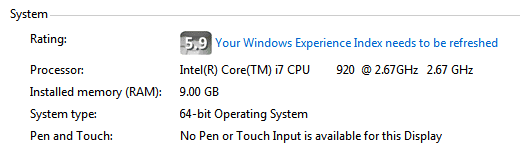
Check your memory again in system properties, you most certainly do not have 9 MB installed.

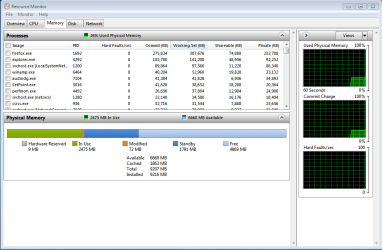
Also, post a shot of Resource Monitor showing the memory tab, and one on the Performance tab.

Task Manager>Resource Monitor>Memory Tab
 

My Computer My Computer

At a glance

Windows 10 Pro x64Intel Core i7 6700KGSkill TridentZ RGB 16GB 3600 16-16-16-36EVGA GTX 980 Ti SC x2
Computer type
PC/Desktop
Computer Manufacturer/Model Number
Skylake Special #666
OS
Windows 10 Pro x64
CPU
Intel Core i7 6700K
Motherboard
Asus Sabertooth Z170 Mark 1
Memory
GSkill TridentZ RGB 16GB 3600 16-16-16-36
Graphics Card(s)
EVGA GTX 980 Ti SC x2
Sound Card
Realtek High Definition
Monitor(s) Displays
AOC G2460PG
Screen Resolution
1920 x 1080 144Hz
Hard Drives
Samsung 860 Pro 256GB, Seagate Barracuda 4TB x2
PSU
EVGA 1000 P2, EVGA White Custom Braided Cables
Case
Corsair Vengeance C70 Gunmetal Black
Cooling
Corsair H100i v2, Corsair ML120 x2, Thermal Grizzly Kryonaut
Keyboard
Logitech G910 Orion Spectrum
Mouse
Logitech G700s
Internet Speed
Verizon Fios Quantum Gateway 75/75
Antivirus
Windows Defender, Malwarebytes Free 3.8.3
Browser
Chrome
Other Info
Corsair SP120 x4, LG Blu-ray Drive, Durabrand HT-395 100 Watt Dolby Digital Amp, Corsair H2100 Wireless 7.1 Headset
Yep 9GB, mistakenly typed MB previously (has been edited now). At least what it says, screen shot is now when things are normal. Will get another one later when it is acting up.
 

Attachments

  • System.PNG
    System.PNG
    4.4 KB · Views: 16
  • Memeory Tab.PNG
    Memeory Tab.PNG
    24.7 KB · Views: 1
Last edited:

My Computer My Computer

At a glance

Windows 7 64bit Home premiumi7 9209MBMSI NVIDIA GeForce GTX 760ti
Computer type
PC/Desktop
Computer Manufacturer/Model Number
Gateway FX 6801
OS
Windows 7 64bit Home premium
CPU
i7 920
Motherboard
?
Memory
9MB
Graphics Card(s)
MSI NVIDIA GeForce GTX 760ti
Antivirus
Norton Security Suite
Browser
Firefox, IE9
After the last post I let the computer sit and it went to sleep. This was 40 minutes ago and now the memory usage is at 7GB (I had said MB earlier, my mistake) upon wake up.
 

Attachments

  • Memory high.PNG
    Memory high.PNG
    24.4 KB · Views: 2

My Computer My Computer

At a glance

Windows 7 64bit Home premiumi7 9209MBMSI NVIDIA GeForce GTX 760ti
Computer type
PC/Desktop
Computer Manufacturer/Model Number
Gateway FX 6801
OS
Windows 7 64bit Home premium
CPU
i7 920
Motherboard
?
Memory
9MB
Graphics Card(s)
MSI NVIDIA GeForce GTX 760ti
Antivirus
Norton Security Suite
Browser
Firefox, IE9
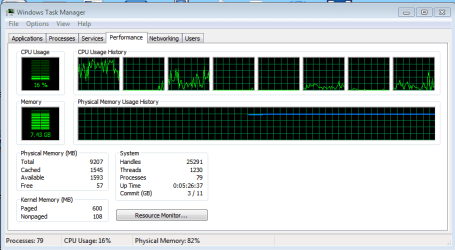
Post a screenshot of Task Manager - Performance tab. This shows information not in Resource Monitor.
 

My Computer My Computer

At a glance

Windows 7 Pro 64 bitXeon W35208 GBNvidia Geforce 210
Computer type
PC/Desktop
Computer Manufacturer/Model Number
HP
OS
Windows 7 Pro 64 bit
CPU
Xeon W3520
Memory
8 GB
Graphics Card(s)
Nvidia Geforce 210
Well 1st off, you should not have 9 GB installed, no way are you running in dual channel that way.

You should have 4, 8, or 16 GB installed, you need to fix that.
 

My Computer My Computer

At a glance

Windows 10 Pro x64Intel Core i7 6700KGSkill TridentZ RGB 16GB 3600 16-16-16-36EVGA GTX 980 Ti SC x2
Computer type
PC/Desktop
Computer Manufacturer/Model Number
Skylake Special #666
OS
Windows 10 Pro x64
CPU
Intel Core i7 6700K
Motherboard
Asus Sabertooth Z170 Mark 1
Memory
GSkill TridentZ RGB 16GB 3600 16-16-16-36
Graphics Card(s)
EVGA GTX 980 Ti SC x2
Sound Card
Realtek High Definition
Monitor(s) Displays
AOC G2460PG
Screen Resolution
1920 x 1080 144Hz
Hard Drives
Samsung 860 Pro 256GB, Seagate Barracuda 4TB x2
PSU
EVGA 1000 P2, EVGA White Custom Braided Cables
Case
Corsair Vengeance C70 Gunmetal Black
Cooling
Corsair H100i v2, Corsair ML120 x2, Thermal Grizzly Kryonaut
Keyboard
Logitech G910 Orion Spectrum
Mouse
Logitech G700s
Internet Speed
Verizon Fios Quantum Gateway 75/75
Antivirus
Windows Defender, Malwarebytes Free 3.8.3
Browser
Chrome
Other Info
Corsair SP120 x4, LG Blu-ray Drive, Durabrand HT-395 100 Watt Dolby Digital Amp, Corsair H2100 Wireless 7.1 Headset
Always wondered about the 9GB myself but it was that way from the manufacture and have never had any issues related to it. Memory has never been an issue till recently. Now up to 16% CPU and 7.43GB memory. Here is a screen of the performance tab also.
 

Attachments

  • performance tab.PNG
    performance tab.PNG
    12.8 KB · Views: 0

My Computer My Computer

At a glance

Windows 7 64bit Home premiumi7 9209MBMSI NVIDIA GeForce GTX 760ti
Computer type
PC/Desktop
Computer Manufacturer/Model Number
Gateway FX 6801
OS
Windows 7 64bit Home premium
CPU
i7 920
Motherboard
?
Memory
9MB
Graphics Card(s)
MSI NVIDIA GeForce GTX 760ti
Antivirus
Norton Security Suite
Browser
Firefox, IE9
I have run memory diagnostics, malware and virus scans and all checks out with no issues.
 

My Computer My Computer

At a glance

Windows 7 64bit Home premiumi7 9209MBMSI NVIDIA GeForce GTX 760ti
Computer type
PC/Desktop
Computer Manufacturer/Model Number
Gateway FX 6801
OS
Windows 7 64bit Home premium
CPU
i7 920
Motherboard
?
Memory
9MB
Graphics Card(s)
MSI NVIDIA GeForce GTX 760ti
Antivirus
Norton Security Suite
Browser
Firefox, IE9
Looks like I may have found the issue. Looks like my AV downloaded a bad update or the update got interrupted during a power outage we had a while back and was causing issue with NORTON running when the PC was idle or at rest. Did fresh install of NORTON and checked this morning after sitting all night and physical memeory was at 26%, 2.2GB. :) Will check again whe get home this afternoon, keeping fingers crossed.
 

My Computer My Computer

At a glance

Windows 7 64bit Home premiumi7 9209MBMSI NVIDIA GeForce GTX 760ti
Computer type
PC/Desktop
Computer Manufacturer/Model Number
Gateway FX 6801
OS
Windows 7 64bit Home premium
CPU
i7 920
Motherboard
?
Memory
9MB
Graphics Card(s)
MSI NVIDIA GeForce GTX 760ti
Antivirus
Norton Security Suite
Browser
Firefox, IE9
Back
Top