Problem with System Restore - usb drive not recognised

theRsole

New member
Local time
8:52 PM
Messages
6
So I have been trying to sort this out all day to no joy.

I have a system restore image on an external hard drive and was sent a replacement hard drive for by dell.
I got to the point of restoring from the system image, however when I reboot to continue I cannot select the external drive or see it to select the backup image.

I have followed a few threads around but not got anywhere - I have tried to point it to the correct drivers, but nothing seems to have worked to allow me access to the drive, pretty ridiculous that you aren't told about the huge flaws in the system restore process!

Is anyone able to confirm a way to do this, it's windows 7 pro, its a WD elements Hard drive, i've tried it in the usb 3.0 slots, in the usb 2.0 slots, ones on the front, ones on the back, tried to load the nusb3hub.inf files at the prompt and anything else I've managed to find on the web, but at the moment I'm looking at having to reinstall all my programs and files a different way, which is another day of not working

any help would be appreciated
 

My Computer

Computer type
PC/Desktop
OS
Windows 7 Pro
Welcome to the forum what are you booting from you need a boot disk for the imaging software does the drive normally need drivers?
 

My Computer

Computer type
PC/Desktop
OS
win 8 32 bit
When in windows the disk reads fine and doesn't need any drivers, or ask for them.
When you go through the system restore in control panel in the advanced menu it asks if you want to restore from a previously saved image, it then boots into a system restore bit and you have to select the image, this is where the USB HD is no longer found and the option is to look for files on a network or load drivers.
I've tried to do it with the windows DVD too and repair windows but it's the same scenario not being able to see the USB drive.
Seems pretty common issue looking on this and other forums
 

My Computer

Computer type
PC/Desktop
OS
Windows 7 Pro
Is the image a windows image or in other format ie ghost or acronis image?
 

My Computer

Computer type
PC/Desktop
OS
win 8 32 bit
samaria is on the right track by asking what did you use to create the USB image. Most imaging programs require some sort of boot method to get the computer to the stage it can read the stored image.
 

My Computer

Computer type
PC/Desktop
Computer Manufacturer/Model Number
Self built using existing case
OS
Windows 7 Home Premium 64 bit sp1
CPU
Intel i5 3570 3.4Ghz Ivy Bridge SKT 1155 quad core
Motherboard
Gigabyte Z77-HD3 SKT 1155 2xSata 3, 4x USB 3.0
Memory
G-Skill Rip Jaws 16Gb (8x2) DDR3 -1600 PC3 12800 CL 10 red
Graphics Card(s)
Gigabyte NVIDIA GT610 1Gb DDR3 810/1200 PCI-E 2.0 Silent
Sound Card
NVIDIA High Definition & Realtech High Definition Audio
Monitor(s) Displays
2 x Philips 226V4L 16:9 aspect ratio
Screen Resolution
1920 x 1080 HD
Hard Drives
Samsung 840 Pro 256gb SSD, SATA 3.
Hitachi Touro Portable 1tb, USB 3.0 HDD used for image b/ups.
PSU
Corsair VS450
Case
Codeng
Cooling
PSU fan & CPU fan
Keyboard
Logitech
Mouse
Logitech Wireless trackball M570
Internet Speed
Wireless 3G. 3mg down & 550kb up.
Antivirus
Bitdefender Internet Security 2020
Browser
Opera (Current Version) & Firefox
Other Info
MS Office 2013 Pro. Davis weather station software. MGE Nova 600 avr UPS.
the backup was made using the backup and restore in windows 7,
the restore was attempted using the same.

in windows I can see the disk and back up, in fact, it gives me the option to select the dated backups to restore the files from the external hard disk, however if I try to restore the system image it has created I cannot access the external hard disk
 

My Computer

Computer type
PC/Desktop
OS
Windows 7 Pro
Welcome to Seven Forums!

According to many people who have posted on this Forum, the built in Windows 7 backup and restore can be problematic. Having said that, it's always worked for me. Here's what I understand (if I've misunderstood I sincerely apologize.)
1. Dell sent you a replacement hard drive for your computer. (I'm guessing the replacement drive has Windows 7 on it or you wouldn't be able to boot from it.)
2. You boot your computer and then you go to "Backup and Restore"
3. You try to access your external hard drive (which contains your system images) but no joy.

Have you tried restoring a system image by using a System Repair Disc? Make sure your BIOS is set to boot from your CD/DVD drive as first option. Plug in your external drive. Boot from the repair disc. Select the option for Windows Complete PC Restore.

If you don't have a System Repair Disc this tutorial explains how. If your computer is 32-bit you have to use a disc created on a 32-bit computer. If a 64-bit computer, disc must be created on a 64-bit computer.

System Repair Disc - Create

Again, my apologies if I've misunderstood things. And my apologies (for jumping in) to those members who have been helping you.
 

My Computer

Computer type
Laptop
Computer Manufacturer/Model Number
Sony Vaio VPCEB47GM Laptop
OS
Win 7 Pro 64-bit
CPU
Intel i5 2.4 Ghz
Memory
8GB DDR3
Graphics Card(s)
Intel HD 3000
Sound Card
IDT High Definition
Monitor(s) Displays
15.6 WGXA Anti-Glare LED
Screen Resolution
1280x800
Hard Drives
640Gb 7200rpm
Antivirus
MSE
Browser
Opera (primary) with IE9 backup
Close enough, when I get into the bit to select the backup either on the reboot from backup and restore or from the repair disk the USB drive where the files are is not seen by windows so I can't complete the process
 

My Computer

Computer type
PC/Desktop
OS
Windows 7 Pro
Hi

Are you using 2.5 " external HDD.

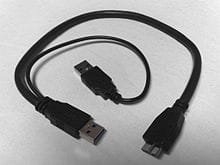
If the HDD cannot be read by the OS, you need a special Y-shaped_USB_3_cable.

1. The thin cable has to be connect to USB 2 port only, for power supply.

2. The center cable to connect to computer USB 3 port.

Do note that you need to connect to USB 2 for the power (step 1) before connect to computer USB 3 port (step 2).

Most probably is lack of power supply.


Eric.
 

Attachments

  • Y-shaped_USB_3.0_cable.jpg
    Y-shaped_USB_3.0_cable.jpg
    7.1 KB · Views: 30

My Computer

Computer type
Laptop
Computer Manufacturer/Model Number
Toshiba L630 and L735
OS
Windows 7 x64
Hard Drives
240 GB SSD
thanks for the tip, but I don't think the power is an issue at all as it lights up fine and works if you go into windows, would the power be getting reduced trying to use it in the boot menu?
 

My Computer

Computer type
PC/Desktop
OS
Windows 7 Pro

My Computer

Computer type
Laptop
Computer Manufacturer/Model Number
Sony Vaio VPCEB47GM Laptop
OS
Win 7 Pro 64-bit
CPU
Intel i5 2.4 Ghz
Memory
8GB DDR3
Graphics Card(s)
Intel HD 3000
Sound Card
IDT High Definition
Monitor(s) Displays
15.6 WGXA Anti-Glare LED
Screen Resolution
1280x800
Hard Drives
640Gb 7200rpm
Antivirus
MSE
Browser
Opera (primary) with IE9 backup

My Computer

Computer type
PC/Desktop
OS
Windows 7 Pro
Ah... sorry I wasn't fast enough with the link. Hopefully you won't need it now that everything (minus the bloatware) has been reinstalled. Best of luck with the new system and thanks for posting back. :thumbsup:
 

My Computer

Computer type
Laptop
Computer Manufacturer/Model Number
Sony Vaio VPCEB47GM Laptop
OS
Win 7 Pro 64-bit
CPU
Intel i5 2.4 Ghz
Memory
8GB DDR3
Graphics Card(s)
Intel HD 3000
Sound Card
IDT High Definition
Monitor(s) Displays
15.6 WGXA Anti-Glare LED
Screen Resolution
1280x800
Hard Drives
640Gb 7200rpm
Antivirus
MSE
Browser
Opera (primary) with IE9 backup
Back
Top