Solved Problem with the Wireless Adapter or Access point

Sherlocked

New member
Local time
3:20 AM
Messages
3
Location
New York
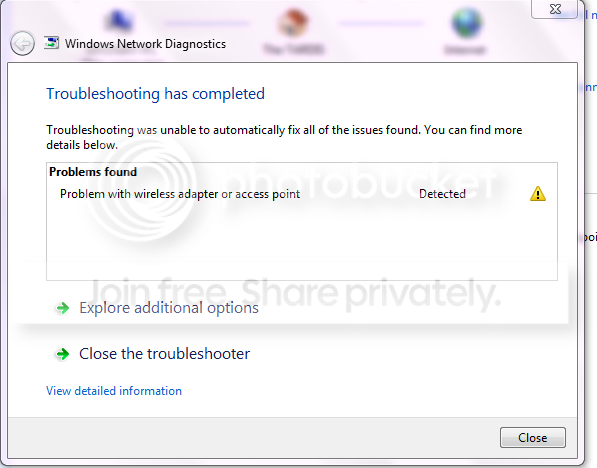
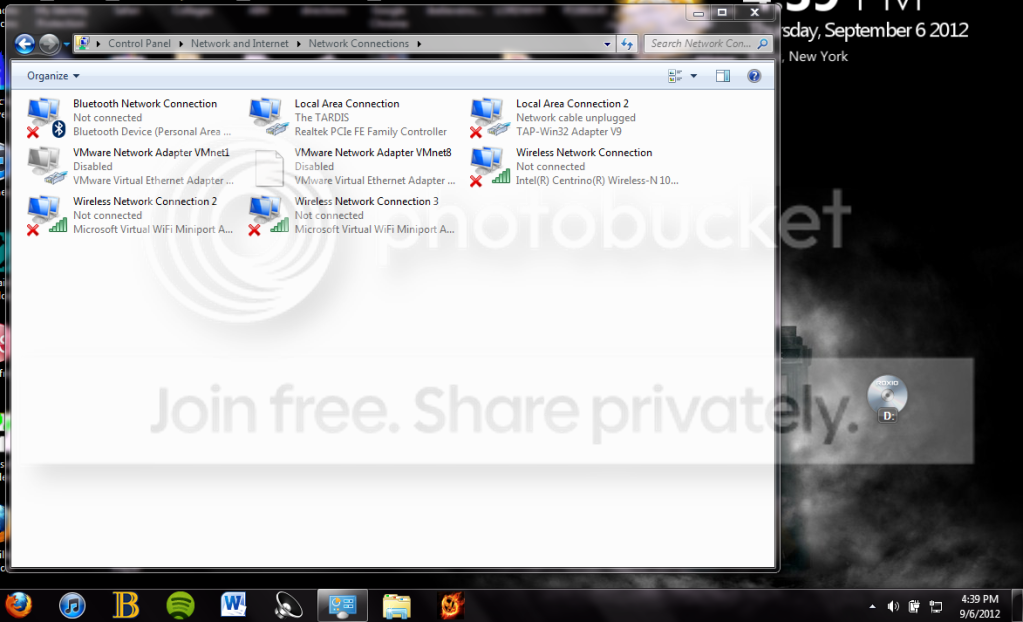
Hi, I'm having problem connecting to my wireless router. The router is working fine since I can use my iPod Touch and 3DS with it, it's my laptop that's giving me issues. The problem started at 3:30 in the morning and I went to school hoping it would be somehow better when I came back (wishful thinking, I know. :p), but of course...it wasn't. I remember when my computer told me it couldn't connect to the router I clicked on trouble shoot and it told me Vmnet1 and 8 were disabled and since I don't know anything about fixing it, I didn't trouble it. Can someone please help me? I'm currently using an Ethernet cable that is connected to my wireless router and it's a huge inconvenience. Thank you in advance for your time and help. :)

wirelessproblem.png

networkadapters.png
 

My Computer

OS
Windows 7 Home Premium 64bit.
You should first go into Device Manager and disable the two Microsoft Virtual WiFi mini port adaptors, these are famous for causing wireless connection problems and are only used for sharing a wireless connection.

It may also help to disable the Bluetooth connection if you aren't using it.

Just to confirm you don't have iTunes or McAfee installed on this system?
 

My Computer

Computer type
PC/Desktop
Computer Manufacturer/Model Number
Home built
OS
Windows 7 Ult, Windows 8.1 Pro,
CPU
Q9650-4.275GHz, E8600 4.5GHz, E6750-3.8GHz
Motherboard
Evga 780i FTW
Memory
G.Skill PC2 9600 1200Mhz 5 5 5 15 2T
Graphics Card(s)
GTX480
Sound Card
Asus Xonar D2
Monitor(s) Displays
HannsG
Screen Resolution
1680X1050
Hard Drives
GSkill Phoenix Pro 120GB SSD
PSU
ThermalTake Toughpower 1000Watt modular
Case
ThermalTake XaserV
Cooling
Xigmatek S1283
Keyboard
Logitech G15
Mouse
Logitech G9
Internet Speed
T1
The first thing to try when you have problems like this is reboot the router. Turn the power off for a minute or so then turn it back on. Doesn't always work but since you were able to connect to the router previously then suddenly can't, I would definitely give it a try.
 

My Computer

Computer type
PC/Desktop
Computer Manufacturer/Model Number
Home Built desktop, Dell G15 5511 Gaming laptop,MS Surface Pro 7 tablet
OS
W10 Pro desktop, W11 laptop, W11 Pro tablet (all 64-bit)
CPU
3.7Ghz 8700K i7, i7-11800H, i7-1065G7
Motherboard
ASUS TUF Z370-Pro Gaming in desktop
Memory
16G desktop, 16G laptop, 4G tablet
Graphics Card(s)
AMD Radeon RX580, RTX 3060, Intel Iris Plus
Sound Card
High Definition Audio (Built-in to mobo)
Monitor(s) Displays
Samsung U32J59 32" (2x), 15.6", 12"
Screen Resolution
3840x2160, 3840x2160, 1920x1080, 2160x1440
Hard Drives
500G SSD for OS; 2T, 10T & 15T HDDs for Data on Desktop, 1TB SSD laptop, 128G SSD tablet.
PSU
Corsair CX 750M
Case
Antec 100
Cooling
CM 212+
Keyboard
IBM Model M - used continuously since 1986
Mouse
Microsoft Pro IntelliMouse
Internet Speed
400M down 8M up
Antivirus
Windows Defender
Browser
FireFox
Other Info
Built my first computer (8Mhz 8088cpu, 640K RAM, 20MB HDD, 2 360K floppy drives) in 1985 and have been building them for myself, relatives and friends ever since.
Hey guys, first off I just wanted to say thank you for taking the time to help me. Chev65, if you hadn't told me to go to device manager, I would have never known the Intel(R) Centrino(R) Wireless-N 1030 was disabled. I don't know HOW it got disabled, but I just enabled it and bam - my computer found The TARDIS. :)
 

My Computer

OS
Windows 7 Home Premium 64bit.
Hey guys, first off I just wanted to say thank you for taking the time to help me. Chev65, if you hadn't told me to go to device manager, I would have never known the Intel(R) Centrino(R) Wireless-N 1030 was disabled. I don't know HOW it got disabled, but I just enabled it and bam - my computer found The TARDIS. :)

That adaptor showed up as not connected which is different than being disabled. Glad you figured out what the problem was.
 

My Computer

Computer type
PC/Desktop
Computer Manufacturer/Model Number
Home built
OS
Windows 7 Ult, Windows 8.1 Pro,
CPU
Q9650-4.275GHz, E8600 4.5GHz, E6750-3.8GHz
Motherboard
Evga 780i FTW
Memory
G.Skill PC2 9600 1200Mhz 5 5 5 15 2T
Graphics Card(s)
GTX480
Sound Card
Asus Xonar D2
Monitor(s) Displays
HannsG
Screen Resolution
1680X1050
Hard Drives
GSkill Phoenix Pro 120GB SSD
PSU
ThermalTake Toughpower 1000Watt modular
Case
ThermalTake XaserV
Cooling
Xigmatek S1283
Keyboard
Logitech G15
Mouse
Logitech G9
Internet Speed
T1
You should first go into Device Manager and disable the two Microsoft Virtual WiFi mini port adaptors, these are famous for causing wireless connection problems and are only used for sharing a wireless connection.

It may also help to disable the Bluetooth connection if you aren't using it.

Just to confirm you don't have iTunes or McAfee installed on this system?


Hi I am having a similar issue as this guy you helped BUT the problems started after McAfee was downloaded by mistake (attached to flash player update) so I was wondering if you could help me.:confused:
 

My Computer

Computer type
Laptop
Computer Manufacturer/Model Number
toshiba
OS
windows 7
You should first go into Device Manager and disable the two Microsoft Virtual WiFi mini port adaptors, these are famous for causing wireless connection problems and are only used for sharing a wireless connection.

It may also help to disable the Bluetooth connection if you aren't using it.

Just to confirm you don't have iTunes or McAfee installed on this system?


Hi I am having a similar issue as this guy you helped BUT the problems started after McAfee was downloaded by mistake (attached to flash player update) so I was wondering if you could help me.:confused:
It would help you if you made a new post explaining your problems and giving as many details as possible. You may think your issue is the same but you'd be surprised how different it can be with different machines.

Welcome to the forum and hoping you get your problem solved. :D
 

My Computer

Computer type
PC/Desktop
Computer Manufacturer/Model Number
Acer Aspire XC-704 x64 bit/ Asus K55A Notebook PC/HP Envy x360 Convertible 15-bq0xx
OS
Windows 10 64bit/Windows 10 64bit/Windows 10 64bit
CPU
Intel Pentium J3710 @ 60GHz/Intel B820,1.7GHz/AMD A9 Radeon
Motherboard
Acer Aspire XC-704 (SOCKET 0)/Asus/HP 8312 (Socket FP4)
Memory
8.00GB DDR3 @ 1599MHz/8GB 2 x 4GB DDR3/8.00GB Dual-Channel
Graphics Card(s)
Intel HD Graphics/Intel/512MB ATI AMD Radeon R5 Graphics (HP
Sound Card
Realtek High Definition Audio/Onboard/AMD High Definition Au
Monitor(s) Displays
Acer LCD K222HQL /Asus 15.6/Generic PnP Monitor (1920x1080@6
Screen Resolution
1920x1080@59Hz/1366 x 768/1920x1080@60Hz
Hard Drives
1863GBWesternn Digital WDC/Asus/119GB SanDisk SD8SN8U-128G-1006 (SSD)
931GB Hitachi HGST HTS721010A9E630 (SATA)
Keyboard
Microsoft Natural Ergonomic Keyboard 4000 (UK)/Inbuilt/Inbui
Mouse
Microsoft Optical Wheel Mouse/Same plus Touchpad/Same + Pad
Internet Speed
Infinity 2 up to 76 Mbps
Antivirus
MSE/MSE/MSE and all 3 have MalwareBytes Premium
Browser
Edge, Firefox/Edge, Firefox/Edge, Firefox, Chrome
Other Info
Seagate Expansion 500GB External Desktop Drive
Seagate Expansion Portable Drives 500GB and 1TB
Epson XP-332 Wireless Printer
wireless adapter

I know this is an old thread but it comes up all the time when searching this subject. I finally resolved this by resetting my router to default. Apparently (I have a Belkin) it saved prior information (not necessarily the original one??) and when I changed the SSID, passwords, etc., it conflicted with everything else. Try resetting your router but don't forget to save your prior settings. I knew them by heart since I was dealing with this for so long!! :mad:
Hope this helps :D
 

My Computer

Computer type
Laptop
OS
Windows 7 Pro 32bit
Back
Top