Problem with Toshiba Battery

Y5N

New member
Local time
3:33 AM
Messages
5
Hi , i have this toshiba satellite C870-15R , and my problem started today when i tried to boot only with my battery but it didn't , and plugged it, and successfully booted , i checked bettery icon , it show 100% charged , is there anything you can help me with thanks in advance , ( ask me for any informations about the laptop )

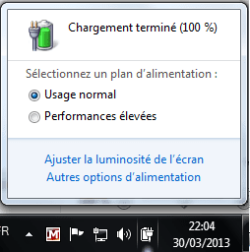
i attached 2 pictures for battery notifications , first one with battery attached , second picture when i remove the battery ( just to show the battery isn't dead )
( i have windows 7 ultimate x64 )


Attachments

  • problem 2.png
    problem 2.png
    6.9 KB · Views: 20
  • problem 1.png
    problem 1.png
    7.1 KB · Views: 19

My Computer

OS
Windows 7 Édition Intégrale x64
If I understand french, the message shows that your battery is not detected (it may be dead/dilapidated).

Can you boot up you PC with battery AND AC adapter(as well) plugged in?
 

My Computer

Computer Manufacturer/Model Number
Toshiba Satelite P300D 13J (Short model No: PSPDCE)
OS
Windows 7 Enterprise x64 SP1 Version 6.1 Build 7601
CPU
x64bit AMD Turion(tm) X2 Ultra Dual-Core Mobile ZM-82
Memory
4096 (2048 + 2048) MB, DDR2 RAM (800 MHz), max 8,192 MB
Graphics Card(s)
ATI Mobility Radeon™ HD 3650+HyperMemory™(512MB VRAM+2302MB)
Sound Card
Manufacturer: harman/kardon
Monitor(s) Displays
Generic PnP Monitor (MONITOR\LPLA101)
Screen Resolution
1440 x 900 (19" LCD)
Hard Drives
HDD1: TOSHIBA MK3252GSX ATA Device (IDE 320 GB 5,400 o/min) ,
HDD2: Msft Virtual Disk SCSI Disk Device (Virtual Hard Drive),
HDD3: TOSHIBA MK3263GSX USB Device (USB Mobile HDD) (TakeMS MemLine)
PSU
Batery: technology : lithium-ion
Cooling
integrated cooler + 3x external cooler
Keyboard
USB Logitech S520
Mouse
USB Logitech S520
Internet Speed
WAN: 7,2 Mbit/sec, WLAN: 54 Mbit/sec + Bluetooth®
Hi,
about the pictures, the left is when i remove the battery, the right one is with battery on
and yes it can boot up with AC adapter and battery (that's what the right pic shows , with 100% charged )
and another thing that's battery LED is off even the battery is plugged in
 

My Computer

OS
Windows 7 Édition Intégrale x64
Back
Top