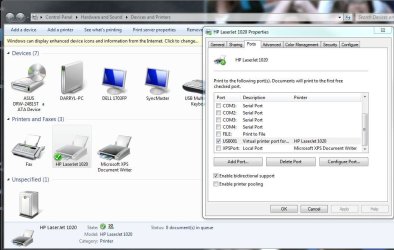
I was a bit stupid in installing the print driver for the HP1200 - It seems that my Dell Vostro 420 didn't find the printer via the USB ports that I tried... So I went to HP and downloaded their PCL5 driver and installed it.
Unfortunately :
1) It shows up as wanting to print thro LPT1 - which the Vostro des NOT have, & I can't see any way of removing this driver and "trying again"!
2)I was surprised to find that there was no "Restore" function preset on this Win 7 x64 before I fell into this trap.
3) I have set up enough "Viagra" disk space to allow many "restore to previous time" NOW.
But that doen't aid me NOW.
I do not see any way of removing this "forced to use LPT1" port now, nor any way of forcing Win 7 x64 to find & activate the USB printing port.... of which I have many.
Can anyone assist?
I might add that the same Vostro has had no trouble USB printing with XP-64 a few days ago, so perhaps I'll need to multi-boot to that O/s just to do some printing - very unfortunately.
All serious suggestions gratefully received over here in "Far Cathay" @ 00:15
Unfortunately :
1) It shows up as wanting to print thro LPT1 - which the Vostro des NOT have, & I can't see any way of removing this driver and "trying again"!
2)I was surprised to find that there was no "Restore" function preset on this Win 7 x64 before I fell into this trap.
3) I have set up enough "Viagra" disk space to allow many "restore to previous time" NOW.
But that doen't aid me NOW.
I do not see any way of removing this "forced to use LPT1" port now, nor any way of forcing Win 7 x64 to find & activate the USB printing port.... of which I have many.
Can anyone assist?
I might add that the same Vostro has had no trouble USB printing with XP-64 a few days ago, so perhaps I'll need to multi-boot to that O/s just to do some printing - very unfortunately.
All serious suggestions gratefully received over here in "Far Cathay"
@ 00:15My Computer
- Computer Manufacturer/Model Number
- Dell Vostro 420
- OS
- Win 7 x64
- CPU
- Quad core
- Memory
- 4GB
- Hard Drives
- Many 320GB + 2TB