

- Local time
- 10:02 PM
- Messages
- 136
It seems with my installation of Windows 7 Professional SP1 as soon as I manage to fix one problem it creates another.
It all started when I installed a copy of R3dfox as a trial in an attempt to resolve problems I've started to encounter with some websites no longer being compatible with the version of Firefox I use: 115.35.0esr (64-bit).
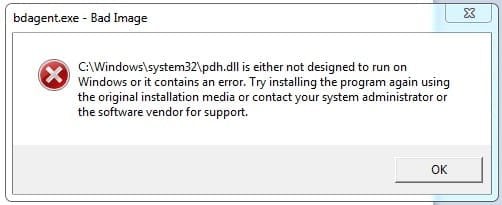
It might be a coincidence but I immediately started getting an error every time I booted the system. This flagged a problem with system file pdh.dll shown in the attached screenshot. Uninstalling R3dfox didn't fix it.
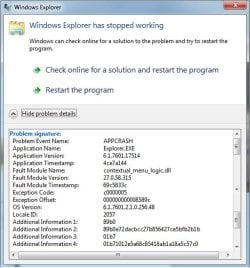
Having searched online for a solution I decided to try System Restore to a date before I installed R3dfox. This seemed to fix the error but now I'm having a problem with Windows Explorer crashing. This happens every time I try to right-click on anything. I've selected the option for Windows to search online for a solution - repeatedly - but this has not fixed it. The second attached screenshot shows the error information.
To complicate things further I had to uninstall Bitdefender before System Restore would work and now I haven't been able to re-install it. The installer doesn't work - nothing happens when I try to run it - and I'm wondering if that's related to the problem with Explorer.
If anyone has any ideas how to resolve this I'd be massively grateful as I'm currently tearing my hair out with this system.
Edit: Looks like the pdh.dll problem isn't fixed either after all so things are just going from bad to worse I've now discovered Explorer crashes if I try to empty the waste bin.
It all started when I installed a copy of R3dfox as a trial in an attempt to resolve problems I've started to encounter with some websites no longer being compatible with the version of Firefox I use: 115.35.0esr (64-bit).
It might be a coincidence but I immediately started getting an error every time I booted the system. This flagged a problem with system file pdh.dll shown in the attached screenshot. Uninstalling R3dfox didn't fix it.
Having searched online for a solution I decided to try System Restore to a date before I installed R3dfox. This seemed to fix the error but now I'm having a problem with Windows Explorer crashing. This happens every time I try to right-click on anything. I've selected the option for Windows to search online for a solution - repeatedly - but this has not fixed it. The second attached screenshot shows the error information.
To complicate things further I had to uninstall Bitdefender before System Restore would work and now I haven't been able to re-install it. The installer doesn't work - nothing happens when I try to run it - and I'm wondering if that's related to the problem with Explorer.
If anyone has any ideas how to resolve this I'd be massively grateful as I'm currently tearing my hair out with this system.
Edit: Looks like the pdh.dll problem isn't fixed either after all so things are just going from bad to worse
I've now discovered Explorer crashes if I try to empty the waste bin.Attachments
Last edited:
My Computer
At a glance
Windows 7 Professional 64-bit SP1Pentium Core i5-2500 3.3GHz2 x 4GB DDR3 1333MHzAsus GT440 1GB GDDR5
- Computer type
- PC/Desktop
- Computer Manufacturer/Model Number
- Home build
- OS
- Windows 7 Professional 64-bit SP1
- CPU
- Pentium Core i5-2500 3.3GHz
- Motherboard
- Gigabyte P61-USB3-B3
- Memory
- 2 x 4GB DDR3 1333MHz
- Graphics Card(s)
- Asus GT440 1GB GDDR5
- Sound Card
- Realtek integrated sound
- Monitor(s) Displays
- LG L1942PE
- Screen Resolution
- 1280 x 1024 @ 60Hz
- Hard Drives
- 2 x 1TB Western Digital WD10EARS, 1 x 1TB Seagate ST1000DM010
- PSU
- EVGA 450BR
- Case
- Novatech Panther ATX
- Cooling
- Sharkoon Silent Eagle 1000 120mm in case rear extracting
- Keyboard
- Logitech K120


