
Problems creating default association for Yahoo mail

nottaclue9

New member
Member
VIP
Local time
11:17 PM
Messages
456
Location
San Antonio, TX
I have a new computer. I thought I had Yahoo installed on the new computer because I can send and receive email. But I cannot send an attachment or photo. "There is no email program associated.... Create an association in the default programs control panel." I have tried several different things such as regedit 32exe (and 64exe)/HKEY/clients/mail, etc., but cannot get past the "exe" part. I get the red X box telling me that an error occurred in opening the file. So then I tried start/default programs/set program association/non-Microsoft and Custom.

The problem is that "use current email" is already checked in the window which appears during the latter process. There are no other email programs to select, nor is there a place to type in another email program.
 

Attachments
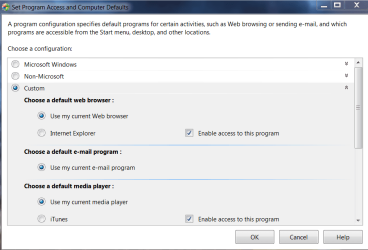
  • Capture.PNG
    Capture.PNG
    24.8 KB · Views: 1

My Computer

Computer type
PC/Desktop
Computer Manufacturer/Model Number
Custom
OS
Windows 7 Home Premium 64-bit, service pack 1
CPU
Intel box core i5 4460
Motherboard
Asus B85MECSM 1150
Memory
Kingston Hyper X Fury BLK 1866 8GB 4x2
Monitor(s) Displays
Samsung 23" wide-screen
Screen Resolution
1920 X 1080
Hard Drives
WD Passport, 1 TB
Case
Win Z583 Mini Tower w/ USB3.0
Keyboard
Microsoft ergo wave
Mouse
Logitech wireless
Antivirus
Bitdefender; Malwarebytes Pro
Browser
IE11

My Computer

Computer type
PC/Desktop
OS
Windows 10 Home x64
CPU
INTEL Core i5-750 Quad-Core 3.37GHz
Motherboard
ASUS P7P55D
Memory
HyperX Fury Black Series 8GB (2 x 4GB) 1866Mhz
Graphics Card(s)
EVGA GeForce GTX 750 Superclocked 1GB 128-Bit GDDR5
Monitor(s) Displays
LG 32MA68HY 32" IPS
Screen Resolution
1920 x 1080
Hard Drives
Samsung 840 Evo 120GB, SEAGATE 500GB Barracuda® 7200.12, SATA 3 Gb/s, 7200 RPM, 16MB cache
PSU
ANTEC TruePower New TP-550, 80 PLUS, 550W
Case
ANTEC Three Hundred Illusion
Cooling
COOLER MASTER Hyper 212 Plus, 4 x 120mm 1 x 140mm Noctua's
Internet Speed
85 + Mbps
Antivirus
Avast
Browser
Vivaldi
Thanks, A Guy. Although I dread having the Yahoo toolbar, I will give this a try.

~~~~~~~~~~~~~~~~~~~~~~~~~~~~~~~~~~~~~~~~~~~~~~~~~~~~~~~~~~~~~~~~~~

OK. Toolbar is installed, but there is still no association established. I have discovered that I have no MAIL TO in my protocols. Is that the problem?
 

My Computer

Computer type
PC/Desktop
Computer Manufacturer/Model Number
Custom
OS
Windows 7 Home Premium 64-bit, service pack 1
CPU
Intel box core i5 4460
Motherboard
Asus B85MECSM 1150
Memory
Kingston Hyper X Fury BLK 1866 8GB 4x2
Monitor(s) Displays
Samsung 23" wide-screen
Screen Resolution
1920 X 1080
Hard Drives
WD Passport, 1 TB
Case
Win Z583 Mini Tower w/ USB3.0
Keyboard
Microsoft ergo wave
Mouse
Logitech wireless
Antivirus
Bitdefender; Malwarebytes Pro
Browser
IE11

My Computer

Computer type
PC/Desktop
OS
Windows 10 Home x64
CPU
INTEL Core i5-750 Quad-Core 3.37GHz
Motherboard
ASUS P7P55D
Memory
HyperX Fury Black Series 8GB (2 x 4GB) 1866Mhz
Graphics Card(s)
EVGA GeForce GTX 750 Superclocked 1GB 128-Bit GDDR5
Monitor(s) Displays
LG 32MA68HY 32" IPS
Screen Resolution
1920 x 1080
Hard Drives
Samsung 840 Evo 120GB, SEAGATE 500GB Barracuda® 7200.12, SATA 3 Gb/s, 7200 RPM, 16MB cache
PSU
ANTEC TruePower New TP-550, 80 PLUS, 550W
Case
ANTEC Three Hundred Illusion
Cooling
COOLER MASTER Hyper 212 Plus, 4 x 120mm 1 x 140mm Noctua's
Internet Speed
85 + Mbps
Antivirus
Avast
Browser
Vivaldi
Would I need to change my browser to Firefox?

~~~~~~~~~~~~~~~~~~~~~~~~~~~~~~~~~~~~~~~~~~~~~~~~~~~~~~~~~~~~~~~~~~

Wow, just tried to disable Yahoo toolbar, and my computer froze. Then I got a window telling me to contact my administrator. Brutal!
 

My Computer

Computer type
PC/Desktop
Computer Manufacturer/Model Number
Custom
OS
Windows 7 Home Premium 64-bit, service pack 1
CPU
Intel box core i5 4460
Motherboard
Asus B85MECSM 1150
Memory
Kingston Hyper X Fury BLK 1866 8GB 4x2
Monitor(s) Displays
Samsung 23" wide-screen
Screen Resolution
1920 X 1080
Hard Drives
WD Passport, 1 TB
Case
Win Z583 Mini Tower w/ USB3.0
Keyboard
Microsoft ergo wave
Mouse
Logitech wireless
Antivirus
Bitdefender; Malwarebytes Pro
Browser
IE11
Firefox and Chrome can be set to us Yahoo for web based links, and you'd have to use those browsers, yes. If you set up WLM to use Yahoo, then it would be the system default. Yeah, I wouldn't especially want the Yahoo toolbar either :(

A Guy
 

My Computer

Computer type
PC/Desktop
OS
Windows 10 Home x64
CPU
INTEL Core i5-750 Quad-Core 3.37GHz
Motherboard
ASUS P7P55D
Memory
HyperX Fury Black Series 8GB (2 x 4GB) 1866Mhz
Graphics Card(s)
EVGA GeForce GTX 750 Superclocked 1GB 128-Bit GDDR5
Monitor(s) Displays
LG 32MA68HY 32" IPS
Screen Resolution
1920 x 1080
Hard Drives
Samsung 840 Evo 120GB, SEAGATE 500GB Barracuda® 7200.12, SATA 3 Gb/s, 7200 RPM, 16MB cache
PSU
ANTEC TruePower New TP-550, 80 PLUS, 550W
Case
ANTEC Three Hundred Illusion
Cooling
COOLER MASTER Hyper 212 Plus, 4 x 120mm 1 x 140mm Noctua's
Internet Speed
85 + Mbps
Antivirus
Avast
Browser
Vivaldi
I would like to use Firefox, but there are so many things about it that I can't seem to get a handle on. Like that pale type, among other things.

Do you know why I wouldn't have MAIL TO in my protocols?
 

My Computer

Computer type
PC/Desktop
Computer Manufacturer/Model Number
Custom
OS
Windows 7 Home Premium 64-bit, service pack 1
CPU
Intel box core i5 4460
Motherboard
Asus B85MECSM 1150
Memory
Kingston Hyper X Fury BLK 1866 8GB 4x2
Monitor(s) Displays
Samsung 23" wide-screen
Screen Resolution
1920 X 1080
Hard Drives
WD Passport, 1 TB
Case
Win Z583 Mini Tower w/ USB3.0
Keyboard
Microsoft ergo wave
Mouse
Logitech wireless
Antivirus
Bitdefender; Malwarebytes Pro
Browser
IE11
You don't have the mailto protocol at all? I was going to suggest this thread

http://www.sevenforums.com/browsers-mail/214845-mailto-protocol-missing-3.html

But see you are the last poster there. Did you try Shawn's reg file?

You could try editing the registry, if so, make a backup first

http://www.sevenforums.com/tutorials/4230-registry-backup-restore.html

See the step How Re-create the missing string value? in the Answer here:

No mailto protocol - Microsoft Community

Chrome makes it easy to use Gmail. FF makes it easy to choose the provider, but IE is tied in with windows, it expects you to use the system defaults in the OS itself. I only mentioned WLM because it would be easy to set it's associations, and it can be made to send through Yahoo. You wouldn't be using WLM much, just for the Mailto. You can always still access Yahoo via the web as you do now. A Guy
 

My Computer

Computer type
PC/Desktop
OS
Windows 10 Home x64
CPU
INTEL Core i5-750 Quad-Core 3.37GHz
Motherboard
ASUS P7P55D
Memory
HyperX Fury Black Series 8GB (2 x 4GB) 1866Mhz
Graphics Card(s)
EVGA GeForce GTX 750 Superclocked 1GB 128-Bit GDDR5
Monitor(s) Displays
LG 32MA68HY 32" IPS
Screen Resolution
1920 x 1080
Hard Drives
Samsung 840 Evo 120GB, SEAGATE 500GB Barracuda® 7200.12, SATA 3 Gb/s, 7200 RPM, 16MB cache
PSU
ANTEC TruePower New TP-550, 80 PLUS, 550W
Case
ANTEC Three Hundred Illusion
Cooling
COOLER MASTER Hyper 212 Plus, 4 x 120mm 1 x 140mm Noctua's
Internet Speed
85 + Mbps
Antivirus
Avast
Browser
Vivaldi
Thanks, A Guy. Yes, I did try Shawn's reg file. I kept ending up at the same place, no matter what I tried. It seems like it's the mailto thing that's the problem.

Meanwhile, down here on the ranch, Yahoo kept doing stranger and stranger things as the day progressed. I think installing and uninstalling the Yahoo Toolbar confused Yahoo's brain, and things started going haywire. My usual patient self just sort of said, "Way too much hassle to deal with you. G'Bye." I just notified my weary correspondents that I'd changed my email to one of my other accounts. Yahoo's a mess. I took the easy out! Thanks for all the ideas, however. :)
 

My Computer

Computer type
PC/Desktop
Computer Manufacturer/Model Number
Custom
OS
Windows 7 Home Premium 64-bit, service pack 1
CPU
Intel box core i5 4460
Motherboard
Asus B85MECSM 1150
Memory
Kingston Hyper X Fury BLK 1866 8GB 4x2
Monitor(s) Displays
Samsung 23" wide-screen
Screen Resolution
1920 X 1080
Hard Drives
WD Passport, 1 TB
Case
Win Z583 Mini Tower w/ USB3.0
Keyboard
Microsoft ergo wave
Mouse
Logitech wireless
Antivirus
Bitdefender; Malwarebytes Pro
Browser
IE11
Back
Top