Solved Problems dual booting with ubuntu - now Win7 wont start

happygarden

New member
Local time
7:20 PM
Messages
8
Hi, I have a problem which I'm lookin for some advice.
I've downloaded and loaded up ubuntu 11.10 on my win7 laptop.

I assumed I required several partitions to run ubuntu alongside win7 - but having freed up some space (100gb) in gparted – which then stayed “unusable” - I then (initially) rebooted back into Win 7 fine (after a 5min chkdsk at startup) - saw my free space, and formatted it as fat32 (why I did that, I’m not entirely sure – but I supposed gparted could see/use it.

So far so good (or so I thought). Fired up ubuntu, set the install partition (mount "/" - ex4, etc) - but with no swap partition. So I repeat the process - resize the main Win7 sys partition by another 5 gb - and then try and reboot into win7...

And now nothing. I load the Win7 recovery environment - and startup repair states chkdsk fails due to "system volume on disk is corrupt". load up diskpart - select the dist - but now shows the main hdd has no volumes - and status is invalid. Also - there is an * denoting it's a dynamic disk. ???

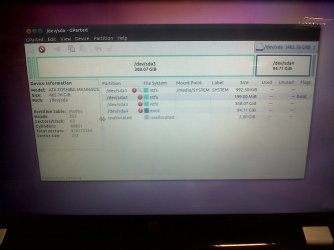
If I reload ubuntu from a dvd- all ok, from gparted - I see in disks: the ntfs partitions with all the data -and the 100gb free for ubuntu (all of which are unaccessible in windows recovery env - or so it seems).

how can I repair the win7 boot option? I'm not too fussed about the ubuntu (and wouldn't have ventured if I'd have known what lay in store) - however, it all seemed straightforward at the time, and I'm drawn by a quick boot time, etc, etc..

So - dual booting isnt' setup. Win7 won't load - and can't access any of the other partitions either.

I don't want to blat the thing - but any advice on getting back to where I was (before I started) would be gratefully recieved...

Thanks
 

My Computer My Computer

At a glance

7 home x64amd4gb
Computer Manufacturer/Model Number
hp
OS
7 home x64
CPU
amd
Memory
4gb
Hard Drives
500gb
Ouch! Yep, you have to be a bit careful dual-booting Windows and Linux, in that order, but it can be done quite easily - I have Windows 7 and Linux Mint 12 dual-booted, although I chose to go to separate disk for the Linux installation.

Do you have the Windows 7 installation DVD handy? I speak under correction, but I believe it is possible to fix the bootmgr from the Windows 7 DVD, but I've never done it myself....and certainly never after a borked Linux installation. I'll see if I can find someone that has, and point them this way.

Help has been requested - locate your Windows 7 installation DVD and sit tight.....

Regards,
Golden
 

My Computer My Computer

At a glance

Windows 10 Pro x64 ; Xubuntu x64Intel i7 860 @ 2.80 GHz O/C'ed to 4.0GHz16GB Corsair Vengance DDR3 @ 661 MHz Dual Cha...EVGA NVidia GTX 560 1024MB
Computer type
PC/Desktop
Computer Manufacturer/Model Number
Golden Mk. I.4
OS
Windows 10 Pro x64 ; Xubuntu x64
CPU
Intel i7 860 @ 2.80 GHz O/C'ed to 4.0GHz
Motherboard
Gigabyte P55A-UD3R Rev.1. Award BIOS F13
Memory
16GB Corsair Vengance DDR3 @ 661 MHz Dual Channel (9-9-9-24)
Graphics Card(s)
EVGA NVidia GTX 560 1024MB
Sound Card
Realtek Integrated
Monitor(s) Displays
Dual Samsung SyncMaster 2494HS
Screen Resolution
1920*1080 and 1920*1080
Hard Drives
1*Samsung 840 EVO 120GB SSD;
1*OCZ Vertex 2 60GB SSD;
2*Samsung F3 SpinPoint 1TB in RAID0;
1*Samsung F1 SpinPoint 1TB;
2*Western Digital 1TB External USB 3.0
1*Western Digital 500GB External USB 3.0
1*Seagate 500GB External USB 2.0
PSU
Thermaltake ToughPower QFan 750W
Case
Thermaltake Element S VK60001W2Z
Cooling
Corsair H60 Water Cooling, 2*230mm and 2*80mm case fans
Keyboard
Logitech G110
Mouse
Logitech MX518
thanksforthespeedyreply.
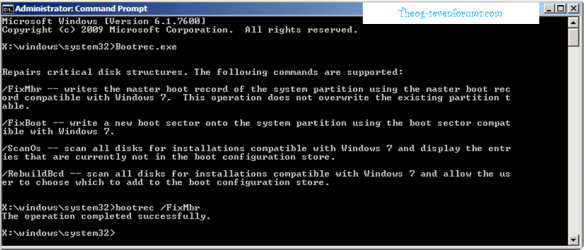
yes, I have loaded up the recovery dvd - and tried a bootrec.exe /fixmbr - but still no joy.
I don't quite know what I've bodged...
 

My Computer My Computer

At a glance

7 home x64amd4gb
Computer Manufacturer/Model Number
hp
OS
7 home x64
CPU
amd
Memory
4gb
Hard Drives
500gb

My Computer My Computer

At a glance

Windows 10 Pro x64 ; Xubuntu x64Intel i7 860 @ 2.80 GHz O/C'ed to 4.0GHz16GB Corsair Vengance DDR3 @ 661 MHz Dual Cha...EVGA NVidia GTX 560 1024MB
Computer type
PC/Desktop
Computer Manufacturer/Model Number
Golden Mk. I.4
OS
Windows 10 Pro x64 ; Xubuntu x64
CPU
Intel i7 860 @ 2.80 GHz O/C'ed to 4.0GHz
Motherboard
Gigabyte P55A-UD3R Rev.1. Award BIOS F13
Memory
16GB Corsair Vengance DDR3 @ 661 MHz Dual Channel (9-9-9-24)
Graphics Card(s)
EVGA NVidia GTX 560 1024MB
Sound Card
Realtek Integrated
Monitor(s) Displays
Dual Samsung SyncMaster 2494HS
Screen Resolution
1920*1080 and 1920*1080
Hard Drives
1*Samsung 840 EVO 120GB SSD;
1*OCZ Vertex 2 60GB SSD;
2*Samsung F3 SpinPoint 1TB in RAID0;
1*Samsung F1 SpinPoint 1TB;
2*Western Digital 1TB External USB 3.0
1*Western Digital 500GB External USB 3.0
1*Seagate 500GB External USB 2.0
PSU
Thermaltake ToughPower QFan 750W
Case
Thermaltake Element S VK60001W2Z
Cooling
Corsair H60 Water Cooling, 2*230mm and 2*80mm case fans
Keyboard
Logitech G110
Mouse
Logitech MX518
Thats it right there - thanks for your help theog.
 

My Computer My Computer

At a glance

Windows 10 Pro x64 ; Xubuntu x64Intel i7 860 @ 2.80 GHz O/C'ed to 4.0GHz16GB Corsair Vengance DDR3 @ 661 MHz Dual Cha...EVGA NVidia GTX 560 1024MB
Computer type
PC/Desktop
Computer Manufacturer/Model Number
Golden Mk. I.4
OS
Windows 10 Pro x64 ; Xubuntu x64
CPU
Intel i7 860 @ 2.80 GHz O/C'ed to 4.0GHz
Motherboard
Gigabyte P55A-UD3R Rev.1. Award BIOS F13
Memory
16GB Corsair Vengance DDR3 @ 661 MHz Dual Channel (9-9-9-24)
Graphics Card(s)
EVGA NVidia GTX 560 1024MB
Sound Card
Realtek Integrated
Monitor(s) Displays
Dual Samsung SyncMaster 2494HS
Screen Resolution
1920*1080 and 1920*1080
Hard Drives
1*Samsung 840 EVO 120GB SSD;
1*OCZ Vertex 2 60GB SSD;
2*Samsung F3 SpinPoint 1TB in RAID0;
1*Samsung F1 SpinPoint 1TB;
2*Western Digital 1TB External USB 3.0
1*Western Digital 500GB External USB 3.0
1*Seagate 500GB External USB 2.0
PSU
Thermaltake ToughPower QFan 750W
Case
Thermaltake Element S VK60001W2Z
Cooling
Corsair H60 Water Cooling, 2*230mm and 2*80mm case fans
Keyboard
Logitech G110
Mouse
Logitech MX518
thanks for your assistance.
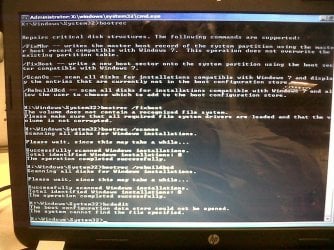
right, I've tried loading up the win7 recovery environment - but (as per the attachment)

I can't move to the c: where win7 is...
? I can see from ubuntu (from the live cd) on gparted - that the ntfs partition is still there - but how come windows can't see it?

forgive my limited knowledge - but any further advice would be great.

thanks
 

Attachments

  • IMG00021-20120123-1357.jpg
    IMG00021-20120123-1357.jpg
    144.3 KB · Views: 23

My Computer My Computer

At a glance

7 home x64amd4gb
Computer Manufacturer/Model Number
hp
OS
7 home x64
CPU
amd
Memory
4gb
Hard Drives
500gb
Why you in DISKPART?

Startup Repair 6.PNG
 

My Computer My Computer

At a glance

ME/XP/Vista/Win7
OS
ME/XP/Vista/Win7

My Computers My Computers

  • At a glance

    Windows 11 ProRyzen 9 5900X32GB G Skill DDR4-3600EVGA RTX 3080 FTW 3 Ultra
    Computer type
    PC/Desktop
    Computer Manufacturer/Model Number
    ALWAYS UNDER CONSTRUCTION
    OS
    Windows 11 Pro
    CPU
    Ryzen 9 5900X
    Motherboard
    Asus X570 Crosshair Viii Hero
    Memory
    32GB G Skill DDR4-3600
    Graphics Card(s)
    EVGA RTX 3080 FTW 3 Ultra
    Sound Card
    On Board/Sennheiser PC37X Headset
    Monitor(s) Displays
    3 X Asus 27"
    Screen Resolution
    2560x1440
    Hard Drives
    2 X 1 TB NVME drives
    PSU
    EVGA 850
    Case
    Phanteks Eclipse P400A
    Cooling
    EVGA 280 AIO
    Keyboard
    Logitech G510s/ Logitech G13
    Mouse
    Logitech G502
    Internet Speed
    24/1
    Antivirus
    ESET/MBAM Pro/SAS Pro
    Browser
    Chrome/ Firefox/ Edge
  • At a glance

    Windows 11 ProIntel Ultra 9 288V32 GB LPDDR5X 8533
    Computer type
    Laptop
    System Manufacturer/Model Number
    Dell 16 Plus
    OS
    Windows 11 Pro
    CPU
    Intel Ultra 9 288V
    Memory
    32 GB LPDDR5X 8533
    Monitor(s) Displays
    16" Mini-LED HDR600 Touch 90 Hz
    Screen Resolution
    2560X1600
    Hard Drives
    1 TB NVME
Make sure the Windows 7 partition or it's 100mb System Reserved partition (preferred if you have it) are marked Active: Partition - Mark as Active (Method Two)

Then boot into System Recovery Options to run Startup Repair - Run 3 Separate Times.

The reason it's best to use automated Startup Repair is because there are other tests and fixes it may also need to run, like System Restore or SFC.

If there is suspicion of infection it's best to first run Malwarebytes in Safe Mode or boot into Microsoft Standalone System Sweeper.

In the case of Linux Dual Boot GRUB is itself an infection which can render Windows 7 irreparable.
 
so near, yet...

so I've tried a few more things. I realise (one of) my bigger mistakes was to resize the ntfs partition from the ubuntu live cd - and it's all getting a bit complicated for my bbc micro brain.

from the WinRE DVD I cannot see a windows installation still. the scan/repair fails each time at the end - saying "system volume is corrupt"

I've tried the bootrec options - and within Diskpart - the disk shows status 'invalid'.

however - when I load back into ubuntu, I see this in gparted, so I see (a glimmer of) hope. Anywhere to go from here?
 

Attachments

  • IMG00022-20120124-1021.jpg
    IMG00022-20120124-1021.jpg
    168.6 KB · Views: 11
  • IMG00024-20120124-1049.jpg
    IMG00024-20120124-1049.jpg
    154.5 KB · Views: 12

My Computer My Computer

At a glance

7 home x64amd4gb
Computer Manufacturer/Model Number
hp
OS
7 home x64
CPU
amd
Memory
4gb
Hard Drives
500gb
Why are you using the repair commands on the RAM Drive X: & not the OS Drive?

Startup Repair 5.PNG
 

My Computer My Computer

At a glance

ME/XP/Vista/Win7
OS
ME/XP/Vista/Win7
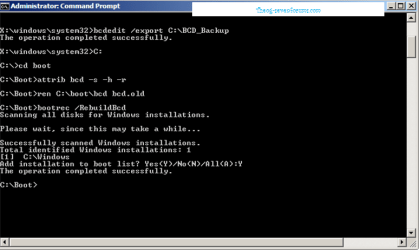
CMD: Using Repair Tools

I can't switch to the c: - windows cannot see it... (but ubuntu can).
I've started copying data off - but I'm loathe to rebuild it...

any one else?
 

My Computer My Computer

At a glance

7 home x64amd4gb
Computer Manufacturer/Model Number
hp
OS
7 home x64
CPU
amd
Memory
4gb
Hard Drives
500gb
Why did you just ignore the steps I took the time to type out for you, which have worked for thousands of others here?
 
Gregrocker, thanks for your kind words. I did try all your suggestions, but this issue is looking more complicated than it seems.

Make sure the Windows 7 partition or it's 100mb System Reserved partition (preferred if you have it) are marked Active: Partition - Mark as Active (Method Two)
- doesn't work, can't switch to the c:\

Then boot into
System Recovery Options to run Startup Repair - Run 3 Separate Times.
- ran it 4 times - still fails on the chkdsk part


The reason it's best to use automated Startup Repair is because there are other tests and fixes it may also need to run, like System Restore or SFC.

If there is suspicion of infection it's best to first run
Malwarebytes in Safe Mode or boot into Microsoft Standalone System Sweeper.

In the case of Linux Dual Boot GRUB is itself an infection which can render Windows 7 irreparable.

- I'm thinking yes, that's the case.
 

My Computer My Computer

At a glance

7 home x64amd4gb
Computer Manufacturer/Model Number
hp
OS
7 home x64
CPU
amd
Memory
4gb
Hard Drives
500gb
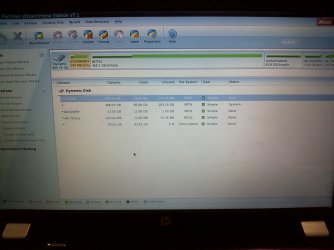
dynamic disk...

partition wizard (home) doesn't support dynamic disks.

I wasn't aware I could have a dynamic disk on a laptop (or what the benefits of why you'd do it).

any ideas how I can fix the mbr on a dynamic disk setup?
 

Attachments

  • IMG00026-20120124-1817.jpg
    IMG00026-20120124-1817.jpg
    170.7 KB · Views: 12

My Computer My Computer

At a glance

7 home x64amd4gb
Computer Manufacturer/Model Number
hp
OS
7 home x64
CPU
amd
Memory
4gb
Hard Drives
500gb
You must have ignored a warning when you tried to add a new partition that it would convert the HD to Dynamic - which is meant for spanning partitions on multiple HD's.

To avoid destructive conversion you'll need to use free Partition Wizard bootable CD version 4.2 which still features the Dynamic<>Basic conversion in the free edition: pw422.zip ISO - Windows Live

Click on Disk to highlight it then from Disk tab "Convert to Basic HD." Once you apply the step and confirm it's converted, work through the other steps given.
 
gregrocker, that version of partitionwizard did the trick. many thanks to you, and everyone else for your advice. best wishes, m
 

My Computer My Computer

At a glance

7 home x64amd4gb
Computer Manufacturer/Model Number
hp
OS
7 home x64
CPU
amd
Memory
4gb
Hard Drives
500gb
Back
Top