
Problems physically replacing Lenovo desktop OEM SSD with new

markg2

New member
Member
VIP
Local time
9:16 AM
Messages
477
ThinkCentre M82 Series
Serial Number: MJYGFKY
Machine Type Model: 2697CTO


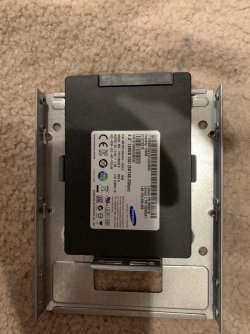
I removed the OEM 128GB 2 1/2" SSD primary drive with intent to replace it with a new Crucial ~480GB SSD.
[FONT=&quot]
[/FONT]

The drive is screwed to a Storage Converter that then fits into a [FONT=&quot]3.5” Hard Disk Drive Bracket that slides into the drive bay.[/FONT]
[FONT=&quot]
[/FONT]
[FONT=&quot]The SSD is attached to the converter with 4 screws. I removed the two screws adjacent to the connector end with moderate effort. The two screws at the opposite end absolutely would not budge. The screw heads are a modified Phillips.
[/FONT]
[FONT=&quot]
[/FONT]
[FONT=&quot]My Plan B is to get another converter to use with my new drive--so far, no dice.
[/FONT]

I downloaded the complete documentation for the machine. No where in the 130+ pages does Lenovo provide part and part numbers.


The Lenovo web page for the machine does not offer another doc with part numbers.


Assuming the part still exists, the Lenovo parts outsources requires a part number.


Any suggestions?

Mark
 

Attachments
  • SSD Bracket.JPG
    SSD Bracket.JPG
    336.3 KB · Views: 0
Last edited:

My Computer My Computer

Computer type
PC/Desktop
OS
Windows 7 & Windows 10
Is it just the bracket you are looking for?

If so, there are plenty of 3.5 to 2.5 brackets available online and in your local computer shop.

Here is the Lenovo Thinkstation bracket, for dimensions so you can see if it is the same.

HDD Bracket Kit (E32 SFF) (4XF0F33440)

ThinkStation 2.5” Hard Disk Drive Bracket Kit - Overview and Service Parts - US

apparently that is also for Thinkcentre M83 - so maybe the M82 as well ?

Thinkcenter m83 SFF. Adding a 2.5" drive

‎01-08-2015 06:32 AM

Thanks, I ordered the retail kit (4XF0F33440)

Solved: Re: Thinkcenter m83 SFF. Adding a 2.5" drive - Lenovo Community

It took less than 2mins to find that information on the internet
 

My Computers My Computers

System One System Two

  • Computer type
    PC/Desktop
    OS
    7 X64
    CPU
    i5 8400
    Motherboard
    gigabyte b365m ds3h
    Memory
    2x8gb 3200mhz
    Hard Drives
    various
    PSU
    pure power 11 400w cm
    Case
    Coolermaster
    Cooling
    cryorig m9i
  • Computer type
    PC/Desktop
    OS
    7x64
    CPU
    g5400
    Motherboard
    ga b365m ds3h
    Memory
    8gb ddr4 2400
    PSU
    xfx pro 450w
No, I previously found "HDD Bracket Kit (E32 SFF) (4XF0F33440)".

That is the 'bracket'. It's blue and bendy with 4 pins. You flex back the sides of the bracket then release the flex so the pins align with the 4 holes in the sides of the Storage Converter. It's the storage converter that I cannot find either separate or with the bracket. And it's the storage converter that I cannot get the 2 back screws out from her inplace assembly.


As you can see by my image, the converter is just a backplane for the 2 1/2" SSD to screw to that allows for the bracket to enclose it and slide in the bay. If the converter isn't for my model (and her tower does not have the same internal config as the small profile desktop of the same model), I would suspect there's a high probability the bracket pins will not line up with the converter holes (assuming the converter has side holes for these pins.
 

My Computer My Computer

Computer type
PC/Desktop
OS
Windows 7 & Windows 10
"The screw heads are a modified Phillips."
It looks like it is a Torx screw.
Torx - Wikipedia

Despite the screws, the bracket and the SSD are standards.
If you can't take the screws, buy a new bracket.
SSD bracket - Newegg.com
 

My Computers My Computers

System One System Two

  • Computer type
    PC/Desktop
    Computer Manufacturer/Model Number
    custom build
    OS
    Windows 7 HP 64
    CPU
    i5 6600K - 800MHz to 4200MHz
    Motherboard
    GA-Z170-HD3P
    Memory
    4+4G GSkill DDR4 3000
    Graphics Card(s)
    IG - Intel 530
    Monitor(s) Displays
    Samsung 226BW
    Screen Resolution
    1680x1050
    Hard Drives
    (1) -1 SM951 – 128GB M.2 AHCI PCIe SSD drive for Windows 7 and Lubuntu
    (2) -1 WD SATA 3 - 1T for Data
    (3) -1 WD SATA 3 - 1T for backup
    PSU
    Thermaltake 450W TR2 gold
    Keyboard
    Old and good Chicony mechanical keyboard
    Mouse
    Logitech mX performance - 9 buttons (had to disable some)
    Internet Speed
    500Mb/s
    Browser
    Firefox 64
    Other Info
    TinyWall firewall
  • Computer type
    Laptop
    System Manufacturer/Model Number
    Asus Q550LF
    OS
    Windows 7 Pro
    CPU
    i7-4500U 800MHz to 3.0GHz
    Motherboard
    Asus Q550LF
    Memory
    (4+4)G DDR3 1600
    Graphics Card(s)
    IG intel 4400 + NVIDIA GeForce GT 745M
    Sound Card
    Realtek
    Monitor(s) Displays
    LG Display LP156WF4-SPH1
    Screen Resolution
    1920 x 1080
    Hard Drives
    BX500 120G SSD for Windows and programs +
    1T HDD for data
    Internet Speed
    500 Mb/s
    Browser
    Firefox
    Other Info
    TinyWall firewall
Back
Top