Problems Recognizing Enabled Virtualization

defunker

New member
Local time
5:34 PM
Messages
5
Location
SK, Canada
I'm having issues with Windows XP Mode recognizing that my virtualization is enabled. I have double checked in BIOS and it is indeed enabled. The application havdetectiontool.exe is not recognizing that it is enabled as well, so I'm a little unsure what the problem is.

I'm running Windows 7 64-bit Professional with an Intel Core 2 E6750. This stuff is a little over my head and I've had little luck trying to determine what to do next. Is BIOS the only way to go about turning virtualization on and off? Any help would be appreciated.
 

My Computer

OS
Windows 7 Pro 64-bit
CPU
Intel Core 2 E6750 @ 2.66GHz
Motherboard
EVGA nForce 680i SLI
Memory
8GB Ballistix DDR2 PC2-6400
Graphics Card(s)
NVIDIA GeForce 9800 GT
Hello defunker, welcome to the Seven Forums.

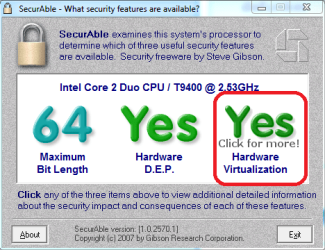
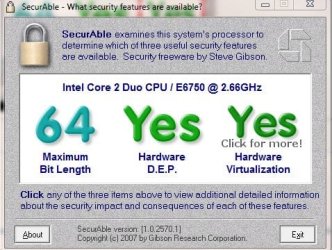
Download SecurAble and run it. What does it tell you?

Kari
 

Attachments

  • SecurAble.png
    SecurAble.png
    29.1 KB · Views: 27

My Computer

Computer type
Laptop
Computer Manufacturer/Model Number
HP ENVY 17-1150eg
OS
Windows 10 Pro x64 EN-GB
CPU
1.6 GHz Intel Core i7-720QM Processor
Memory
6 GB
Graphics Card(s)
ATI Mobility Radeon HD 5850 Graphics
Sound Card
Beats sound system with integrated subwoofer
Monitor(s) Displays
17" laptop display, 22" LED and 32" Full HD TV through HDMI
Screen Resolution
1600*900 (1), 1920*1080 (2&3)
Hard Drives
Internal: 2 x 500 GB SATA Hard Disk Drive 7200 rpm
External: 2TB for backups, 3TB USB3 network drive for media
Cooling
As Envy runs a bit warm, I have it on a Cooler Master pad
Keyboard
Logitech diNovo Media Desktop Laser (bluetooth)
Mouse
Logitech Performance Mouse MX
Internet Speed
50/10 Mbps VDSL
Antivirus
Windows Defender 4.3.9431.0
Browser
Maxthon 3.5.2., IE11
Here is my screenshot after running securable.exe
 

Attachments

  • Securable.JPG
    Securable.JPG
    51.4 KB · Views: 21

My Computer

OS
Windows 7 Pro 64-bit
CPU
Intel Core 2 E6750 @ 2.66GHz
Motherboard
EVGA nForce 680i SLI
Memory
8GB Ballistix DDR2 PC2-6400
Graphics Card(s)
NVIDIA GeForce 9800 GT
What is the exact error message you get when starting XP Mode?

Kari
 

My Computer

Computer type
Laptop
Computer Manufacturer/Model Number
HP ENVY 17-1150eg
OS
Windows 10 Pro x64 EN-GB
CPU
1.6 GHz Intel Core i7-720QM Processor
Memory
6 GB
Graphics Card(s)
ATI Mobility Radeon HD 5850 Graphics
Sound Card
Beats sound system with integrated subwoofer
Monitor(s) Displays
17" laptop display, 22" LED and 32" Full HD TV through HDMI
Screen Resolution
1600*900 (1), 1920*1080 (2&3)
Hard Drives
Internal: 2 x 500 GB SATA Hard Disk Drive 7200 rpm
External: 2TB for backups, 3TB USB3 network drive for media
Cooling
As Envy runs a bit warm, I have it on a Cooler Master pad
Keyboard
Logitech diNovo Media Desktop Laser (bluetooth)
Mouse
Logitech Performance Mouse MX
Internet Speed
50/10 Mbps VDSL
Antivirus
Windows Defender 4.3.9431.0
Browser
Maxthon 3.5.2., IE11
The error message says, "Unable to start Windows Virtual PC because hardware-assisted virtualization is disabled".

It then proceeds to explain how to go about turning on hardware virtualization in BIOS. After checking in BIOS the virtualization was enabled to begin with.
 

My Computer

OS
Windows 7 Pro 64-bit
CPU
Intel Core 2 E6750 @ 2.66GHz
Motherboard
EVGA nForce 680i SLI
Memory
8GB Ballistix DDR2 PC2-6400
Graphics Card(s)
NVIDIA GeForce 9800 GT
OK.

Could you please tell what motherboard you have? You system specs are incomplete, found only your OS there but nothing about your hardware setup.

Kari.
 

My Computer

Computer type
Laptop
Computer Manufacturer/Model Number
HP ENVY 17-1150eg
OS
Windows 10 Pro x64 EN-GB
CPU
1.6 GHz Intel Core i7-720QM Processor
Memory
6 GB
Graphics Card(s)
ATI Mobility Radeon HD 5850 Graphics
Sound Card
Beats sound system with integrated subwoofer
Monitor(s) Displays
17" laptop display, 22" LED and 32" Full HD TV through HDMI
Screen Resolution
1600*900 (1), 1920*1080 (2&3)
Hard Drives
Internal: 2 x 500 GB SATA Hard Disk Drive 7200 rpm
External: 2TB for backups, 3TB USB3 network drive for media
Cooling
As Envy runs a bit warm, I have it on a Cooler Master pad
Keyboard
Logitech diNovo Media Desktop Laser (bluetooth)
Mouse
Logitech Performance Mouse MX
Internet Speed
50/10 Mbps VDSL
Antivirus
Windows Defender 4.3.9431.0
Browser
Maxthon 3.5.2., IE11
I didn't expect anybody to be looking there :D. They're updated now. My specs are as follows:
OS
Windows 7 Pro 64-bit
CPU
Intel Core 2 E6750 @ 2.66GHz
Motherboard
EVGA nForce 680i SLI
Memory
8GB Ballistix DDR2 PC2-6400
Graphics Card(s)
NVIDIA GeForce 9800 GT
 

My Computer

OS
Windows 7 Pro 64-bit
CPU
Intel Core 2 E6750 @ 2.66GHz
Motherboard
EVGA nForce 680i SLI
Memory
8GB Ballistix DDR2 PC2-6400
Graphics Card(s)
NVIDIA GeForce 9800 GT
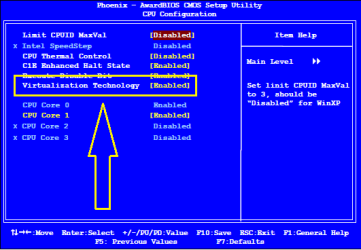
OK, I checked the manual of your MoBo and BIOS, there's only this one switch to be enabled:

BIOS.png

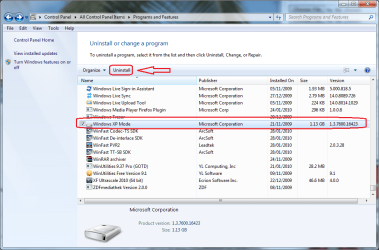
My recommendation is to completely re-install both Virtual PC and XP Mode. First you have to uninstall them. It's a bit tricky because Virtual PC is not installed as an application; instead it is an update. So here's how to remove them:

First, uninstall Windows XP Mode normally from Control Panel > Programs and Features:

XPM_Uninstall.png

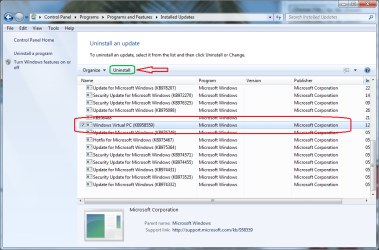
When XP Mode is uninstalled, click View installed updates in the left pane in Programs and Features window. Scroll down to update Windows Virtual PC and click Uninstall:

VPC_Uninstall.png

Reboot, go to http://www.microsoft.com/windows/virtual-pc/download.aspx and download & install both Windows XP Mode and Windows Virtual PC. Please notice the installation order:

VPC_XPM_Install.PNG

Kari
 

My Computer

Computer type
Laptop
Computer Manufacturer/Model Number
HP ENVY 17-1150eg
OS
Windows 10 Pro x64 EN-GB
CPU
1.6 GHz Intel Core i7-720QM Processor
Memory
6 GB
Graphics Card(s)
ATI Mobility Radeon HD 5850 Graphics
Sound Card
Beats sound system with integrated subwoofer
Monitor(s) Displays
17" laptop display, 22" LED and 32" Full HD TV through HDMI
Screen Resolution
1600*900 (1), 1920*1080 (2&3)
Hard Drives
Internal: 2 x 500 GB SATA Hard Disk Drive 7200 rpm
External: 2TB for backups, 3TB USB3 network drive for media
Cooling
As Envy runs a bit warm, I have it on a Cooler Master pad
Keyboard
Logitech diNovo Media Desktop Laser (bluetooth)
Mouse
Logitech Performance Mouse MX
Internet Speed
50/10 Mbps VDSL
Antivirus
Windows Defender 4.3.9431.0
Browser
Maxthon 3.5.2., IE11
No luck with the reinstall.

The program that Microsoft lists on their website (havdetectiontool.exe) for testing the compatibility of the Windows XP Mode on your system comes back as being compatible, but reports that it is not enabled . This leads me to believe that it is something beyond the Virtual PC and XP programs themselves and more likely something to do with my system. As I've said earlier, I've double checked that the virtulization is turned on in BIOS and I've been trying to find something in the OS that would report the same.

I guess I'll keep poking around to see if I can come up with anything more. Thanks for the help.
 

My Computer

OS
Windows 7 Pro 64-bit
CPU
Intel Core 2 E6750 @ 2.66GHz
Motherboard
EVGA nForce 680i SLI
Memory
8GB Ballistix DDR2 PC2-6400
Graphics Card(s)
NVIDIA GeForce 9800 GT
You could test if this issue is related to VPC or to your system by installing another virtualization software. Download Sun VirtualBox, create a virtual machine and see if it runs.

Kari
 

My Computer

Computer type
Laptop
Computer Manufacturer/Model Number
HP ENVY 17-1150eg
OS
Windows 10 Pro x64 EN-GB
CPU
1.6 GHz Intel Core i7-720QM Processor
Memory
6 GB
Graphics Card(s)
ATI Mobility Radeon HD 5850 Graphics
Sound Card
Beats sound system with integrated subwoofer
Monitor(s) Displays
17" laptop display, 22" LED and 32" Full HD TV through HDMI
Screen Resolution
1600*900 (1), 1920*1080 (2&3)
Hard Drives
Internal: 2 x 500 GB SATA Hard Disk Drive 7200 rpm
External: 2TB for backups, 3TB USB3 network drive for media
Cooling
As Envy runs a bit warm, I have it on a Cooler Master pad
Keyboard
Logitech diNovo Media Desktop Laser (bluetooth)
Mouse
Logitech Performance Mouse MX
Internet Speed
50/10 Mbps VDSL
Antivirus
Windows Defender 4.3.9431.0
Browser
Maxthon 3.5.2., IE11
same problem

I am having the same problem with my system. I have the same mobo. I was able to get virtual pc to work on it with XP Pro 64-bit before I just upgraded to Windows 7 pro 64-bit. I also tried VMWare 6.5 and still no luck. Anyone have any suggestions?
 

My Computer

OS
Windows 7 Pro 64-bit
CPU
E6600
Motherboard
Nvidia nForce 680i SLi
Memory
4gb corsair
Graphics Card(s)
8600gt
Kari, I found the solution to our problem with the 680i mobo. I went into the bios and disabled the virtualization feature and booted up. I immediately restarted the machine, went back into the bios and re-enabled virtualization and saved it to the bios and rebooted. It then worked. Happy virtualizing.
 

My Computer

OS
Windows 7 Pro 64-bit
CPU
E6600
Motherboard
Nvidia nForce 680i SLi
Memory
4gb corsair
Graphics Card(s)
8600gt
Jlozzie, welcome to the Seven Forums.

That's good news. Let's hope Defunker still follows this thread, that might work for him, too.

Kari
 

My Computer

Computer type
Laptop
Computer Manufacturer/Model Number
HP ENVY 17-1150eg
OS
Windows 10 Pro x64 EN-GB
CPU
1.6 GHz Intel Core i7-720QM Processor
Memory
6 GB
Graphics Card(s)
ATI Mobility Radeon HD 5850 Graphics
Sound Card
Beats sound system with integrated subwoofer
Monitor(s) Displays
17" laptop display, 22" LED and 32" Full HD TV through HDMI
Screen Resolution
1600*900 (1), 1920*1080 (2&3)
Hard Drives
Internal: 2 x 500 GB SATA Hard Disk Drive 7200 rpm
External: 2TB for backups, 3TB USB3 network drive for media
Cooling
As Envy runs a bit warm, I have it on a Cooler Master pad
Keyboard
Logitech diNovo Media Desktop Laser (bluetooth)
Mouse
Logitech Performance Mouse MX
Internet Speed
50/10 Mbps VDSL
Antivirus
Windows Defender 4.3.9431.0
Browser
Maxthon 3.5.2., IE11
I know this is going to sound silly, but shutdown the computer, all the way off and then back on. I enabled it in my BIOS as the computer booted up, saved my changes, and let it continue on, when I went to run XP mode, I got the error that Hardware Virtualization was not enabled.

So i turned off my computer the whole way, and then restarted it (without going back into the BIOS), and viola, it worked without issue.

thanks,
 

My Computer

Computer Manufacturer/Model Number
HP EliteBook - 8530w
OS
Windows 7
CPU
Intel Duo T9600 @ 2.89GHz
Motherboard
Dont Know
Memory
4GB
Graphics Card(s)
Nvidia Quadro 512Mb
Sound Card
dont care
Monitor(s) Displays
Laptop Display 15.5 Inch
Hard Drives
1 x 300Gb Sata 2 - 3 GBits/sec
PSU
External
Case
laptop
Cooling
a fan - duh
I have the exact same issue and I'm running an EVGA 680i Motherboard.

The issue is the fix recommended here only resolves the issue temporarily. After a fresh boot and disabling / re-enabling hardware virtualization I can run my VM's, but a few hours later I come back and the issue has returned.

I also tested with both Microsoft VM and VMWare Workstation and they both display the same problem.

The common thread here seems to be the 680i Motherboard. Not sure if it's limited to the EVGA version or not.
 

My Computer

OS
Windows 7 x64
CPU
Core 2 Duo E6600
Motherboard
EVGA 680i
Memory
6GB
Graphics Card(s)
8800GTX
Hard Drives
RAID 0+1
Back
Top