Problems separating audio streams to different outputs

clippin7

New member
Local time
4:01 PM
Messages
6
I've been using Windows XP for several years then Vista for a month (on this same machine). In both I could play media player through my head phones then change the default device to the digital output and start other application and their sound would play though the digital output.

In Windows 7 using the same equipment, the latest Realtek drivers (or even the windows provided drivers) and the same method and settings, all I get is all the sounds being played on the same output device. It will switch the device but it wont separate them.
 

My Computer My Computer

OS
Windows 7 64Bit
CPU
Intel E6400 ([email protected] GHz)
Motherboard
ASUS P5WDH Deluxe
Memory
3 GB (800MHz)
Graphics Card(s)
Saphire 4870HD 512MB
Sound Card
Realtek ALC882M
Monitor(s) Displays
Samsung SyncMaster 941BW
Hard Drives
RAID 0 - Samsung HD501LJ (2@512MB)
PSU
Rosewill RP600V2-S-SL 600W
Case
Antec P182
I've been using Windows XP for several years then Vista for a month (on this same machine). In both I could play media player through my head phones then change the default device to the digital output and start other application and their sound would play though the digital output.

In Windows 7 using the same equipment, the latest Realtek drivers (or even the windows provided drivers) and the same method and settings, all I get is all the sounds being played on the same output device. It will switch the device but it wont separate them.

Hi and welcome

Nine out ten times its the driver. can you check device manager ot see if the driver is present and correctly installed (should not have a yellow tirangle on it or be missing). let us know

Kenn J++
 

My Computer My Computer

Computer Manufacturer/Model Number
HP Pavillion dv-7 1005 Tx
OS
Win 8 Release candidate 8400
CPU
[email protected]
Memory
4 gigs
Graphics Card(s)
Nvidia 9600M
Sound Card
HD built-in
Monitor(s) Displays
17" Wxga
Screen Resolution
1440x900
Cooling
none
Internet Speed
45Mb down 5Mb up
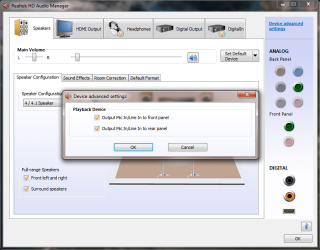
The current driver looks appropriate (Realtek Semiconductor Corp. Version: 6.0.1.5983, Dated: 11/17/09). No warnings showing. I had also tried uninstalling the drivers and using the windows generic one, but that driver behaves in the same manner. Can anyone
moz-screenshot.png
tell me how it is suppose to operate under Windows 7? Maybe it is operating correctly and I am just miss understanding. I am not sure what the "Make front and rear output devices play two different audio streams" options purpose is if it does not behave as I describe.

moz-screenshot-1.png
Device Advanced Settings.PNG
 

My Computer My Computer

OS
Windows 7 64Bit
CPU
Intel E6400 ([email protected] GHz)
Motherboard
ASUS P5WDH Deluxe
Memory
3 GB (800MHz)
Graphics Card(s)
Saphire 4870HD 512MB
Sound Card
Realtek ALC882M
Monitor(s) Displays
Samsung SyncMaster 941BW
Hard Drives
RAID 0 - Samsung HD501LJ (2@512MB)
PSU
Rosewill RP600V2-S-SL 600W
Case
Antec P182
Hello, Cllipin.

I have word for word the exact same issue you have.

I have a HP Pavillion that came with the same audio card. On Vista, I was able to enjoy two audio streams via the technique you described, and now it's gone.

Somehow I want to think that what we were enjoying was actually just a vista bug that wasn't supposed to do that, and we were able to exploit it.

But now that I have windows 7, I can't listen to my music while my wife watches recorded TV from the same computer.
 

My Computer My Computer

Computer Manufacturer/Model Number
HP Pavillion Media Center m8430f
OS
windows 7
Graphics Card(s)
NVIDIA GeForce 8500 GT
That's exactly what I am having an issue with. My wife will watch recorded shows while I'm listening to music or playing games. I also could do this on this same computer with XP. Windows 7 is the first system I have had an issue with. I have noticed since that certain application will occasionally split streams (I can play a game over the surround sound speakers and talk to friends through the headset) but it works randomly. I don't get it to work every time.
 

My Computer My Computer

OS
Windows 7 64Bit
CPU
Intel E6400 ([email protected] GHz)
Motherboard
ASUS P5WDH Deluxe
Memory
3 GB (800MHz)
Graphics Card(s)
Saphire 4870HD 512MB
Sound Card
Realtek ALC882M
Monitor(s) Displays
Samsung SyncMaster 941BW
Hard Drives
RAID 0 - Samsung HD501LJ (2@512MB)
PSU
Rosewill RP600V2-S-SL 600W
Case
Antec P182
Funny thing is, I USED to have the program exactly as it is in that screenshot you posted. NOW, the program dropdown only has the options "Output MiC In/LineIn to Front Panel" and "Output MiC In/LineIn to Rear Panel".

realekscreenshot.png

Any idea about how I can get the one you have back? I used to have that when I used windows vista.
 

My Computer My Computer

Computer Manufacturer/Model Number
HP Pavillion Media Center m8430f
OS
windows 7
Graphics Card(s)
NVIDIA GeForce 8500 GT
I actually just installed the latest realtek drivers this past weekend and I am fairly certain the pop-up options that I displayed in my original pic is still the same. I'll check when I get home. I'm not sure why the options would have changed for you and not for me other than different drivers.
 

My Computer My Computer

OS
Windows 7 64Bit
CPU
Intel E6400 ([email protected] GHz)
Motherboard
ASUS P5WDH Deluxe
Memory
3 GB (800MHz)
Graphics Card(s)
Saphire 4870HD 512MB
Sound Card
Realtek ALC882M
Monitor(s) Displays
Samsung SyncMaster 941BW
Hard Drives
RAID 0 - Samsung HD501LJ (2@512MB)
PSU
Rosewill RP600V2-S-SL 600W
Case
Antec P182
I checked last night and the "Device Advanced Settings" gives me the pop-up dialog I originally showed. I have no clue why yours would not do the same.
 

My Computer My Computer

OS
Windows 7 64Bit
CPU
Intel E6400 ([email protected] GHz)
Motherboard
ASUS P5WDH Deluxe
Memory
3 GB (800MHz)
Graphics Card(s)
Saphire 4870HD 512MB
Sound Card
Realtek ALC882M
Monitor(s) Displays
Samsung SyncMaster 941BW
Hard Drives
RAID 0 - Samsung HD501LJ (2@512MB)
PSU
Rosewill RP600V2-S-SL 600W
Case
Antec P182
I also have an HP Pavillion I bought last November and I have the same problems as you Hell. I downloaded the latest drivers for Realtek yet I still have the same advanced settings you have. Fix anyone? :(
 

My Computer My Computer

Computer Manufacturer/Model Number
HP Pavillion
OS
windows 7 64 Bit
bump
 

My Computer My Computer

Computer Manufacturer/Model Number
HP Pavillion
OS
windows 7 64 Bit
bumpadump.

I'm still having the same issues. I've poured myself into forums all over the place. no luck so far. damn you, realtek!
 

My Computer My Computer

Computer Manufacturer/Model Number
HP Pavillion Media Center m8430f
OS
windows 7
Graphics Card(s)
NVIDIA GeForce 8500 GT
I solved the problem with different output to the front panel
on my ASUS P5P43TD.

All you need to do is to go to Onboard Devices Configuration in BIOS
settings and change Front Panel Type from HD Audio to AC97

After restarting you have now Tab called HD Audio 2nd output
in Realtek Audio Manager (but keep Speakers tab as default output).

If you can't see that Tab, go to Device Advanced Settings and change it to
Make Front and Rear output devices playback two different
audio streams simultaneously
.

If you choose the other option in Advanced, you will have only
one stream but from both outputs - front and rear (Yes! It's possible!)

And now you have multiple choice for output in popular applications
such as audio- and video-players, where you can change output to
Speakers or to HD Audio 2nd output.
As a result my Foobar2000 (audio) and MPC (video) are playing
onto different outputs as I'm typing this post.

For some games you can choose the output too (Black Ops) in game
Sound options but in some of them you cannot (MW II)
BTW if you don't set anything as Default in Realtek Audio Manager
you won't have any sound in MW II and some other games.
 

My Computer My Computer

OS
Windows 7
CPU
DualCore Intel Core 2 Duo, 2933 MHz
Motherboard
Asus P5P43TD
Memory
4GB DDR3 PC3-12800 1600MHz (Patriot)
Graphics Card(s)
ATI Radeon HD 4870 512MB GDDR5
Sound Card
Intel 82801JB ICH10, ATI RV770/790
Monitor(s) Displays
ViewSonic VX2240w
Hard Drives
ST3320613AS (320 GB, 7200 RPM, SATA-II)
PIONEER DVD-RW DVR-108
PSU
Antec Truepower New 750W
Case
Lian-Li PC-K8
I went into my BIOS, and I guess it's not the same since I have an HP Pavillion m8430f. I changed the audio thingy from auto to enabled, and nothing really changed. That was really the only option I had, too.

Thanks for the input, though. I really appreciate someone posting to this thread. Been having this problem for almost a year, been following this thread for just as long.

I have recently had another problem. When I select the "Speakers" from the realtek audio manager, and listen from that jack, I can only hear sound out of the right ear and it's VER VERY faint, I have to turn off everything in the room just to be able to kind of hear it. for a while I just thought it was my imagination.

I think that might have something to do with a problem with the motherboard. Something might have become broken or disconnected. If that's the case, it might also be causing my Realtek audio manager to not give me the option of outputting two different streams.
 

My Computer My Computer

Computer Manufacturer/Model Number
HP Pavillion Media Center m8430f
OS
windows 7
Graphics Card(s)
NVIDIA GeForce 8500 GT
Back
Top