Solved Problems viewing certain webpages IE 11

Msradell

New member
Local time
12:47 PM
Messages
23
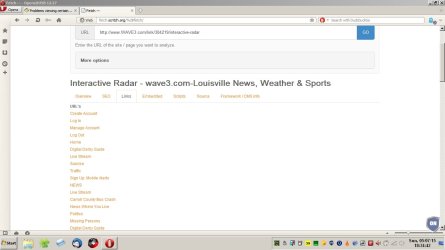
There are several websites that do not display correctly on my computer although the majority of them do. One of the ones that have the problem is this one: http://www.wave3.com/link/304219/interactive-radar


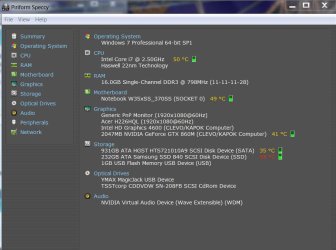
I've attached a screen clip of what my display looks like when I look at this webpage as well as a screenshot of Speccy showing my system specifications.


I've already reinstalled flash player and Java and even went so far as uninstalling and reinstalling IE 11 but I keep getting the same results. I also went so far is reinstalling Windows 7 but that didn't make any difference either.

This happens on several websites but not all of them, the one I attach is just a good example that's easy to access.

Any help is certainly appreciated


Attachments

  • Capture.JPG
    Capture.JPG
    95.9 KB · Views: 0
  • Speccy.JPG
    Speccy.JPG
    87.7 KB · Views: 0

My Computer

Computer type
PC/Desktop
Computer Manufacturer/Model Number
Sager
OS
Microsoft Windows 7 Professional 64-bit 7601 Multiprocessor Free Service Pack 1
CPU
Intel(R) Core(TM) i7-4710MQ CPU @ 2.50GHz
Motherboard
Notebook W35xSS_370SS
Memory
16.00 GB
Graphics Card(s)
(1) Intel(R) HD Graphics 4600 (2) NVIDIA GeForce GTX 860M
Sound Card
(1) VIA HD Audio (2) USB Audio Device (3) Intel(R) Displ
Screen Resolution
0 x 0 x 0 bits (0 colors) @ 0 Hz
Hard Drives
(1) ATA HGST HTS721010A9 SCSI Disk Device (2) ATA Samsung SSD 840 SCSI Disk Device (3) USB Flash Memory USB Device (4) YMAX MagicJack USB Device
Internet Speed
15 MB U-verse
Antivirus
Norton Security
Change DNS and test.

I've already reinstalled flash player and Java and even went so far as uninstalling and reinstalling IE 11 but I keep getting the same results. I also went so far is reinstalling Windows 7 but that didn't make any difference either.

This happens on several websites but not all of them, the one I attach is just a good example that's easy to access.

That site doesn't require Java but it does require Flash Player. Since you reinstalled Windows - assuming that you patched and updated all software I suggest taking a look at this post and have a look at information on changing DNS Lookup Provider. Especially if you've never changed from the default one provided by your ISP. If that's causing problems it would indeed persist after a fresh install of windows.

http://www.sevenforums.com/browsers...-loading-forever-post3088580.html#post3088580

Maybe read the rest of the thread from the first post to the last.
 

My Computer

Computer type
Laptop
Computer Manufacturer/Model Number
ASUS
OS
Microsoft Windows 7 Home Premium 64-bit 7601 Multiprocessor Free Service Pack 1
CPU
AMD C-60 APU with Radeon(tm) HD Graphics
Motherboard
ASUSTeK COMPUTER INC. X501U
Memory
4.00 GB
Graphics Card(s)
AMD Radeon HD 6290 Graphics
Sound Card
(1) AMD High Definition Audio Device (2) Realtek High Defi
Screen Resolution
1366 x 768 x 32 bits (4294967296 colors) @ 60 Hz
Hard Drives
Hitachi HTS545050A7E380 SATA Disk Device
Antivirus
Comodo CIS & FW, SecureAplus App Whitelisting, Threatfire
Browser
Cyberfox 64bit, Opera 64bit, Airfox
Other Info
Spy-The-Spy, HitmanPro.Alert, Norton Connect Safe, MJRegWatcher, BitDefender TrafficLight, Voodoo Shield, Zemana AntiMalware
I didn't mention it in my original thread but I'd already actually tried it, I changed them to the Google DNS servers as a test but the results were the same. Somehow it's an Internet Explorer problem because I can view the website correctly on Google Chrome. It's just that I need to use IE for several other things I do so I want to use it for everything. The site used to work but now doesn't.
 

My Computer

Computer type
PC/Desktop
Computer Manufacturer/Model Number
Sager
OS
Microsoft Windows 7 Professional 64-bit 7601 Multiprocessor Free Service Pack 1
CPU
Intel(R) Core(TM) i7-4710MQ CPU @ 2.50GHz
Motherboard
Notebook W35xSS_370SS
Memory
16.00 GB
Graphics Card(s)
(1) Intel(R) HD Graphics 4600 (2) NVIDIA GeForce GTX 860M
Sound Card
(1) VIA HD Audio (2) USB Audio Device (3) Intel(R) Displ
Screen Resolution
0 x 0 x 0 bits (0 colors) @ 0 Hz
Hard Drives
(1) ATA HGST HTS721010A9 SCSI Disk Device (2) ATA Samsung SSD 840 SCSI Disk Device (3) USB Flash Memory USB Device (4) YMAX MagicJack USB Device
Internet Speed
15 MB U-verse
Antivirus
Norton Security
I just did some more testing and discovered something very interesting. If I delete the Internet Explorer folders under local and roaming in my appdata folder the website I mentioned in my original post works fine until I reboot and then it's back to the same problem. This makes it really frustrating and strange.
 

My Computer

Computer type
PC/Desktop
Computer Manufacturer/Model Number
Sager
OS
Microsoft Windows 7 Professional 64-bit 7601 Multiprocessor Free Service Pack 1
CPU
Intel(R) Core(TM) i7-4710MQ CPU @ 2.50GHz
Motherboard
Notebook W35xSS_370SS
Memory
16.00 GB
Graphics Card(s)
(1) Intel(R) HD Graphics 4600 (2) NVIDIA GeForce GTX 860M
Sound Card
(1) VIA HD Audio (2) USB Audio Device (3) Intel(R) Displ
Screen Resolution
0 x 0 x 0 bits (0 colors) @ 0 Hz
Hard Drives
(1) ATA HGST HTS721010A9 SCSI Disk Device (2) ATA Samsung SSD 840 SCSI Disk Device (3) USB Flash Memory USB Device (4) YMAX MagicJack USB Device
Internet Speed
15 MB U-verse
Antivirus
Norton Security

My Computer

Computer type
Laptop
Computer Manufacturer/Model Number
Employer provided Dell Latitude
OS
W7 Pro SP1 64bit
CPU
i7
Memory
8GB
Graphics Card(s)
Intel HD Graphics
Hard Drives
crappy SSD
Antivirus
Employer mandated Symantec Endpoint Protection
Browser
Pale Moon 64bit, IE11 64bit & Chrome 64bit
What antivirus and firewall app are you using?

Reset IE11 - including step 5.

If the website still fails to load correctly, thy these steps:
http://www.sevenforums.com/tutorial...ation-conflicts-performing-clean-startup.html
I'm using Norton Security with Backup and I do regular scans with Malwarebytes, everything has come up clean. I've done the reset of IE 11 but a few times in the past but I did it again and no changes occurred.

I also and follow the steps and disabled all startup items and all non-Microsoft services and the same problem still occurs. I even went ahead and try doing a startup in safe mode with Internet access and even with that startup I still have the problem.

The only thing I've ever done to get the website working again recently with delete the Internet Explorer directories like I described above. Very strange situation to say the least.

Any ideas are certainly appreciated and will be tried.
 

My Computer

Computer type
PC/Desktop
Computer Manufacturer/Model Number
Sager
OS
Microsoft Windows 7 Professional 64-bit 7601 Multiprocessor Free Service Pack 1
CPU
Intel(R) Core(TM) i7-4710MQ CPU @ 2.50GHz
Motherboard
Notebook W35xSS_370SS
Memory
16.00 GB
Graphics Card(s)
(1) Intel(R) HD Graphics 4600 (2) NVIDIA GeForce GTX 860M
Sound Card
(1) VIA HD Audio (2) USB Audio Device (3) Intel(R) Displ
Screen Resolution
0 x 0 x 0 bits (0 colors) @ 0 Hz
Hard Drives
(1) ATA HGST HTS721010A9 SCSI Disk Device (2) ATA Samsung SSD 840 SCSI Disk Device (3) USB Flash Memory USB Device (4) YMAX MagicJack USB Device
Internet Speed
15 MB U-verse
Antivirus
Norton Security
If you are not using the backup function, uninstall Norton, install MSE, delete those folders and test for a few weeks.
 

My Computer

Computer type
Laptop
Computer Manufacturer/Model Number
Employer provided Dell Latitude
OS
W7 Pro SP1 64bit
CPU
i7
Memory
8GB
Graphics Card(s)
Intel HD Graphics
Hard Drives
crappy SSD
Antivirus
Employer mandated Symantec Endpoint Protection
Browser
Pale Moon 64bit, IE11 64bit & Chrome 64bit
Hi,
Look like a bad cache,
Use Alt+TD or gear symbol on the top right and point or click on Safety,
Click on Delete browser history
Uncheck the top box and Check all others/ Delete.

Shut down your machine and test again
WAVE Louisville weather with Kevin Harned and Brian Goode - wave3.com-Louisville News, Weather & Sports

Make sure flash is enable Gear symbol/ Manage add-on
On the bottom left column switch Show to All add-ons and see if Flash is listed
If not switch Show to Run without permission and look there,

If you see Java disable.
Weird it would be a issue on a clean reinstall :/
 

My Computer

Computer type
PC/Desktop
Computer Manufacturer/Model Number
Custom assembled by me :}
OS
Win-7-Pro64bit 7-H-Prem-64bit
CPU
i7-5930K 2nd i9-9940x both water blocked VRM's too
Motherboard
ASUS SABERTOOTH X99 2nd ASUS x299 Apex
Memory
Trident-z 3200C14 2nd Trident-z 3600C16
Graphics Card(s)
EVGA 1080ti ftw3 2nd Titan Xp both water blocked
Sound Card
Built-in Realtek
Monitor(s) Displays
1-AOC G2460PG 24"G-Sync 144Hz/ 2nd 1-ASUS VG248QE 24" 144Hz
Screen Resolution
1920 x 1080 144Hz
Hard Drives
2-Samsung M.2 Evo & Evo Plus
2-Samsung 850 EVO 500GB SSD's/ 3-2.5 W.D. Black 1tb-&3-1tb/3-3.5 WD Black 1tb hdd's
PSU
EVGA SuperNOVA 1000-P2 2nd 1200-P2
Case
2-Corsair Obsidian Series 450D Black ATX Mid Tower
Cooling
Custom water loops
Keyboard
Logitech G710+/ 2nd Logitech G910
Mouse
2-RedDragon M901 Perdition 16400 dpi Gaming mouse = wired
Internet Speed
Comcast Ping 19ms 89.31mbps download speed 6.12mbps upload
Antivirus
Malwarebytes Pro/ Superantispyware Pro
Browser
FireFox & Pale moon
Other Info
2nd ASUS X299 Apex/Intel i9-9940x with Custom water loop/7H-Prem-x64/Corsair 450D case/Ram Trident-z 3600C16 4x8gb / Samsung970Evo plus 500gb SSD/Dual ssd EZ swap evo/PSU EVGA SuperNova 1200w-P2 80+Platinum/GPU Titan Xp /8-ML-140 on push-pull on 2-280GTX rads

My Computer

Computer type
Laptop
Computer Manufacturer/Model Number
Employer provided Dell Latitude
OS
W7 Pro SP1 64bit
CPU
i7
Memory
8GB
Graphics Card(s)
Intel HD Graphics
Hard Drives
crappy SSD
Antivirus
Employer mandated Symantec Endpoint Protection
Browser
Pale Moon 64bit, IE11 64bit & Chrome 64bit
I haven't checked in a while but doesn't ie11 have a temp folder size of 1024mb by default ?
I noticed it in win-10tp

Not sure why we get a reply 10-11 hours ago when the issue is solved :/

I agree Norton :eek:
 

My Computer

Computer type
PC/Desktop
Computer Manufacturer/Model Number
Custom assembled by me :}
OS
Win-7-Pro64bit 7-H-Prem-64bit
CPU
i7-5930K 2nd i9-9940x both water blocked VRM's too
Motherboard
ASUS SABERTOOTH X99 2nd ASUS x299 Apex
Memory
Trident-z 3200C14 2nd Trident-z 3600C16
Graphics Card(s)
EVGA 1080ti ftw3 2nd Titan Xp both water blocked
Sound Card
Built-in Realtek
Monitor(s) Displays
1-AOC G2460PG 24"G-Sync 144Hz/ 2nd 1-ASUS VG248QE 24" 144Hz
Screen Resolution
1920 x 1080 144Hz
Hard Drives
2-Samsung M.2 Evo & Evo Plus
2-Samsung 850 EVO 500GB SSD's/ 3-2.5 W.D. Black 1tb-&3-1tb/3-3.5 WD Black 1tb hdd's
PSU
EVGA SuperNOVA 1000-P2 2nd 1200-P2
Case
2-Corsair Obsidian Series 450D Black ATX Mid Tower
Cooling
Custom water loops
Keyboard
Logitech G710+/ 2nd Logitech G910
Mouse
2-RedDragon M901 Perdition 16400 dpi Gaming mouse = wired
Internet Speed
Comcast Ping 19ms 89.31mbps download speed 6.12mbps upload
Antivirus
Malwarebytes Pro/ Superantispyware Pro
Browser
FireFox & Pale moon
Other Info
2nd ASUS X299 Apex/Intel i9-9940x with Custom water loop/7H-Prem-x64/Corsair 450D case/Ram Trident-z 3600C16 4x8gb / Samsung970Evo plus 500gb SSD/Dual ssd EZ swap evo/PSU EVGA SuperNova 1200w-P2 80+Platinum/GPU Titan Xp /8-ML-140 on push-pull on 2-280GTX rads
I'm not sure of IE11's default cache size... but completely resetting IE has not helped. The reset should clear the cache and yet the websites are not formatted correctly right after the reset (if I'm understanding the OP correctly).

I have seen webpages "formatted" just like the one in post #1. We never did cure IE's ills for the computer mentioned in this post of mine: http://www.sevenforums.com/browsers-mail/284485-ie9-flash-youtube.html

I've seen this type of "formatting" and video play back issue on other W7 systems while using IE. I've never solved the issue. Deleting the folders mentioned here did not help... so, maybe the root cause is different.
 

My Computer

Computer type
Laptop
Computer Manufacturer/Model Number
Employer provided Dell Latitude
OS
W7 Pro SP1 64bit
CPU
i7
Memory
8GB
Graphics Card(s)
Intel HD Graphics
Hard Drives
crappy SSD
Antivirus
Employer mandated Symantec Endpoint Protection
Browser
Pale Moon 64bit, IE11 64bit & Chrome 64bit
If you are not using the backup function, uninstall Norton, install MSE, delete those folders and test for a few weeks.

The OP "solved" the issue a week ago.

I would like Norton out of the mix for a while...
...but not at the expense of backups.
Actually, I thought I had the problem solved but as I mentioned earlier in this post it comes back after I reboot so it's really not solved!

I tried taking Norton out of the mix last night and going to MSE but I still have the same problem that didn't change anything. I don't even use the backup function of Norton but I got it free because I did some initial testing for them. I use another backup system.


My Computer

Computer type
PC/Desktop
Computer Manufacturer/Model Number
Sager
OS
Microsoft Windows 7 Professional 64-bit 7601 Multiprocessor Free Service Pack 1
CPU
Intel(R) Core(TM) i7-4710MQ CPU @ 2.50GHz
Motherboard
Notebook W35xSS_370SS
Memory
16.00 GB
Graphics Card(s)
(1) Intel(R) HD Graphics 4600 (2) NVIDIA GeForce GTX 860M
Sound Card
(1) VIA HD Audio (2) USB Audio Device (3) Intel(R) Displ
Screen Resolution
0 x 0 x 0 bits (0 colors) @ 0 Hz
Hard Drives
(1) ATA HGST HTS721010A9 SCSI Disk Device (2) ATA Samsung SSD 840 SCSI Disk Device (3) USB Flash Memory USB Device (4) YMAX MagicJack USB Device
Internet Speed
15 MB U-verse
Antivirus
Norton Security
Hi,
Look like a bad cache,
Use Alt+TD or gear symbol on the top right and point or click on Safety,
Click on Delete browser history
Uncheck the top box and Check all others/ Delete.

Shut down your machine and test again
WAVE Louisville weather with Kevin Harned and Brian Goode - wave3.com-Louisville News, Weather & Sports

Make sure flash is enable Gear symbol/ Manage add-on
On the bottom left column switch Show to All add-ons and see if Flash is listed
If not switch Show to Run without permission and look there,

If you see Java disable.
Weird it would be a issue on a clean reinstall :/


I've cleared the cache multiple times as well as the leading history and everything else. Flash (Shockwave actually) shows up under add-ins and is enabled. Other sites I go to that have flash work okay it's just the site as well as a few others but this is the one that I use the most that was working perfectly until the issue started. Java is disabled.

I also for the fun of it tried running that site under compatibility mode and that didn't make any difference either so I'm still looking for ideas. Hopefully somebody had broken up with something that solves the problem.
 

My Computer

Computer type
PC/Desktop
Computer Manufacturer/Model Number
Sager
OS
Microsoft Windows 7 Professional 64-bit 7601 Multiprocessor Free Service Pack 1
CPU
Intel(R) Core(TM) i7-4710MQ CPU @ 2.50GHz
Motherboard
Notebook W35xSS_370SS
Memory
16.00 GB
Graphics Card(s)
(1) Intel(R) HD Graphics 4600 (2) NVIDIA GeForce GTX 860M
Sound Card
(1) VIA HD Audio (2) USB Audio Device (3) Intel(R) Displ
Screen Resolution
0 x 0 x 0 bits (0 colors) @ 0 Hz
Hard Drives
(1) ATA HGST HTS721010A9 SCSI Disk Device (2) ATA Samsung SSD 840 SCSI Disk Device (3) USB Flash Memory USB Device (4) YMAX MagicJack USB Device
Internet Speed
15 MB U-verse
Antivirus
Norton Security
Hi,
Start out by filling in your system spec's page with the link above my signature.
Add also which security and any other utilities you've used or use now
Cheers.
 

My Computer

Computer type
PC/Desktop
Computer Manufacturer/Model Number
Custom assembled by me :}
OS
Win-7-Pro64bit 7-H-Prem-64bit
CPU
i7-5930K 2nd i9-9940x both water blocked VRM's too
Motherboard
ASUS SABERTOOTH X99 2nd ASUS x299 Apex
Memory
Trident-z 3200C14 2nd Trident-z 3600C16
Graphics Card(s)
EVGA 1080ti ftw3 2nd Titan Xp both water blocked
Sound Card
Built-in Realtek
Monitor(s) Displays
1-AOC G2460PG 24"G-Sync 144Hz/ 2nd 1-ASUS VG248QE 24" 144Hz
Screen Resolution
1920 x 1080 144Hz
Hard Drives
2-Samsung M.2 Evo & Evo Plus
2-Samsung 850 EVO 500GB SSD's/ 3-2.5 W.D. Black 1tb-&3-1tb/3-3.5 WD Black 1tb hdd's
PSU
EVGA SuperNOVA 1000-P2 2nd 1200-P2
Case
2-Corsair Obsidian Series 450D Black ATX Mid Tower
Cooling
Custom water loops
Keyboard
Logitech G710+/ 2nd Logitech G910
Mouse
2-RedDragon M901 Perdition 16400 dpi Gaming mouse = wired
Internet Speed
Comcast Ping 19ms 89.31mbps download speed 6.12mbps upload
Antivirus
Malwarebytes Pro/ Superantispyware Pro
Browser
FireFox & Pale moon
Other Info
2nd ASUS X299 Apex/Intel i9-9940x with Custom water loop/7H-Prem-x64/Corsair 450D case/Ram Trident-z 3600C16 4x8gb / Samsung970Evo plus 500gb SSD/Dual ssd EZ swap evo/PSU EVGA SuperNova 1200w-P2 80+Platinum/GPU Titan Xp /8-ML-140 on push-pull on 2-280GTX rads
Hi,
Start out by filling in your system spec's page with the link above my signature.
Add also which security and any other utilities you've used or use now
Cheers.
The information has been added. Actually included all the information with a screenshot from Speccy earlier so everyone had the information. The only utility I use regularly is Dragon NaturallySpeaking because I'm disabled and have to use it to type and control my computer. I do use my touchpad for some navigation however
 

My Computer

Computer type
PC/Desktop
Computer Manufacturer/Model Number
Sager
OS
Microsoft Windows 7 Professional 64-bit 7601 Multiprocessor Free Service Pack 1
CPU
Intel(R) Core(TM) i7-4710MQ CPU @ 2.50GHz
Motherboard
Notebook W35xSS_370SS
Memory
16.00 GB
Graphics Card(s)
(1) Intel(R) HD Graphics 4600 (2) NVIDIA GeForce GTX 860M
Sound Card
(1) VIA HD Audio (2) USB Audio Device (3) Intel(R) Displ
Screen Resolution
0 x 0 x 0 bits (0 colors) @ 0 Hz
Hard Drives
(1) ATA HGST HTS721010A9 SCSI Disk Device (2) ATA Samsung SSD 840 SCSI Disk Device (3) USB Flash Memory USB Device (4) YMAX MagicJack USB Device
Internet Speed
15 MB U-verse
Antivirus
Norton Security
Can't figure it out. Your IE seems to display the list of available links rather than the whole page.

Problem Site.jpg

Questions:

After your fresh install of windows how many times did you test this website and at what stages?

Did you apply all patches and updates then test? Or test first then apply patches and updates.

My thoughts: Possibly run the flash player removal tool and delete all leftover files and folders. Reboot and clean install the latest version of flash player.
 

My Computer

Computer type
Laptop
Computer Manufacturer/Model Number
ASUS
OS
Microsoft Windows 7 Home Premium 64-bit 7601 Multiprocessor Free Service Pack 1
CPU
AMD C-60 APU with Radeon(tm) HD Graphics
Motherboard
ASUSTeK COMPUTER INC. X501U
Memory
4.00 GB
Graphics Card(s)
AMD Radeon HD 6290 Graphics
Sound Card
(1) AMD High Definition Audio Device (2) Realtek High Defi
Screen Resolution
1366 x 768 x 32 bits (4294967296 colors) @ 60 Hz
Hard Drives
Hitachi HTS545050A7E380 SATA Disk Device
Antivirus
Comodo CIS & FW, SecureAplus App Whitelisting, Threatfire
Browser
Cyberfox 64bit, Opera 64bit, Airfox
Other Info
Spy-The-Spy, HitmanPro.Alert, Norton Connect Safe, MJRegWatcher, BitDefender TrafficLight, Voodoo Shield, Zemana AntiMalware
Can't figure it out. Your IE seems to display the list of available links rather than the whole page.

View attachment 364957

Questions:

After your fresh install of windows how many times did you test this website and at what stages?

Did you apply all patches and updates then test? Or test first then apply patches and updates.

My thoughts: Possibly run the flash player removal tool and delete all leftover files and folders. Reboot and clean install the latest version of flash player.


I actually tried it immediately after doing the fresh install before allowing any updates to be installed and it even failed at that point in time. I then install the updates and patches in groups testing after each group.

I've already gone through the flash player removal once before but I'm going to try it again as you suggested. It doesn't take that long and it's certainly worth a try.

You're right about them looking like links and the cursor changes to the point you're making you think they are links but when you click them nothing happens. To say this is getting frustrating would be an understatement!
 

My Computer

Computer type
PC/Desktop
Computer Manufacturer/Model Number
Sager
OS
Microsoft Windows 7 Professional 64-bit 7601 Multiprocessor Free Service Pack 1
CPU
Intel(R) Core(TM) i7-4710MQ CPU @ 2.50GHz
Motherboard
Notebook W35xSS_370SS
Memory
16.00 GB
Graphics Card(s)
(1) Intel(R) HD Graphics 4600 (2) NVIDIA GeForce GTX 860M
Sound Card
(1) VIA HD Audio (2) USB Audio Device (3) Intel(R) Displ
Screen Resolution
0 x 0 x 0 bits (0 colors) @ 0 Hz
Hard Drives
(1) ATA HGST HTS721010A9 SCSI Disk Device (2) ATA Samsung SSD 840 SCSI Disk Device (3) USB Flash Memory USB Device (4) YMAX MagicJack USB Device
Internet Speed
15 MB U-verse
Antivirus
Norton Security
From what you say - I'm not sure that a clean install of flash player will fix it. Worth a try though. That screensot I posted - if you compare it to yours it shows the same links. I used an HTTP analyzer and debugger to look at the page and look at the scripts to see if I could spot any problem but nothing found.
 

My Computer

Computer type
Laptop
Computer Manufacturer/Model Number
ASUS
OS
Microsoft Windows 7 Home Premium 64-bit 7601 Multiprocessor Free Service Pack 1
CPU
AMD C-60 APU with Radeon(tm) HD Graphics
Motherboard
ASUSTeK COMPUTER INC. X501U
Memory
4.00 GB
Graphics Card(s)
AMD Radeon HD 6290 Graphics
Sound Card
(1) AMD High Definition Audio Device (2) Realtek High Defi
Screen Resolution
1366 x 768 x 32 bits (4294967296 colors) @ 60 Hz
Hard Drives
Hitachi HTS545050A7E380 SATA Disk Device
Antivirus
Comodo CIS & FW, SecureAplus App Whitelisting, Threatfire
Browser
Cyberfox 64bit, Opera 64bit, Airfox
Other Info
Spy-The-Spy, HitmanPro.Alert, Norton Connect Safe, MJRegWatcher, BitDefender TrafficLight, Voodoo Shield, Zemana AntiMalware
From what you say - I'm not sure that a clean install of flash player will fix it. Worth a try though. That screensot I posted - if you compare it to yours it shows the same links. I used an HTTP analyzer and debugger to look at the page and look at the scripts to see if I could spot any problem but nothing found.
I just did the uninstall of flash player. After I completed the uninstall I did a search of my C: drive and deleted every reference to Macromedia, Flash Player and Shockwave. I then rebooted and tried to look at the webpage in question before even trying to reload flash player and it looked exactly the same as it does when I have flash player installed. I then installed flash player, rebooted and tried again and it still looks the same. It appears that for some reason that page is seen flash player when it's installed. As I've mentioned I've seen the same thing and other webpages but this one I go to regularly that I know with working a month ago so that's why I keep referencing it.

Whatever it is is certainly very strange to say the least. I'm not sure if I've mentioned or not but I also tried forcing Internet Explorer to use my Nvidia video card and the built in GPU in my processor and that didn't make any difference either. I didn't think it would but I thought it was something I needed to try anyway.
 

My Computer

Computer type
PC/Desktop
Computer Manufacturer/Model Number
Sager
OS
Microsoft Windows 7 Professional 64-bit 7601 Multiprocessor Free Service Pack 1
CPU
Intel(R) Core(TM) i7-4710MQ CPU @ 2.50GHz
Motherboard
Notebook W35xSS_370SS
Memory
16.00 GB
Graphics Card(s)
(1) Intel(R) HD Graphics 4600 (2) NVIDIA GeForce GTX 860M
Sound Card
(1) VIA HD Audio (2) USB Audio Device (3) Intel(R) Displ
Screen Resolution
0 x 0 x 0 bits (0 colors) @ 0 Hz
Hard Drives
(1) ATA HGST HTS721010A9 SCSI Disk Device (2) ATA Samsung SSD 840 SCSI Disk Device (3) USB Flash Memory USB Device (4) YMAX MagicJack USB Device
Internet Speed
15 MB U-verse
Antivirus
Norton Security
I'm not suggesting that you uninstall Flash again, but here are the steps that Adobe suggests doing when the normal uninstallation process fails. Not that the the normal uninstallation process failed for you - I'm just citing that process in case it adds something to your already excellent troubleshooting skills.

You mentioned that deleting certain IE folders fixes the issue until you reboot. Problem solved. Don't reboot :-)

Does that mean that you can go for days without this website formatting issue showing up? Only a reboot triggers the issue?

Have you tried these things in this order:
delete those "IE folders" that we talked about in your last thread
do the clean startup steps
(reboot as part of the clean startup steps)
surf to the test website

The goal of those steps in that order is to see if some other app is corrupting something in those IE folders at startup.
 

My Computer

Computer type
Laptop
Computer Manufacturer/Model Number
Employer provided Dell Latitude
OS
W7 Pro SP1 64bit
CPU
i7
Memory
8GB
Graphics Card(s)
Intel HD Graphics
Hard Drives
crappy SSD
Antivirus
Employer mandated Symantec Endpoint Protection
Browser
Pale Moon 64bit, IE11 64bit & Chrome 64bit
Back
Top