Problems with Adobe Flash Player under Windows7 64 bit

WimYogya

New member
Member
VIP
Local time
10:29 PM
Messages
104
The newest Adobe Flash Player does not play *.swf files when installed on my brandnew Acer Aspire 1410 notebook with Windows 7 [64 bits].
Any known compatibility issue?
Any solution?
Any alternative player?
 

My Computer

Computer Manufacturer/Model Number
AcerAspire 1410 Netbook with external CD/DVD-RW
OS
windows 7
CPU
Genuine Intel u2300
Motherboard
?
Memory
4Gb
Graphics Card(s)
?
Sound Card
?
Monitor(s) Displays
?
Hard Drives
Hitachi HTS
various WD external hard drives
PSU
?
Case
?
Cooling
?
Are you trying to install flash player on a 64 bit browser? There is no flash player for 64 bit, for windows anyway.
What browser are you using?
 

My Computer

Computer type
PC/Desktop
Computer Manufacturer/Model Number
Self Built
OS
Win 10 Pro x64
CPU
Intel I5-2500K @3.3GHz
Motherboard
Asrock P67 Extreme4
Memory
16GB G.Skill Ripjaws X (4x4GB)
Graphics Card(s)
EVGA GeForce 750 Ti SC 2GB
Sound Card
ASUS Xonar DG 5.1 Channels 24-bit 96KHz PCI Interface Sound
Monitor(s) Displays
auria eq2367
Screen Resolution
1920 x 1080
Hard Drives
250GB Samsung 850 EVO SSD
1TB WD Blue
1TB Hitachi
PSU
SeaSonic X 650W 80 Plus Gold
Case
Corsair Obsidian 750D
Cooling
Corsair H60, Three 140mm case fans
Keyboard
Logitech Wireless Keyboard K520
Mouse
Logitech Wireless Mouse M310
Internet Speed
Wave Broadband ~ 100 dn 5 up
Antivirus
Windows Defender, Malwarebytes Premium
Browser
Edge, IE11, Chrome
Other Info
Laptop specs: HP g7-1365dx /
CPU: AMD A6-3420M APU with Radeon(tm) HD Graphics /
RAM: Crucial 8Gb (2x4Gb) /
SSD: Crucial M4-CT128M4SSD2 ATA Device/ FW 000F /
GFX: AMD Radeon HD 6520G /
OS: Windows 10 Pro x64
Hi,
I use Firefox, newest version, English.
I do see animated pix in firefox, so assume it is working THERE, inside the browser.
But downloaded *&.swf files should be played with Adobe Flash player too, right?
Well, it's not possible. those files are not linked to ANY application, after installing AFPlayer 10x.
So... what is the solution?
is ther NO flash player at all that can handle *.swf files in Windows 7 [64 bits]?
 

My Computer

Computer Manufacturer/Model Number
AcerAspire 1410 Netbook with external CD/DVD-RW
OS
windows 7
CPU
Genuine Intel u2300
Motherboard
?
Memory
4Gb
Graphics Card(s)
?
Sound Card
?
Monitor(s) Displays
?
Hard Drives
Hitachi HTS
various WD external hard drives
PSU
?
Case
?
Cooling
?
It works fine if you use the official 32-bit browser. There is no native 64-bit flash player currently.
 

My Computer

Computer Manufacturer/Model Number
self built
OS
Windows 7 Professional 64-bit
CPU
Intel E8400 3GHz
Motherboard
Intel DX48BT2
Memory
Kingston PC3-10700H 4Gb
Graphics Card(s)
XFX Radeon HD 5850 BlackEd.
Sound Card
Asus Xonar DG
Monitor(s) Displays
2x Samsung SM-T220HD 22"
Screen Resolution
1680x1050 on two monitors
Hard Drives
OCZ Vertex 2 120gb 3.5" (OS)
Seagate Momentus XT 500gb
Samsung F3 1Tb (games)
2x Samsung F1 1Tb
PSU
Thermaltake ToughPower 850w
Case
Thermaltake Armor
Cooling
Scythe Mugen II
Keyboard
Microsoft Comfort Curve USB
Mouse
Razer Diamondback 3G
Internet Speed
8128/443
well, maybe it SHOULD work fine, but it doesnt. 10 installations failed. brandnew computer. what can be the cause? and the solution? any other (32) player i could try instead?
 

My Computer

Computer Manufacturer/Model Number
AcerAspire 1410 Netbook with external CD/DVD-RW
OS
windows 7
CPU
Genuine Intel u2300
Motherboard
?
Memory
4Gb
Graphics Card(s)
?
Sound Card
?
Monitor(s) Displays
?
Hard Drives
Hitachi HTS
various WD external hard drives
PSU
?
Case
?
Cooling
?

My Computer

Computer type
PC/Desktop
Computer Manufacturer/Model Number
Self Built
OS
Win 10 Pro x64
CPU
Intel I5-2500K @3.3GHz
Motherboard
Asrock P67 Extreme4
Memory
16GB G.Skill Ripjaws X (4x4GB)
Graphics Card(s)
EVGA GeForce 750 Ti SC 2GB
Sound Card
ASUS Xonar DG 5.1 Channels 24-bit 96KHz PCI Interface Sound
Monitor(s) Displays
auria eq2367
Screen Resolution
1920 x 1080
Hard Drives
250GB Samsung 850 EVO SSD
1TB WD Blue
1TB Hitachi
PSU
SeaSonic X 650W 80 Plus Gold
Case
Corsair Obsidian 750D
Cooling
Corsair H60, Three 140mm case fans
Keyboard
Logitech Wireless Keyboard K520
Mouse
Logitech Wireless Mouse M310
Internet Speed
Wave Broadband ~ 100 dn 5 up
Antivirus
Windows Defender, Malwarebytes Premium
Browser
Edge, IE11, Chrome
Other Info
Laptop specs: HP g7-1365dx /
CPU: AMD A6-3420M APU with Radeon(tm) HD Graphics /
RAM: Crucial 8Gb (2x4Gb) /
SSD: Crucial M4-CT128M4SSD2 ATA Device/ FW 000F /
GFX: AMD Radeon HD 6520G /
OS: Windows 10 Pro x64
@derekimo: well, if i would UNDERSTAND the help, it might help... but as often kind helpers overestimate the knowledge of common users.
What does this mean:
"Have a look in your activex controls under Tools>Internet Options>Security>Custom Levels
it sounds like you disabled a previous activex control that Flash requires to function properly."
Look where? Windows? Firefox?
How do I see if some activex control is missing? Which one? How to restore/find/add?

I followed other help (close browser, close AVG) and installed Flah for the 20th time. Same result:
- it cannot even be found under start > all programs - or via search - it simply has not been installed at all.
- i cannot understand the flash log file, but apart from abacadabra i see an instruction that says: execute uninstall.exe.

Any help? I will go travel soon and would love to logon during my trip with a functioning Flash.
Thanks
 

My Computer

Computer Manufacturer/Model Number
AcerAspire 1410 Netbook with external CD/DVD-RW
OS
windows 7
CPU
Genuine Intel u2300
Motherboard
?
Memory
4Gb
Graphics Card(s)
?
Sound Card
?
Monitor(s) Displays
?
Hard Drives
Hitachi HTS
various WD external hard drives
PSU
?
Case
?
Cooling
?
Sorry I should have been clearer with what I was pointing you to, I just re-read your post above and I think what you are asking is how do I play the flash or .swf files that are on your computer already?


If that is what you are trying to do, you're right windows media player does not play flash video natively. There are a couple of ways to fix this,

You can download VLC media Player here http://download.cnet.com/VLC-Media-Player/3000-13632_4-10267151.html?tag=mncol This will play flash video and just about everything else.

Or you can download a codec pack like this one http://shark007.net/win7codecs.html and since you have a 64 bit system you'll need the 64 bit add on of the codec pack here http://shark007.net/x64components.html . You have to install the first one BEFORE you install the add on. You can read more about that Here http://www.sevenforums.com/music-pictures-video/16179-win7codecs.html
 
Last edited:

My Computer

Computer type
PC/Desktop
Computer Manufacturer/Model Number
Self Built
OS
Win 10 Pro x64
CPU
Intel I5-2500K @3.3GHz
Motherboard
Asrock P67 Extreme4
Memory
16GB G.Skill Ripjaws X (4x4GB)
Graphics Card(s)
EVGA GeForce 750 Ti SC 2GB
Sound Card
ASUS Xonar DG 5.1 Channels 24-bit 96KHz PCI Interface Sound
Monitor(s) Displays
auria eq2367
Screen Resolution
1920 x 1080
Hard Drives
250GB Samsung 850 EVO SSD
1TB WD Blue
1TB Hitachi
PSU
SeaSonic X 650W 80 Plus Gold
Case
Corsair Obsidian 750D
Cooling
Corsair H60, Three 140mm case fans
Keyboard
Logitech Wireless Keyboard K520
Mouse
Logitech Wireless Mouse M310
Internet Speed
Wave Broadband ~ 100 dn 5 up
Antivirus
Windows Defender, Malwarebytes Premium
Browser
Edge, IE11, Chrome
Other Info
Laptop specs: HP g7-1365dx /
CPU: AMD A6-3420M APU with Radeon(tm) HD Graphics /
RAM: Crucial 8Gb (2x4Gb) /
SSD: Crucial M4-CT128M4SSD2 ATA Device/ FW 000F /
GFX: AMD Radeon HD 6520G /
OS: Windows 10 Pro x64
If you are trying to play flash video files that are already on your hard drive than you have several options.

If you happen to have Nero installed, than the Nero Showtime will play flash files for you.

Also, if you download the flash plug-in from the Adobe site - make sure that you download the right one, there is a plug-in for Firefox and also one for IE - they are different. Then you can open the flash file from you browser and it should play it, at least it does work for me with IE. Just make sure you are using the 32-bit browser.

You can also try VLC player, as suggested by derekimo. Although in my experience sometimes it works and sometimes it does not.

There is also Adobe Player, but I have never figured it out.

Unfortunately flash video was designed for streaming, not for downloading and playing later. That's why there are all kinds of problems with such files - if you use some plug-in or downloader to get them from streaming sites such as YouTube that is. Thus is can be that the downloaded file is simply incomplete or corrupted - in this case nothing will play it. I'm not suggesting that this is your problem, but it has happened to me more than once.
 

My Computer

Computer Manufacturer/Model Number
Dell Inspiron 530
OS
Windows 7 Ultimate (x64)
CPU
Q6600
Memory
8 GB
Graphics Card(s)
ATI Radeon HD 2600 XT
Monitor(s) Displays
Samsung Syncmaster P2450
Screen Resolution
1920x1080
Hard Drives
Samsung HD103UJ
Samsung HD501LJ
Internet Speed
25 Mb/s
@unifex, @derekimo: thanks for your suggestions, but no result so far.

it is very strange:
- adobe online tells me that i have successfully installed the newest flashplayer, flashes online ar no problem (at least: i see animations and streaming video, but my connection is simply too slow to for good streams), so I try to save files and then play them.
- but for *.swf files ALREADY ON MY COMPUTER nothing seems to work:
- VLC says when attempting to play a file: VLC can't recognize the input's format: The format of 'C:\Program Files (x86)\Yahoo!\Messenger\cache\Avatars\1sId3rveWAAED5CIkfkg=.full.swf' cannot be detected. Have a look at the log for details.
- NeroVision has a similar message, assuming that the file might be corrupt - which is not the case: the same happens with ALL normal *.swf files.
- i can NOT link *.swf to any default program: in the extension list the .swf is simply missing
- i am so much a newbie in this that i have no clue what i do if i install all kinds of c codec packs: i don't understand the instructions and am afraid to mess up things more than already done by windows.
- so?


Last edited:

My Computer

Computer Manufacturer/Model Number
AcerAspire 1410 Netbook with external CD/DVD-RW
OS
windows 7
CPU
Genuine Intel u2300
Motherboard
?
Memory
4Gb
Graphics Card(s)
?
Sound Card
?
Monitor(s) Displays
?
Hard Drives
Hitachi HTS
various WD external hard drives
PSU
?
Case
?
Cooling
?
O.K. If you would rather not install a codec pack here are a couple of options,

Adobe - Adobe Shockwave Player Make sure you uncheck the option to install the Google Toolbar if you don't want it.

GlobFX - Downloads

These are both free, I hope this helps you out. Let us know how it turns out.
 

My Computer

Computer type
PC/Desktop
Computer Manufacturer/Model Number
Self Built
OS
Win 10 Pro x64
CPU
Intel I5-2500K @3.3GHz
Motherboard
Asrock P67 Extreme4
Memory
16GB G.Skill Ripjaws X (4x4GB)
Graphics Card(s)
EVGA GeForce 750 Ti SC 2GB
Sound Card
ASUS Xonar DG 5.1 Channels 24-bit 96KHz PCI Interface Sound
Monitor(s) Displays
auria eq2367
Screen Resolution
1920 x 1080
Hard Drives
250GB Samsung 850 EVO SSD
1TB WD Blue
1TB Hitachi
PSU
SeaSonic X 650W 80 Plus Gold
Case
Corsair Obsidian 750D
Cooling
Corsair H60, Three 140mm case fans
Keyboard
Logitech Wireless Keyboard K520
Mouse
Logitech Wireless Mouse M310
Internet Speed
Wave Broadband ~ 100 dn 5 up
Antivirus
Windows Defender, Malwarebytes Premium
Browser
Edge, IE11, Chrome
Other Info
Laptop specs: HP g7-1365dx /
CPU: AMD A6-3420M APU with Radeon(tm) HD Graphics /
RAM: Crucial 8Gb (2x4Gb) /
SSD: Crucial M4-CT128M4SSD2 ATA Device/ FW 000F /
GFX: AMD Radeon HD 6520G /
OS: Windows 10 Pro x64
every solution given gives NO results.
problem seems to be that adobe flash player does NOT support a 64-bits operating system. i finally found out after swiff player told me that i was missing a windows component and windows told me that it was flash player (which i installed 10+ times - successfully, as adobe said!).

adobe gave more info on Flash Player support on 64-bit operating systems.
what i understand is this:
- they are working on a 64 bit version but not done yet
- i can use flash player ONLINE if my browser (firefox) is 32 bit - it is.
- i can NOT use any swf-player so far because a flash player component will be missing till the 64-bit version has been released.

since i am not an expert in this at all: is this interpretation correct?
should i just be patient and wait - or play swf files on one of my other computers?

thanks for helping!
 

My Computer

Computer Manufacturer/Model Number
AcerAspire 1410 Netbook with external CD/DVD-RW
OS
windows 7
CPU
Genuine Intel u2300
Motherboard
?
Memory
4Gb
Graphics Card(s)
?
Sound Card
?
Monitor(s) Displays
?
Hard Drives
Hitachi HTS
various WD external hard drives
PSU
?
Case
?
Cooling
?
What they are talking about with flash and 64 bit is for browsers,A 64 bit system comes with 2 versions, a 32 and 64 bit browser. flash is only supported in the 32 bit browser. Now since you stated that it is working in your browser (Firefox) you can watch it online.
Now as for watching the ones that you download those are just a couple of the players that should play those files.
I have a 64 bit system too and I can play flash video on my computer with those players I suggested.
I don't understand why you can't play them, I would like to help you get this sorted out.
 

My Computer

Computer type
PC/Desktop
Computer Manufacturer/Model Number
Self Built
OS
Win 10 Pro x64
CPU
Intel I5-2500K @3.3GHz
Motherboard
Asrock P67 Extreme4
Memory
16GB G.Skill Ripjaws X (4x4GB)
Graphics Card(s)
EVGA GeForce 750 Ti SC 2GB
Sound Card
ASUS Xonar DG 5.1 Channels 24-bit 96KHz PCI Interface Sound
Monitor(s) Displays
auria eq2367
Screen Resolution
1920 x 1080
Hard Drives
250GB Samsung 850 EVO SSD
1TB WD Blue
1TB Hitachi
PSU
SeaSonic X 650W 80 Plus Gold
Case
Corsair Obsidian 750D
Cooling
Corsair H60, Three 140mm case fans
Keyboard
Logitech Wireless Keyboard K520
Mouse
Logitech Wireless Mouse M310
Internet Speed
Wave Broadband ~ 100 dn 5 up
Antivirus
Windows Defender, Malwarebytes Premium
Browser
Edge, IE11, Chrome
Other Info
Laptop specs: HP g7-1365dx /
CPU: AMD A6-3420M APU with Radeon(tm) HD Graphics /
RAM: Crucial 8Gb (2x4Gb) /
SSD: Crucial M4-CT128M4SSD2 ATA Device/ FW 000F /
GFX: AMD Radeon HD 6520G /
OS: Windows 10 Pro x64
@derekimo: thanks for your continuous willingness to help. at the moment i dont have too much time to pay full attention because in 30 mins from NOW i will start making a big trip from Indonesia via Tokyo and LA to Mexico, for 3 months. But during the trip I bring my netbook, so i hope that sooner or later I can use it normally, including playing .swf files.
But: if you are willing to help, how? you already gave various suggestions, but it is strange that none of them helps on my machine...
So what next? ;)
 

My Computer

Computer Manufacturer/Model Number
AcerAspire 1410 Netbook with external CD/DVD-RW
OS
windows 7
CPU
Genuine Intel u2300
Motherboard
?
Memory
4Gb
Graphics Card(s)
?
Sound Card
?
Monitor(s) Displays
?
Hard Drives
Hitachi HTS
various WD external hard drives
PSU
?
Case
?
Cooling
?
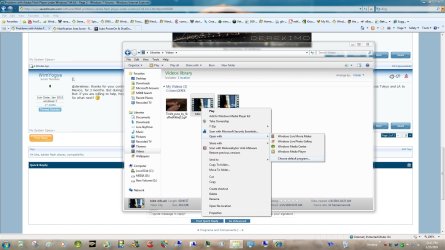
When you right click on one of your files can you choose open with and then pick a program?
 

Attachments

  • wim.jpg
    wim.jpg
    442.3 KB · Views: 194

My Computer

Computer type
PC/Desktop
Computer Manufacturer/Model Number
Self Built
OS
Win 10 Pro x64
CPU
Intel I5-2500K @3.3GHz
Motherboard
Asrock P67 Extreme4
Memory
16GB G.Skill Ripjaws X (4x4GB)
Graphics Card(s)
EVGA GeForce 750 Ti SC 2GB
Sound Card
ASUS Xonar DG 5.1 Channels 24-bit 96KHz PCI Interface Sound
Monitor(s) Displays
auria eq2367
Screen Resolution
1920 x 1080
Hard Drives
250GB Samsung 850 EVO SSD
1TB WD Blue
1TB Hitachi
PSU
SeaSonic X 650W 80 Plus Gold
Case
Corsair Obsidian 750D
Cooling
Corsair H60, Three 140mm case fans
Keyboard
Logitech Wireless Keyboard K520
Mouse
Logitech Wireless Mouse M310
Internet Speed
Wave Broadband ~ 100 dn 5 up
Antivirus
Windows Defender, Malwarebytes Premium
Browser
Edge, IE11, Chrome
Other Info
Laptop specs: HP g7-1365dx /
CPU: AMD A6-3420M APU with Radeon(tm) HD Graphics /
RAM: Crucial 8Gb (2x4Gb) /
SSD: Crucial M4-CT128M4SSD2 ATA Device/ FW 000F /
GFX: AMD Radeon HD 6520G /
OS: Windows 10 Pro x64

My Computer

Computer type
PC/Desktop
Computer Manufacturer/Model Number
Self Built
OS
Win 10 Pro x64
CPU
Intel I5-2500K @3.3GHz
Motherboard
Asrock P67 Extreme4
Memory
16GB G.Skill Ripjaws X (4x4GB)
Graphics Card(s)
EVGA GeForce 750 Ti SC 2GB
Sound Card
ASUS Xonar DG 5.1 Channels 24-bit 96KHz PCI Interface Sound
Monitor(s) Displays
auria eq2367
Screen Resolution
1920 x 1080
Hard Drives
250GB Samsung 850 EVO SSD
1TB WD Blue
1TB Hitachi
PSU
SeaSonic X 650W 80 Plus Gold
Case
Corsair Obsidian 750D
Cooling
Corsair H60, Three 140mm case fans
Keyboard
Logitech Wireless Keyboard K520
Mouse
Logitech Wireless Mouse M310
Internet Speed
Wave Broadband ~ 100 dn 5 up
Antivirus
Windows Defender, Malwarebytes Premium
Browser
Edge, IE11, Chrome
Other Info
Laptop specs: HP g7-1365dx /
CPU: AMD A6-3420M APU with Radeon(tm) HD Graphics /
RAM: Crucial 8Gb (2x4Gb) /
SSD: Crucial M4-CT128M4SSD2 ATA Device/ FW 000F /
GFX: AMD Radeon HD 6520G /
OS: Windows 10 Pro x64
Back
Top