Solved Problems with Buffalo hard drive

Northerner

New member
Member
Local time
10:43 PM
Messages
31
I have just bought an Buffalo external mini station 500 gb hard drive with the intention of installing Ubantu on to it.Any way, to cut a long story short I have made a mess off it, I need to merge the three seperate partitions which I have created into one, then format the whole disc.
In other words a factory reset.

Thank you for any help
Northerner
 

Attachments
  • Capture3.JPG
    Capture3.JPG
    88.9 KB · Views: 76

My Computer

Computer Manufacturer/Model Number
HP DV5 111em
OS
Windows 7 Home Premium 32bit.
No problem, just delete all the partitions and make one large new one. If you are not sure how to do that, just ask.

Regards....Mike Connor
 

My Computer

OS
Several, including Windows 7 x64 Ultimate
Thanks for your reply, I am asking how to do it.
Cheers
 

My Computer

Computer Manufacturer/Model Number
HP DV5 111em
OS
Windows 7 Home Premium 32bit.
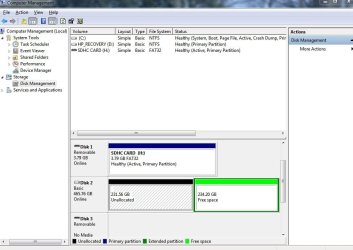
I have got down to two segments (see attachment), where do I go from here.
Regards
Northerner
 

Attachments

  • Capture10.JPG
    Capture10.JPG
    70.2 KB · Views: 42

My Computer

Computer Manufacturer/Model Number
HP DV5 111em
OS
Windows 7 Home Premium 32bit.
I have got down to two segments (see attachment), where do I go from here.
Regards
Northerner

Delete the other unallocated partition as well. Make sure you only delete the partitions on the Buffalo of course!

You don't need to delete "Free space".

You could also click on the unallocated partition and simply choose "Extend Volume", and then extend it to the full size of the drive.

Regards....Mike Connor
 

My Computer

OS
Several, including Windows 7 x64 Ultimate
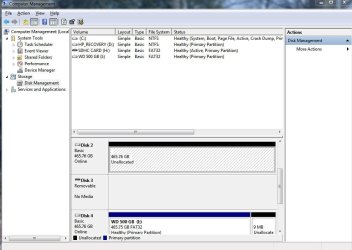
What you should end up with ( This is actually a Buffalo drive as it happens);

is something like this;


Regards....Mike Connor
 

My Computer

OS
Several, including Windows 7 x64 Ultimate
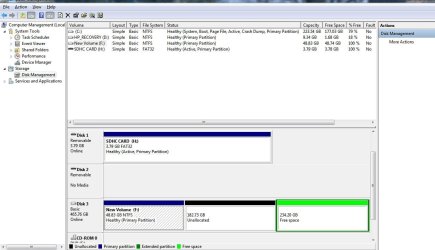
Thanks for your help Mike, it now looks like this (see attachment), problem is it does'nt auto boot and it will not let me attach a drive letter to it.
Also DISK 3 (no media) seems to be blank all the time, can I remove, if so how?
Regards
Northerner
 

Attachments

  • Capture10.JPG
    Capture10.JPG
    78.3 KB · Views: 9

My Computer

Computer Manufacturer/Model Number
HP DV5 111em
OS
Windows 7 Home Premium 32bit.
Disk 3 is a CD/DVD drive or similar. You can not do anything at all to it.

The Buffalo drive is now empty, and you can create a partition in it.

To do this, right click on it and choose "New Simple Volume"


Type in how many MB (1 GB = 1024 MB) you want to use from the unallocated partition to create the new partition with, then click on the Next button. (See screenshot below)
NOTE: If you want to use all of the unallocated partition to create the new partition with, then type all of the maximum disk space shown for the unallocated partition.


To format the disk right click on it and choose "Format";


Just leave the defaults in that box, and click OK. Although you can change the "Volume Label" to something else if you want. This one is called "Data".

Regards....Mike Connor
 

My Computer

OS
Several, including Windows 7 x64 Ultimate
Thanks Mike
I dont suppose you know how to istall Ubuntu 10.10 os onto the buffalo drive, and use this to duel boot my laptop with windows 7.
Thanks again
Northerner
 

My Computer

Computer Manufacturer/Model Number
HP DV5 111em
OS
Windows 7 Home Premium 32bit.
Thanks Mike
I dont suppose you know how to istall Ubuntu 10.10 os onto the buffalo drive, and use this to duel boot my laptop with windows 7.
Thanks again
Northerner

Sorry, Ubuntu is not my strong suit. I don't know enough to attempt explaining that, although it is fairly simple to do, you need to be very careful and follow instructions exactly. If you wait a moment somebody with more Ubuntu experience will perhaps chime in and explain how to do it.

Just in case they don't, here is a good explanation of how to do it;

http://www.pendrivelinux.com/installing-ubuntu-to-a-usb-hard-drive/

That is not a "dual-boot" installation as such, you have to choose which drive to boot from in BIOS. Or, you can simply make the USB the first boot default, and when you want to boot into Windows, just remove the drive. This does prevent a lot of potential problems with boot-loaders and stuff like that.

The drive is now OK I hope?

Regards....Mike Connor
 

My Computer

OS
Several, including Windows 7 x64 Ultimate
Back
Top