Problems with new nvidia driver??

baric27

New member
Local time
9:53 PM
Messages
23
Hi!
I have a strange(not common) problem..
I installed a few days ago the new nvidia driver 260.89.I did a clean isntall.When it prompted to restart it didn't restart my pc.I had to use the reset button.After that I could'nt restart my windows it simply said shutting down, and after that black screen(no video signal), and nothing happened.I tried to reinstall an older driver but the same problem, the driver installed correctly but the restart didn't work.In safe mode same problem.I managed to resolve by disabling the VGA card from the device manager and enabling after restart.But today the problem came back, and now it isn't working with the disable of the VGA card.
Can someone help me pls, because I cannot restart my PC from windows, only with the reset button.The shut down is working perfectly, only the restart doesn't.
Thank you!
 

My Computer

OS
Windows 7 Ultimate x64
CPU
Core 2 Duo E8200
Motherboard
Gigabyte GA-P35-DS3
Memory
2x2GB Kingmax 1066
Graphics Card(s)
Gigabyte 9600GT
I had a problem somewhat similar, except that my system crashed with an 0x124 BSOD, and wouldn't boot past the login window, until after running chkdsk /r.
 

My Computer

Computer Manufacturer/Model Number
DIY
OS
W7x64 Pro, SuSe 12.1/** W7 x64 Pro, XP MCE
CPU
Phenom II 1090T w/Noctua NH-D14 /**4400+ X2 w/CM Hyper TX 3
Motherboard
ASRock 890FX Deluxe 4/**A8N-SLI
Memory
2 x 2GB Patriot PGS34g1600LLKA/**4x1GB Corsair VS
Graphics Card(s)
EVGA GTX460 SC/**EVGA 8800GTS
Sound Card
Asus Xonar D2X/**Xonar D1
Monitor(s) Displays
Acer X233H, Dell E152FPc /**LG M237-WD
Screen Resolution
1920x1080 & 1024x768/**1980x1080
Hard Drives
WDC 2TB, 1.5TB, 1TB, 500GB,Seagate 500GB , Maxtor 80GB /**500GB Seagate & WDC 1TB Black
PSU
CM RS600 w/ APC BX1000G/**Antec 500 TP w/ APC BX1000
Case
HAF922/**Antec 1040IIB
Cooling
3x200mm, 1x140 and 1x120mm/**5x80mm fans
Keyboard
Logitech Media USB/**Saitek Eclipse
Mouse
Cordless Trackman Wheel/**Ditto
Internet Speed
3.3Mbps
Other Info
SB 560 5.1 w/ Sennheiser RS140/**Creative T20 speakers, Dvico FusionHDTV7 Gold RT, Cisco E3000, HP 5510V AIO, Linksys E3000, Belkin F5U237 hub and **F5D8055 adapter
(** = 2nd rig)
I tried chkdsk /r but it didn't helped :(
 

My Computer

OS
Windows 7 Ultimate x64
CPU
Core 2 Duo E8200
Motherboard
Gigabyte GA-P35-DS3
Memory
2x2GB Kingmax 1066
Graphics Card(s)
Gigabyte 9600GT
Hi baric,

You could try the following...

  1. Boot into safe mode
  2. Click the Start menu and in the search box type device, look for Device Manager and click it
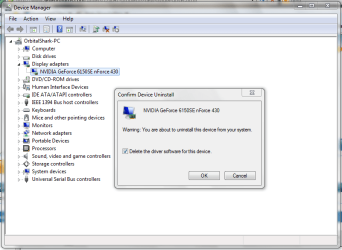
  3. Cick the arrow next to 'Display Adapters', right-click your display and choose 'Uninstall'
  4. Click the 'Delete the driver software for this device' box then click OK
  5. Reboot your computer
Capture.PNG

This will force windows to use the 'Standard VGA Adapter' and re-install the default driver for your device. You can then try downloading the driver again or the previous driver from their archives.


OS
 

My Computer

Computer Manufacturer/Model Number
Compaq Desktop
OS
Windows 7 Ultimate x64
CPU
AMD Sempron Dual Core
Memory
3GB
Graphics Card(s)
NVIDIA GeForce 6150SE nForce 430
Screen Resolution
1024x768
Hard Drives
150GB Sata
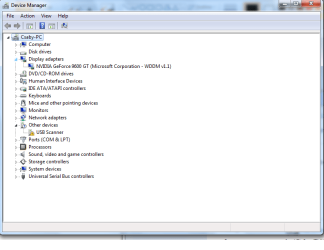
I tried but it didn't helped:( :After I uninstalled in safe mode as u said with Delete the driver software for this device, I did a restart(forced with reset button) and the windows installed a WDM driver for the card.But the problem is the same
 

Attachments

  • Untitled.png
    Untitled.png
    24.1 KB · Views: 19

My Computer

OS
Windows 7 Ultimate x64
CPU
Core 2 Duo E8200
Motherboard
Gigabyte GA-P35-DS3
Memory
2x2GB Kingmax 1066
Graphics Card(s)
Gigabyte 9600GT

My Computer

Computer Manufacturer/Model Number
Alienware AREA-51 M17x
OS
windows 7 ultimate 64bit
CPU
Intel Core2 Extreme x9000 2.8GHZ
Motherboard
Asus P965 Intel chipset
Memory
4Gig
Graphics Card(s)
2 NVidia GeForce 8800M GTX (SLi)
Sound Card
onboard
Monitor(s) Displays
17in. built-in, 47in JVC LCD
Screen Resolution
1080p
Hard Drives
2 250Gig Hitachi (RAID 0) @ 7200RPM
Case
17in. laptop
Mouse
touchpad, Logitech Anywhere Mouse cordless laser
Internet Speed
cable
I have no idea what this 260.89 version is. I am subscribed to nVidia's newsletter and they regularly send me emails with notifications for new driver versions. My card is close to the one the OP has, installing 260.99 worked fine, no need for a restart at all.
 

My Computer

Computer type
Laptop
Computer Manufacturer/Model Number
Custom
OS
Windows 7 Home Premium x64
CPU
Intel Core i5 2500K
Motherboard
MSI MS-7750
Memory
8GB DDR3
Graphics Card(s)
nVidia GeForce GTX650 Ti BOOST
Sound Card
Realtek
Monitor(s) Displays
21' Philips
Screen Resolution
Full HD
Hard Drives
1TB
PSU
500W
Try downloading the latest driver fr your card from Nvidia to your desktop>unzip or unpack the driver then stop.Drivers - Download NVIDIA Drivers

Go to device manager>display adapter>update driver software>browse my computer>let me pick>have disk>browse to where you have the driver downloaded to>run the setup.exe file> or click or double click the .inf file and seee if it will install
Fabe
 

My Computer

Computer Manufacturer/Model Number
Self Built
OS
Windows 7 ultimate 64 bit / XP Home sp3
CPU
intel Core 2 Duo E8400 3.0ghz
Motherboard
Asus P5ND bios 1401
Memory
8 gigs 1066 OCZ Fata1ty
Graphics Card(s)
EVGA GTX 580 Call of Duty Black Ops Edition
Sound Card
Creative Soundblaster Audigy 2zs
Monitor(s) Displays
Asus 24in LCD's 2MS X2
Screen Resolution
1920x1080p @60Hz
Hard Drives
WD Caviar 500 Black/ WD Caviar 200 Blue
PSU
OCZ 700W GameXtreme
Case
NZXT Apollo
Cooling
Corsair H50 CPU/120mm x3 /60mm x2 /Corsair Dominator Ram
Keyboard
Logitech Bluetooth Wireless MX5000
Mouse
Logitech Bluetooth Wireless MX1000
Internet Speed
Download 19.83 Upload 0.97
Other Info
Logitech Z2300 Speakers/ Bose Noise Cancelling Headphones/Avermedia PCI-e Hybrid TV Bravo/Epson NX415 all in one/ 4 Port Powered USB Hub/ LG 10x Bluray Burner /TSST Corp DVDRW External
Thefabe:I cannot install the diver like that because there is no inf file in the main directory(English), and with the setup.exe file doesn't working.So I installed running the setup.exe but it didn't help :(

kword88:I removed the drivers with the diver sweeper, but the restart still not worked, I installed the 260.99 driver after that, but it didn't help :(
 

My Computer

OS
Windows 7 Ultimate x64
CPU
Core 2 Duo E8200
Motherboard
Gigabyte GA-P35-DS3
Memory
2x2GB Kingmax 1066
Graphics Card(s)
Gigabyte 9600GT
if you are able to boot your computer successfully, i would say run driver sweeper again (after uninstall), and reinstall your last driver that worked.
 

My Computer

Computer Manufacturer/Model Number
Alienware AREA-51 M17x
OS
windows 7 ultimate 64bit
CPU
Intel Core2 Extreme x9000 2.8GHZ
Motherboard
Asus P965 Intel chipset
Memory
4Gig
Graphics Card(s)
2 NVidia GeForce 8800M GTX (SLi)
Sound Card
onboard
Monitor(s) Displays
17in. built-in, 47in JVC LCD
Screen Resolution
1080p
Hard Drives
2 250Gig Hitachi (RAID 0) @ 7200RPM
Case
17in. laptop
Mouse
touchpad, Logitech Anywhere Mouse cordless laser
Internet Speed
cable
Yes, I can boot, there is no problem with my computer excepting the restart.
I don't know which driver was worked before, but I will install the driver from my original driver cd.
 

My Computer

OS
Windows 7 Ultimate x64
CPU
Core 2 Duo E8200
Motherboard
Gigabyte GA-P35-DS3
Memory
2x2GB Kingmax 1066
Graphics Card(s)
Gigabyte 9600GT
do you know if you have integrated graphics? if so, you may find an updated driver on gigabytes website.
 

My Computer

Computer Manufacturer/Model Number
Alienware AREA-51 M17x
OS
windows 7 ultimate 64bit
CPU
Intel Core2 Extreme x9000 2.8GHZ
Motherboard
Asus P965 Intel chipset
Memory
4Gig
Graphics Card(s)
2 NVidia GeForce 8800M GTX (SLi)
Sound Card
onboard
Monitor(s) Displays
17in. built-in, 47in JVC LCD
Screen Resolution
1080p
Hard Drives
2 250Gig Hitachi (RAID 0) @ 7200RPM
Case
17in. laptop
Mouse
touchpad, Logitech Anywhere Mouse cordless laser
Internet Speed
cable
No, I don't have onboard vga card
 

My Computer

OS
Windows 7 Ultimate x64
CPU
Core 2 Duo E8200
Motherboard
Gigabyte GA-P35-DS3
Memory
2x2GB Kingmax 1066
Graphics Card(s)
Gigabyte 9600GT
i tried looking on gigabytes website, but without the cards model number, thats impossible.
 

My Computer

Computer Manufacturer/Model Number
Alienware AREA-51 M17x
OS
windows 7 ultimate 64bit
CPU
Intel Core2 Extreme x9000 2.8GHZ
Motherboard
Asus P965 Intel chipset
Memory
4Gig
Graphics Card(s)
2 NVidia GeForce 8800M GTX (SLi)
Sound Card
onboard
Monitor(s) Displays
17in. built-in, 47in JVC LCD
Screen Resolution
1080p
Hard Drives
2 250Gig Hitachi (RAID 0) @ 7200RPM
Case
17in. laptop
Mouse
touchpad, Logitech Anywhere Mouse cordless laser
Internet Speed
cable
Hi!
I have a strange(not common) problem..
I installed a few days ago the new nvidia driver 260.89.I did a clean isntall.When it prompted to restart it didn't restart my pc.I had to use the reset button.After that I could'nt restart my windows it simply said shutting down, and after that black screen(no video signal), and nothing happened.I tried to reinstall an older driver but the same problem, the driver installed correctly but the restart didn't work.In safe mode same problem.I managed to resolve by disabling the VGA card from the device manager and enabling after restart.But today the problem came back, and now it isn't working with the disable of the VGA card.
Can someone help me pls, because I cannot restart my PC from windows, only with the reset button.The shut down is working perfectly, only the restart doesn't.
Thank you!

This doesn't really sound like a driver issue, but rather a hardware issue.

Check the video card to make sure it is properly seated, and check any power connections to see if anything is loose.

Let us know. I'm on my way out, so it'll be some time before I get back to you.

Later.
 

My Computer

Computer type
PC/Desktop
Computer Manufacturer/Model Number
Custom built by me.
OS
Windows 10 Pro
CPU
Intel Core i7-4770K (3.5Ghz)
Motherboard
Gigabyte G1 Sniper 5 (F10 Bios)
Memory
32 gig Corsair Dominator Platinum (4x8Gig)
Graphics Card(s)
Sapphire Tri-X R9 Fury
Sound Card
Soundblaster ZXR
Monitor(s) Displays
NEC PA242W 24" LCD Monitor
Screen Resolution
1920 x 1200
Hard Drives
Primary - Samsung 850 Pro (512gig), Samsung 840 Pro (256gig), 2TB WD Caviar Black.
PSU
EVGA Supernova 1000 G2
Case
Cooler Master HAF X
Cooling
Corsair H100i with Corsair Air Series SP120 Quiet Fans
Keyboard
Logitech Wireless Wave
Mouse
Logitech Performance MX
Internet Speed
High Speed Cable
Antivirus
Norton Security
Browser
IE11
Other Info
Memory Timings - 1866MHz @ 9-9-9-27-1T @ 1.5 volts
kword88:I tried again with the driver sweeper, and then installed the driver from gigabyte(I know the model number) but it didn't help :(

sygnus21:I will check that, but if this is a hardware issue, then why is the card working perfectly in any game??
 

My Computer

OS
Windows 7 Ultimate x64
CPU
Core 2 Duo E8200
Motherboard
Gigabyte GA-P35-DS3
Memory
2x2GB Kingmax 1066
Graphics Card(s)
Gigabyte 9600GT
This doesn't really sound like a driver issue, but rather a hardware issue.

, but if this is a hardware issue, then why is the card working perfectly in any game??

Cause it could be something other than the video card. Power supply, loose wires, or it could very well be that the card is failing or intermittent (comes and goes).

That's why I said check all your wire/cable connections. And I'm not ruling out the driver issue, I just said it doesn't sound like one.

Also, I think it’s a good maintenance to occasionally remove and clean the contacts of your PCI cards every now and then. This ensures that the cards are properly seated and have good contact.

I do this at least 2 times a year, sometimes more, and it also ensures my case isn’t full of dust or other debris.

My two cents.
 

My Computer

Computer type
PC/Desktop
Computer Manufacturer/Model Number
Custom built by me.
OS
Windows 10 Pro
CPU
Intel Core i7-4770K (3.5Ghz)
Motherboard
Gigabyte G1 Sniper 5 (F10 Bios)
Memory
32 gig Corsair Dominator Platinum (4x8Gig)
Graphics Card(s)
Sapphire Tri-X R9 Fury
Sound Card
Soundblaster ZXR
Monitor(s) Displays
NEC PA242W 24" LCD Monitor
Screen Resolution
1920 x 1200
Hard Drives
Primary - Samsung 850 Pro (512gig), Samsung 840 Pro (256gig), 2TB WD Caviar Black.
PSU
EVGA Supernova 1000 G2
Case
Cooler Master HAF X
Cooling
Corsair H100i with Corsair Air Series SP120 Quiet Fans
Keyboard
Logitech Wireless Wave
Mouse
Logitech Performance MX
Internet Speed
High Speed Cable
Antivirus
Norton Security
Browser
IE11
Other Info
Memory Timings - 1866MHz @ 9-9-9-27-1T @ 1.5 volts
GT9600, thats a fairly older card yes?
260.XX is for the latest nVidia cards. You probably do not want to use it. I just went back to 197.XX from the 260.XX driver, for my GTX260.
Like suggested above, safe mode, uninstall driver in device manager, add/remove uninstall all nvidia software, driver sweeper, uninstall all nVidia software. reboot Install 1XX.XX series driver, reboot....

System restore??????????????????????

Quite possible Direct X 11 or latest PhysX not for your card.

http://www.sevenforums.com/graphic-cards/119548-evga-gtx-260-sc-55nm.html

Earlier discussion I had started over the 260.XX driver.
 

My Computer

Computer Manufacturer/Model Number
DIY #3, #2
OS
W7 Ulti/64, XP Pro/32
CPU
INTEL i7 920 DO, Core2 Duo 6400
Motherboard
GIGABYTE EX58 UD3R-SLI, EP45-UD3R
Memory
KINGSTON DDR3 1333MHz, CORSAIR DDR2 800MHz
Graphics Card(s)
EVGA GTX 260 x2, 8800 GTX
Sound Card
REALTEK HD onboard, ditto
Monitor(s) Displays
SONY 40" BRAVIA LCD
Screen Resolution
1360 X 768
Hard Drives
OCZ VERTEX/RAID0 -3, Vertex 30GB
PSU
COOLERMASTER 900W, ENERMAX 850W
Case
COOLERMASTER HAF 932 x2
Cooling
stock
Keyboard
MS
Mouse
MS
Internet Speed
ADSL 3MB/768KBs
Other Info
amateur enthusiast
Or, it could be the fact that it was not related at all to the nVidia driver install, but something else that was installed in the same time period.

Have you verified in WU to see if anything was installed within a day of your attempted nVidia driver install?

Remember, this is happening regardless of which driver you are using - which indicates that it is suspiciously not related to the GPU driver at all, in the first place....
 

My Computers

System One System Two

  • Computer type
    PC/Desktop
    Computer Manufacturer/Model Number
    The Beast Model A (homebrew)
    OS
    Windows 11 21H2 Current build
    CPU
    AMD Ryzen 9 3950X
    Motherboard
    MSI MEG X570 GODLIKE
    Memory
    4 * 32 GB - Corsair Vengeance 3600 MHz
    Graphics Card(s)
    EVGA GeForce RTX 3080 Ti XC3 ULTRA GAMING (12G-P5-3955-KR)
    Sound Card
    Realtek® ALC1220 Codec
    Monitor(s) Displays
    2x Eve Spectrum ES07D03 4K Gaming Monitor (Matte) | Eve Spec
    Screen Resolution
    3x 3840 x 2160
    Hard Drives
    3x Samsung 980 Pro NVMe PCIe 4 M.2 2 TB SSD (MZ-V8P2T0B/AM) } 3x Sabrent Rocket NVMe 4.0 1 TB SSD
    PSU
    PC Power & Cooling’s Silencer Series 1050 Watt, 80 Plus Plat
    Case
    Fractal Design Define 7 XL Dark ATX Full Tower Case
    Cooling
    SteelSeries Apex Pro Wired Gaming Keyboard
    Keyboard
    SteelSeries Apex Pro
    Mouse
    Logitech MX Master 3S | MX Master 3 for business
    Internet Speed
    AT&T LightSpeed Gigabit Duplex Ftth
    Antivirus
    Windows Defender + MB 3
    Browser
    Nightly (default) + Firefox (stable),Chrome, Edge
  • Computer type
    PC/Desktop
    System Manufacturer/Model Number
    Dell Latitude E5470
    OS
    ChromeOS Flex Dev Channel (current)
    CPU
    Intel(R) Core(TM) i5-6300U CPU @ 2.40GHz, 2501 Mhz, 2 Core(s), 4 Logical Processor(s)
    Motherboard
    Dell
    Memory
    16 GB
    Graphics Card(s)
    Intel(R) HD Graphics 520
    Sound Card
    Intel(R) HD Graphics 520 + RealTek Audio
    Monitor(s) Displays
    Dell laptop display 15"
    Screen Resolution
    1920 * 1080
    Hard Drives
    Toshiba 128GB M.2 22300 drive
    INTEL Cherryville 520 Series SSDSC2CW180A 180 GB SATA III SSD
    PSU
    Dell
    Case
    Dell
    Cooling
    Dell
    Keyboard
    Dell
    Mouse
    Logitech MX Master 3S (shared w. Sys 1) | Dell TouchPad
    Internet Speed
    AT&T LightSpeed Gigabit Duplex Ftth
Maybe you are right, maybe there is something else, or something else too.
I checked out my windows updates history, but no updates were installed in that day.
 

My Computer

OS
Windows 7 Ultimate x64
CPU
Core 2 Duo E8200
Motherboard
Gigabyte GA-P35-DS3
Memory
2x2GB Kingmax 1066
Graphics Card(s)
Gigabyte 9600GT
Back
Top