fsufan0025
New member
- Local time
- 9:28 PM
- Messages
- 14
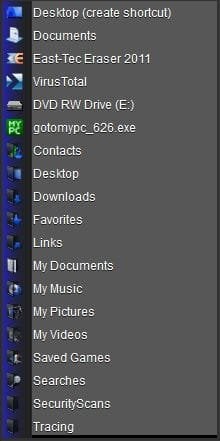
I had a major problem with my desktop and had to reload it. I had everything backed up on dvd, so I didn't think it would be a problem. After running my windows 7 disk, and my program disk, I started to load my music, pictures, and videos. I found out how to add a shortcut to the send to menu, (shell:sendto) and was able to drag and drop the my pictures, my videos, and my music shortcuts from the start menu. When my 1st disk came up, I did the select all to send themm all to my pictures. But -- when I clicked on my pictures, they aren't there. Seems they are in a folder at C:\Users\User-Name\AppData\Roaming\Microsoft\Windows\SendTo and I don't understand it. How can I put a shortcut on the send to menu that I can access from the start menu, like C\User\My Pictures ???
My Computer
At a glance
windows 7 64 bitamd 8120 8 coreg skill 2x8 1600pny gtx960 4 gig gddr5
- Computer type
- PC/Desktop
- Computer Manufacturer/Model Number
- custom
- OS
- windows 7 64 bit
- CPU
- amd 8120 8 core
- Motherboard
- asrock 990 killer
- Memory
- g skill 2x8 1600
- Graphics Card(s)
- pny gtx960 4 gig gddr5
- Sound Card
- onboard
- Monitor(s) Displays
- samsung 65 inch ultra hi def
- Screen Resolution
- 3840x2160
- Hard Drives
- pny 240 gig ssd sata 6 and sandisk 240 gig ssd sata6
- PSU
- evga 750 watt modular
- Case
- in win grone
- Cooling
- 10 x 120 mm corsair red led
- Keyboard
- logitech wireless k810
- Mouse
- logitech wireless trackball m570
- Internet Speed
- 60 mps
- Antivirus
- microsoft defender
- Browser
- chrome
- Other Info
- Vantec 3.5 media card reader