Mik018
New member
Hi Guys
I read that a lot of people are having problems with there soundcards and windows 7 (64 bits). I guess I’m just 1 more guy on that list.
Well I recently bought a Asus Rampage II Extreme , I7 920 and 12 Gb of ram. With Mobo I got a soundcard Supreme FX from Creative (PCI express)
And then I installed windows 7 64 bit
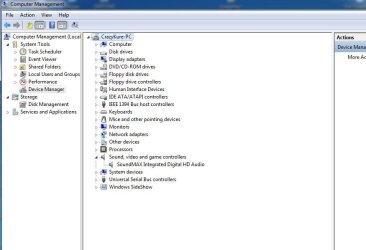
And for like a week everything worked fine. Then suddenly one day I lost sound in windows. Windows does recognize my sound card, but it cannot play any sound.
Well since I didn’t make backup of image I reinstalled windows and I had sound once again.
Then last night I made some windows update and today when I got back from work I lost sound again. I tried to restore image to the point where I created backup and it worked, I had sound again.
So I’m not that sure that the problem is a device driver, but I must say I spent more or less 6 hours now reading and trying everything but I simply can’t get any sound to play again.
I have tried PAX drivers, i have tried solution from Darasain in topic http://www.sevenforums.com/sound-audio/1907-asus-supremefx-x-fi.html
It didn’t work, I have tried solution from HikerRemastered in the same topic and that didn’t work neither.
After a couple of hours I replaced the soundcard with my old SoundBlaster Audigy, like that did any good J, no no nothing new, no sound what so ever
Now I’m back with new soundcard Supreme FX, and wondering what do to.
I can imagine that the problem is somewhere in windows, because when I went back to restore point I got sound. And after that I installed Kaspesky internet Security 2010 and turn my pc off. Next time I started windows I lost sound again. If anyone have any Idea please help, any advise is appreciated.
Kind regards
Very desperate Mik
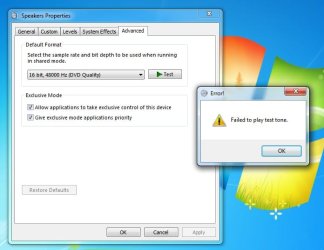
PS here is a screenshot of a error msg
I read that a lot of people are having problems with there soundcards and windows 7 (64 bits). I guess I’m just 1 more guy on that list.
Well I recently bought a Asus Rampage II Extreme , I7 920 and 12 Gb of ram. With Mobo I got a soundcard Supreme FX from Creative (PCI express)
And then I installed windows 7 64 bit
And for like a week everything worked fine. Then suddenly one day I lost sound in windows. Windows does recognize my sound card, but it cannot play any sound.
Well since I didn’t make backup of image I reinstalled windows and I had sound once again.
Then last night I made some windows update and today when I got back from work I lost sound again. I tried to restore image to the point where I created backup and it worked, I had sound again.
So I’m not that sure that the problem is a device driver, but I must say I spent more or less 6 hours now reading and trying everything but I simply can’t get any sound to play again.
I have tried PAX drivers, i have tried solution from Darasain in topic http://www.sevenforums.com/sound-audio/1907-asus-supremefx-x-fi.html
It didn’t work, I have tried solution from HikerRemastered in the same topic and that didn’t work neither.
After a couple of hours I replaced the soundcard with my old SoundBlaster Audigy, like that did any good J, no no nothing new, no sound what so ever
Now I’m back with new soundcard Supreme FX, and wondering what do to.
I can imagine that the problem is somewhere in windows, because when I went back to restore point I got sound. And after that I installed Kaspesky internet Security 2010 and turn my pc off. Next time I started windows I lost sound again. If anyone have any Idea please help, any advise is appreciated.
Kind regards
Very desperate Mik
PS here is a screenshot of a error msg
Attachments
My Computer
- OS
- Windows pro 7 64Bit
- CPU
- I7 920
- Motherboard
- Asusu Rampage II Extreme
- Memory
- 12 Gb Corsair CMX6-1600 MHz
- Graphics Card(s)
- GeForce 9600Gt 2Gb ram
- Sound Card
- hah ?
- Monitor(s) Displays
- Samsung 22"
- PSU
- 750 watts
- Keyboard
- Logitech G15
- Mouse
- Razor
- Internet Speed
- 20/2