Process Explorer discrepencies

Ageeb

New member
Pro User
VIP
Local time
6:58 PM
Messages
196
Location
Minnesota
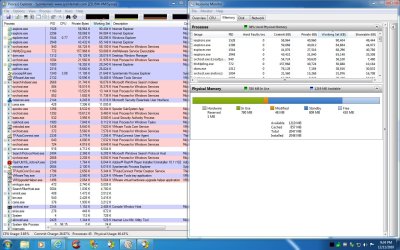
Memory used for processes in Process Explorer is largely different than in Task Manager...

processes.jpg

for example, MSE is off by roughly 10MB. Which do you think is more accurate?

edit:
wow look at dwm.exe!
 

My Computer

Computer Manufacturer/Model Number
Custom
OS
Windows 7 Ultimate x64
CPU
Intel i5-2500k
Motherboard
ASUS P8Z68-V Pro/GEN3
Memory
16GB
Graphics Card(s)
2x Radeon HD7970 Crossfire
Sound Card
On-Board / Logitech G930
Monitor(s) Displays
3x Dell u2412m
Screen Resolution
5760x1200
Hard Drives
Toshiba thns064gg2bbaa SSD
Seagate Barracuda 7200.12 ST31000528AS 1TB
Intel RST SSD caching enabled
PSU
Corsair AX850
Case
Corsair Obsidian 650D
Cooling
Corsair H100
Keyboard
Logitech Illuminated
Mouse
Logitech M510 Wireless
Internet Speed
1Mb/s
Hmm.. same amount of processes.. same amount of physical memory in use (~31%) the only different thing i notice is the CPU usage, and the memory usage from some programs.. but it still seems ok.. can't tell which one is telling the truth and which one is lying :(
 

My Computer

Computer type
PC/Desktop
OS
Windows
exactly! Really makes knowing which apps are 'lighter' difficult ;)
 

My Computer

Computer Manufacturer/Model Number
Custom
OS
Windows 7 Ultimate x64
CPU
Intel i5-2500k
Motherboard
ASUS P8Z68-V Pro/GEN3
Memory
16GB
Graphics Card(s)
2x Radeon HD7970 Crossfire
Sound Card
On-Board / Logitech G930
Monitor(s) Displays
3x Dell u2412m
Screen Resolution
5760x1200
Hard Drives
Toshiba thns064gg2bbaa SSD
Seagate Barracuda 7200.12 ST31000528AS 1TB
Intel RST SSD caching enabled
PSU
Corsair AX850
Case
Corsair Obsidian 650D
Cooling
Corsair H100
Keyboard
Logitech Illuminated
Mouse
Logitech M510 Wireless
Internet Speed
1Mb/s
They're both correct. Process Explorer is showing the Working Set and Private Bytes counters, but Task Manager is showing (in your view in the screenshot) a subset of the Working Set called Private Working Set. They're both being accurate, they're just showing different memory counters. There are quite a few, and if you want an accurate picture of virtual memory utilization/pressure, you should be using perfmon instead.
 

My Computer

Computer type
PC/Desktop
Computer Manufacturer/Model Number
Custom
OS
Windows 10 Pro x64
CPU
Intel Core i7 4790K @ 4.5GHz
Motherboard
Asus Maximus Hero VII
Memory
32GB DDR3
Graphics Card(s)
Nvidia GeForce GTX970
Sound Card
Realtek HD Audio
Screen Resolution
1920x1200
Hard Drives
1x Samsung 250GB SSD
4x WD RE 2TB (RAIDZ)
PSU
Corsair AX760i
Case
Fractal Design Define R4
Cooling
Noctua NH-D15
If you go to Resource Manager > Memory tab, you will see the different numbers.
 

My Computer

Computer Manufacturer/Model Number
HP, Dell, Gateway, Toshiba - 4 laptops and 2 desktops
OS
Vista, Windows7, Mint Mate, Zorin, Windows 8
CPU
from 1.6GHz Duo to i7
Monitor(s) Displays
2x HP w2207
Hard Drives
5x HDD, 7x SSD, 12x Externals
Keyboard
with trackball - no mices
Mouse
Trackball mice
Internet Speed
DSL 6000
They're both correct. Process Explorer is showing the Working Set and Private Bytes counters, but Task Manager is showing (in your view in the screenshot) a subset of the Working Set called Private Working Set. They're both being accurate, they're just showing different memory counters. There are quite a few, and if you want an accurate picture of virtual memory utilization/pressure, you should be using perfmon instead.

Thank you! that's alot to take it ;)

whs said:
If you go to Resource Manager > Memory tab, you will see the different numbers.

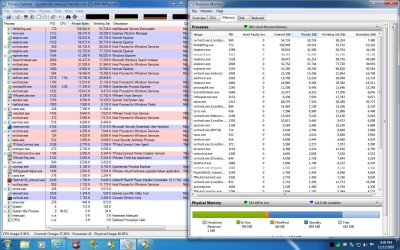
ok i'm understanding better, and working is spot on between the two:
working.jpg

but private is still far off:
private.jpg
 

My Computer

Computer Manufacturer/Model Number
Custom
OS
Windows 7 Ultimate x64
CPU
Intel i5-2500k
Motherboard
ASUS P8Z68-V Pro/GEN3
Memory
16GB
Graphics Card(s)
2x Radeon HD7970 Crossfire
Sound Card
On-Board / Logitech G930
Monitor(s) Displays
3x Dell u2412m
Screen Resolution
5760x1200
Hard Drives
Toshiba thns064gg2bbaa SSD
Seagate Barracuda 7200.12 ST31000528AS 1TB
Intel RST SSD caching enabled
PSU
Corsair AX850
Case
Corsair Obsidian 650D
Cooling
Corsair H100
Keyboard
Logitech Illuminated
Mouse
Logitech M510 Wireless
Internet Speed
1Mb/s
No, actually it's not off at all - the "Private" counter is actually showing you the commit of the working set. If you look closely, you'll see that the "Commit" column in Resource Monitor matches the Private Bytes of Process Explorer. Until you become proficient in learning what all of these names actually mean (there are close to a hundred different ways to slice a process memory space up into counters), use Process Explorer, which has names that are easier for someone who doesn't do performance monitoring/scaling/troubleshooting to understand. Unfortunately, if you're going to use Resource Monitor or perfmon, you really will have to learn what those names actually mean. The counter names in Windows are very specific, and unless you already know Windows internals these can be very confusing. If you know perfmon, you will likely understand the difference between "Private", "Commit", "Private Working Set", etc; and to those that don't, stick with Process Explorer ;).
 

My Computer

Computer type
PC/Desktop
Computer Manufacturer/Model Number
Custom
OS
Windows 10 Pro x64
CPU
Intel Core i7 4790K @ 4.5GHz
Motherboard
Asus Maximus Hero VII
Memory
32GB DDR3
Graphics Card(s)
Nvidia GeForce GTX970
Sound Card
Realtek HD Audio
Screen Resolution
1920x1200
Hard Drives
1x Samsung 250GB SSD
4x WD RE 2TB (RAIDZ)
PSU
Corsair AX760i
Case
Fractal Design Define R4
Cooling
Noctua NH-D15
thanks for the help cluberti... I appreciate everyones input, and clearly need to do some research during some down time.
 

My Computer

Computer Manufacturer/Model Number
Custom
OS
Windows 7 Ultimate x64
CPU
Intel i5-2500k
Motherboard
ASUS P8Z68-V Pro/GEN3
Memory
16GB
Graphics Card(s)
2x Radeon HD7970 Crossfire
Sound Card
On-Board / Logitech G930
Monitor(s) Displays
3x Dell u2412m
Screen Resolution
5760x1200
Hard Drives
Toshiba thns064gg2bbaa SSD
Seagate Barracuda 7200.12 ST31000528AS 1TB
Intel RST SSD caching enabled
PSU
Corsair AX850
Case
Corsair Obsidian 650D
Cooling
Corsair H100
Keyboard
Logitech Illuminated
Mouse
Logitech M510 Wireless
Internet Speed
1Mb/s
That's ok - the innards of Windows (and the tools to get at them) really aren't designed for the uninitiated. That group is a small few, so not knowing is nothing to be ashamed of. That's why you ask, and we answer ;).
 

My Computer

Computer type
PC/Desktop
Computer Manufacturer/Model Number
Custom
OS
Windows 10 Pro x64
CPU
Intel Core i7 4790K @ 4.5GHz
Motherboard
Asus Maximus Hero VII
Memory
32GB DDR3
Graphics Card(s)
Nvidia GeForce GTX970
Sound Card
Realtek HD Audio
Screen Resolution
1920x1200
Hard Drives
1x Samsung 250GB SSD
4x WD RE 2TB (RAIDZ)
PSU
Corsair AX760i
Case
Fractal Design Define R4
Cooling
Noctua NH-D15
  • Like
Reactions: whs
Back
Top