Processor being excessively utilised

Pixelpro

Techie -Helping you along
Power User
Local time
7:41 AM
Messages
156
I just installed windows 7 on a 'new' in the sense I just got it but its a refurbished PC from a working environment, anyway I activated Hyper Threading and I got 2 bars on the performance tab of task manager (2 graphs as before I activated Hyper Threading it was just 1 graph), but there's 2 Physical Cpu's in this computer, is only one being used and the other just sitting there or? I'm not sure due to the nature of this PC and it having 2 Intel Xeons, also I noticed if you turn the computer on and open something like chrome you get a CPU utilisation of about 80% then that jumps around and it hits 100% easily,

I've noticed if you close everything its fine... once you open anything, let it be notepad, chrome, anything and the Cpu instantly rises to 40% then continues bobbing around 60%

Cpu: Intel Xeon 2.8GHZ (X2)

Kind Regards,
 
Last edited:

My Computer

Computer type
Laptop
Computer Manufacturer/Model Number
HP
OS
Windows 7 64 Bit Home Premium
CPU
Intel core I3
Motherboard
Unkown
Memory
4Gb
Graphics Card(s)
Ati Mobility Radeon
Sound Card
Default
Monitor(s) Displays
1
Hard Drives
c:/ 277Gb
PSU
Unknown
Case
HP Pavilion DV7
Cooling
Default
Keyboard
Default
Mouse
Default
Internet Speed
50Mb/s VIRGIN MEDIA CABLE (FIBRE-OPTIC)
Other Info
Bought November 2011
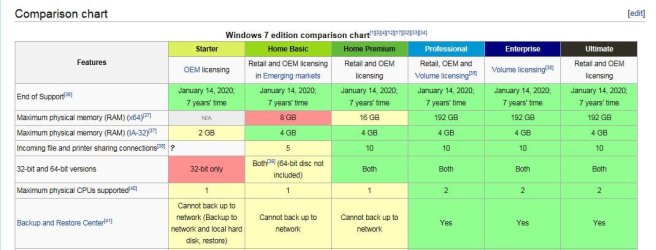
Based on your provided info, you have a single core xeon with hyperthreading technology (this might probably be Pentium 4 HT server edition). Also your operating system says Windows 7 Home Premium. Before you enabled HT, you only saw 1 thread on Task Manager. This definitely means that the other CPU isn't being utilized. In order for Windows 7 to use 2 CPUs, you must be running Professional, Ultimate or Enterprise edition.

Here's the comparison table for Windows 7 editions:

Capture.JPG

Windows 7 editions - Wikipedia, the free encyclopedia
 

My Computer

Computer type
Laptop
Computer Manufacturer/Model Number
Dell Optiplex SX270, Lenovo Z470
OS
Windows 7 Professional x64 SP1
CPU
Intel® Pentium® 4 @ 2.26 GHz, Intel Core i7-2670QM @ 2.20 GH
Motherboard
Dell, Lenovo
Memory
512MB Dual channel DDR SDRAM @ 400MHz 2.5-3-3-7, 8 GB DDR3
Graphics Card(s)
Intel 82865G, Nvidia GeForce 520M Graphics
Sound Card
SoundMax Integrated Audio, Integrated HD Audio
Monitor(s) Displays
LG W1952
Screen Resolution
1440x900, 1366 x 768
Hard Drives
40 GB 2.5" IDE 4200 RPM HDD, 500 GB 5400 RPM Sata 1.5 + 32 GB SSD
PSU
Dell 145 Watt, Lenovo 120 Watt Power Adapter
Case
Optiplex SX270 Small Form Factor, Laptop
Cooling
Dell Proprietary Air Cooling, Stock laptop cooling
Keyboard
Dell SK-8125 USB Keyboard
Mouse
Dell PS/2 2 button ball mouse with wheel scroll
Internet Speed
300 Mbit down / 20 Mbps up Time Warner Cable
Antivirus
MSE, Malwarebytes Scanner
Browser
Internet (Aizawa) Explorer 11
Other Info
Running Windows Server 2012 Datacenter on a virtual machine to run Metro Apps.
OH I see, so utilising another CPU means I can get 4 threads in total? Also is there a reason why I open a program and it uses 40% CPU or?
 

My Computer

Computer type
Laptop
Computer Manufacturer/Model Number
HP
OS
Windows 7 64 Bit Home Premium
CPU
Intel core I3
Motherboard
Unkown
Memory
4Gb
Graphics Card(s)
Ati Mobility Radeon
Sound Card
Default
Monitor(s) Displays
1
Hard Drives
c:/ 277Gb
PSU
Unknown
Case
HP Pavilion DV7
Cooling
Default
Keyboard
Default
Mouse
Default
Internet Speed
50Mb/s VIRGIN MEDIA CABLE (FIBRE-OPTIC)
Other Info
Bought November 2011
Yes and your system will act like true dual core instead of a single core with HT, and you will notice significant boost in multitasking because HT only improves performance by 30% whereas 2 CPUs will almost double the performance of your system. The reason for high CPU utilization is due to the fact that Windows is using only 1 CPU with 1 core. Windows 7 has more background activities than older versions (except Vista) so those background services, apps, etc will have to share only 1 core of your CPU making it easy to reach 100%. If Chrome is idle and you notice constant high CPU utilization most of the time, you might want to check the compatibility of the driver's installed since there maybe a conflict with the OS and thus robbing your CPU cycles. Try to run Resource Monitor and check to see which process uses the most CPU. Even a single core without HT CPU should not use more than ~10% CPU when the computer is idle, and when a program or app is launched or being used, it is normal to see 100% CPU spikes for a single threaded CPU.
 

My Computer

Computer type
Laptop
Computer Manufacturer/Model Number
Dell Optiplex SX270, Lenovo Z470
OS
Windows 7 Professional x64 SP1
CPU
Intel® Pentium® 4 @ 2.26 GHz, Intel Core i7-2670QM @ 2.20 GH
Motherboard
Dell, Lenovo
Memory
512MB Dual channel DDR SDRAM @ 400MHz 2.5-3-3-7, 8 GB DDR3
Graphics Card(s)
Intel 82865G, Nvidia GeForce 520M Graphics
Sound Card
SoundMax Integrated Audio, Integrated HD Audio
Monitor(s) Displays
LG W1952
Screen Resolution
1440x900, 1366 x 768
Hard Drives
40 GB 2.5" IDE 4200 RPM HDD, 500 GB 5400 RPM Sata 1.5 + 32 GB SSD
PSU
Dell 145 Watt, Lenovo 120 Watt Power Adapter
Case
Optiplex SX270 Small Form Factor, Laptop
Cooling
Dell Proprietary Air Cooling, Stock laptop cooling
Keyboard
Dell SK-8125 USB Keyboard
Mouse
Dell PS/2 2 button ball mouse with wheel scroll
Internet Speed
300 Mbit down / 20 Mbps up Time Warner Cable
Antivirus
MSE, Malwarebytes Scanner
Browser
Internet (Aizawa) Explorer 11
Other Info
Running Windows Server 2012 Datacenter on a virtual machine to run Metro Apps.
Oh and I'm purchasing Ultimate or Professional, should I just stick the disk in and press "upgrade"? and I see, how would I check and fix the issues on the CPU?
 

My Computer

Computer type
Laptop
Computer Manufacturer/Model Number
HP
OS
Windows 7 64 Bit Home Premium
CPU
Intel core I3
Motherboard
Unkown
Memory
4Gb
Graphics Card(s)
Ati Mobility Radeon
Sound Card
Default
Monitor(s) Displays
1
Hard Drives
c:/ 277Gb
PSU
Unknown
Case
HP Pavilion DV7
Cooling
Default
Keyboard
Default
Mouse
Default
Internet Speed
50Mb/s VIRGIN MEDIA CABLE (FIBRE-OPTIC)
Other Info
Bought November 2011
A clean install is what I recommend due to some processes using too much CPU. It is a lot easier to troubleshoot a clean installed Windows since you can easily monitor changes in CPU, RAM and HDD behavior after installing a driver or a software. Just make sure to backup all your software, drivers, documents, etc. To check which processes/services that are using too much CPU, load the Resource Monitor. See this tutorial for using the Resource Monitor:

http://www.sevenforums.com/tutorials/12523-resource-monitor.html
 

My Computer

Computer type
Laptop
Computer Manufacturer/Model Number
Dell Optiplex SX270, Lenovo Z470
OS
Windows 7 Professional x64 SP1
CPU
Intel® Pentium® 4 @ 2.26 GHz, Intel Core i7-2670QM @ 2.20 GH
Motherboard
Dell, Lenovo
Memory
512MB Dual channel DDR SDRAM @ 400MHz 2.5-3-3-7, 8 GB DDR3
Graphics Card(s)
Intel 82865G, Nvidia GeForce 520M Graphics
Sound Card
SoundMax Integrated Audio, Integrated HD Audio
Monitor(s) Displays
LG W1952
Screen Resolution
1440x900, 1366 x 768
Hard Drives
40 GB 2.5" IDE 4200 RPM HDD, 500 GB 5400 RPM Sata 1.5 + 32 GB SSD
PSU
Dell 145 Watt, Lenovo 120 Watt Power Adapter
Case
Optiplex SX270 Small Form Factor, Laptop
Cooling
Dell Proprietary Air Cooling, Stock laptop cooling
Keyboard
Dell SK-8125 USB Keyboard
Mouse
Dell PS/2 2 button ball mouse with wheel scroll
Internet Speed
300 Mbit down / 20 Mbps up Time Warner Cable
Antivirus
MSE, Malwarebytes Scanner
Browser
Internet (Aizawa) Explorer 11
Other Info
Running Windows Server 2012 Datacenter on a virtual machine to run Metro Apps.
Back
Top