Processor Not At Full Speed!!!

Sunehildeep

New member
Local time
3:26 PM
Messages
14
i have total 4gb ram but in pc it displays only 3gb and i have a processor of 2.20ghz speed and in pc it only gives 1.47 ghz. i checked in control panel also and with cpu-z also when gaming also it stays on 1.47 ghz.this only happened after i changed my mobo because my previous one died. help plz.:(
 

My Computer

Computer type
PC/Desktop
OS
Microsoft Windows 7 Ultimate 32-bit 7600 Multiprocessor Free
CPU
Intel(R) Pentium(R) Dual CPU E2200 @ 2.20GHz
Motherboard
LORD ELECTRONICS CO.,LTD. 945GM ICH7 Series
Memory
4.00 GB
Graphics Card(s)
Gainward NVIDIA GeForce GT 610
Sound Card
(1) High Definition Audio Device (2) Realtek High Definiti
Screen Resolution
1600 x 900 x 32 bits (4294967296 colors) @ 60 Hz
Hard Drives
Hitachi HDP725025GLA380 ATA Device
Antivirus
-
Browser
Google Chrome
Hello Sunihill mate download, install and run this HWiNFO, HWiNFO32/64 - Download make sure you pick the correct bit version.
When the first screen comes up close t eh update window it is of no use you will be left with a couple of windows showing info on the CPU GPU and on the far right at what frequencies the CPU is actually running. Do this at idle and then close the program start a security scan and open up the HW Info program again and see what the CPU is doing then. It should be running faster.

Close those two windows and on the left hand panel open up Central Processor and you can scroll down the listing in the right hand panel to get very detailed info on the CPU look for any reference for the volts etc at which the CPU is working with.
 

Attachments

  • HW 2.PNG
    HW 2.PNG
    76.9 KB · Views: 1
  • HW 1.PNG
    HW 1.PNG
    35.2 KB · Views: 0

My Computer

Computer type
PC/Desktop
Computer Manufacturer/Model Number
Own build (new) Desk1 / Asus ROG Win 7 / Desk2 1st build
OS
Desk1 7 Home Prem / Desk2 10 Pro / Main lap Asus ROG 10 Pro 2 laptop Toshiba 7 Pro Asus P2520 7 & 10
CPU
Desk1 i5 3750K / Laptop i7 GTX 860M / Desk2 i5 2500
Motherboard
Desk1 Asus P877-V / Desk2 Gigabyte H67 UD3H / Laptop ?
Memory
Desk1 8GB (1866) / Desk2 16GB (1333) / Laptop 8Gb DDR3
Graphics Card(s)
Desk 1& 2NVidia GTX 650 & Laptops on board Intel
Sound Card
Desk 1 & 2 -XONAR DG Realtek High Def audio Laptop
Monitor(s) Displays
Desk 1 Benq HD 2450 / Desk2 Philips 24" / Laptop 17.5"
Screen Resolution
1920x1080 D1 & D2 & Laptop 1
Hard Drives
Desk1 Samsung 120GB 830 SSD
Asus ROG 256GB 850 Pro SSD
Desk2 Samsung 840 256 SSD
Toshiba 120GB EVO
PSU
Desk 1 Corsair HX 1050/ Laptop ? / Desk 2 Corsair HX 650
Case
Desk 1 Cooler HAF XM ? Toshiba laptop / Desk2 Coolermaster
Cooling
Fans on all Desk1 -2 Desk2 - all Coolermasters 5 Laptop ?
Keyboard
Desk 1 MS Sidewinder X6 Desk 2 MS Sidewinder X 4
Mouse
Desk 1&2 - Gigabyte MS 900 gamer - laptop - Logitec wireless
Internet Speed
ADSL2+
Other Info
One other Desktop (tester) and spare Toshba laptop both with SSD's
Running Kaspersky 2016 ISS on all machines config'd identically
Logitec audio stereo systems on each machine (x3)
Canon MG5250MFC
Router/modem TP-Link running WPA2SK
Hello Sunihill mate download, install and run this HWiNFO, HWiNFO32/64 - Download make sure you pick the correct bit version.
When the first screen comes up close t eh update window it is of no use you will be left with a couple of windows showing info on the CPU GPU and on the far right at what frequencies the CPU is actually running. Do this at idle and then close the program start a security scan and open up the HW Info program again and see what the CPU is doing then. It should be running faster.

Close those two windows and on the left hand panel open up Central Processor and you can scroll down the listing in the right hand panel to get very detailed info on the CPU look for any reference for the volts etc at which the CPU is working with.
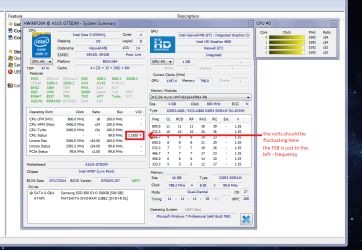
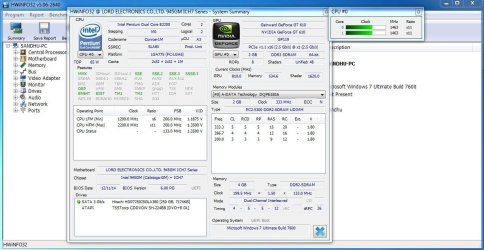
hello. thanks for your info :). i checked with the software and mu cpu speed is 1467.00ghz and in processor tab i get minimum speed 800mhz and max speed 2200ghz and in brackets its written locked like this ex-
2200ghz[locked]
 

My Computer

Computer type
PC/Desktop
OS
Microsoft Windows 7 Ultimate 32-bit 7600 Multiprocessor Free
CPU
Intel(R) Pentium(R) Dual CPU E2200 @ 2.20GHz
Motherboard
LORD ELECTRONICS CO.,LTD. 945GM ICH7 Series
Memory
4.00 GB
Graphics Card(s)
Gainward NVIDIA GeForce GT 610
Sound Card
(1) High Definition Audio Device (2) Realtek High Definiti
Screen Resolution
1600 x 900 x 32 bits (4294967296 colors) @ 60 Hz
Hard Drives
Hitachi HDP725025GLA380 ATA Device
Antivirus
-
Browser
Google Chrome
Hmm something not quite right as the Intel info sheet on that CPU shows it has a base speed of 2.2GHz the L2 cache is rather small at 1MB and the operating voltage has quite a high range Intel® Pentium® Processor E2200 (1M Cache, 2.20 GHz, 800 MHz FSB) Specifications which is why I asked what if it showed them the voltages are to the device - they alter the frequency and you should see that voltage fluctuating in HW Info at those first two small windows see pic.

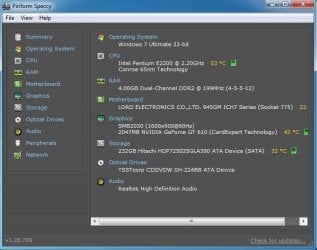
Could you just run Speccy Speccy - Download and post back the temps on that device please.

You also mention the RAM in the first post too well you may well have 4GB (in theory) installed but as a general rule it will show a lower amount - just what does HW Info detect?
 

Attachments

  • VOLTS.PNG
    VOLTS.PNG
    49.1 KB · Views: 1

My Computer

Computer type
PC/Desktop
Computer Manufacturer/Model Number
Own build (new) Desk1 / Asus ROG Win 7 / Desk2 1st build
OS
Desk1 7 Home Prem / Desk2 10 Pro / Main lap Asus ROG 10 Pro 2 laptop Toshiba 7 Pro Asus P2520 7 & 10
CPU
Desk1 i5 3750K / Laptop i7 GTX 860M / Desk2 i5 2500
Motherboard
Desk1 Asus P877-V / Desk2 Gigabyte H67 UD3H / Laptop ?
Memory
Desk1 8GB (1866) / Desk2 16GB (1333) / Laptop 8Gb DDR3
Graphics Card(s)
Desk 1& 2NVidia GTX 650 & Laptops on board Intel
Sound Card
Desk 1 & 2 -XONAR DG Realtek High Def audio Laptop
Monitor(s) Displays
Desk 1 Benq HD 2450 / Desk2 Philips 24" / Laptop 17.5"
Screen Resolution
1920x1080 D1 & D2 & Laptop 1
Hard Drives
Desk1 Samsung 120GB 830 SSD
Asus ROG 256GB 850 Pro SSD
Desk2 Samsung 840 256 SSD
Toshiba 120GB EVO
PSU
Desk 1 Corsair HX 1050/ Laptop ? / Desk 2 Corsair HX 650
Case
Desk 1 Cooler HAF XM ? Toshiba laptop / Desk2 Coolermaster
Cooling
Fans on all Desk1 -2 Desk2 - all Coolermasters 5 Laptop ?
Keyboard
Desk 1 MS Sidewinder X6 Desk 2 MS Sidewinder X 4
Mouse
Desk 1&2 - Gigabyte MS 900 gamer - laptop - Logitec wireless
Internet Speed
ADSL2+
Other Info
One other Desktop (tester) and spare Toshba laptop both with SSD's
Running Kaspersky 2016 ISS on all machines config'd identically
Logitec audio stereo systems on each machine (x3)
Canon MG5250MFC
Router/modem TP-Link running WPA2SK
Hmm something not quite right as the Intel info sheet on that CPU shows it has a base speed of 2.2GHz the L2 cache is rather small at 1MB and the operating voltage has quite a high range Intel® Pentium® Processor E2200 (1M Cache, 2.20 GHz, 800 MHz FSB) Specifications which is why I asked what if it showed them the voltages are to the device - they alter the frequency and you should see that voltage fluctuating in HW Info at those first two small windows see pic.

Could you just run Speccy Speccy - Download and post back the temps on that device please.

You also mention the RAM in the first post too well you may well have 4GB (in theory) installed but as a general rule it will show a lower amount - just what does HW Info detect?
see these pics
 

Attachments

  • Capture2.JPG
    Capture2.JPG
    110.4 KB · Views: 2
  • Capture4.JPG
    Capture4.JPG
    50.5 KB · Views: 21

My Computer

Computer type
PC/Desktop
OS
Microsoft Windows 7 Ultimate 32-bit 7600 Multiprocessor Free
CPU
Intel(R) Pentium(R) Dual CPU E2200 @ 2.20GHz
Motherboard
LORD ELECTRONICS CO.,LTD. 945GM ICH7 Series
Memory
4.00 GB
Graphics Card(s)
Gainward NVIDIA GeForce GT 610
Sound Card
(1) High Definition Audio Device (2) Realtek High Definiti
Screen Resolution
1600 x 900 x 32 bits (4294967296 colors) @ 60 Hz
Hard Drives
Hitachi HDP725025GLA380 ATA Device
Antivirus
-
Browser
Google Chrome
Well looks ok the volts don't look that bad and the temp if that is at idle a bit warm but nothing to get excited about.
Could you do this please as I do like to know what is happening with the PSU as without it or it functioning properly the other components obviously are not going to follow suit.
Using HW Info
PART A:
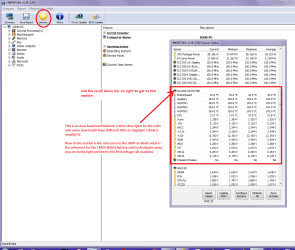
You can test the volts on the PSU with HW Info HWiNFO, HWiNFO32/64 - Download < download the right bit version and close the right hand window select Sensors and scroll down to the power section where you will see what the volts are doing see my pic. In my pic the section (Nuvoton) with VBATT is a dead give away you are in the section for the rail voltages. There are other section titles and one that pops up often is ITE
Now the voltage on the different rails have to be within 5% =+/- of what is required or the machine will not work properly if at all.
See this for the rail voltage info
Power Supply 101: A Reference Of Specifications - Power Supplies (Section 2.)
The original right hand window shows the machine running and is handy for that but for looking at the components in some detail close it and use the main left hand side panel
FOR OTHER COMPONENTS
PART B:
Open each small square with + in it on the section the components are in and then click on the individual component/s (it will highlight in blue) - in the right hand side will appear all sorts of details including brands speeds and other essential info that particular device. See pic for example.
Use PART A: and lets see what comes up with that device.
 

Attachments

  • HW INFO DESKTOP PSU.PNG
    HW INFO DESKTOP PSU.PNG
    52.6 KB · Views: 1

My Computer

Computer type
PC/Desktop
Computer Manufacturer/Model Number
Own build (new) Desk1 / Asus ROG Win 7 / Desk2 1st build
OS
Desk1 7 Home Prem / Desk2 10 Pro / Main lap Asus ROG 10 Pro 2 laptop Toshiba 7 Pro Asus P2520 7 & 10
CPU
Desk1 i5 3750K / Laptop i7 GTX 860M / Desk2 i5 2500
Motherboard
Desk1 Asus P877-V / Desk2 Gigabyte H67 UD3H / Laptop ?
Memory
Desk1 8GB (1866) / Desk2 16GB (1333) / Laptop 8Gb DDR3
Graphics Card(s)
Desk 1& 2NVidia GTX 650 & Laptops on board Intel
Sound Card
Desk 1 & 2 -XONAR DG Realtek High Def audio Laptop
Monitor(s) Displays
Desk 1 Benq HD 2450 / Desk2 Philips 24" / Laptop 17.5"
Screen Resolution
1920x1080 D1 & D2 & Laptop 1
Hard Drives
Desk1 Samsung 120GB 830 SSD
Asus ROG 256GB 850 Pro SSD
Desk2 Samsung 840 256 SSD
Toshiba 120GB EVO
PSU
Desk 1 Corsair HX 1050/ Laptop ? / Desk 2 Corsair HX 650
Case
Desk 1 Cooler HAF XM ? Toshiba laptop / Desk2 Coolermaster
Cooling
Fans on all Desk1 -2 Desk2 - all Coolermasters 5 Laptop ?
Keyboard
Desk 1 MS Sidewinder X6 Desk 2 MS Sidewinder X 4
Mouse
Desk 1&2 - Gigabyte MS 900 gamer - laptop - Logitec wireless
Internet Speed
ADSL2+
Other Info
One other Desktop (tester) and spare Toshba laptop both with SSD's
Running Kaspersky 2016 ISS on all machines config'd identically
Logitec audio stereo systems on each machine (x3)
Canon MG5250MFC
Router/modem TP-Link running WPA2SK
Well looks ok the volts don't look that bad and the temp if that is at idle a bit warm but nothing to get excited about.
Could you do this please as I do like to know what is happening with the PSU as without it or it functioning properly the other components obviously are not going to follow suit.
Using HW Info
PART A:
You can test the volts on the PSU with HW Info HWiNFO, HWiNFO32/64 - Download < download the right bit version and close the right hand window select Sensors and scroll down to the power section where you will see what the volts are doing see my pic. In my pic the section (Nuvoton) with VBATT is a dead give away you are in the section for the rail voltages. There are other section titles and one that pops up often is ITE
Now the voltage on the different rails have to be within 5% =+/- of what is required or the machine will not work properly if at all.
See this for the rail voltage info
Power Supply 101: A Reference Of Specifications - Power Supplies (Section 2.)
The original right hand window shows the machine running and is handy for that but for looking at the components in some detail close it and use the main left hand side panel
FOR OTHER COMPONENTS
PART B:
Open each small square with + in it on the section the components are in and then click on the individual component/s (it will highlight in blue) - in the right hand side will appear all sorts of details including brands speeds and other essential info that particular device. See pic for example.
Use PART A: and lets see what comes up with that device.
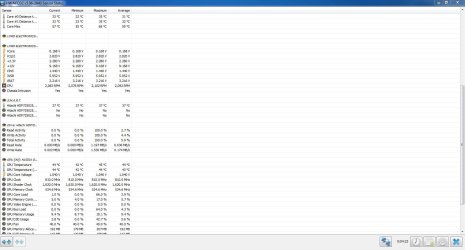
i cant understand anything please see this pic
 

Attachments

  • Capture34 .JPG
    Capture34 .JPG
    122.6 KB · Views: 4

My Computer

Computer type
PC/Desktop
OS
Microsoft Windows 7 Ultimate 32-bit 7600 Multiprocessor Free
CPU
Intel(R) Pentium(R) Dual CPU E2200 @ 2.20GHz
Motherboard
LORD ELECTRONICS CO.,LTD. 945GM ICH7 Series
Memory
4.00 GB
Graphics Card(s)
Gainward NVIDIA GeForce GT 610
Sound Card
(1) High Definition Audio Device (2) Realtek High Definiti
Screen Resolution
1600 x 900 x 32 bits (4294967296 colors) @ 60 Hz
Hard Drives
Hitachi HDP725025GLA380 ATA Device
Antivirus
-
Browser
Google Chrome
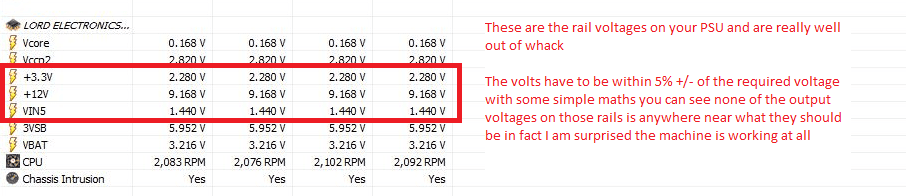
Ok Sunhil you got the right spot in your pic.

I think the PSU is so out of whack I am surprised the machine is working at all because the PSU has circuitry built into it to self test on power up and if the voltages are wrong it does not generate a signal to pin 8 on the 24 pin plug on the motherboard and so the CPU will not start because if it did so may cause damage to components on the board see my pic

The voltages on those rails has to be within 5% +/- of the required voltages ie 12v needs to be at least 11.4v minimum and 12.6v maximum
Examples
ATX Minimum Specs:

3.3v Rail (Min: 3.14v Max: 3.47v)

5v Rail (Min: 4.75v Max: 5.25v)

12v Rail (Min: 11.4v Max: 12.6v)

What I cannot explain is with those rail voltages the machine is working. I can only suggest you swap out that PSU for new one as from the other component details the machine is of a fair age.

The only thing I can think of is maybe the HWInfo report is wrong and the best way to measure the voltages other than that is to test them yourself with a digital multimeter (they are really quite cheap to buy) .
Use the black lead to any black cable on the power plugs and the red lead to measure the other colours.

Edit For the colours of the cables and voltages see this scroll down to the pic of the 24 pin plug / socket
https://en.wikipedia.org/wiki/Power_supply_unit_(computer)
 

Attachments

  • SUNHIL.PNG
    SUNHIL.PNG
    20 KB · Views: 0
  • DIGITAL METER.PNG
    DIGITAL METER.PNG
    91.3 KB · Views: 21

My Computer

Computer type
PC/Desktop
Computer Manufacturer/Model Number
Own build (new) Desk1 / Asus ROG Win 7 / Desk2 1st build
OS
Desk1 7 Home Prem / Desk2 10 Pro / Main lap Asus ROG 10 Pro 2 laptop Toshiba 7 Pro Asus P2520 7 & 10
CPU
Desk1 i5 3750K / Laptop i7 GTX 860M / Desk2 i5 2500
Motherboard
Desk1 Asus P877-V / Desk2 Gigabyte H67 UD3H / Laptop ?
Memory
Desk1 8GB (1866) / Desk2 16GB (1333) / Laptop 8Gb DDR3
Graphics Card(s)
Desk 1& 2NVidia GTX 650 & Laptops on board Intel
Sound Card
Desk 1 & 2 -XONAR DG Realtek High Def audio Laptop
Monitor(s) Displays
Desk 1 Benq HD 2450 / Desk2 Philips 24" / Laptop 17.5"
Screen Resolution
1920x1080 D1 & D2 & Laptop 1
Hard Drives
Desk1 Samsung 120GB 830 SSD
Asus ROG 256GB 850 Pro SSD
Desk2 Samsung 840 256 SSD
Toshiba 120GB EVO
PSU
Desk 1 Corsair HX 1050/ Laptop ? / Desk 2 Corsair HX 650
Case
Desk 1 Cooler HAF XM ? Toshiba laptop / Desk2 Coolermaster
Cooling
Fans on all Desk1 -2 Desk2 - all Coolermasters 5 Laptop ?
Keyboard
Desk 1 MS Sidewinder X6 Desk 2 MS Sidewinder X 4
Mouse
Desk 1&2 - Gigabyte MS 900 gamer - laptop - Logitec wireless
Internet Speed
ADSL2+
Other Info
One other Desktop (tester) and spare Toshba laptop both with SSD's
Running Kaspersky 2016 ISS on all machines config'd identically
Logitec audio stereo systems on each machine (x3)
Canon MG5250MFC
Router/modem TP-Link running WPA2SK
Ok Sunhil you got the right spot in your pic.

I think the PSU is so out of whack I am surprised the machine is working at all because the PSU has circuitry built into it to self test on power up and if the voltages are wrong it does not generate a signal to pin 8 on the 24 pin plug on the motherboard and so the CPU will not start because if it did so may cause damage to components on the board see my pic

The voltages on those rails has to be within 5% +/- of the required voltages ie 12v needs to be at least 11.4v minimum and 12.6v maximum
Examples
ATX Minimum Specs:

3.3v Rail (Min: 3.14v Max: 3.47v)

5v Rail (Min: 4.75v Max: 5.25v)

12v Rail (Min: 11.4v Max: 12.6v)

What I cannot explain is with those rail voltages the machine is working. I can only suggest you swap out that PSU for new one as from the other component details the machine is of a fair age.

The only thing I can think of is maybe the HWInfo report is wrong and the best way to measure the voltages other than that is to test them yourself with a digital multimeter (they are really quite cheap to buy) .
Use the black lead to any black cable on the power plugs and the red lead to measure the other colours.

Edit For the colours of the cables and voltages see this scroll down to the pic of the 24 pin plug / socket
https://en.wikipedia.org/wiki/Power_supply_unit_(computer)
i dont have one but when i was having my previous mobo everything was working fine . when i was having that mobo then also the voltages were these only so i think its not psu problem.
 

My Computer

Computer type
PC/Desktop
OS
Microsoft Windows 7 Ultimate 32-bit 7600 Multiprocessor Free
CPU
Intel(R) Pentium(R) Dual CPU E2200 @ 2.20GHz
Motherboard
LORD ELECTRONICS CO.,LTD. 945GM ICH7 Series
Memory
4.00 GB
Graphics Card(s)
Gainward NVIDIA GeForce GT 610
Sound Card
(1) High Definition Audio Device (2) Realtek High Definiti
Screen Resolution
1600 x 900 x 32 bits (4294967296 colors) @ 60 Hz
Hard Drives
Hitachi HDP725025GLA380 ATA Device
Antivirus
-
Browser
Google Chrome
Ok mate well I am now not sure what we are dealing with because the PSU voltages are not right and if I understand you correctly this mobo is different to the one the CPU was on?? If the CPU was on another board I take it it worked ok??

In any case if you think the PSU is not the problem then I don't see what else I can suggest.
 

My Computer

Computer type
PC/Desktop
Computer Manufacturer/Model Number
Own build (new) Desk1 / Asus ROG Win 7 / Desk2 1st build
OS
Desk1 7 Home Prem / Desk2 10 Pro / Main lap Asus ROG 10 Pro 2 laptop Toshiba 7 Pro Asus P2520 7 & 10
CPU
Desk1 i5 3750K / Laptop i7 GTX 860M / Desk2 i5 2500
Motherboard
Desk1 Asus P877-V / Desk2 Gigabyte H67 UD3H / Laptop ?
Memory
Desk1 8GB (1866) / Desk2 16GB (1333) / Laptop 8Gb DDR3
Graphics Card(s)
Desk 1& 2NVidia GTX 650 & Laptops on board Intel
Sound Card
Desk 1 & 2 -XONAR DG Realtek High Def audio Laptop
Monitor(s) Displays
Desk 1 Benq HD 2450 / Desk2 Philips 24" / Laptop 17.5"
Screen Resolution
1920x1080 D1 & D2 & Laptop 1
Hard Drives
Desk1 Samsung 120GB 830 SSD
Asus ROG 256GB 850 Pro SSD
Desk2 Samsung 840 256 SSD
Toshiba 120GB EVO
PSU
Desk 1 Corsair HX 1050/ Laptop ? / Desk 2 Corsair HX 650
Case
Desk 1 Cooler HAF XM ? Toshiba laptop / Desk2 Coolermaster
Cooling
Fans on all Desk1 -2 Desk2 - all Coolermasters 5 Laptop ?
Keyboard
Desk 1 MS Sidewinder X6 Desk 2 MS Sidewinder X 4
Mouse
Desk 1&2 - Gigabyte MS 900 gamer - laptop - Logitec wireless
Internet Speed
ADSL2+
Other Info
One other Desktop (tester) and spare Toshba laptop both with SSD's
Running Kaspersky 2016 ISS on all machines config'd identically
Logitec audio stereo systems on each machine (x3)
Canon MG5250MFC
Router/modem TP-Link running WPA2SK
Back
Top