Processor Speed Dropping in video games HELP! please

jaiden0203

New member
Local time
11:00 AM
Messages
4
I have a NE56R Model Laptop from gateway, I've been experience extreme slowness from my computer and recently found out that my computers processor speed was dropping from 1796Mhz to 798Mhz at any time randomly but mostly when I play games. Im looking for a fix and my processor Is intel Celeron 1.80Ghz B830
 

My Computer

Computer type
Laptop
Computer Manufacturer/Model Number
Gateway NE56R
OS
Windows 7 Ultimate 64bit
CPU
Intel Celeron Processor 1.80Ghz B830
Memory
4.00Gb
Graphics Card(s)
Intel HD(R) Graphics
Browser
Chrome
Hi jaiden0203, welcome to the Forum.

I see you only have 4gb of RAM & you are using Windows 64 bit, so it's possible that you are running out of RAM when playing games.

It's also possible that your laptop is overheating. Read through this Forum link about downloading Speccy & installing it. When you have done that you will have a lot of info on various temperatures within your laptops CPU etc.

http://www.sevenforums.com/tutorials/306654-speccy-advanced-system-information-tool.html

Then you can get back if you have concerns about overheating.
 

My Computer

Computer type
PC/Desktop
Computer Manufacturer/Model Number
Self built using existing case
OS
Windows 7 Home Premium 64 bit sp1
CPU
Intel i5 3570 3.4Ghz Ivy Bridge SKT 1155 quad core
Motherboard
Gigabyte Z77-HD3 SKT 1155 2xSata 3, 4x USB 3.0
Memory
G-Skill Rip Jaws 16Gb (8x2) DDR3 -1600 PC3 12800 CL 10 red
Graphics Card(s)
Gigabyte NVIDIA GT610 1Gb DDR3 810/1200 PCI-E 2.0 Silent
Sound Card
NVIDIA High Definition & Realtech High Definition Audio
Monitor(s) Displays
2 x Philips 226V4L 16:9 aspect ratio
Screen Resolution
1920 x 1080 HD
Hard Drives
Samsung 840 Pro 256gb SSD, SATA 3.
Hitachi Touro Portable 1tb, USB 3.0 HDD used for image b/ups.
PSU
Corsair VS450
Case
Codeng
Cooling
PSU fan & CPU fan
Keyboard
Logitech
Mouse
Logitech Wireless trackball M570
Internet Speed
Wireless 3G. 3mg down & 550kb up.
Antivirus
Bitdefender Internet Security 2020
Browser
Opera (Current Version) & Firefox
Other Info
MS Office 2013 Pro. Davis weather station software. MGE Nova 600 avr UPS.
Hi thanks for the response, and I don't believe it's overheating well it could be honestly since my laptop rises into the 85ishs however the processor will run at full speed at that time too it's completely random in drops, and it always drops to the same speed of 798.2Mhz any more information i'll happily provide I want this problem to be fixed asap :/
 

My Computer

Computer type
Laptop
Computer Manufacturer/Model Number
Gateway NE56R
OS
Windows 7 Ultimate 64bit
CPU
Intel Celeron Processor 1.80Ghz B830
Memory
4.00Gb
Graphics Card(s)
Intel HD(R) Graphics
Browser
Chrome
Unless you actually know what temps are reaching in the CPU you will not know if it overheating. High temps are the enemy of electrical devices.

So as I suggested download the Speccy program & install it & you will then know what temps are happening inside the laptop.
 

My Computer

Computer type
PC/Desktop
Computer Manufacturer/Model Number
Self built using existing case
OS
Windows 7 Home Premium 64 bit sp1
CPU
Intel i5 3570 3.4Ghz Ivy Bridge SKT 1155 quad core
Motherboard
Gigabyte Z77-HD3 SKT 1155 2xSata 3, 4x USB 3.0
Memory
G-Skill Rip Jaws 16Gb (8x2) DDR3 -1600 PC3 12800 CL 10 red
Graphics Card(s)
Gigabyte NVIDIA GT610 1Gb DDR3 810/1200 PCI-E 2.0 Silent
Sound Card
NVIDIA High Definition & Realtech High Definition Audio
Monitor(s) Displays
2 x Philips 226V4L 16:9 aspect ratio
Screen Resolution
1920 x 1080 HD
Hard Drives
Samsung 840 Pro 256gb SSD, SATA 3.
Hitachi Touro Portable 1tb, USB 3.0 HDD used for image b/ups.
PSU
Corsair VS450
Case
Codeng
Cooling
PSU fan & CPU fan
Keyboard
Logitech
Mouse
Logitech Wireless trackball M570
Internet Speed
Wireless 3G. 3mg down & 550kb up.
Antivirus
Bitdefender Internet Security 2020
Browser
Opera (Current Version) & Firefox
Other Info
MS Office 2013 Pro. Davis weather station software. MGE Nova 600 avr UPS.
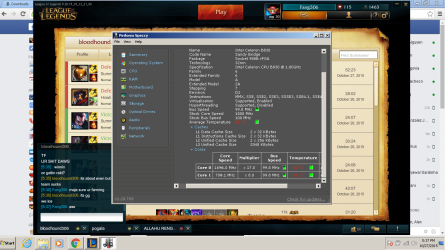
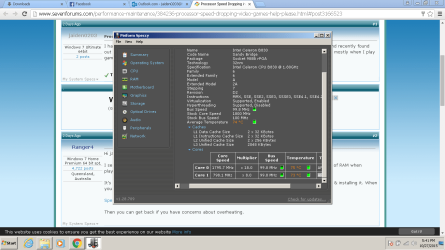
Two pics using speccy
 

Attachments

  • Untitled22.png
    Untitled22.png
    494.2 KB · Views: 2
  • Untitled223.png
    Untitled223.png
    100.2 KB · Views: 1

My Computer

Computer type
Laptop
Computer Manufacturer/Model Number
Gateway NE56R
OS
Windows 7 Ultimate 64bit
CPU
Intel Celeron Processor 1.80Ghz B830
Memory
4.00Gb
Graphics Card(s)
Intel HD(R) Graphics
Browser
Chrome
Those temps are definitely in the very high range. Check to make sure that all the air vents in the laptop are clear & see if you can blow air from a compressed air can to clear fluff & stuff from inside it. You may have to remove covers in order to clean it out.

When you are using it, do not rest it on bedding & clothing as these are a source of fluff.

Also keep in mind laptops are not really designed for intense games use as their cooling is generally restricted & not much can be done to overcome that.
 

My Computer

Computer type
PC/Desktop
Computer Manufacturer/Model Number
Self built using existing case
OS
Windows 7 Home Premium 64 bit sp1
CPU
Intel i5 3570 3.4Ghz Ivy Bridge SKT 1155 quad core
Motherboard
Gigabyte Z77-HD3 SKT 1155 2xSata 3, 4x USB 3.0
Memory
G-Skill Rip Jaws 16Gb (8x2) DDR3 -1600 PC3 12800 CL 10 red
Graphics Card(s)
Gigabyte NVIDIA GT610 1Gb DDR3 810/1200 PCI-E 2.0 Silent
Sound Card
NVIDIA High Definition & Realtech High Definition Audio
Monitor(s) Displays
2 x Philips 226V4L 16:9 aspect ratio
Screen Resolution
1920 x 1080 HD
Hard Drives
Samsung 840 Pro 256gb SSD, SATA 3.
Hitachi Touro Portable 1tb, USB 3.0 HDD used for image b/ups.
PSU
Corsair VS450
Case
Codeng
Cooling
PSU fan & CPU fan
Keyboard
Logitech
Mouse
Logitech Wireless trackball M570
Internet Speed
Wireless 3G. 3mg down & 550kb up.
Antivirus
Bitdefender Internet Security 2020
Browser
Opera (Current Version) & Firefox
Other Info
MS Office 2013 Pro. Davis weather station software. MGE Nova 600 avr UPS.
Alright i'm going to try that, and is it possible that processor speeds would drop that severely cause of that? I've seen my computer get into higher processor speeds at higher temperatures sometimes not often and another thing it runs alot faster when I hear the fan actaully louder and working.
 

My Computer

Computer type
Laptop
Computer Manufacturer/Model Number
Gateway NE56R
OS
Windows 7 Ultimate 64bit
CPU
Intel Celeron Processor 1.80Ghz B830
Memory
4.00Gb
Graphics Card(s)
Intel HD(R) Graphics
Browser
Chrome
High CPU temps can cause all sorts of strange behaviour, the worst being complete failure & ultimate destruction, so they are not to be taken lightly.

The fact that you are hearing the fan working louder is certainly an indication of rising temps. Also you mention that the laptop seems faster at the times you hear the fan speed up. This is caused by the harder working CPU getting hot & the fan increasing speed to compensate as the fan speed is directly related to the CPU getting hotter.

Try cleaning it & see if that helps.
 

My Computer

Computer type
PC/Desktop
Computer Manufacturer/Model Number
Self built using existing case
OS
Windows 7 Home Premium 64 bit sp1
CPU
Intel i5 3570 3.4Ghz Ivy Bridge SKT 1155 quad core
Motherboard
Gigabyte Z77-HD3 SKT 1155 2xSata 3, 4x USB 3.0
Memory
G-Skill Rip Jaws 16Gb (8x2) DDR3 -1600 PC3 12800 CL 10 red
Graphics Card(s)
Gigabyte NVIDIA GT610 1Gb DDR3 810/1200 PCI-E 2.0 Silent
Sound Card
NVIDIA High Definition & Realtech High Definition Audio
Monitor(s) Displays
2 x Philips 226V4L 16:9 aspect ratio
Screen Resolution
1920 x 1080 HD
Hard Drives
Samsung 840 Pro 256gb SSD, SATA 3.
Hitachi Touro Portable 1tb, USB 3.0 HDD used for image b/ups.
PSU
Corsair VS450
Case
Codeng
Cooling
PSU fan & CPU fan
Keyboard
Logitech
Mouse
Logitech Wireless trackball M570
Internet Speed
Wireless 3G. 3mg down & 550kb up.
Antivirus
Bitdefender Internet Security 2020
Browser
Opera (Current Version) & Firefox
Other Info
MS Office 2013 Pro. Davis weather station software. MGE Nova 600 avr UPS.
I agree with Ranger.
Your cpu slows down because of to much heat. It's called throttling down.
Your cpu will back down to create less heat. The cpu is trying to save itself.

The fan speeds up because of heat. It's trying to cool down your system that is overheating.

Your system specs to me show that your system was never designed for any kind of heavy gaming.
 

My Computer

Computer type
PC/Desktop
Computer Manufacturer/Model Number
Home made Desktop
OS
Windows 10 Pro. 64/ version 1709 Windows 7 Pro/64
CPU
Intel i7-6800K @ 4.3
Motherboard
ASUS X-99 Deluxe II
Memory
Corsair Platinum 16 gig @2400
Graphics Card(s)
EVGA GTX 1070 OC
Monitor(s) Displays
Asus 27" LED LCD/VE278Q
Screen Resolution
1920-1080 or 1280-720 HDMI
Hard Drives
INTEL SSD 730-240 Gb Sata 3.0/
PSU
EVGA Platium 1200W
Case
Phanteks Luxe Tempered Glass 8 fans/ one radiator
Cooling
XSPC/ Water Cooled CPU
Keyboard
Das 4 Professional
Mouse
Logitech M705/MX Anywhere 2-S
Internet Speed
100 mbits
Antivirus
Microsoft Security Essentials/ Malwarebytes Premium 3.0/ SAS
Browser
I.E. 11 default/Firefox/ ISP Time Warner Cable/Spectrum
Other Info
LG BluRay Burner/
Sound system-KLipsch-THX/
Icy Dock ssd Hot Swap bays.

Back
Top