Profile log in record

Antcs

New member
Local time
4:39 AM
Messages
24
Hi to all.

I had a question from a clinet that I can not answer. I there a way to tell when a user has looged on. We have a PC, 4 profiles with passwords. Is there a way to draw a report to state that user A logged on at 8. 21 and logged off at 09 00. User B on at 10.00 and off at 10 40. and so on, sure you get my drift... Is it kept in the registry? How will we do this if Windows does not keep a record.

This pc has quite important environmetal control software on and the owner needs to keep tract of who made chages at what time.

All you clever people out there, Please assist.
Thx
 

My Computer

OS
Windows 7
Found this: How do I view login history for my PC using Windows 7

The best way is to create a logon/logoff script that is run when each user does either. It can record the logon/logoff info in a file somewhere.

The logon/logoff info is recorded in Event Viewer but it would be cumbersome at best to view it that way. I'd recommend downloading PSTools and using PSLogList to extract the records you want, write them to a file and process them to generate a chart or whatever output you need.

Edit: psloglist security will dump the security log which is where logon and logoff info is stored.
 

My Computer

Computer type
PC/Desktop
Computer Manufacturer/Model Number
Lenovo IdeaCenter 450
OS
Windows 10 Pro X64
CPU
Intel Quad Core i7-4770 @ 3.4Ghz
Memory
16.0GB PC3-12800 DDR3 SDRAM 1600 MHz
Graphics Card(s)
Intel Integrated HD Graphics
Sound Card
Realtek HD Audio
Monitor(s) Displays
HP 22" LCD
Screen Resolution
1680 x 1050
Hard Drives
250GB Samsung EVO SATA-3 SSD
2TB Seagate ST2000DM001 SATA-2
1.5TB Seagate ST3150041AS SATA
Keyboard
Dell USB
Mouse
Lenovo USB
Internet Speed
Cable via Road Runner 3MB Upload, 30MB Download
Antivirus
Windows Defender, MBAM Pro, MBAE
Browser
Seamonkey
Other Info
UEFI/GPT
PLDS DVD-RW DH16AERSH
Thank you. I have no idea how to do this, yet. I will give it my full attention.
 

My Computer

OS
Windows 7
Had a quick run at this. In CMD mode, view info but my pc only generate errors. How will I write to a file?
thx
 

My Computer

OS
Windows 7
Antcs,
Actually, using the EventViewer isn't bad at all.

Now let me find my writeup on that which I wrote for another purpose but which shows what you want.

I'm uploading a zip file for you. Somewhere I've got still another writeup.

View attachment EVENTVIEWER - WindowsValidationCheck.zip
 

My Computer

Computer Manufacturer/Model Number
Toshiba Satellite S875D-S7239 laptop
OS
MS Windows 7 Ultimate SP1 64-bit
CPU
AMD A10-4600M
Motherboard
AMD Pumori (Socket FT1)
Memory
6.00 GB Dual-Channel DDR3 @ 798MHz (11-11-12-28)
Graphics Card(s)
AMD Radeon HD 7660G
Sound Card
High Definition Audio Device
Monitor(s) Displays
Generic PnP Monitor (1600x900@60Hz)
Screen Resolution
1600x900@60Hz
Hard Drives
SSD 119GB Corsair CSSD-V128GB2 ATA Device
Keyboard
Standard PS/2 Keyboard
Mouse
HP Wireless Optical Mobile Mouse Model FHA-3410
Internet Speed
What the local pub, local coffee shop offers.
Other Info
Optical Drive:MATSHITA BD-CMB UJ160B ATA Device


Also have an Asus ha1002xp netbook with Win 7 Ultimate installed.
And here is PowerShell script which will give you the info:

get-eventlog -LogName Application -InstanceId 1073745925 |
Select-Object TimeWritten, Message

I do not know if you are familiar with PowerShell, however, Powershell comes with your Win 7.
 

My Computer

Computer Manufacturer/Model Number
Toshiba Satellite S875D-S7239 laptop
OS
MS Windows 7 Ultimate SP1 64-bit
CPU
AMD A10-4600M
Motherboard
AMD Pumori (Socket FT1)
Memory
6.00 GB Dual-Channel DDR3 @ 798MHz (11-11-12-28)
Graphics Card(s)
AMD Radeon HD 7660G
Sound Card
High Definition Audio Device
Monitor(s) Displays
Generic PnP Monitor (1600x900@60Hz)
Screen Resolution
1600x900@60Hz
Hard Drives
SSD 119GB Corsair CSSD-V128GB2 ATA Device
Keyboard
Standard PS/2 Keyboard
Mouse
HP Wireless Optical Mobile Mouse Model FHA-3410
Internet Speed
What the local pub, local coffee shop offers.
Other Info
Optical Drive:MATSHITA BD-CMB UJ160B ATA Device


Also have an Asus ha1002xp netbook with Win 7 Ultimate installed.
Wow, you guys a helpful indeed. One issue, that pc is on winxp sp3. Software from Holland not compatible with windows 7. I tested the result and got the following... Txt file attahed.

I log on almost everyday. Well, try to atleast LOL. Why my info so outdated.
I have little if any knowledge of Powershell.
 

Attachments

My Computer

OS
Windows 7
Hi Played around there somewhat. got more info out of it... I will take some time to look at it closely. Thank you
 

My Computer

OS
Windows 7
Excellent. Every time you login, the data and time is recorded and at the same time Win7 verifies that the version is valid.

You might want to consider cleaning out your event logs while playing around with the program (just looking at the login dates in the .txt file).

View attachment Clear Event Logs Using a Batch File.zip
 

My Computer

Computer Manufacturer/Model Number
Toshiba Satellite S875D-S7239 laptop
OS
MS Windows 7 Ultimate SP1 64-bit
CPU
AMD A10-4600M
Motherboard
AMD Pumori (Socket FT1)
Memory
6.00 GB Dual-Channel DDR3 @ 798MHz (11-11-12-28)
Graphics Card(s)
AMD Radeon HD 7660G
Sound Card
High Definition Audio Device
Monitor(s) Displays
Generic PnP Monitor (1600x900@60Hz)
Screen Resolution
1600x900@60Hz
Hard Drives
SSD 119GB Corsair CSSD-V128GB2 ATA Device
Keyboard
Standard PS/2 Keyboard
Mouse
HP Wireless Optical Mobile Mouse Model FHA-3410
Internet Speed
What the local pub, local coffee shop offers.
Other Info
Optical Drive:MATSHITA BD-CMB UJ160B ATA Device


Also have an Asus ha1002xp netbook with Win 7 Ultimate installed.
Clearlogs.bat. Done. restarting pc and logging in. will update
 

My Computer

OS
Windows 7
Excellent.
 

My Computer

Computer Manufacturer/Model Number
Toshiba Satellite S875D-S7239 laptop
OS
MS Windows 7 Ultimate SP1 64-bit
CPU
AMD A10-4600M
Motherboard
AMD Pumori (Socket FT1)
Memory
6.00 GB Dual-Channel DDR3 @ 798MHz (11-11-12-28)
Graphics Card(s)
AMD Radeon HD 7660G
Sound Card
High Definition Audio Device
Monitor(s) Displays
Generic PnP Monitor (1600x900@60Hz)
Screen Resolution
1600x900@60Hz
Hard Drives
SSD 119GB Corsair CSSD-V128GB2 ATA Device
Keyboard
Standard PS/2 Keyboard
Mouse
HP Wireless Optical Mobile Mouse Model FHA-3410
Internet Speed
What the local pub, local coffee shop offers.
Other Info
Optical Drive:MATSHITA BD-CMB UJ160B ATA Device


Also have an Asus ha1002xp netbook with Win 7 Ultimate installed.
Ok. More of the right kind of info. It does not clearly state which user logged on. I am reading this correct? My account name is not mentioned there. Thx
 

Attachments

My Computer

OS
Windows 7
I will create a socond user on my laptop, then do more tests
 

My Computer

OS
Windows 7
Ok. Positive progress. Created a new user. Logged on. Logged off. Logged in with current account. I see that in the txt file and also a lot of other info. Way too much... How do I extract only the log/off events. Thank you
 

Attachments

My Computer

OS
Windows 7
What/how are you creating the file? Are you using PsLogList or a different tool? You're going to need some way to parse the output to extract just the info you want. Powershell will do this but I have no experience with it. Might be able to do it with a batch file but it would take a fair amount of trial and error to get it working.

Hopefully someone else (karlsnooks?) will have a suggestion.
 

My Computer

Computer type
PC/Desktop
Computer Manufacturer/Model Number
Lenovo IdeaCenter 450
OS
Windows 10 Pro X64
CPU
Intel Quad Core i7-4770 @ 3.4Ghz
Memory
16.0GB PC3-12800 DDR3 SDRAM 1600 MHz
Graphics Card(s)
Intel Integrated HD Graphics
Sound Card
Realtek HD Audio
Monitor(s) Displays
HP 22" LCD
Screen Resolution
1680 x 1050
Hard Drives
250GB Samsung EVO SATA-3 SSD
2TB Seagate ST2000DM001 SATA-2
1.5TB Seagate ST3150041AS SATA
Keyboard
Dell USB
Mouse
Lenovo USB
Internet Speed
Cable via Road Runner 3MB Upload, 30MB Download
Antivirus
Windows Defender, MBAM Pro, MBAE
Browser
Seamonkey
Other Info
UEFI/GPT
PLDS DVD-RW DH16AERSH
antcs,
To produce a list of all users with their log on times and their log off times turns out to be non-trivial.

I can give you a script showing the last loon times with the user name, but for reasons that I do not understand the last logoff time is not there, i.e., not a valid string.

Otherwise, I'd recommend visiting some of the powershell forums and posing you question there.
 

My Computer

Computer Manufacturer/Model Number
Toshiba Satellite S875D-S7239 laptop
OS
MS Windows 7 Ultimate SP1 64-bit
CPU
AMD A10-4600M
Motherboard
AMD Pumori (Socket FT1)
Memory
6.00 GB Dual-Channel DDR3 @ 798MHz (11-11-12-28)
Graphics Card(s)
AMD Radeon HD 7660G
Sound Card
High Definition Audio Device
Monitor(s) Displays
Generic PnP Monitor (1600x900@60Hz)
Screen Resolution
1600x900@60Hz
Hard Drives
SSD 119GB Corsair CSSD-V128GB2 ATA Device
Keyboard
Standard PS/2 Keyboard
Mouse
HP Wireless Optical Mobile Mouse Model FHA-3410
Internet Speed
What the local pub, local coffee shop offers.
Other Info
Optical Drive:MATSHITA BD-CMB UJ160B ATA Device


Also have an Asus ha1002xp netbook with Win 7 Ultimate installed.
Thx. Not sure what "loon times" mean. I suspect typeO. That script would be just great. As I understand it... (as my client has explained) he wants to know who was logged on at the time that a certain change was made. The grow fresh produce in huge green houses. They pack for our local market and international. The software controlles heating, venting, water, tempratures and around 70 more variables. It so happend that they lost a crop the other day due to too much water. Now measures needs to be put in place to prevent that event again. Offcourse, no-one would take responsability for the change. If he had a way to pinpoint the user that was logged on at the time it gives him a good place to start.

I do thank you for your efforts
 

My Computer

OS
Windows 7
Found this: How do I view login history for my PC using Windows 7

The best way is to create a logon/logoff script that is run when each user does either. It can record the logon/logoff info in a file somewhere.
I agree the easiest way would be to use a logon & logoff script via Group Policy to create a log file. I would then recommend setting permissions on the log file to prevent anyone from changing it to cover there tracks although I not sure what permissions will allow or prevent the scripts from working.

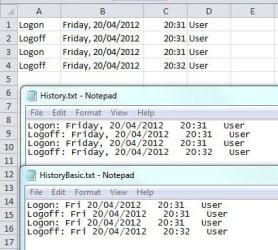
I created a basic batch file using a reference from the link in the quote. Copy the code below to a batch file.
Code:
@echo off
if not exist c:\Logs md c:\Logs

echo Logon: %date%   %time:~0,5%   %UserName%>> c:\Logs\HistoryBasic.txt

echo Logon,"%date:~0,3%, %date:~4,2%/%date:~7,2%/%date:~10,4%",%time:~0,5%,%UserName%>> c:\Logs\History.csv
echo Logon: %date:~0,3%, %date:~4,2%/%date:~7,2%/%date:~10,4%   %time:~0,5%   %UserName%>> c:\Logs\History.txt
You actually only need one of the lines starting with "echo" but I have given 2 examples of different formatting and 1 that outputs to a CSV file (Comma Delimited) for use with a spreadsheet application. Check the attached image for a preview.

This is the logon script, for the logoff script change logon to logoff and save as 2 seperate files.

If you would like different formatting and don't know how to change it I can also help with that.

On WinXP I'm not sure if PowerShell was an optional update or would have been auto installed so you might want to check that before continuing with PowerShell scripts, although it's easy to install.

@karlsnooks
Still post your script.

EDIT: Modified the code above because I had it set to echo the full name of the day as you can see in my screenshot but just found out it doesn't work to well for Saturday because the short version of it is Sat so it logs as Satday. Only Sunday, Monday and Friday will work.

History.txt and HistoryBasic.txt are now the same except a comma after the day.

If you would like it to read Saturday, Sunday etc.. then I could work some if statements in there to check what the day is first and set a variable to echo instead.
 

Attachments

  • Logon-off_History.JPG
    Logon-off_History.JPG
    40.6 KB · Views: 3
Last edited:

My Computer

Computer Manufacturer/Model Number
Self built
OS
Windows 7 Ultimate x64
CPU
Intel Pentium Dual Core E5200 2.5GHz (3.77GHz OC)
Motherboard
Asus P5Q-E
Memory
Corsair 4GB DDR2 (4x1GB CM2X1024-6400C4)
Graphics Card(s)
Palit GeForce GTS 250 (1024MB)
Sound Card
On Board (ADI AD2000B 8ch HD)
Monitor(s) Displays
Samsung 32in LCD TV
Screen Resolution
1360x768
Hard Drives
2 x 1TB Samsung 103SJ (Raid0)
2 x External 500GB Samsung 502IJ (NexStar 3 HD Enclosures)
PSU
550W Antec Neo HE 550
Case
Antec P180
Cooling
Xigmatex Red Scorpion CPU Cooler. 3x120mm Fans
Keyboard
Logitech MX5000 Laser (Combo)
Mouse
Logitech MX5000 Laser (Combo)
Internet Speed
ADSL2+ (avg 10 Mbps Down, 0.80 Mbps up)
Other Info
Gigabyte GN-WP01GS 54g Wireless Lan Card
duzzy,
why I thank you for giving me permission to post my script.
 

My Computer

Computer Manufacturer/Model Number
Toshiba Satellite S875D-S7239 laptop
OS
MS Windows 7 Ultimate SP1 64-bit
CPU
AMD A10-4600M
Motherboard
AMD Pumori (Socket FT1)
Memory
6.00 GB Dual-Channel DDR3 @ 798MHz (11-11-12-28)
Graphics Card(s)
AMD Radeon HD 7660G
Sound Card
High Definition Audio Device
Monitor(s) Displays
Generic PnP Monitor (1600x900@60Hz)
Screen Resolution
1600x900@60Hz
Hard Drives
SSD 119GB Corsair CSSD-V128GB2 ATA Device
Keyboard
Standard PS/2 Keyboard
Mouse
HP Wireless Optical Mobile Mouse Model FHA-3410
Internet Speed
What the local pub, local coffee shop offers.
Other Info
Optical Drive:MATSHITA BD-CMB UJ160B ATA Device


Also have an Asus ha1002xp netbook with Win 7 Ultimate installed.
antcs,

# run PowerShell as an ADMINISTRATOR
# LAST LINE ($data) MUST BE FOLLOWED BY TWO CARRIAGE RETURNS!

# Simply copy and paste (You paste into PowerShell by clicking on right mouse button
# You can delete all of these lines which start with a # aforehand if desired

# a period indicates this computer, use actual name if desired
# $data defined as empty array
# match will compare against a 'regular' expression
# if match exist, returns true, result placed in $matches array

$a = "."
$data = @()
$NetLogs = Get-WmiObject Win32_NetworkLoginProfile -ComputerName $a

foreach ($NetLog in $NetLogs) {
if ($NetLog.LastLogon -match "(\d{14})") {
$row = "" | Select Name,LogonTime,numberoflogons
$row.Name = $NetLog.Name
$row.numberoflogons = $netlog.numberoflogons
$row.LogonTime=[datetime]::ParseExact($matches[0], "yyyyMMddHHmmss", $null)
$data += $row
}
}
$data


#end of script
 

My Computer

Computer Manufacturer/Model Number
Toshiba Satellite S875D-S7239 laptop
OS
MS Windows 7 Ultimate SP1 64-bit
CPU
AMD A10-4600M
Motherboard
AMD Pumori (Socket FT1)
Memory
6.00 GB Dual-Channel DDR3 @ 798MHz (11-11-12-28)
Graphics Card(s)
AMD Radeon HD 7660G
Sound Card
High Definition Audio Device
Monitor(s) Displays
Generic PnP Monitor (1600x900@60Hz)
Screen Resolution
1600x900@60Hz
Hard Drives
SSD 119GB Corsair CSSD-V128GB2 ATA Device
Keyboard
Standard PS/2 Keyboard
Mouse
HP Wireless Optical Mobile Mouse Model FHA-3410
Internet Speed
What the local pub, local coffee shop offers.
Other Info
Optical Drive:MATSHITA BD-CMB UJ160B ATA Device


Also have an Asus ha1002xp netbook with Win 7 Ultimate installed.
Back
Top