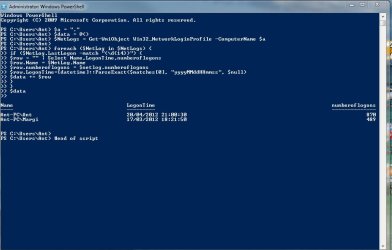
Profile log in record

duzzy,
why I thank you for giving me permission to post my script.
Sorry didn't mean it like that, just thought you might not post until I got a response about mine or until he found out about having PowerShell.
 

My Computer

Computer Manufacturer/Model Number
Self built
OS
Windows 7 Ultimate x64
CPU
Intel Pentium Dual Core E5200 2.5GHz (3.77GHz OC)
Motherboard
Asus P5Q-E
Memory
Corsair 4GB DDR2 (4x1GB CM2X1024-6400C4)
Graphics Card(s)
Palit GeForce GTS 250 (1024MB)
Sound Card
On Board (ADI AD2000B 8ch HD)
Monitor(s) Displays
Samsung 32in LCD TV
Screen Resolution
1360x768
Hard Drives
2 x 1TB Samsung 103SJ (Raid0)
2 x External 500GB Samsung 502IJ (NexStar 3 HD Enclosures)
PSU
550W Antec Neo HE 550
Case
Antec P180
Cooling
Xigmatex Red Scorpion CPU Cooler. 3x120mm Fans
Keyboard
Logitech MX5000 Laser (Combo)
Mouse
Logitech MX5000 Laser (Combo)
Internet Speed
ADSL2+ (avg 10 Mbps Down, 0.80 Mbps up)
Other Info
Gigabyte GN-WP01GS 54g Wireless Lan Card
Nice work. Will need time to wrap my head around this. Did the log.bat file with instant results. Wil use somewhat over the weekend and post results. Thank you. @ Karlsnooks. I am going to lay off the power shellfirst. Not because i think it wont work but because it scares me. I will give it serious go if the other file does not do it for me. But, thank you so much for the effort.
 

My Computer

OS
Windows 7
@Karlsnooks. I just could not wait. Gave powershell a go, just quick you see. Got instant results. Man that is freaky. Info is weird thought. Give me user logon times. not time. Wait I will post screenshot. Whats up with that. Am I doing it wrong. Probably. Late friday night. Time for bed. Thx
 

Attachments

  • ScreenHunter_01 Apr. 20 22.10.jpg
    ScreenHunter_01 Apr. 20 22.10.jpg
    49.8 KB · Views: 12

My Computer

OS
Windows 7
I suspected that you might want more.

What that script shows you is the last time that the user(s) logged on and the total number of times they have logged on.

What it doesn't show is when a user logged off and the total number of hours that they were logged on.

For some of that info, the EventViewer can be useful, however, as you have seen, the clearing of the logs will eliminate past event log entries.

True is that with group policy you can restrict the use of EventViewer.

I suspect that your users don't have the slightest idea what event viewer is.

Although supposedly there is a "LogoffTime" property, the info doesn't seem to be there. Whether this is operator malfucntion or a "feature" of the netlogons is beyond my knowledge.

I seriously recommend visiting a couple of powershell and/or admin forums to see if someone there will, for no renumeration, write a script for you.

http://powershell.com
http://powershellcommunity.org
http://blogs.technet.com/heyscriptingguy

There are many more, I just don't have a convenient set of bookmarks for PowerShell-mostly just RSS feeds

 

My Computer

Computer Manufacturer/Model Number
Toshiba Satellite S875D-S7239 laptop
OS
MS Windows 7 Ultimate SP1 64-bit
CPU
AMD A10-4600M
Motherboard
AMD Pumori (Socket FT1)
Memory
6.00 GB Dual-Channel DDR3 @ 798MHz (11-11-12-28)
Graphics Card(s)
AMD Radeon HD 7660G
Sound Card
High Definition Audio Device
Monitor(s) Displays
Generic PnP Monitor (1600x900@60Hz)
Screen Resolution
1600x900@60Hz
Hard Drives
SSD 119GB Corsair CSSD-V128GB2 ATA Device
Keyboard
Standard PS/2 Keyboard
Mouse
HP Wireless Optical Mobile Mouse Model FHA-3410
Internet Speed
What the local pub, local coffee shop offers.
Other Info
Optical Drive:MATSHITA BD-CMB UJ160B ATA Device


Also have an Asus ha1002xp netbook with Win 7 Ultimate installed.
If you run my batch file it will instantly create the files under C:\Logs that you can then view. If setup through Group Policy as a logon/logoff script it will be ran each time a user logs on or off and the info will be recorded in the log file.

One problem here is I don't know is WinXP Home has Group Policy so you might need WinXP Professional, although you might be able to use Task Scheduler.

Karlsnooks PowerShell script can also be converted to a VBScript file if your familer with that but it accesses the WMI Object Win32_NetworkLoginProfile and under both Win7 and Virtual PC's WinXP Mode the logoff time is returned as "LastLogoff: **************.******+***" making it invalid.

I could not find any WMI Object to return any info about logoff times. It's possible to retrieve this info from the EventViewer but I don't know how to script it to return the info you want in any scripting language but my skills are quite limited. Simply opening the EventViewer to view the info can also be a bit unappealing.

Also my script can be converted to VBScript if you have problems with the batch file but formatting the output may be a challange.

Like Karlsnooks said you can also ask on some scripting sites if you want to retrieve the info from Windows instead of generating it yourself.

If you choose to use my batch script then I can help with any formatting or changes you require.
 

My Computer

Computer Manufacturer/Model Number
Self built
OS
Windows 7 Ultimate x64
CPU
Intel Pentium Dual Core E5200 2.5GHz (3.77GHz OC)
Motherboard
Asus P5Q-E
Memory
Corsair 4GB DDR2 (4x1GB CM2X1024-6400C4)
Graphics Card(s)
Palit GeForce GTS 250 (1024MB)
Sound Card
On Board (ADI AD2000B 8ch HD)
Monitor(s) Displays
Samsung 32in LCD TV
Screen Resolution
1360x768
Hard Drives
2 x 1TB Samsung 103SJ (Raid0)
2 x External 500GB Samsung 502IJ (NexStar 3 HD Enclosures)
PSU
550W Antec Neo HE 550
Case
Antec P180
Cooling
Xigmatex Red Scorpion CPU Cooler. 3x120mm Fans
Keyboard
Logitech MX5000 Laser (Combo)
Mouse
Logitech MX5000 Laser (Combo)
Internet Speed
ADSL2+ (avg 10 Mbps Down, 0.80 Mbps up)
Other Info
Gigabyte GN-WP01GS 54g Wireless Lan Card
PowerShell is available also for XP. Simply a download away. Win 7 and Win 8 come with PowerShell.

I can not recommend strong enough visiting some of the PowerShell sites and also admin sites. PowerShell is the preferred scripting language by admins.

You might want to check www.petri.co.il/ for an admin site.
 

My Computer

Computer Manufacturer/Model Number
Toshiba Satellite S875D-S7239 laptop
OS
MS Windows 7 Ultimate SP1 64-bit
CPU
AMD A10-4600M
Motherboard
AMD Pumori (Socket FT1)
Memory
6.00 GB Dual-Channel DDR3 @ 798MHz (11-11-12-28)
Graphics Card(s)
AMD Radeon HD 7660G
Sound Card
High Definition Audio Device
Monitor(s) Displays
Generic PnP Monitor (1600x900@60Hz)
Screen Resolution
1600x900@60Hz
Hard Drives
SSD 119GB Corsair CSSD-V128GB2 ATA Device
Keyboard
Standard PS/2 Keyboard
Mouse
HP Wireless Optical Mobile Mouse Model FHA-3410
Internet Speed
What the local pub, local coffee shop offers.
Other Info
Optical Drive:MATSHITA BD-CMB UJ160B ATA Device


Also have an Asus ha1002xp netbook with Win 7 Ultimate installed.
I am sorry. I am really busy this side. Did not give this all the attention it needs. We have a long weekend coming up, Friday, Sat, Sun, Monday, and Tuesday. Bad for business but good for the lazy... I will attend to it then.
 

My Computer

OS
Windows 7
Back
Top