Solved Program Files and Program Files (x86)

t-4-2

Banned
Local time
6:55 PM
Messages
997
Home Premium Win 7 64-bit OEM

Just curious to understand why.....
Why is it that there is a Program Files and a Program Files (x86) in my system ?
I realize that the former is in reference to 64-bit OS. The latter is 32-bit.
I do notice that all the programs that I installed are in the (x86) file. Except CCleaners which somehow is in Program Files.

But, still don't see why 2 separate program files.
Or, in particular, why a (x86) file at all.

Thank you.
 

My Computer

Computer Manufacturer/Model Number
Acer Aspire 7741Z
OS
Windows 7 Home Premium 64-bit, SP1
CPU
Intel Pentium P6200, Cores 2, 2.13 GHz
Memory
4 GB
Graphics Card(s)
Intel HD
Sound Card
unknown
Monitor(s) Displays
17.3 inches
Screen Resolution
1600 x 900
Hard Drives
640 GB, 5400 PRM
Program Files contains the programs which are 64 bit, and Program Files(x86) contains programs those are 32 bit .

As the most of your installed programs are 32 bit (usually... the same for me, too) they almost all are in the x86 folders; but the programs bundled with windows are 64 bit (like DVD maker, Microsoft Games, Windows Media Player, Sidebar etc) are contained in the Program Files folder .

Edit : There are two separate program files folders , to make 64 bit windows compatible to run 32 bit programs successfully .
 

My Computer

Computer type
PC/Desktop
Computer Manufacturer/Model Number
Self Assembled
OS
Microsoft Windows 10 Pro Insider Preview 64-bit
CPU
Intel(R) Core(TM) i3-4130 CPU @ 3.40GHz
Motherboard
Gigabyte Technology Co., Ltd. B85M-D3H
Memory
Corsair Vengence 4GB x2 (8.00GB Dual-Channel DDR3 @ 798MHz)
Graphics Card(s)
2047MB GeForce GTS 450 (ZOTAC International)
Sound Card
Onboard (Realtek High Definition Audio)
Monitor(s) Displays
LG Flatron E2040T
Screen Resolution
1600x900
Hard Drives
Western Digital 1 TB
Seagate 500 GB
PSU
Corsair VS550
Case
Cooler Master K380
Cooling
Cooler Master Seidon 120V Plus
Keyboard
Logitech MK260r
Mouse
Logitech MK260r
Internet Speed
PMPL Broadband
Antivirus
Windows Defender + MBAM
Browser
Firefox
Other Info
Dell Studio 15" Laptop
Program Files contains the programs which are 64 bit, and Program Files(x86) contains programs those are 32 bit .

As the most of your installed programs are 32 bit (usually... the same for me, too) they almost all are in the x86 folders; but the programs bundled with windows are 64 bit (like DVD maker, Microsoft Games, Windows Media Player, Sidebar etc) are contained in the Program Files folder .

Edit : There are two separate program files folders , to make 64 bit windows compatible to run 32 bit programs successfully .

I still fail to see the reason for a (x86) file.
As mentioned, my CCleaner file is in Program Files....
1. I did not have to select 64-bit version when I installed CCleaner.
2. I opened the CCleaner folder and there are 2 exe files.
CCleaner.exe and CCleaner64.exe
The former must be for 32-bit, and the latter is obvious.

My point : if CCleaner.exe can be stored in Program Files which is for 64-bit, then why not have all 32-bit programs stored there as well ?
Which comes back to my initial question .....
why Program Files (x86) is needed at all ?
 

My Computer

Computer Manufacturer/Model Number
Acer Aspire 7741Z
OS
Windows 7 Home Premium 64-bit, SP1
CPU
Intel Pentium P6200, Cores 2, 2.13 GHz
Memory
4 GB
Graphics Card(s)
Intel HD
Sound Card
unknown
Monitor(s) Displays
17.3 inches
Screen Resolution
1600 x 900
Hard Drives
640 GB, 5400 PRM
If you download lets say firefox 64 bit it would be in program files. If you downloaded 32-bit it would be in program files(x86)
 

My Computer

Computer Manufacturer/Model Number
HP
OS
Windows 7 Home Premium 64-bit Service Pack 1
CPU
intel core 2 duo x64
Memory
4Gb Ram
Monitor(s) Displays
1
Screen Resolution
1600x900
Mouse
Microsoft Compact Optical Mouse 500 v 2.0
Internet Speed
1MB
Other Info
Using Opera 11
I still fail to see the reason for a (x86) file.
As mentioned, my CCleaner file is in Program Files....
1. I did not have to select 64-bit version when I installed CCleaner.
2. I opened the CCleaner folder and there are 2 exe files.
CCleaner.exe and CCleaner64.exe
The former must be for 32-bit, and the latter is obvious.

My point : if CCleaner.exe can be stored in Program Files which is for 64-bit, then why not have all 32-bit programs stored there as well ?
Which comes back to my initial question .....
why Program Files (x86) is needed at all ?

Hello t-4-2,

That's because CCleaner is actually a 64-bit program when installed on a 64-bit Windows 7. ;)

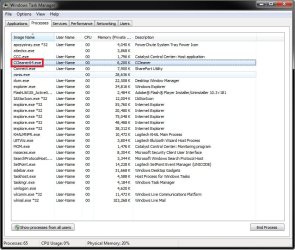
If you look in Task Manager (Shift+CTRL+ESC) under the Processes tab like below, you will notice that .exe files with *32 next to them are 32-bit programs. The ones without this are 64-bit programs.

Task_Manager.jpg
 

My Computer

Computer type
PC/Desktop
Computer Manufacturer/Model Number
Self built custom
OS
64-bit Windows 11 Pro for Workstations
CPU
Intel i7-8700K OC'd to 5 GHz
Motherboard
ASUS ROG Maximus XI Formula Z390
Memory
64 GB (4x16GB) G.SKILL TridentZ RGB DDR4 3600 MHz
Graphics Card(s)
ASUS ROG-STRIX-GTX1080TI-O11G-GAMING
Sound Card
Integrated
Monitor(s) Displays
2 x Samsung Odyssey G7 27"
Screen Resolution
2560x1440
Hard Drives
1TB Samsung 990 PRO M.2,
4TB Samsung 990 PRO PRO M.2,
TerraMaster F8 SSD Plus NAS
PSU
Seasonic Prime Titanium 850W
Case
Thermaltake Core P3
Cooling
Corsair Hydro H115i
Keyboard
Logitech wireless K800
Mouse
Logitech MX Master 4
Internet Speed
2 Gb/s Download and 100 Mb/s Upload
Antivirus
Malwarebyte Anti-Malware Premium
Browser
Google Chrome
Other Info
Logitech Z625 speaker system,
Logitech BRIO 4K Pro webcam,
HP Color LaserJet Pro MFP M477fdn,
APC SMART-UPS RT 1000 XL - SURT1000XLI,
Galaxy S23 Plus phone
Hi t-4-2 ... have you noticed that you have two versions of windows media player ( 32 bit and 64 bit) installed ?
 

My Computer

Computer type
PC/Desktop
Computer Manufacturer/Model Number
Self Assembled
OS
Microsoft Windows 10 Pro Insider Preview 64-bit
CPU
Intel(R) Core(TM) i3-4130 CPU @ 3.40GHz
Motherboard
Gigabyte Technology Co., Ltd. B85M-D3H
Memory
Corsair Vengence 4GB x2 (8.00GB Dual-Channel DDR3 @ 798MHz)
Graphics Card(s)
2047MB GeForce GTS 450 (ZOTAC International)
Sound Card
Onboard (Realtek High Definition Audio)
Monitor(s) Displays
LG Flatron E2040T
Screen Resolution
1600x900
Hard Drives
Western Digital 1 TB
Seagate 500 GB
PSU
Corsair VS550
Case
Cooler Master K380
Cooling
Cooler Master Seidon 120V Plus
Keyboard
Logitech MK260r
Mouse
Logitech MK260r
Internet Speed
PMPL Broadband
Antivirus
Windows Defender + MBAM
Browser
Firefox
Other Info
Dell Studio 15" Laptop

My Computer

Computer Manufacturer/Model Number
Samsung NP550P5C-S02IN
OS
Windows 7 Ultimate - 64-bit | Windows 8 Pro - 64-bit
CPU
Intel® Core™ i7 Processor 3,610QM (2.30Hz, 6MB L3 Cach
Memory
8 GB
Graphics Card(s)
NVIDIA® GeForce® GT 650M 2GB Graphics, Optimus™ techno
Sound Card
SoundAlive™ JBL 3 Speakers (With sub-Woofer)
Monitor(s) Displays
39.62cm (15.6) SuperBright 300nit HD+ LED Display
Screen Resolution
1,600 x 900, Anti-Reflective
Hard Drives
1TB S-ATA II Hard Drive (5,400RPM)
I still fail to see the reason for a (x86) file.
As mentioned, my CCleaner file is in Program Files....
1. I did not have to select 64-bit version when I installed CCleaner.
2. I opened the CCleaner folder and there are 2 exe files.
CCleaner.exe and CCleaner64.exe
The former must be for 32-bit, and the latter is obvious.

My point : if CCleaner.exe can be stored in Program Files which is for 64-bit, then why not have all 32-bit programs stored there as well ?
Which comes back to my initial question .....
why Program Files (x86) is needed at all ?

Hello t-4-2,

That's because CCleaner is actually a 64-bit program when installed on a 64-bit Windows 7. ;)

If you look in Task Manager (Shift+CTRL+ESC) under the Processes tab like below, you will notice that .exe files with *32 next to them are 32-bit programs. The ones without this are 64-bit programs.

View attachment 162303

Thank you.
Yes, I never paid attention. I opened CCleaner, it did say 64-bit.
I have 2 entries with *32 appended.......
wlcomm.exe and wlmail.exe
 

My Computer

Computer Manufacturer/Model Number
Acer Aspire 7741Z
OS
Windows 7 Home Premium 64-bit, SP1
CPU
Intel Pentium P6200, Cores 2, 2.13 GHz
Memory
4 GB
Graphics Card(s)
Intel HD
Sound Card
unknown
Monitor(s) Displays
17.3 inches
Screen Resolution
1600 x 900
Hard Drives
640 GB, 5400 PRM
Hi t-4-2 ... have you noticed that you have two versions of windows media player ( 32 bit and 64 bit) installed ?

Yes, I have 2 wmplayer.exe files, one in each program files.
The one in 64-bit files has 164 KB.
The one in 32-bit files has 161 KB.
 

My Computer

Computer Manufacturer/Model Number
Acer Aspire 7741Z
OS
Windows 7 Home Premium 64-bit, SP1
CPU
Intel Pentium P6200, Cores 2, 2.13 GHz
Memory
4 GB
Graphics Card(s)
Intel HD
Sound Card
unknown
Monitor(s) Displays
17.3 inches
Screen Resolution
1600 x 900
Hard Drives
640 GB, 5400 PRM
The two Program Files location is only there for organization nothing more. You do not need to put 32-bit programs into Program Files (x86) or put 64-bit programs into the other. Its just there to help you differentiate between the two if you want to.
 

My Computer

Computer type
PC/Desktop
Computer Manufacturer/Model Number
Alienware Aurora ALX R4
OS
Windows 10 Pro (x64)
CPU
Intel Core i7-3930K (3.2GHz - 4.5GHz)
Motherboard
Alienware Aurora-R4 x79
Memory
4x Samsung 4GB PC3-12800 DDR3 (16GB 1600MHz)
Graphics Card(s)
Nvidia Geforce GTX 690
Sound Card
SteelSeries Siberia Elite
Monitor(s) Displays
Dell UltraSharp U3011
Screen Resolution
2560x1600
Hard Drives
Samsung 850 Pro 256 GB, Seagate 1TB Desktop Hybrid HDD, 2x Western Digital 4TB Green HDD
PSU
875W Some Dell PSU <.<
Case
Alienware Aurora ALX
Cooling
Custom Liquid Cooling (EK CPU & GPU blocks) dual EK 480RAD
Keyboard
Logitech G710+ Mechanical
Mouse
Logitech G700s
Internet Speed
Verizon Fios (50 mbps average)
Other Info
Server: Intel NUC D54250WYK: i5-4250U, 16GB, 256 GB mSATA, Windows Server 2012 R2
The two Program Files location is only there for organization nothing more. You do not need to put 32-bit programs into Program Files (x86) or put 64-bit programs into the other. Its just there to help you differentiate between the two if you want to.

Thank you.
Logical.
 

My Computer

Computer Manufacturer/Model Number
Acer Aspire 7741Z
OS
Windows 7 Home Premium 64-bit, SP1
CPU
Intel Pentium P6200, Cores 2, 2.13 GHz
Memory
4 GB
Graphics Card(s)
Intel HD
Sound Card
unknown
Monitor(s) Displays
17.3 inches
Screen Resolution
1600 x 900
Hard Drives
640 GB, 5400 PRM
While I haven't heard of any issues by altering the default install path, there's really no reason to not let the apps install to their defaults. Given the way Windows 7 works, you there's little reason to be entering the system folders, so you honestly won't see the paths much, aside from when installing software.
 

My Computer

OS
Windows 7 Ultimate x64 SP1
CPU
Intel Core i7-2600
Motherboard
Gigabyte GA-P67A-UD3P-B3
Memory
12 GB Patriot Extreme DDR3-1333
Graphics Card(s)
Nvidia GTX 470
Monitor(s) Displays
Dell UltraSharp 2209WA
Hard Drives
OCZ Agility3 240 GB, WD5001AALS, WD7501AALS
PSU
OCZ ModStream 700W
Case
CoolerMaster HAF 912 Advanced
Cooling
CoolerMaster Hyper 212 Plus
While I haven't heard of any issues by altering the default install path, there's really no reason to not let the apps install to their defaults. Given the way Windows 7 works, you there's little reason to be entering the system folders, so you honestly won't see the paths much, aside from when installing software.

Some files go under Common Folder on Program files and Program files (x86) which makes it a little harder to change the location.
 

My Computer

Computer Manufacturer/Model Number
Samsung NP550P5C-S02IN
OS
Windows 7 Ultimate - 64-bit | Windows 8 Pro - 64-bit
CPU
Intel® Core™ i7 Processor 3,610QM (2.30Hz, 6MB L3 Cach
Memory
8 GB
Graphics Card(s)
NVIDIA® GeForce® GT 650M 2GB Graphics, Optimus™ techno
Sound Card
SoundAlive™ JBL 3 Speakers (With sub-Woofer)
Monitor(s) Displays
39.62cm (15.6) SuperBright 300nit HD+ LED Display
Screen Resolution
1,600 x 900, Anti-Reflective
Hard Drives
1TB S-ATA II Hard Drive (5,400RPM)
Back
Top