
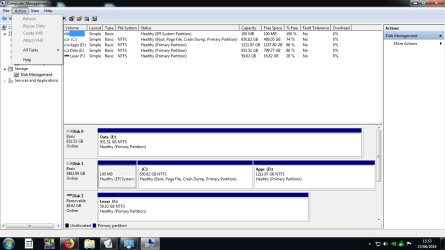
Program Files (x86) showing as empty

Here we are
 

Attachments

  • disk management.png
    disk management.png
    96.7 KB · Views: 8

My Computer

Computer type
PC/Desktop
Computer Manufacturer/Model Number
custom build
OS
Microsoft Windows 7 Home Premium 64-bit 7601 Multiprocessor Free Service Pack 1
CPU
Intel(R) Core(TM) i3-3220 CPU @ 3.30GHz
Motherboard
Gigabyte Technology Co., Ltd. Z77-D3H
Memory
8.00 GB
Graphics Card(s)
NVIDIA GeForce 8400GS
Sound Card
(1) NVIDIA High Definition Audio (2) NVIDIA High Definitio
Screen Resolution
1280 x 1024 x 32 bits (4294967296 colors) @ 75 Hz
Hard Drives
(1) SAMSUNG HD103SI ATA Device (2) ST2000DM001-1CH164 ATA Device (3) BUFFALO External HDD USB Device (4) Hitachi HDP725050GLA360 USB Device (5) WDC WD20 EZRX-00DC0B0 USB Device
Internet Speed
Down 30.57Mbps Up 7.26
D: has around 40G on it.
You say you cant see anything on Explorer.
What kind of files are on D: (data, programs)?
 

My Computers

System One System Two

  • Computer type
    PC/Desktop
    Computer Manufacturer/Model Number
    custom build
    OS
    Windows 7 HP 64
    CPU
    i5 6600K - 800MHz to 4200MHz
    Motherboard
    GA-Z170-HD3P
    Memory
    4+4G GSkill DDR4 3000
    Graphics Card(s)
    IG - Intel 530
    Monitor(s) Displays
    Samsung 226BW
    Screen Resolution
    1680x1050
    Hard Drives
    (1) -1 SM951 – 128GB M.2 AHCI PCIe SSD drive for Windows 7 and Lubuntu
    (2) -1 WD SATA 3 - 1T for Data
    (3) -1 WD SATA 3 - 1T for backup
    PSU
    Thermaltake 450W TR2 gold
    Keyboard
    Old and good Chicony mechanical keyboard
    Mouse
    Logitech mX performance - 9 buttons (had to disable some)
    Internet Speed
    500Mb/s
    Browser
    Firefox 64
    Other Info
    TinyWall firewall
  • Computer type
    Laptop
    System Manufacturer/Model Number
    Asus Q550LF
    OS
    Windows 7 Pro
    CPU
    i7-4500U 800MHz to 3.0GHz
    Motherboard
    Asus Q550LF
    Memory
    (4+4)G DDR3 1600
    Graphics Card(s)
    IG intel 4400 + NVIDIA GeForce GT 745M
    Sound Card
    Realtek
    Monitor(s) Displays
    LG Display LP156WF4-SPH1
    Screen Resolution
    1920 x 1080
    Hard Drives
    BX500 120G SSD for Windows and programs +
    1T HDD for data
    Internet Speed
    500 Mb/s
    Browser
    Firefox
    Other Info
    TinyWall firewall
Mostly programs and some pics and documents. I've found a program called 'Drive Drill' which has located some of the files.
I'll try to access the drive again tomorrow as I think if it is showing then it must still be there.
 

My Computer

Computer type
PC/Desktop
Computer Manufacturer/Model Number
custom build
OS
Microsoft Windows 7 Home Premium 64-bit 7601 Multiprocessor Free Service Pack 1
CPU
Intel(R) Core(TM) i3-3220 CPU @ 3.30GHz
Motherboard
Gigabyte Technology Co., Ltd. Z77-D3H
Memory
8.00 GB
Graphics Card(s)
NVIDIA GeForce 8400GS
Sound Card
(1) NVIDIA High Definition Audio (2) NVIDIA High Definitio
Screen Resolution
1280 x 1024 x 32 bits (4294967296 colors) @ 75 Hz
Hard Drives
(1) SAMSUNG HD103SI ATA Device (2) ST2000DM001-1CH164 ATA Device (3) BUFFALO External HDD USB Device (4) Hitachi HDP725050GLA360 USB Device (5) WDC WD20 EZRX-00DC0B0 USB Device
Internet Speed
Down 30.57Mbps Up 7.26
Started the PC this morning and was okay, did not have time to check the D drive as I was going out to an appointment. This evening my wife went to use the PC and it would not start, eventualy it started to do a check on the C drive, at the moment (23:36 UK time) it is up to 4 percent and saying that files are unreadable. Would it be possible to use the windows 7 disc to do a repair do you think or is it shot?
 

My Computer

Computer type
PC/Desktop
Computer Manufacturer/Model Number
custom build
OS
Microsoft Windows 7 Home Premium 64-bit 7601 Multiprocessor Free Service Pack 1
CPU
Intel(R) Core(TM) i3-3220 CPU @ 3.30GHz
Motherboard
Gigabyte Technology Co., Ltd. Z77-D3H
Memory
8.00 GB
Graphics Card(s)
NVIDIA GeForce 8400GS
Sound Card
(1) NVIDIA High Definition Audio (2) NVIDIA High Definitio
Screen Resolution
1280 x 1024 x 32 bits (4294967296 colors) @ 75 Hz
Hard Drives
(1) SAMSUNG HD103SI ATA Device (2) ST2000DM001-1CH164 ATA Device (3) BUFFALO External HDD USB Device (4) Hitachi HDP725050GLA360 USB Device (5) WDC WD20 EZRX-00DC0B0 USB Device
Internet Speed
Down 30.57Mbps Up 7.26
Hi warmbells,

Would it be possible to use the windows 7 disc to do a repair do you think or is it shot?

Have you tried running a Startup Repair from the Win 7 installation disc?
 

My Computer

Computer type
Laptop
Computer Manufacturer/Model Number
Fujitsu LIFEBOOK
OS
Win 7 HP SP1 64-bit Vista HB SP2 32-bit Linux Mint 18.3
CPU
Intel(R) Pentium(R) CPU P6200 @ 2.13GHz
Motherboard
FUJITSU FJNBB06
Memory
4.00 GB
Graphics Card(s)
Intel(R) Graphics Media Accelerator HD
Sound Card
[1] Realtek High Definition Audio [2] Intel(R) Display Audio
Screen Resolution
1366 x 768 x 32 bits (4294967296 colors) @ 59 Hz
Hard Drives
TOSHIBA MK5076GSX
Antivirus
AVG FREE
Not tried that yet, But when I got up this morning the PC was working. D drive still showing that it is not accessible. What I might do is put a new smallish drive for the OS and partition the old drive into one and try it as D and see what happens. Or just get a 1Tb drive for D as they are cheap enough.
 

My Computer

Computer type
PC/Desktop
Computer Manufacturer/Model Number
custom build
OS
Microsoft Windows 7 Home Premium 64-bit 7601 Multiprocessor Free Service Pack 1
CPU
Intel(R) Core(TM) i3-3220 CPU @ 3.30GHz
Motherboard
Gigabyte Technology Co., Ltd. Z77-D3H
Memory
8.00 GB
Graphics Card(s)
NVIDIA GeForce 8400GS
Sound Card
(1) NVIDIA High Definition Audio (2) NVIDIA High Definitio
Screen Resolution
1280 x 1024 x 32 bits (4294967296 colors) @ 75 Hz
Hard Drives
(1) SAMSUNG HD103SI ATA Device (2) ST2000DM001-1CH164 ATA Device (3) BUFFALO External HDD USB Device (4) Hitachi HDP725050GLA360 USB Device (5) WDC WD20 EZRX-00DC0B0 USB Device
Internet Speed
Down 30.57Mbps Up 7.26
Started the PC this morning and was okay, did not have time to check the D drive as I was going out to an appointment. This evening my wife went to use the PC and it would not start, eventualy it started to do a check on the C drive, at the moment (23:36 UK time) it is up to 4 percent and saying that files are unreadable. Would it be possible to use the windows 7 disc to do a repair do you think or is it shot?

I would say that your disk 1 is dying.
As C: and D: partitions are on same disk, if you can boot save all your data on the other disk (E:).

Don't buy a HDD. Buy a small (128 or 256G) SSD. Use the SSD for Windows and programs and the HDD for data. You will have the speed of a SSD and the space of a HDD at low cost.
 

My Computers

System One System Two

  • Computer type
    PC/Desktop
    Computer Manufacturer/Model Number
    custom build
    OS
    Windows 7 HP 64
    CPU
    i5 6600K - 800MHz to 4200MHz
    Motherboard
    GA-Z170-HD3P
    Memory
    4+4G GSkill DDR4 3000
    Graphics Card(s)
    IG - Intel 530
    Monitor(s) Displays
    Samsung 226BW
    Screen Resolution
    1680x1050
    Hard Drives
    (1) -1 SM951 – 128GB M.2 AHCI PCIe SSD drive for Windows 7 and Lubuntu
    (2) -1 WD SATA 3 - 1T for Data
    (3) -1 WD SATA 3 - 1T for backup
    PSU
    Thermaltake 450W TR2 gold
    Keyboard
    Old and good Chicony mechanical keyboard
    Mouse
    Logitech mX performance - 9 buttons (had to disable some)
    Internet Speed
    500Mb/s
    Browser
    Firefox 64
    Other Info
    TinyWall firewall
  • Computer type
    Laptop
    System Manufacturer/Model Number
    Asus Q550LF
    OS
    Windows 7 Pro
    CPU
    i7-4500U 800MHz to 3.0GHz
    Motherboard
    Asus Q550LF
    Memory
    (4+4)G DDR3 1600
    Graphics Card(s)
    IG intel 4400 + NVIDIA GeForce GT 745M
    Sound Card
    Realtek
    Monitor(s) Displays
    LG Display LP156WF4-SPH1
    Screen Resolution
    1920 x 1080
    Hard Drives
    BX500 120G SSD for Windows and programs +
    1T HDD for data
    Internet Speed
    500 Mb/s
    Browser
    Firefox
    Other Info
    TinyWall firewall
Thanks for the replies,
I can boot and am leaving the PC on all the time and transfering everything I can to the spare drive. The PC has a GA-Z77-DS3H motherboard which has two slots for mSATA boards, my son has a 240Gb board he has not used and said he will let me have it. Will I have to go into the BIOS and change the boot configuration?
 

My Computer

Computer type
PC/Desktop
Computer Manufacturer/Model Number
custom build
OS
Microsoft Windows 7 Home Premium 64-bit 7601 Multiprocessor Free Service Pack 1
CPU
Intel(R) Core(TM) i3-3220 CPU @ 3.30GHz
Motherboard
Gigabyte Technology Co., Ltd. Z77-D3H
Memory
8.00 GB
Graphics Card(s)
NVIDIA GeForce 8400GS
Sound Card
(1) NVIDIA High Definition Audio (2) NVIDIA High Definitio
Screen Resolution
1280 x 1024 x 32 bits (4294967296 colors) @ 75 Hz
Hard Drives
(1) SAMSUNG HD103SI ATA Device (2) ST2000DM001-1CH164 ATA Device (3) BUFFALO External HDD USB Device (4) Hitachi HDP725050GLA360 USB Device (5) WDC WD20 EZRX-00DC0B0 USB Device
Internet Speed
Down 30.57Mbps Up 7.26
The main advantage of a SSD over a HDD is speed.
The mSATA should be used for Windows and programs and the HDD for data.
With Macrium Software | Macrium Reflect Free generate a disk image of disk 1. Save the image on disk 0 (E: ).
Partially restore the image on the mSATA disk. The 100M EFI partition first then the C: partition (You will have to let it shrink C: on the mSATA). Don't restore the D: as there is no space on the mSATA for it.
 

My Computers

System One System Two

  • Computer type
    PC/Desktop
    Computer Manufacturer/Model Number
    custom build
    OS
    Windows 7 HP 64
    CPU
    i5 6600K - 800MHz to 4200MHz
    Motherboard
    GA-Z170-HD3P
    Memory
    4+4G GSkill DDR4 3000
    Graphics Card(s)
    IG - Intel 530
    Monitor(s) Displays
    Samsung 226BW
    Screen Resolution
    1680x1050
    Hard Drives
    (1) -1 SM951 – 128GB M.2 AHCI PCIe SSD drive for Windows 7 and Lubuntu
    (2) -1 WD SATA 3 - 1T for Data
    (3) -1 WD SATA 3 - 1T for backup
    PSU
    Thermaltake 450W TR2 gold
    Keyboard
    Old and good Chicony mechanical keyboard
    Mouse
    Logitech mX performance - 9 buttons (had to disable some)
    Internet Speed
    500Mb/s
    Browser
    Firefox 64
    Other Info
    TinyWall firewall
  • Computer type
    Laptop
    System Manufacturer/Model Number
    Asus Q550LF
    OS
    Windows 7 Pro
    CPU
    i7-4500U 800MHz to 3.0GHz
    Motherboard
    Asus Q550LF
    Memory
    (4+4)G DDR3 1600
    Graphics Card(s)
    IG intel 4400 + NVIDIA GeForce GT 745M
    Sound Card
    Realtek
    Monitor(s) Displays
    LG Display LP156WF4-SPH1
    Screen Resolution
    1920 x 1080
    Hard Drives
    BX500 120G SSD for Windows and programs +
    1T HDD for data
    Internet Speed
    500 Mb/s
    Browser
    Firefox
    Other Info
    TinyWall firewall
Back
Top