Hi Eddie794, when you change a pinned Icon, you usually need to Unpin and Close the program before it will take effect to change the Icon, then you can repin it.
How did you change the Icon, did you change it from a Shortcut on your Desktop, a shortcut in the Start Menu, or from the Taskbar itself?
See if making another Shortcut for the Program and changing the Shortcut's Icon helps.
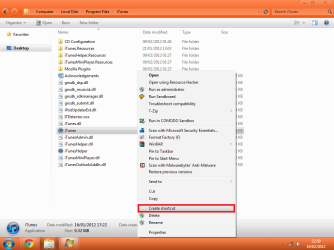
Go to the
Application's location and
Right Click on the
.exe and select
Create Shortcut
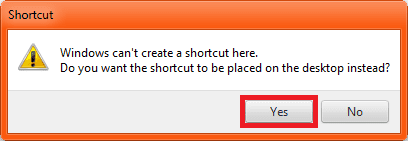
A popup will ask warning you that you cannot save there and will save to the Desktop instead, click
Yes.
 Right Click
 on the
new Icon's Shortcut from the
Desktop and select
Properties.

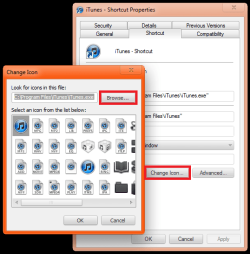
In the
Shortcut Properties Box select
Change Iconand click
Browse to go to the location of the Icon you want to change.
 Repin iTunes
 or whatever program it is and the Icon should change:
 Program Locations:
iTunes
Program Locations:
iTunes =
C:\Program Files\iTunes\iTunes.exe
Firefox =
C:\Program Files\Mozilla Firefox\firefox.exe
Chrome =
C:\Users\User-Name\AppData\Local\Google\Chrome\Application\chrome.exe
Note
The locations may vary because these are the 32 Bit locations and according to your System Specs you are running 64 Bit.
If none of this helps, try
rebuilding your Icon Cache and try attempting this again