SRWare Iron creates second icon when Pinned to Taskbar

Bulldog19892

New member
Local time
3:13 AM
Messages
5
I've been using a browser named 'SRWare Iron' for a while now with no issues. However, recently I attempted to update the program to it's newest version and that version was problematic in a number of ways so I went back to the previous one. Though now, I've got pinned the browser 'SRWare Iron' to the taskbar, but whenever I click it it creates a second icon and operates entirely from the second icon.

Before you say it, I've tried the most common solution, pinning the icon that appears and unpinning the old one. Unfortunately that doesn't seem to solve the problem as it always brings up a second icon. Do you guys know if there's a more advanced way to see what's happening with my taskbar?
 

My Computer

Computer type
Laptop
OS
Windows 7 64-bit
Welcome to the Seven Forums.

Please post the info from the shortcut Properties field named Target: for each of the two pinned items.
right click on the pinned item
right click on the shortcut
right click on Properties
copy/paste/post the info requested above for each of the two pinned items.

Also, please let us know the exact version of this browser you are using and post a link to where that version can be downloaded.
 

My Computer

Computer type
Laptop
Computer Manufacturer/Model Number
Employer provided Dell Latitude
OS
W7 Pro SP1 64bit
CPU
i7
Memory
8GB
Graphics Card(s)
Intel HD Graphics
Hard Drives
crappy SSD
Antivirus
Employer mandated Symantec Endpoint Protection
Browser
Pale Moon 64bit, IE11 64bit & Chrome 64bit
Thank you!

Interestingly enough the pinned item comes up as a shortcut with a path to iron.exe in it's target, however the second item that pops up is not a shortcut to iron.exe but is the actual iron.exe. When this is pinned to the taskbar it becomes a shortcut to iron.exe.
 

My Computer

Computer type
Laptop
OS
Windows 7 64-bit
For reference here is a screenshot. The one on the right is the one that works normally and is not pinned to the taskbar. When I click 'Pin to Taskbar' it turns into the one on the left, and then opens up the one on the left.

Untitled.jpg
 

My Computer

Computer type
Laptop
OS
Windows 7 64-bit
You are welcome.

Please see my other requests below.

Welcome to the Seven Forums.

Please post the info from the shortcut Properties field named Target: for each of the two pinned items.
right click on the pinned item
right click on the shortcut
right click on Properties
copy/paste/post the info requested above for each of the two pinned items.

Also, please let us know the exact version of this browser you are using and post a link to where that version can be downloaded.
 

My Computer

Computer type
Laptop
Computer Manufacturer/Model Number
Employer provided Dell Latitude
OS
W7 Pro SP1 64bit
CPU
i7
Memory
8GB
Graphics Card(s)
Intel HD Graphics
Hard Drives
crappy SSD
Antivirus
Employer mandated Symantec Endpoint Protection
Browser
Pale Moon 64bit, IE11 64bit & Chrome 64bit

My Computer

Computer type
PC/Desktop
Computer Manufacturer/Model Number
Golden Mk. I.4
OS
Windows 10 Pro x64 ; Xubuntu x64
CPU
Intel i7 860 @ 2.80 GHz O/C'ed to 4.0GHz
Motherboard
Gigabyte P55A-UD3R Rev.1. Award BIOS F13
Memory
16GB Corsair Vengance DDR3 @ 661 MHz Dual Channel (9-9-9-24)
Graphics Card(s)
EVGA NVidia GTX 560 1024MB
Sound Card
Realtek Integrated
Monitor(s) Displays
Dual Samsung SyncMaster 2494HS
Screen Resolution
1920*1080 and 1920*1080
Hard Drives
1*Samsung 840 EVO 120GB SSD;
1*OCZ Vertex 2 60GB SSD;
2*Samsung F3 SpinPoint 1TB in RAID0;
1*Samsung F1 SpinPoint 1TB;
2*Western Digital 1TB External USB 3.0
1*Western Digital 500GB External USB 3.0
1*Seagate 500GB External USB 2.0
PSU
Thermaltake ToughPower QFan 750W
Case
Thermaltake Element S VK60001W2Z
Cooling
Corsair H60 Water Cooling, 2*230mm and 2*80mm case fans
Keyboard
Logitech G110
Mouse
Logitech MX518
I installed app into a virtual machine.
The installation process created a shortcut on the desktop with this target:
"C:\Program Files (x86)\SRWare Iron\iron.exe"

I opened the app using that desktop shortcut. As you know, when an app is running, it usually places an item in the task bar. I pinned that item to the task bar. I was able to open the app using that pinned shortcut without any of the problems that you mentioned.

It has a target of:
"C:\Program Files (x86)\SRWare Iron\chrome.exe" --profile-directory=Default

I then unpinned that shortcut and restarted the virtual machine.

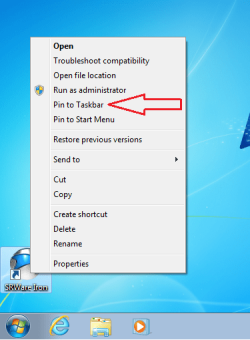
If I do what I think you did:
iron1.png

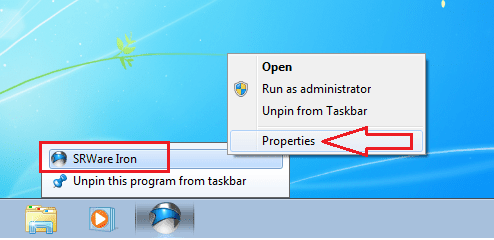
It creates this pinned shortcut
iron2.png
iron3.png

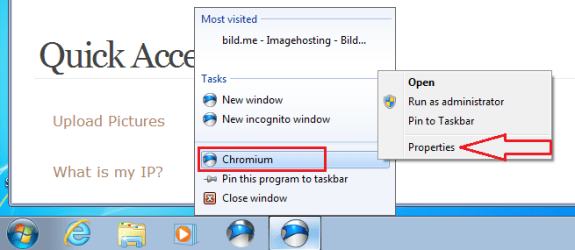
Starting the app with that, creates this item:
iron4.png
iron5.png

Pinning that item and deleting the pinned desktop shortcut worked just fine for me - even after another restart. I was able to start the app and it did not create a new task bar item (pinned of otherwise). Nor did it copy the iron exe to the pinned items folder. Do you need to start the iron app?
 

My Computer

Computer type
Laptop
Computer Manufacturer/Model Number
Employer provided Dell Latitude
OS
W7 Pro SP1 64bit
CPU
i7
Memory
8GB
Graphics Card(s)
Intel HD Graphics
Hard Drives
crappy SSD
Antivirus
Employer mandated Symantec Endpoint Protection
Browser
Pale Moon 64bit, IE11 64bit & Chrome 64bit

My Computer

Computer type
PC/Desktop
OS
Windows 10 Home x64
CPU
INTEL Core i5-750 Quad-Core 3.37GHz
Motherboard
ASUS P7P55D
Memory
HyperX Fury Black Series 8GB (2 x 4GB) 1866Mhz
Graphics Card(s)
EVGA GeForce GTX 750 Superclocked 1GB 128-Bit GDDR5
Monitor(s) Displays
LG 32MA68HY 32" IPS
Screen Resolution
1920 x 1080
Hard Drives
Samsung 840 Evo 120GB, SEAGATE 500GB Barracuda® 7200.12, SATA 3 Gb/s, 7200 RPM, 16MB cache
PSU
ANTEC TruePower New TP-550, 80 PLUS, 550W
Case
ANTEC Three Hundred Illusion
Cooling
COOLER MASTER Hyper 212 Plus, 4 x 120mm 1 x 140mm Noctua's
Internet Speed
85 + Mbps
Antivirus
Avast
Browser
Vivaldi
I tried adding the Target that UsernameIssues posted with the "--profile-directory=Default" on the end, changing 'chrome.exe' to 'iron.exe'. This opened a tab with a new profile instead of the default profile. I pinned this icon to the taskbar, and deleted all the profiles in Iron and simply started over again with the default profile. This seems to have worked as Iron is now pinned to the taskbar and no extra icons appear anymore.

I'm not sure how that worked or what exactly fixed the issue, but it seems to have stopped. Thank you guys for all your help!
 

My Computer

Computer type
Laptop
OS
Windows 7 64-bit
:thumbsup:

A Guy
 

My Computer

Computer type
PC/Desktop
OS
Windows 10 Home x64
CPU
INTEL Core i5-750 Quad-Core 3.37GHz
Motherboard
ASUS P7P55D
Memory
HyperX Fury Black Series 8GB (2 x 4GB) 1866Mhz
Graphics Card(s)
EVGA GeForce GTX 750 Superclocked 1GB 128-Bit GDDR5
Monitor(s) Displays
LG 32MA68HY 32" IPS
Screen Resolution
1920 x 1080
Hard Drives
Samsung 840 Evo 120GB, SEAGATE 500GB Barracuda® 7200.12, SATA 3 Gb/s, 7200 RPM, 16MB cache
PSU
ANTEC TruePower New TP-550, 80 PLUS, 550W
Case
ANTEC Three Hundred Illusion
Cooling
COOLER MASTER Hyper 212 Plus, 4 x 120mm 1 x 140mm Noctua's
Internet Speed
85 + Mbps
Antivirus
Avast
Browser
Vivaldi
Back
Top