
I'm posting in this section vs. applications since the problem is more associated with the OS.
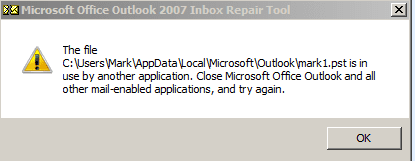
I'm attempting to run scanpst. I have closed Outlook. I've confirmed with Task Manager that the Outlook.exe process is not running. However, I still get the 'program running' error.
So 2 questions:
1. How can another program be associated with Outlook and Outlook.exe not be running?
2. How do you determine what program is causing Outlook to somehow be open or in use?
3. Alternatively, is there a more definitive, blunt force way to 'turn off' Outlook regardless of what other app is using it so that I can run scanpst and then when finished, turn Outlook back on?
Mark
I'm attempting to run scanpst. I have closed Outlook. I've confirmed with Task Manager that the Outlook.exe process is not running. However, I still get the 'program running' error.
So 2 questions:
1. How can another program be associated with Outlook and Outlook.exe not be running?
2. How do you determine what program is causing Outlook to somehow be open or in use?
3. Alternatively, is there a more definitive, blunt force way to 'turn off' Outlook regardless of what other app is using it so that I can run scanpst and then when finished, turn Outlook back on?
Mark
Attachments
My Computer
- Computer type
- PC/Desktop
- OS
- Windows 7 & Windows 10


