Hello all!
Normally, I'm able to find a thread that discusses any problem I may be having, but I have a rather unique issue today. I recently did a fresh install of Windows 7 SP1 on a HP Pavilion laptop. The install went well, but I ran into an issue when I installed GameMaker 8.1 Standard. It is an old game creation program that I still like using for sprite creation.
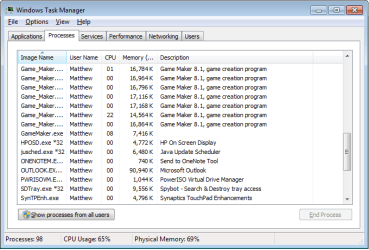
I've tried uninstalling and reinstalling, reinstalling to a new directory, and even copying the install folder from my old computer, but no matter what I do, the program will open new windows repeatedly until the computer runs out of memory or I find a way to shut it down. Each window creates a new process called Game_Maker.exe *32, but there is always one process running called GameMaker.exe. If I end that process from the Task Manager, it stops and I can close windows until I only have one copy of the program running. The tricky part is, that process is reopened each time a new Game_Maker.exe *32 thread is started, meaning I have to have impeccable timing if I want to actually stop the program from sucking all my RAM. Otherwise, I get an error stating that the thread can't be closed because it no longer exists. I uploaded a screenshot of Task Manager during this (slightly hilarious) mess. I think that the auto-updater is the issue, but there is no setting to turn it off. Also, to make this even more ridiculous, I should probably mention that this is happening on my home computer, which is the exact same model and OS as my travel computer (on which there is no error). I even have the same start bar configuration and desktop background on both computers
I doubt that anyone here has ever heard of Game Maker, let alone experienced this problem, so I am looking for a workaround instead of a specific solution. I am wondering if there is any sort of program or command that will freeze all active applications so I can go in and shut down the process at fault without it trying to play Hide-and-Go-Seek? Any other workarounds you can think of would be welcome. Right now, I am starting the program, waiting for it to open around 50 windows, then force restarting Windows. The thread at fault is shut down first, and I can stop the restart before the rest of the windows close. It works, but it is still a pain. I don't use Game Maker that often, but I would still like to know if there's anything I can do to fix it.
Normally, I'm able to find a thread that discusses any problem I may be having, but I have a rather unique issue today. I recently did a fresh install of Windows 7 SP1 on a HP Pavilion laptop. The install went well, but I ran into an issue when I installed GameMaker 8.1 Standard. It is an old game creation program that I still like using for sprite creation.
I've tried uninstalling and reinstalling, reinstalling to a new directory, and even copying the install folder from my old computer, but no matter what I do, the program will open new windows repeatedly until the computer runs out of memory or I find a way to shut it down. Each window creates a new process called Game_Maker.exe *32, but there is always one process running called GameMaker.exe. If I end that process from the Task Manager, it stops and I can close windows until I only have one copy of the program running. The tricky part is, that process is reopened each time a new Game_Maker.exe *32 thread is started, meaning I have to have impeccable timing if I want to actually stop the program from sucking all my RAM. Otherwise, I get an error stating that the thread can't be closed because it no longer exists. I uploaded a screenshot of Task Manager during this (slightly hilarious) mess. I think that the auto-updater is the issue, but there is no setting to turn it off. Also, to make this even more ridiculous, I should probably mention that this is happening on my home computer, which is the exact same model and OS as my travel computer (on which there is no error). I even have the same start bar configuration and desktop background on both computers
I doubt that anyone here has ever heard of Game Maker, let alone experienced this problem, so I am looking for a workaround instead of a specific solution. I am wondering if there is any sort of program or command that will freeze all active applications so I can go in and shut down the process at fault without it trying to play Hide-and-Go-Seek? Any other workarounds you can think of would be welcome. Right now, I am starting the program, waiting for it to open around 50 windows, then force restarting Windows. The thread at fault is shut down first, and I can stop the restart before the rest of the windows close. It works, but it is still a pain. I don't use Game Maker that often, but I would still like to know if there's anything I can do to fix it.
Attachments
My Computer
At a glance
Windows 7AMD A6-3400M6 GBRadeon
- Computer type
- Laptop
- Computer Manufacturer/Model Number
- HP
- OS
- Windows 7
- CPU
- AMD A6-3400M
- Memory
- 6 GB
- Graphics Card(s)
- Radeon
- Hard Drives
- 1 - 600GB traditional hard drive
- Antivirus
- AVG free, Spybot S&D
- Browser
- Chrome