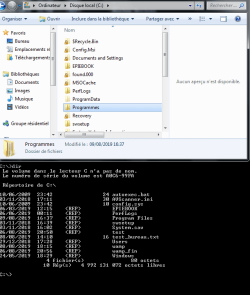
Programmes folder instead of Program Files under Windows 7 32-bit

riahi

New member
Local time
8:04 PM
Messages
5
[FONT=&quot]Hello,[/FONT]
[FONT=&quot]My OS is Windows 7 32 bit. When I display the contents of C: using Windows Explorer, I find the programmes and ProgramData folders (Program Files does not exist), but when I display the contents of C: in command lines I find Program Files[/FONT]
[FONT=&quot] [/FONT]
[FONT=&quot]-When I directly enter the path c:\program files in the explorer, it displays the path c:\programs and its contents.[/FONT]
[FONT=&quot] [/FONT]
[FONT=&quot]- Maybe is it an alias system!?[/FONT]
[FONT=&quot] [/FONT]
[FONT=&quot]-All my applications are installed in c:\programmes[/FONT]
 

Attachments
  • image_Progammes_Program Files.png
    image_Progammes_Program Files.png
    25.1 KB · Views: 1

My Computer

Computer type
PC/Desktop
OS
Windows 7 Professionnel 32 bits
Welcome to the forum. In explorer have you got show hidden and system files?
 

My Computer

Computer type
PC/Desktop
OS
win 8 32 bit
Welcome to the forum. In explorer have you got show hidden and system files?

Yes he/she has, because I can see ProgramData, which is usually a hidden file.
 

My Computer

Computer type
PC/Desktop
OS
Windows 7 x64, Vista x64, 8.1 smartphone
CPU
Intel E8400 65W 64-bit
Motherboard
Gigabyte EP45-UD3LR
Memory
DDR2 2 x 2GB, 1GB x 2
Graphics Card(s)
XFX Radeon HD5750
Sound Card
AMD High Definition Audio; Realtek High Definition Audio
Monitor(s) Displays
iiyama prolite X2377HDS
Screen Resolution
1920 x 1080
Hard Drives
500GB 7200 rpm Seagate ST3500413AS 16MB, 500GB 5400 rpm Toshiba MQ02ABF050H 32MB, 200GB 7200 rpm Seagate ST3200820AS 8MB, 2TB 7200 rpm Western Digital WD20EZRX 64MB
PSU
Enermax Liberty Modular
Case
Antec P193 Midi Tower
Keyboard
Mionix ZIBAL 60
Mouse
Razer USB 2.0 Diamondback Mouse or Huion Graphics Tablet
Browser
Internet Explorer, Lunascape, Firefox, Opera, Avast Safezone
[FONT=&quot]
[FONT=&quot]- Maybe is it an alias system!?[/FONT]
[/FONT]

Hello riahi,

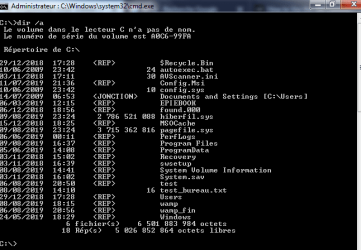
you can tell if it is a symbolic link by opening a cmd.exe window and typing dir /a in the C: root folder.
 

My Computer

Computer type
PC/Desktop
OS
Windows 7 x64, Vista x64, 8.1 smartphone
CPU
Intel E8400 65W 64-bit
Motherboard
Gigabyte EP45-UD3LR
Memory
DDR2 2 x 2GB, 1GB x 2
Graphics Card(s)
XFX Radeon HD5750
Sound Card
AMD High Definition Audio; Realtek High Definition Audio
Monitor(s) Displays
iiyama prolite X2377HDS
Screen Resolution
1920 x 1080
Hard Drives
500GB 7200 rpm Seagate ST3500413AS 16MB, 500GB 5400 rpm Toshiba MQ02ABF050H 32MB, 200GB 7200 rpm Seagate ST3200820AS 8MB, 2TB 7200 rpm Western Digital WD20EZRX 64MB
PSU
Enermax Liberty Modular
Case
Antec P193 Midi Tower
Keyboard
Mionix ZIBAL 60
Mouse
Razer USB 2.0 Diamondback Mouse or Huion Graphics Tablet
Browser
Internet Explorer, Lunascape, Firefox, Opera, Avast Safezone
dir /a

hello,
please see the attached screenshot
 

Attachments

  • image2.png
    image2.png
    12.5 KB · Views: 32

My Computer

Computer type
PC/Desktop
OS
Windows 7 Professionnel 32 bits
To provide more details to the observation made by samuria-

In Windows Explorer, find Local Drive C: and highlight it.

Go to Organize and click on the down arrow.

Open Folder and Search Options.

In the View tab, click on the circle next to Show hidden file and folders.

Click on OK.

Apply the change to all subfolders.

Do you now see Program Files when you click on the Local C: drive in Windows Explorer?
 

My Computer

Computer type
Laptop
Computer Manufacturer/Model Number
Dell M6500 Precision Work Station
OS
Windows 7 Pro SP1 64 bit
Memory
8 GB
Screen Resolution
1920x
Internet Speed
30 Mbps
Antivirus
Norton Security
Browser
IE 11
This kind of thing is common in non English systems. In such systems many folders have 2 names, the real name as used in the file system and by applications and a localized name in the local language that is displayed in Windows Explorer. The localized name is stored in the desktop.ini file in the folder. If there is no localized name the real name is displayed. The localized name for "Program Files" is "[FONT=&quot]Programmes". Cmd.exe displays only the real folder name.
[/FONT]
 

My Computer

Computer type
PC/Desktop
Computer Manufacturer/Model Number
HP
OS
Windows 7 Pro 64 bit
CPU
Xeon W3520
Memory
8 GB
Graphics Card(s)
Nvidia Geforce 210
I also found this article program files folder different languages that may be of interest here.

- (The article also talks about a Program Files (x86) folder, which does not exist on your system, because your Edition of Windows is not 64-bit.)

To recap then, the Program Files folder exists on English implementations of Windows. However, if you install Windows under the French local, then this same folder is called Programmes. In Spanish it would be called Archivos de programa, but the same folder would also be called Programmes in German.

To confirm these findings, open cmd.exe and type
Code:
cd "\program files"
dir/w

And confirm if the displayed folders in Program Files directory match the folders seen in Windows Explorer Programmes directory.
 

My Computer

Computer type
PC/Desktop
OS
Windows 7 x64, Vista x64, 8.1 smartphone
CPU
Intel E8400 65W 64-bit
Motherboard
Gigabyte EP45-UD3LR
Memory
DDR2 2 x 2GB, 1GB x 2
Graphics Card(s)
XFX Radeon HD5750
Sound Card
AMD High Definition Audio; Realtek High Definition Audio
Monitor(s) Displays
iiyama prolite X2377HDS
Screen Resolution
1920 x 1080
Hard Drives
500GB 7200 rpm Seagate ST3500413AS 16MB, 500GB 5400 rpm Toshiba MQ02ABF050H 32MB, 200GB 7200 rpm Seagate ST3200820AS 8MB, 2TB 7200 rpm Western Digital WD20EZRX 64MB
PSU
Enermax Liberty Modular
Case
Antec P193 Midi Tower
Keyboard
Mionix ZIBAL 60
Mouse
Razer USB 2.0 Diamondback Mouse or Huion Graphics Tablet
Browser
Internet Explorer, Lunascape, Firefox, Opera, Avast Safezone
"Programmes" folder = "Program Files"

[FONT=&quot]Hello,[/FONT]
[FONT=&quot] [/FONT]
As he already said LMiller7, there is only one folder containing programs (Program Files) but according to the installation language of Windows 7 (it's French in my case), this folder is renamed in this language for the sake of consistency (Programmes, in French) because of a file (hidden) desktop.ini which is in this folder. It does not change his address but just his name. [FONT=&quot] [/FONT]
[FONT=&quot]I found this in the desktop.ini file contained in the folder c:\programmes[/FONT]
[FONT=&quot] [/FONT]
[FONT=&quot][.ShellClassInfo][/FONT]
[FONT=&quot]LocalizedResourceName=@%SystemRoot%\system32\shell32.dll,-21781[/FONT][FONT=&quot][/FONT]
[FONT=&quot] [/FONT]
[FONT=&quot]In the end, everything is normal. Worries for nothing.[/FONT][FONT=&quot][/FONT]
[FONT=&quot] [/FONT]
[FONT=&quot]Thank you for being interested in my “problem”[/FONT][FONT=&quot][/FONT]
[FONT=&quot] [/FONT]
 

My Computer

Computer type
PC/Desktop
OS
Windows 7 Professionnel 32 bits
[FONT=&quot]Yes I confirm.[/FONT][FONT=&quot][/FONT]
 

My Computer

Computer type
PC/Desktop
OS
Windows 7 Professionnel 32 bits
[FONT=&quot] [/FONT]
[FONT=&quot]As they already said LMiller7 and iko22, there is only one folder containing programs (Program Files) but according to the installation language of Windows 7 (it's French in my case), this folder is renamed in this language for the sake of consistency (Programmes, in French) [/FONT]because of a file (hidden) desktop.ini [FONT=&quot] which is in this folder. It does not change his address but just his name.[/FONT]
[FONT=&quot] [/FONT]
[FONT=&quot]I found this in the desktop.ini file contained in the folder c:\programmes[/FONT]
[FONT=&quot] [/FONT]
[FONT=&quot][.ShellClassInfo][/FONT]
[FONT=&quot]LocalizedResourceName=@%SystemRoot%\system32\shell32.dll,-21781[/FONT][FONT=&quot][/FONT]
[FONT=&quot] [/FONT]
[FONT=&quot]In the end, everything is normal. Worries for nothing.[/FONT][FONT=&quot][/FONT]
[FONT=&quot] [/FONT]
[FONT=&quot]Thank you for being interested in my “problem”[/FONT]
 

My Computer

Computer type
PC/Desktop
OS
Windows 7 Professionnel 32 bits
Back
Top